
Let's get one thing straight right away: TikTok automation isn't about spam bots or shady engagement schemes that get your account banned. Forget all that.
Think of it as your personal content creation assistant—a smart system built to take the most repetitive, soul-crushing tasks off your plate.
Imagine a world-class chef. Do they spend hours chopping vegetables and washing dishes? Of course not. They have a team to handle the prep work so they can focus on what really matters: designing the menu and perfecting the final dish. That’s exactly what modern automation does for TikTok creators. It takes over the grunt work like scheduling posts, crunching performance data, and even brainstorming initial video ideas, letting you get back to what you do best—creating amazing content.
Reclaim Your Time, a Practical Look
The biggest win with a good automation setup is the staggering amount of time you get back. So many creators get buried under administrative tasks, and it's a fast track to burnout. When you offload those jobs to a tool built for it, you reclaim hours every single week.
The impact is huge. The latest AI tools can now handle 60-75% of a typical creator's entire workflow. We're talking scheduling, analytics, hashtag research, and even comment moderation. This slashes a creator's weekly workload by an estimated 21 to 27 hours. For example, AI-assisted video creation can take a task that eats up 8-12 hours and shrink it down to just 2-3 hours a week. You can discover more details on how automation maximizes creator efficiency right here.
Manual vs. Automated TikTok Workflow: A Time Savings Comparison
To really see the difference, you have to look at the numbers side-by-side. The daily grind of a manual workflow stacks up fast, but with automation, those hours melt away.
The table below breaks down just how much time you can expect to save when you switch from doing everything by hand to using an automation tool.
| Task | Manual Weekly Time | Automated Weekly Time | Time Saved |
|---|---|---|---|
| Content Ideation & Scripting | 4-6 hours | 1 hour | 3-5 hours |
| Video Creation & Editing | 8-12 hours | 2-3 hours | 6-9 hours |
| Scheduling & Publishing | 3-5 hours | 30 minutes | 2.5-4.5 hours |
| Performance Analytics | 2-3 hours | 15 minutes | 1.75-2.75 hours |
| Community Management | 4-6 hours | 1-2 hours | 3-4 hours |
| Total Weekly Commitment | 21-32 hours | 4.75-6.75 hours | ~21-27 hours |
The results are pretty clear. You're not just saving a few minutes here and there; you're fundamentally changing how you spend your work week.
The goal of TikTok automation isn't to replace the creator—it's to empower them. It’s all about shifting your energy from tedious manual tasks to high-impact creative strategy.
This is what it looks like in practice. A platform like ShortsNinja gives you a central dashboard to manage your entire content pipeline, from the first spark of an idea to the final published video.
What you're seeing here isn't just a fancy interface. It's a visual representation of a streamlined, step-by-step process. That logical flow is the heart and soul of effective automation.
The Four Pillars of an Automated Workflow
A smart TikTok automation strategy isn't just a single switch you flip. It's more like a high-performance engine built on four distinct, interconnected parts. Each piece has a specific job, but they all need to work together to build momentum. Getting a handle on these pillars shows you how automation goes way beyond simple scheduling to become a full-blown content machine.
Each pillar tackles a critical step in a creator's day-to-day, from that first spark of an idea to digging into a video's performance stats. When you automate each stage, you create a smooth workflow that hums along in the background, freeing you up to think about the bigger picture.
This diagram shows how these pillars—ideation, creation, scheduling, and analytics—fit together to form a complete automation ecosystem.
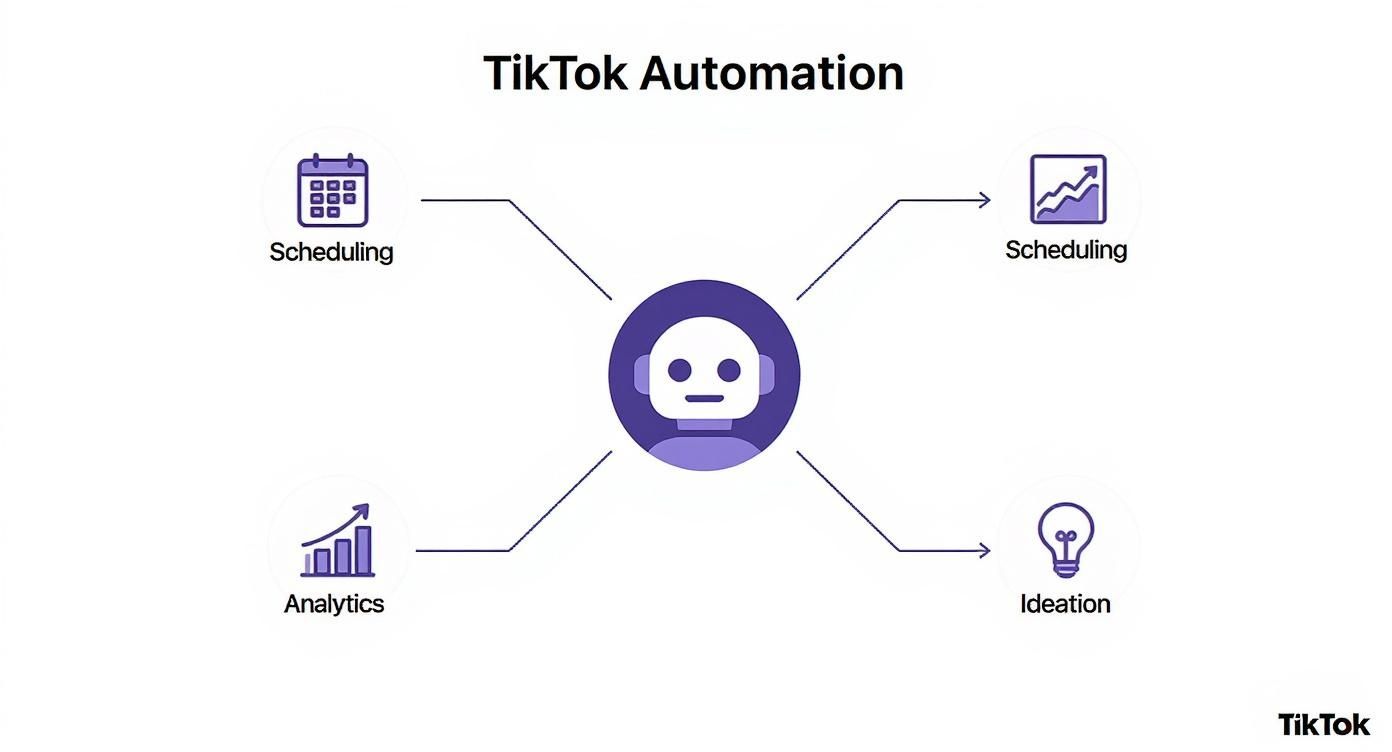
As you can see, a central automation engine powers every part of your content strategy, creating a cycle that keeps getting smarter over time.
Pillar 1: AI-Powered Ideation
First up is AI-Powered Ideation, which basically acts as your creative co-pilot. This is where the whole content journey kicks off. Instead of losing hours scrolling through your feed trying to guess what’s next, an automation platform does the heavy lifting for you. It keeps an eye on viral trends, spots emerging audio, and finds content gaps in your niche that are ripe for the taking.
For instance, a creator with a cooking channel could use this to find a trending "one-pan dinner" sound before it blows up. The AI doesn't just flag the trend; it might spit out a few video script ideas tailored to the creator's style, like "One-Pan Lemon Herb Chicken for Busy Weeknights." It turns a vague idea into a real, actionable starting point in just a few minutes.
Pillar 2: Automated Content Creation
Once you’ve got a solid idea, the second pillar, Automated Content Creation, steps in. This is easily the most game-changing part of modern TikTok automation, as it can turn a simple script or prompt into a finished video. This pillar uses AI to generate visuals, add voiceovers, layer in background music, and burn in captions.
Instead of spending your afternoon sourcing clips, recording audio, and wrestling with editing software, the system pieces the video together for you. Platforms like ShortsNinja can take a text script and transform it into a visually engaging, ready-to-post video with realistic voiceovers in over 50 languages. Your role shifts from grunt work to creative director, where you’re just making small tweaks to the final cut instead of building it from scratch.
Pillar 3: Intelligent Scheduling
With a batch of fresh videos ready to go, the third pillar, Intelligent Scheduling, makes sure they reach the biggest audience possible. This is so much more than just picking a time and hitting "publish." A smart scheduler digs into your account's past performance and your target audience's activity patterns to pinpoint the absolute best times to post.
An optimized posting schedule isn't about guesswork; it's a data-driven strategy. Posting just one hour earlier or later can be the difference between a video that fizzles out and one that hits the For You Page.
This pillar gets rid of the need to manually post content, which is a lifesaver for creators managing multiple accounts or targeting viewers in different time zones. You can map out a full week—or even a month—of content in one sitting, keeping your feed active without being glued to your phone.
Pillar 4: Actionable Performance Analytics
The final pillar, Actionable Performance Analytics, closes the loop. After your videos go live, this component gathers all the raw data—views, likes, comments, shares, watch time—and translates it into clear insights you can actually use. It tells you what worked, what flopped, and why.
Instead of just showing you a chart of view counts, it might highlight which video formats drove the most engagement or which topics really clicked with your audience. This data then feeds right back into the first pillar, AI-Powered Ideation, creating a powerful feedback loop. The lessons from past videos inform the ideas for future ones, making sure your content strategy is always evolving and improving. This cycle of create, publish, and analyze is the real engine for sustainable growth.
How to Automate Safely and Avoid Pitfalls
Jumping into TikTok automation can feel like hitting the fast-forward button on your account's growth. The upside is huge—you can scale up content production, lock in a consistent posting schedule, and use data to make smarter creative choices. But with all that power comes a big dose of responsibility.
Think of it like a high-performance car. In the right hands, it gets you where you want to go faster and more efficiently than you ever thought possible. But if you start driving recklessly and ignoring the rules of the road, you’re headed for a crash. The trick is knowing the difference between smart, ethical automation and the risky stuff that puts your account on the line.

The main goal here is to supercharge your workflow, not to fake authentic human interaction. TikTok is built on genuine connection, and its algorithm is scary good at sniffing out and penalizing anything that feels phony. This is where the line between safe and unsafe automation becomes non-negotiable.
The Clear Line Between Safe and Unsafe Automation
Safe automation is all about the behind-the-scenes work. It handles the tedious tasks that support your content creation and management, letting you work smarter, not just harder. Unsafe automation, on the other hand, is when you use bots to mimic real user engagement in ways that fly in the face of TikTok's community guidelines. Getting this distinction right is crucial for protecting your brand and keeping your account in good standing.
To make it dead simple, I've broken down what to do and what to run away from.
Safe vs Unsafe TikTok Automation Practices
This table cuts through the noise, showing you exactly which automation activities are green-lit and which ones will get you into hot water. Sticking to the "safe" column keeps you compliant with TikTok's policies, while straying into the "unsafe" territory is a fast track to account penalties.
| Automation Activity | Safety Level | Why It Matters |
|---|---|---|
| Content Creation & Video Generation | Safe ✅ | Using AI to whip up video drafts from scripts or ideas is a massive time-saver. It happens off-platform and doesn't violate any rules. |
| Post Scheduling & Publishing | Safe ✅ | Scheduling posts through an approved tool is an officially supported method for staying consistent. TikTok actually encourages this. |
| Analytics & Performance Tracking | Safe ✅ | Pulling data on your own content's performance is standard marketing practice. It helps you figure out what's working and what's not. |
| Auto-Following & Unfollowing | Unsafe ❌ | Firing up a bot to rapidly follow and unfollow accounts is classic spam behavior. It's a huge red flag that can get you suspended. |
| Automated Likes & Comments | Unsafe ❌ | Bots dropping generic comments like "Nice video!" or auto-liking posts are easily detected and are a direct violation of TikTok’s policies. |
| Spammy Direct Messaging (DMs) | Unsafe ❌ | Blasting out mass-automated DMs to people who haven't engaged with you is spam, plain and simple. It’s a quick way to get your account flagged. |
Ultimately, the rule is simple: if an automation tool helps you create and manage your own content, you're likely in the clear. If it interacts with other people's content or profiles on your behalf, you're playing with fire.
The Human Oversight Principle
Even with the best tools, the secret sauce to successful TikTok automation is keeping a human in the driver's seat. Automation should never be a complete substitute for your creative instincts or personal touch. It’s a tool, not a replacement for the creator.
Your audience follows you for your unique voice and perspective. Automation should amplify that voice, not silence it. Always review and approve content before it goes live to ensure it aligns with your brand and feels authentic.
This "human-in-the-loop" approach is your quality control. Sure, you can use automation to spit out ten video ideas in a minute, but you need to be the one to pick the winner. An AI can assemble a video draft, but you should give it that final polish to add your signature flair. This balance is what keeps your content from feeling generic and ensures you stay in full control of your brand's story.
If you want to dig deeper into the different kinds of bots and their associated risks, check out our detailed guide on the TikTok automation bot.
Best Practices for Ethical Automation
To keep your account safe and on a steady growth path, build these ethical habits into your workflow. They’ll help you get the most out of automation while keeping the risks at bay.
- Choose Reputable Tools: Stick with platforms that are upfront about how they work and that play by TikTok's Terms of Service.
- Focus on Production, Not Engagement: Use automation for the heavy lifting of content creation—ideation, scripting, generating videos, and scheduling. Never use it to fake likes, comments, or follows.
- Review Everything: Before any video goes live, give it a final watch. Make sure the visuals, captions, and overall vibe are 100% on-brand.
- Engage Manually: This is non-negotiable. Respond to comments and DMs yourself. This is where you build a real community, and it's a job that should never be handed over to a bot.
By sticking to these guidelines, you can use TikTok automation with confidence to scale your presence, reclaim your time, and get back to what matters most: creating awesome content that people love.
Choosing the Right Automation Platform for You
Picking a TikTok automation platform isn't like grabbing a new coffee machine off the shelf. Not all tools are built the same, and the wrong one can be a massive drain on your time and money. The market is flooded with options, but a truly great platform does way more than just schedule your posts. It should be the command center for your entire content strategy.
Think of it like hiring a rockstar assistant. You wouldn't just hire someone who can file papers. You want the person who can also draft reports, manage your calendar, and give you a heads-up on what your competitors are doing. Your automation tool should be that versatile, giving you the power to not only manage your workflow but to make it smarter.
It’s easy to get lost in a sea of feature lists when you're comparing platforms. To cut through the noise, you need to zero in on the core functions that actually move the needle. These are the absolute non-negotiables for any serious creator.
Must-Have Platform Features
A solid automation platform is built on a handful of essential features that work together like a well-oiled machine. Make sure any tool you’re considering has these fundamentals nailed down—it’s the only way you’ll be able to scale your efforts without burning out.
- AI Video Generator: The power to turn a simple text script into a polished, ready-to-post video is an absolute game-changer. This one feature can slash your production time by over 75%.
- Intelligent Scheduler with Trend Analysis: Don’t just throw content out there and hope for the best. A smart scheduler digs into your audience’s activity and current platform trends to tell you the perfect time to post.
- Multi-Account Management: This is a lifesaver for agencies or creators juggling multiple accounts. It lets you run totally different content strategies from one dashboard, saving you from the headache of logging in and out all day.
- Comprehensive Analytics Dashboard: Your tool needs to do more than just show you view counts. It should give you real, actionable insights into what’s working and why, so you can make smarter decisions about your next video.
When you're looking at different tools, a solid grasp of understanding platform integrations is key. The best tools play nice with others, making your entire tech stack run smoother.
Key Metrics to Measure Success
So, you've picked a tool. How do you actually know if it's working? Forget vanity metrics like your follower count. To measure the real impact of TikTok automation, you need to track the numbers that reflect your efficiency and output.
The real ROI of automation isn’t just about gaining more followers; it’s about reclaiming your creative energy. The right tool gives you the freedom to focus on high-level strategy instead of getting stuck in the weeds of manual production.
Here are the two key performance indicators (KPIs) you should be watching like a hawk:
-
Time-to-Create: How long does it take you to get from a basic idea to a fully scheduled video? Before automation, this could easily take a few hours. A good platform should shrink that down to just a few minutes.
-
Content Output Volume: Keep track of how many high-quality videos you're producing and scheduling each week. Automation should let you ramp up your posting frequency without killing yourself or letting quality slide. Going from three videos a week to ten or more is a clear win.
By focusing on these features and metrics, you can confidently pick a platform that will feel less like a tool and more like a partner in your growth. For a deeper dive into the options out there, check out our breakdown of the best TikTok automation software on the market.
Your First Automated Content Workflow
Alright, let's move from theory to practice, because this is where TikTok automation really starts to click. Concepts are great, but nothing beats seeing a real workflow in action. We’re going to build your first automated content pipeline, taking one solid idea and spinning it into a full week of scheduled posts.
This isn’t about complicated tech. It’s a simple, logical sequence that lets the software do all the heavy lifting. We'll start with a winning topic and finish with a packed content calendar, showing you just how smoothly each step flows into the next.
Step 1: Find a Viral Topic
Every great video starts with an idea. But instead of mindlessly scrolling the For You Page hoping for inspiration to strike, a good automation tool puts data to work with a trend analyzer. This feature scans TikTok for up-and-coming sounds, popular challenges, and trending keywords in your specific niche.
Let’s say you run a personal finance channel. The analyzer might flag a huge spike in searches for "side hustle ideas 2025." That’s not a wild guess—it’s a data-backed insight telling you exactly what your audience is hungry for right now. Just like that, you’ve found your topic without wasting a minute on manual research.
Step 2: Instantly Generate a Script
Once your topic is locked in, it's time to write the script. For most people, this is a major bottleneck. But with an AI script generator, you just feed it your topic: "Top 5 Low-Cost Side Hustles for 2025."
The AI immediately gets to work, outlining a full script. It will probably start with a catchy hook ("Stop scrolling! Here are five side hustles you can start this weekend with almost no money."), break down the five points, and end with a clear call-to-action ("Follow for more daily money tips!"). The whole thing takes less than 60 seconds.
An automated workflow transforms content creation from a series of disjointed, time-consuming tasks into a single, seamless production line. The goal is to move from idea to final product with as little friction as possible.
Step 3: Transform Script to Video
Here’s where the real magic happens. Take that freshly generated script and plug it into the platform's AI video generator. The system automatically pulls relevant stock footage or creates AI visuals, lays down a realistic AI voiceover in your chosen language, and syncs it all with background music and animated captions.
What once took hours of sourcing clips, editing, and timing is now a completely hands-off process. Your only job is to review the finished video. This step is the heart of effective TikTok automation, turning a simple text idea into a polished, visually engaging video. As you build out your workflow, you can even bring in specialized video editing outsourcing services to give your content an extra professional edge.
Step 4: Add Your Brand's Touch
Automation gets you 90% of the way there. That last 10% is where you make the content truly yours. This is the crucial human review stage, and it’s non-negotiable. Watch the AI-generated video and look for small things to tweak.
Maybe you want to swap out a specific clip, adjust the timing on a caption, or add your logo as a watermark. This quick, five-minute check ensures the final video perfectly matches your brand's voice and quality standards, which is key to keeping your content feeling authentic.
Step 5: Schedule a Full Week of Content
Once you’re happy with the video, don't just post it immediately. Add it to an intelligent scheduler. The platform will analyze your account’s past performance and suggest the absolute best time to post for maximum reach. Then, just repeat this process for a few more video ideas to batch your work.
In a single sitting, you can knock out and schedule an entire week's worth of quality content. That kind of consistency is everything for growth, especially on a fast-moving platform like TikTok. With projections showing TikTok will hit 2.14 billion global users by 2025—38% of whom are aged 18-24—you need a steady stream of content to capture their attention. Automation makes that possible. You’ve officially gone from one idea to a fully loaded content calendar in a fraction of the time it would've taken by hand.
Why Platform Scale Makes Automation Essential
Remember the early days of TikTok? You could probably keep up with your account manually. But trying that today is like trying to direct rush hour traffic on foot—you're going to get run over. The platform has exploded into a global beast, and its sheer size and speed have completely changed the game for creators.
Simply put, keeping up without help isn't a real strategy anymore if you're serious about growth.
TikTok isn't just another social app; it’s a massive, lightning-fast ecosystem. Trends pop up and vanish in hours, not days. Trying to stay relevant and consistent in that environment is a herculean task. This relentless pace means TikTok automation isn't some shady shortcut. It's a necessary response to what the market demands.
The Numbers Driving the Need for Automation
The scale of TikTok is just staggering, and the numbers tell the whole story. The platform’s financial engine is roaring, with projections hitting around $23 billion in revenue for 2024, a massive year-on-year growth of 42.8%. That kind of money flooding the system means more competition and a desperate need for efficiency. You can dig into more of TikTok's explosive growth stats on tekrevol.com.
This commercial boom is fueled by a gigantic user base. We're talking about 1.8 billion monthly active users expected by late 2025. Meanwhile, advertisers can now reach nearly 1.59 billion people on the platform. Trying to get noticed in a crowd that big without a smart system is like shouting into a hurricane. Automation gives you the structure to actually compete.
In an arena with billions of users and an algorithm that rewards relentless consistency, manual content management is a losing battle. Automation is the only way to level the playing field.
Adapting to the Speed of Culture
It’s not just about the raw numbers. The speed of culture on TikTok is what really makes automation a must-have. A trending sound or a new video format has an incredibly short shelf life. By the time you spot a trend, write a script, shoot, edit, and figure out when to post it all by hand, the moment is probably gone.
This is where automation flips the script and gives you a real competitive edge. It lets you:
- Act on Trends Instantly: The right tools can flag emerging sounds and topics, letting you jump on trends while they're still hot.
- Maintain Posting Velocity: You can schedule a high volume of content without being glued to your phone 24/7, making sure you stay in front of your audience.
- Analyze Performance at Scale: Automation can crunch huge amounts of data to give you clear, actionable insights on what’s working with a massive audience.
Basically, automation allows you to operate at the same insane speed as TikTok itself. It’s the engine that helps you master the modern TikTok algorithm explained in our guide and turns the platform’s intimidating scale from an obstacle into your biggest opportunity for growth.
Got Questions About TikTok Automation? We’ve Got Answers.
Jumping into TikTok automation can feel like learning a new language. You've probably got a bunch of questions buzzing around. Let's clear the air and tackle the most common ones creators ask, so you can move forward with confidence.
Is TikTok Automation Even Allowed?
Yes, but it’s a tale of two automations. The kind that helps you create, schedule, and analyze your content is perfectly fine—in fact, it's what pros use every day. The trouble starts when you use bots to fake engagement, like auto-liking, auto-following, or dropping spammy comments everywhere.
That stuff will get you in hot water with TikTok fast, risking a shadowban or even a permanent boot. The golden rule is simple: automate the production, not the pretending.
How Much Is This Going to Cost Me?
The price tag on automation tools is all over the map. You can find basic schedulers with free plans or subscriptions for under $20 a month. But if you're looking for the heavy hitters—platforms with AI video generation, trend analysis, and deep analytics—you can expect to pay anywhere from $50 to over $200 per month.
Most services, including our own ShortsNinja, offer different tiers. This way, you can start small and scale up your plan as your channel (and your revenue) grows.
Don’t think of it as a cost. Think of it as an investment. The hours you get back from not doing grunt work can be poured into big-picture strategy, and that's where the real money is made.
Will Automation Make My Content Feel Like a Robot Made It?
That's a real concern, but it’s totally avoidable. The key is to let automation do 90% of the heavy lifting, while you handle the final 10%—the human touch. An AI might generate a fantastic video draft, but you always get the final say.
This is what we call the "human-in-the-loop" approach. Before anything goes live, you give it a final once-over. Maybe you tweak a caption to match your slang, swap a visual that feels off, or adjust the tone. You’re not the factory worker anymore; you’re the creative director, and your only job is quality control.
Which Automation Tool Is the Best for a Beginner?
If you're just starting out, you don't want to juggle a half-dozen different tools. The best choice is an all-in-one platform that walks you through the entire process, from that first spark of an idea to hitting "publish."
Look for a tool that bundles the essentials into one clean workflow:
- AI Scripting: To get you past that blinking cursor.
- Text-to-Video Generation: So you don’t have to be a video editor.
- An Integrated Scheduler: To lock in your posting consistency.
By keeping it all under one roof, you can skip the technical headaches and focus on what really matters: learning the art of creating great content.
Ready to stop the manual grind and start scaling your content the smart way? ShortsNinja puts everything you need to script, generate, and schedule your TikTok videos in one place. Try it for free and see just how easy automation can be.