
Creating a YouTube video with AI means bringing together a few smart tools for scripting, voiceover, and visuals into one smooth workflow. The whole process takes a simple text idea and turns it into a video that’s ready to publish, often in just a few minutes. It automates the stuff that used to take hours of manual labor.
Platforms like ShortsNinja are designed to bundle these steps together, making it possible for pretty much anyone to jump into content creation.
The New Reality of AI Video Creation
Every creator knows the feeling: staring at a blank project file, that empty timeline mocking you. It’s a huge hurdle, usually defined by creative blocks, a tight budget, or just not enough hours in the day. For years, that was just how video production worked.
But that’s changing, and fast.
Artificial intelligence isn't some far-off concept anymore; it's a real, hands-on partner in the creative process. Think of it as an assistant that handles all the heavy lifting, from brainstorming ideas that could go viral to automating the final upload. This is about more than just being efficient—it’s about rewriting the rules of who can be a creator and how they find success.
Unlocking New Creative Potential
The real magic here isn't just about making content faster. It's about opening up creative doors that were completely shut before. A single person can now produce a slick animated short, a detailed documentary-style video, or a daily series of Shorts without a crew or expensive gear.
This tech directly solves some of the most common headaches for creators:
- Creative Block: Instead of pulling your hair out for an idea, you can generate hundreds of concepts based on what's trending in your niche.
- Budget Constraints: Need high-quality stock footage, a realistic voiceover, or custom visuals? It's now accessible without shelling out for pricey subscriptions or freelancers.
- Time Sinks: All those repetitive tasks like scripting, splicing clips, and generating subtitles get done in moments. That frees you up to focus on the big picture—strategy and growth.
The core idea is simple: AI manages the tedious parts of production, allowing your creative vision to take center stage. You become the director, guiding the AI to bring your ideas to life.
Integrated platforms like ShortsNinja are leading this charge. They pull all these complicated steps—ideation, scripting, voice generation, visual creation, and publishing—into a single, easy-to-use workflow. This makes it possible to build a content engine that keeps running, producing consistent, high-quality videos that work for you, even when you're not.
Mastering AI-Powered Ideation and Scripting
Every great video starts with a solid idea, but let's be honest—staring at a blank page is the fastest way to kill your creative momentum. This is where AI really shines. It can act as your personal trend analyst, turning that empty document into a goldmine of ideas that viewers are actually searching for.
Think of it this way: instead of just guessing what might work, you can feed an AI information about your niche, who you're trying to reach, and what's currently buzzing on YouTube. In minutes, you'll have clusters of topics with a genuine shot at getting traction. It's less about finding one perfect idea right away and more about building a strong foundation of relevant concepts to pull from.
Crafting Prompts That Deliver Viral Ideas
The secret to getting great ideas from AI? It all comes down to the quality of your prompts. Vague requests will get you generic, uninspired video titles every single time. You have to be specific to get content ideas that actually connect with an audience.
Imagine you're a director giving crystal-clear instructions. A weak prompt like "video ideas about fitness" is useless. You need to give the AI context and guardrails.
Actionable Prompt Examples:
- For a Tutorial: "Generate 10 YouTube video titles for a tutorial on 'at-home HIIT workouts for beginners with no equipment.' The tone should be encouraging and focus on 15-minute routines. Include keywords like 'quick workout,' 'apartment friendly,' and 'beginner fitness.'"
- For a Narrative Story: "Create a concept for a short, faceless YouTube video telling the story of the lost city of Atlantis. Structure the script for a 3-minute video with a mysterious and educational tone. The target audience is history enthusiasts."
- For a Product Review: "Brainstorm 5 engaging hooks for a YouTube Short reviewing the new 'Brand X' smartphone. Focus on its camera capabilities and battery life. The style should be fast-paced and energetic, like top tech reviewers."
Prompts like these give the AI a clear roadmap, ensuring the output matches the format, tone, and audience you're targeting. This is a critical skill if you want to create a YouTube video with AI that doesn't feel like it was made by a robot.
Turning Ideas Into Structured Scripts
Once you’ve landed on a winning concept, it's time to build the script. This is where you flesh out that title into a full narrative with a hook, a middle, and a satisfying end. AI is fantastic at this kind of structural work, helping you outline scenes, draft dialogue, and nail the pacing to keep people watching.
A good habit is to ask the AI to break the script into sections: the hook, the intro, a few main points, and a call to action. This gives you a clean, organized framework that's much easier to edit. For a deeper dive on structuring your stories, our complete guide to script writing for beginners is a great resource.
The real goal isn't to just copy and paste the AI's first draft. Use it as a detailed blueprint, then inject your own personality, stories, and insights. That human touch is what separates truly memorable content from forgettable filler.
The Rise of Faceless Content With AI
One of the best ways to use this workflow is for creating 'faceless' videos. Since this style relies on strong narration and visuals instead of an on-camera host, it’s a perfect match for an AI-driven process. You can generate the entire script and voiceover without ever showing your face.
This completely lowers the barrier to entry for creators who might be camera-shy or don't have a fancy recording setup. The trend is especially booming in short-form video, with 71% of marketers confirming that clips between 30 seconds and two minutes perform best. And with AI context windows expanding by over 2500% in just 18 months, these tools can now generate surprisingly nuanced scripts for these formats with very little effort.
By getting comfortable with AI for ideation and scripting, you're essentially building an engine to produce a steady stream of quality content, setting your channel up for consistent growth.
Bringing Your Script to Life With AI Visuals and Voice
With your script locked in, it's time for the fun part: turning those words into the sights and sounds that will hook your viewers. This is where your video really comes alive, moving from a simple text document to a piece of content with personality.
Not long ago, this was the most expensive and time-consuming stage. It meant shelling out for stock footage, hiring animators, or booking studio time. Now, you can generate almost everything you need with a few smart prompts.
Generating Compelling AI Visuals
Your visuals are what stop the scroll. To create a YouTube video with AI that looks polished and professional, you need a consistent visual style. This all comes down to how you prompt your AI image and video models, like RunwayML or Luma Labs.
Think of yourself as an art director. Your job is to guide the AI to create visuals that match the tone of your script. A lazy prompt like "a futuristic city" will get you generic, forgettable results. You have to get specific.
- Set the mood: "cinematic, moody, mysterious"
- Define the colors: "neon-drenched, cyberpunk aesthetic with deep blues and vibrant pinks"
- Detail the shot: "wide-angle shot, low camera angle looking up at towering skyscrapers"
- Add stylistic flair: "photorealistic, 8K, highly detailed, sharp focus"
Layering details like this gives you control and ensures every visual feels like it belongs. For a deeper dive, check out our guide on using an AI image to video generator. That consistency is what separates top-tier AI content from the stuff that just looks amateur.
Pro Tip: I always create a "style guide" prompt for each video. Something like: "Create an image in a minimalist, flat illustration style, using a color palette of #2272ff, #f5f5f5, and #333333." I reuse this for every visual, which keeps the branding airtight.
Finding the Perfect AI Voice
The right voiceover can make or break your video. It dictates the pace, conveys emotion, and creates a direct line to your viewer. Thankfully, the days of robotic, monotone AI voices are a distant memory. Modern text-to-speech (TTS) tools like ElevenLabs offer an incredible range of voices that are almost impossible to tell apart from human narration.
When picking a voice, think about:
- Tone: Does your script need an authoritative expert, a friendly guide, or an energetic hype-man?
- Pacing: Are you making a punchy Short that needs rapid-fire delivery, or a calm, measured documentary?
- Clarity: Is the voice easy to understand? Is the enunciation crisp?
Most quality AI voice tools let you tweak inflections, add pauses, and dial in the speed to get the delivery perfect. Platforms like ShortsNinja build these features right in, letting you generate a professional voiceover from your script in one click. It's a huge time-saver compared to juggling multiple tools and subscriptions.
This kind of tech is changing how creators reach people worldwide. By the end of 2025, it's projected that over 1 million YouTube channels will be using AI creation tools daily. This includes features like auto-dubbing, which is already giving creators a 25%+ boost in watch time from viewers in other countries.
AI Model Selection Guide for YouTube Videos
Choosing the right AI for your video can feel overwhelming with so many options out there. This quick guide breaks down which models to use for visuals and voiceovers depending on your specific needs.
| AI Model Type | Popular Tools (e.g.) | Best For | Pro Tip |
|---|---|---|---|
| Text-to-Image | Midjourney, DALL-E 3, Stable Diffusion | Creating unique, high-quality still images for explainer videos, slideshows, or custom thumbnails. | Develop a "master prompt" with your core style elements (e.g., "flat vector art, pastel colors") to maintain visual consistency. |
| Image-to-Video | RunwayML, Pika, Luma Labs | Animating still images to add subtle motion like panning, zooming, or parallax effects, making static scenes more dynamic. | Start with high-resolution images (4K if possible). The AI will have more detail to work with, resulting in smoother animations. |
| Text-to-Video | Sora (OpenAI), Invideo AI, Veed.io | Generating short video clips from a text description. Great for B-roll, abstract concepts, or quick social media content. | Be extremely descriptive in your prompts. Specify the action, camera angle, and lighting to get closer to your vision. |
| Text-to-Speech | ElevenLabs, Murf.ai, Play.ht | Producing natural-sounding voiceovers for narration. Essential for faceless channels, tutorials, and documentaries. | Generate your script in smaller paragraph chunks. This makes it easier to edit timing and add natural pauses in your video editor. |
This table should give you a solid starting point. The key is to experiment with a few tools to find the ones that best fit your workflow and creative style. Don't be afraid to mix and match!
Matching Visuals to Your Narrative
Once you have your voiceover track, the final creative step is syncing your visuals to the audio. This isn’t just about dropping images on a timeline; it's about telling a story. Each visual should directly relate to the words being spoken, reinforcing the message and keeping the viewer locked in.
Don’t just place your visuals at random. Think about the rhythm.
- For high-energy parts of the script, use quick cuts between different images or clips.
- When you’re making a key point, let a powerful visual linger on screen for an extra second or two to let it sink in.
- Use simple transitions to guide the viewer smoothly from one idea to the next without being distracting.
This thoughtful synchronization is what elevates a video from a simple slideshow into a polished, professional story. When the sights and sounds work together, you create a cohesive narrative that holds your audience's attention from beginning to end.
Polishing and Optimizing Your AI-Generated Video
The raw assets from your AI tools—the script, voiceover, and visuals—are just the starting point. This is where you, the creator, step in to turn those pieces into a cohesive video that actually connects with people. Skipping this stage is the biggest mistake you can make when you create a YouTube video with AI.
Think of this as the final edit. It's where you trim clips for better pacing, add background music to set the mood, and use text overlays to make your key points pop. Many all-in-one platforms like ShortsNinja have built-in editors, so you can handle these final tweaks without juggling separate software.
And this trend is exploding for a reason. A staggering 51% of video marketers were using AI for creation and editing in 2025, which is a massive 128% jump from 2023. The results speak for themselves—adding AI-powered subtitles alone can boost viewer retention by 65%, a metric that can make or break you on YouTube. You can discover more about these video marketing statistics and see just how much AI is changing the game.
Conducting Essential Quality Checks
Before you hit "publish," a thorough quality check is non-negotiable. AI is powerful, but it’s far from perfect. It's your job to catch any awkward phrasing, weird visual glitches, or pacing issues that might make a viewer click away.
Here’s a practical checklist I run through for every video:
- Audio Clarity: Is the AI voiceover clear? Did it mispronounce any brand names or technical terms? Make sure the narration is always louder than the background music.
- Visual Cohesion: Do the images and clips feel like they belong together? Keep an eye out for strange AI artifacts, like people with six fingers or distorted objects in the background. They happen more than you'd think.
- Pacing and Flow: Does the video drag? I always trim out unnecessary pauses in the voiceover and make sure the visuals change often enough to hold attention, especially for Shorts.
- Narrative Sync: Does what you see on screen match what's being said? A mismatch here is a surefire way to confuse your audience and kill your message.
This quality check is your final line of defense. Remember, 64% of consumers will actively avoid a brand after a poor video experience. A few minutes of review can be the difference between a subscriber and a lost viewer.
Mastering YouTube SEO With AI Assistance
A great video is worthless if nobody finds it. That's where YouTube SEO comes in, and AI can be an incredible partner in getting your video discovered. Forget guessing which keywords to use—AI can help you generate a complete, optimized package for publishing.
Your main goal is to send clear signals to the YouTube algorithm about your video's topic and intended audience. That means crafting a title, description, and tags filled with the right search terms.
Writing Titles and Descriptions That Rank
Your video's title is its billboard. It needs to be catchy enough to earn a click while also including your main keywords. An AI tool can brainstorm dozens of options in just a few seconds.
Example Prompt for AI: "Generate 5 click-worthy YouTube titles for a video about 'the benefits of intermittent fasting for beginners.' The tone should be informative and encouraging. Include keywords like 'weight loss' and 'health benefits.'"
When it comes to the description, AI can write a detailed summary that weaves in your primary and secondary keywords naturally. A solid description doesn't just help the algorithm; it also tells viewers exactly what they're getting, which can seriously boost your watch time.
Here's how I structure my descriptions:
- The Hook: Start with a punchy sentence that repeats the main promise from your title.
- Detailed Summary: Write 2-3 short paragraphs summarizing the video. This is where you'll sprinkle in your target keywords.
- Timestamps: Break the video into chapters. This helps viewers find what they need and is a huge plus for the YouTube algorithm.
- Calls to Action: Add links to your website, socials, or other relevant videos.
By using AI to nail these elements, you're not just saving time. You're building a data-driven SEO foundation that gives every single video the best possible chance to find its audience.
Building Your Automated Content Workflow
Once you've got the hang of creating single videos, the real magic of AI kicks in when you start automating the whole system. This is the leap from being a video creator to a channel manager. You're building a content engine that works for you in the background, growing your audience without you needing to be hands-on every single day.
The idea is to set up a pipeline where a simple idea goes in one end, and a fully optimized, scheduled video comes out the other. It’s that consistency that the YouTube algorithm absolutely loves, and it’s how you build real momentum.
Designing Your End-to-End System
A solid automated workflow connects every part of the production process without any gaps. With a platform like ShortsNinja, this is surprisingly simple. You just drop in a topic, and the system takes over—it drafts the script, generates the voiceover and visuals, and stitches it all together into a final video.
This is the secret to how you create a YouTube video with AI at scale. Instead of juggling a dozen different tools and subscriptions, a single, unified workflow handles all the heavy lifting. This means you can keep pumping out content, even on days when you’re not feeling creative or just don't have the time. For a deeper dive, check out our guide on building an automated YouTube channel.
Here's a quick look at the final stages your video goes through in an automated pipeline.
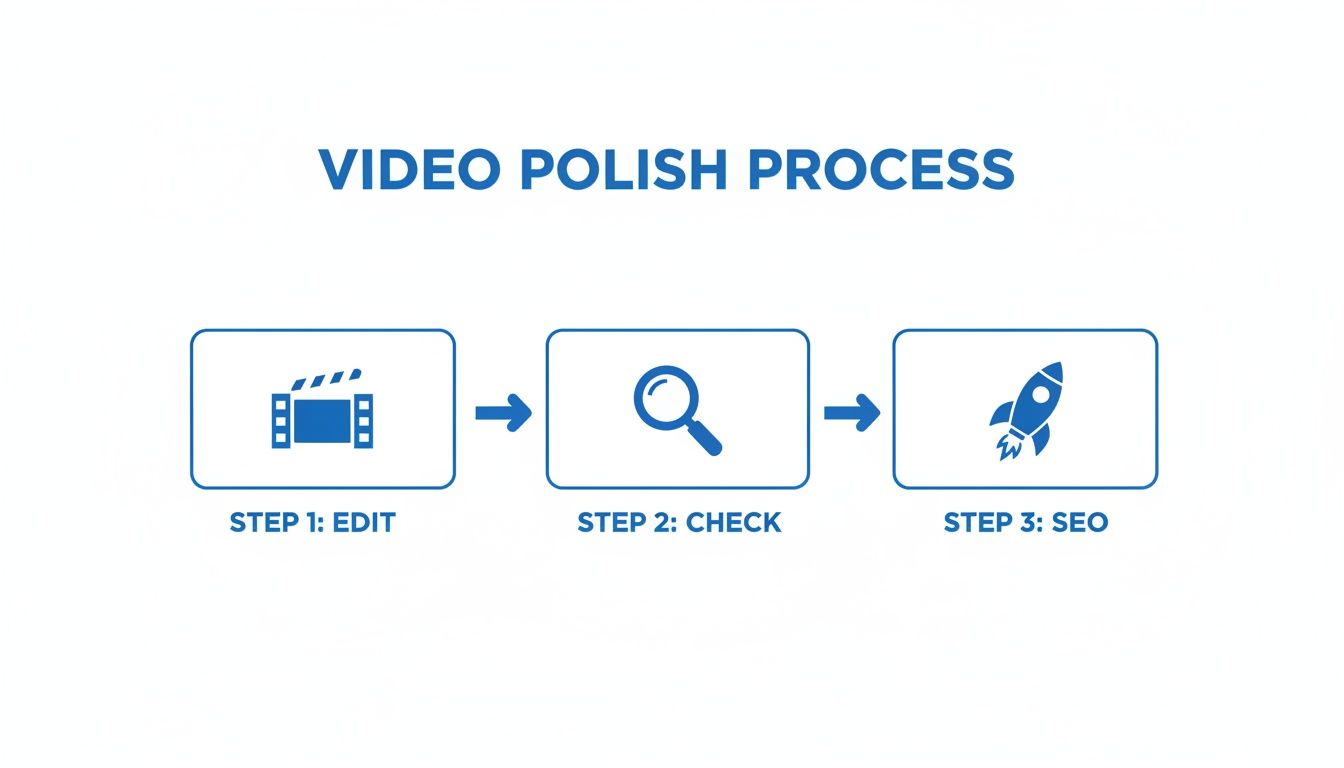
This just breaks down the final polish: a quick edit for quality, a final check to make sure everything looks right, and applying SEO to get as many eyes on it as possible.
Leveraging Built-In Scheduling and Multi-Platform Posting
Consistency is everything on social media, but trying to post manually every single day is a fast track to burnout. Real automation means you can schedule your content calendar weeks or even months out. You’ll be hitting your audience at the perfect times without being chained to your desk.
A huge advantage of modern AI platforms is the ability to link your social accounts directly. For example, you can connect your YouTube and TikTok profiles, create a video once, and schedule it to post on both platforms at the same time. That’s double the reach with zero extra work.
The real win here isn't just saving time—it's about maintaining a professional, reliable presence. When your audience knows to expect content from you, you build trust and anticipation. An automated scheduler makes sure you never miss a beat.
Exploring Advanced Series Automation
What if you could set up a recurring content theme and just let it run on its own? That’s exactly what series automation is for. This powerful feature lets you define a topic or format—like "Daily Historical Facts" or "Weekly Tech Tips"—and the AI will create brand new, unique videos based on that theme, all on a schedule you set.
- Define Your Theme: Just give the AI a core concept, like "Amazing facts about space."
- Set Your Schedule: Decide how often you want a new video (e.g., every Monday, Wednesday, and Friday).
- Let It Run: The system gets to work, generating fresh scripts, visuals, and voiceovers for each video in the series before scheduling them to post.
This is pretty much the ultimate hands-off approach to content creation. It keeps your channel active and engaging, building a massive library of content that continually brings in new viewers. If you want to get even smarter about your content delivery, looking at general marketing automation workflow examples can give you some great ideas. By building a solid workflow, you turn content creation from a daily chore into a scalable system that drives your channel's growth on autopilot.
Got Questions About AI Video Creation?
Jumping into AI video for the first time usually brings up a bunch of questions. It's a new space, so it's totally normal to wonder about the creative process, how monetization works, and what roadblocks to watch out for. Let's tackle the most common questions head-on so you can move forward with confidence.
Can AI Truly Replace Human Creativity?
Let's get this one out of the way first. Think of AI as a ridiculously talented assistant, not a replacement for you. It's brilliant at handling the grunt work—spitting out a first draft of a script, generating a ton of visual options, or laying down a clean voiceover track. This frees you up to do what humans do best: steer the creative direction, refine the strategy, and add that final layer of personality that makes content stick.
The best AI-powered content is always a partnership. You're combining the raw speed of a machine with your unique vision and taste. Your prompts, your edits, your final say—that's what guides the AI and ensures the video actually feels like you and connects with your audience. It's about making your creativity more powerful, not making it obsolete.
The process of creating art makes art of you. The book, the painting, the film script is not the only art. It’s important, but in a way it’s a receipt… Because in the end of it all, you are the art.
Is It Possible to Monetize an AI YouTube Channel?
Absolutely. YouTube’s monetization policies don’t care what tools you used; they care about the value and originality you provide. As long as your AI-generated videos are engaging, well-made, and bring a fresh perspective to the table, they are 100% eligible for the YouTube Partner Program.
The trick is to avoid low-effort, copy-paste content that feels spammy. Successful channels use AI to produce high-quality, transformative work—think deeply researched faceless documentaries or insightful explainer videos that genuinely help the viewer. It all comes down to the quality of what you publish, not the process behind it.
How Long Does It Take to Create a YouTube Short With AI?
For someone who knows their way around an integrated platform, you can go from a simple idea to a ready-to-publish Short in as little as 5 to 10 minutes. This speed is, frankly, one of the biggest game-changers of using an AI workflow.
Here’s a rough play-by-play of the timing:
- Dropping in the concept: Less than a minute.
- Tweaking the AI script: A couple of minutes for quick edits.
- Automatic generation: Visuals and voiceover usually cook in under two minutes.
- Final touches: Adding some music and doing a final quality check takes another minute or two.
This workflow crushes what would normally take hours of manual labor into a few minutes of focused, high-leverage work. That kind of efficiency means you can actually create a YouTube video with AI and keep up a consistent posting schedule without burning out.
What Are the Most Common Mistakes to Avoid?
The number one mistake is just accepting whatever the AI spits out first. This is a fast track to generic content that has zero personality. Always, always take a few minutes to review and refine AI scripts to inject your own voice and point of view.
Another classic pitfall is visual inconsistency. If your video looks like a random collage of assets pulled from ten different places, it screams "amateur." Use detailed and consistent prompts to nudge the AI toward a cohesive look that matches your brand.
Finally, don't get so caught up in creation that you forget about SEO. You can make the most brilliant AI video in the world, but it's dead in the water without an optimized title, description, and thumbnail. Remember, AI is your assistant—you're still the strategist.
Ready to build your own automated content engine? ShortsNinja combines scripting, visuals, voiceovers, and scheduling into one seamless platform. Stop juggling tools and start creating consistent, high-quality Shorts in minutes. Try it now and see how fast you can grow your channel.