
Short-form video has exploded. It’s no longer just a trend—it’s how people consume content now, and a solid YouTube Shorts editor is your ticket to getting in on the action. Tools built for this, especially AI-powered ones like ShortsNinja, are designed to cut through the noise and automate the grunt work, turning what used to be a complicated editing slog into a quick, almost effortless process.
Why YouTube Shorts Is Your Biggest Growth Opportunity
The shift to short-form video isn't just a small change; it's a complete rewiring of how people watch content online, and YouTube is pushing all its chips in on Shorts. The algorithm now heavily favors this bite-sized, vertical format, creating a massive opening for creators to grow their audience faster than ever before. Relying solely on old-school, long-form strategies just won't cut it anymore.
The numbers here are pretty staggering. The hunger for short-form content is off the charts, with YouTube Shorts' daily views rocketing from 70 billion to an incredible 200 billion in just a single year. That's a 186% jump, which shows just how fast viewers have jumped on this train.
Capitalizing on the Content Gold Rush
Creators who are leaning into this new reality are seeing some incredible results. By pumping out engaging Shorts consistently, they’re reaching new eyeballs, racking up subscribers, and even driving traffic back to their longer videos and other projects. To pull this off, you really only need two things: a steady flow of ideas and a workflow that doesn’t burn you out. A reliable internet connection is also a must-have for smooth uploads and editing, so it's smart to look for the best internet for remote work to keep things running smoothly.
This is where an AI-powered YouTube Shorts editor like ShortsNinja really changes the game.

This kind of setup is basically the modern creator's command center, a place where ideas can become viral content with incredible speed. The secret sauce is automating the parts of the process that used to eat up all your time.
The real challenge isn't a lack of ideas; it's the production bottleneck. An effective YouTube Shorts editor shatters that barrier, turning a multi-hour chore into something you can knock out in five minutes.
To show you just how dramatic the difference is, let's break down the time commitment for making a single Short the old way versus with an AI assist.
Short-Form Video Production Traditional vs AI-Powered
| Task | Traditional Method (Hours) | AI-Powered Method (Minutes) |
|---|---|---|
| Ideation & Scripting | 1 – 2 hours | 5 – 10 minutes |
| Asset Gathering/Creation | 1 – 3 hours | 2 – 5 minutes |
| Editing & Pacing | 2 – 4 hours | 5 – 15 minutes |
| Captions & Graphics | 0.5 – 1 hour | 1 – 3 minutes |
| Final Review & Export | 0.5 hours | 2 minutes |
| Total Time | 5 – 10.5 hours | 15 – 35 minutes |
As you can see, the time savings are massive. What used to take up an entire day (or more) can now be done in the time it takes to drink a cup of coffee.
This efficiency is what allows you to maintain momentum and stay consistent. If you want to know how to measure your success along the way, check out our guide on the https://shortsninja.com/blog/top-5-metrics-for-youtube-shorts-growth/. By letting AI handle the scripting, visual generation, and editing, you’re free to focus on what actually matters: your strategy and building a community around your content.
Crafting a Viral Script Without Writer's Block
Every viral Short starts with one thing: a solid script. But let's be real—this is where most creators hit a wall. Staring at a blinking cursor on a blank page, trying to cook up something brilliant in under 60 seconds, can be completely paralyzing. It often leads to hours of wasted time and a ton of frustration.
The secret isn't just about brainstorming harder. It's about having a system. A great Short needs three things: a hook that grabs attention in the first three seconds, a middle section that gets straight to the point, and a clear call-to-action that tells people what to do next. Simple, right? But tough to nail consistently.
Moving From Blank Page to Final Script in Minutes
This is where bringing AI into your YouTube Shorts editor can be a total game-changer for your workflow. Imagine turning a fleeting thought into a script that’s ready to produce, almost instantly. Instead of fighting with writer's block, you just feed the AI a basic prompt and let it do the heavy lifting.
For example, you could give a tool like ShortsNinja a simple idea like "surprising historical facts." Within seconds, it spits back multiple script variations. Each one comes with a punchy hook, a tight middle, and a call-to-action, ready for you to either use as is or tweak to fit your style.
The goal is to transform brainstorming from a time-consuming chore into a rapid, creative process. An AI-powered script generator acts as your co-writer, ensuring you never run out of high-quality material.
This approach takes all the guesswork out of the equation. You can quickly test different angles for the same topic without manually writing each one from scratch. To see more on how this works behind the scenes, check out our guide on the AI story creator.
A Practical Example of AI Scripting
Let’s walk through what this looks like in the real world. Say you want to make a Short about productivity hacks for remote workers.
- Your Prompt: "Three unconventional productivity tips for working from home."
- AI-Generated Hook: "You're probably using the Pomodoro Technique all wrong. Here's a better way…"
- AI-Generated Body: The AI scripts out three distinct points, each explained in a single, sharp sentence to keep the pace snappy.
- AI-Generated CTA: "Follow for more daily tips that actually work!"
This whole process takes less than a minute. What used to be an hour of brainstorming, outlining, and writing gets condensed into just a few clicks. When you build this step directly into your YouTube Shorts editor, you're not just saving time—you're creating a scalable content engine that churns out engaging scripts whenever you need them.
Generating Stunning AI Visuals and Voiceovers
Forget needing a fancy camera, a professional studio, or even a microphone. This next stage in your workflow is where the magic happens, letting you create professional, captivating faceless videos without any of that traditional equipment. This is where a modern YouTube Shorts editor really starts to shine, taking your finalized script and turning it into a polished visual story.
With an AI engine like the one inside ShortsNinja, the leap from text to video is almost instant. The tool scans the keywords and context in your script to generate unique, high-quality images and video clips that actually match your narrative. This isn't just about grabbing clips from a stock library; it's creating visuals from scratch.
This intelligent generation ensures that the visuals directly support the story you're telling, making the final product feel much more coherent and engaging for the viewer.
A Practical Example of Visual Generation
Let’s say your script is about "the future of AI." Once you feed that script into the platform, the AI gets to work. Instead of you spending hours digging through stock sites for the right B-roll, the system automatically creates relevant visuals right on the spot.
- For a line about "neural networks," it might generate an animation of glowing, interconnected data streams.
- When the script mentions "robotics," it could create clips of sleek, futuristic machines in action.
- A mention of "data analysis" could produce visuals of complex, abstract digital interfaces.
This automated process ensures that every single second of your Short is visually stimulating and perfectly aligned with your script's message. That’s how you keep your audience hooked from the first frame to the last.
The real power of AI visual generation is its ability to translate abstract concepts into compelling visuals instantly. This saves countless hours of creative effort and eliminates the need for expensive stock footage subscriptions.
By handling all the visual creation, the tool frees you up to focus on refining the narrative and the overall pacing—two things that are absolutely critical for viewer retention on YouTube.
Bringing Your Script to Life with AI Narration
Once the visuals are in place, the next move is adding a powerful voiceover. A clear, professional-sounding narration can be the difference between a video that gets skipped and one that goes viral. And this is another area where a comprehensive YouTube Shorts editor completely changes the game.
Rather than trying to record and edit your own audio—which requires a quiet space and good equipment—you can use an integrated AI voice generator. Modern text-to-speech tech has become remarkably human-like, offering a huge range of tones, accents, and emotional inflections. You can see some of the best options out there in our breakdown of the top 5 AI voice generators to elevate your content.
ShortsNinja, for instance, lets you choose from dozens of voices and languages. You just paste your script, pick your preferred voice, and the AI generates a crisp, clean narration in seconds. This doesn't just save time; it provides a level of consistency and quality that can be really tough to achieve with a home recording setup.
The result is a professional-grade Short with stunning visuals and a perfect voiceover, ready for the final editing touches.
Editing Techniques for Maximum Viewer Retention
An AI-generated draft is a great starting point, but the real magic happens in the edit. This is where you transform a rough concept into a polished, high-performance Short that keeps people watching.
Using a solid YouTube Shorts editor isn't about mastering complicated software. It’s about understanding the psychology of your viewer. Their attention is gold, and you’ve only got a few seconds to prove your video is worth it.
Your main job here is to build and maintain momentum. The fastest way to lose someone is with a slow, rambling clip. Every scene, every word, and every visual needs to push the story forward. This is where your human touch makes all the difference, turning a decent idea into seriously great content.
Mastering the Art of Pacing and Cuts
Pacing is the heartbeat of your Short. A fast, dynamic rhythm keeps viewers locked in, while a slow pace is an invitation to swipe away.
The key is to make aggressive cuts. Trim out every bit of dead air and any awkward pauses between sentences. Think of it as a conversation—you want to get straight to the point without any weird silences. In practice, this means you should be constantly trimming the fat from the beginning and end of every single clip. Shaving off even half a second can inject a surprising amount of energy into the final video.
Use jump cuts to snap between ideas or speakers. This creates a sense of urgency that pulls the viewer right along with you.
Viewer retention on Shorts is a game of milliseconds. A snappy, well-paced edit respects the viewer's time and signals that your content is packed with value, making them more likely to watch until the very end.
Here’s a great trick: listen to your voiceover without watching the video. Any time you hear a slight pause or even a breath, that’s your signal to make a cut. This method forces your audio to drive the edit, which is absolutely essential for a format where sound is so important.
Boosting Engagement with Captions and Music
Let's be real: a huge chunk of short-form video is watched on mute. That makes animated captions a non-negotiable. They aren't just for accessibility anymore; they're a core part of the viewing experience.
An effective YouTube Shorts editor like ShortsNinja can automate this for you, generating dynamic, word-by-word captions that keep eyes glued to the screen.
When you're setting up your captions, follow these best practices:
- Use Bold Colors: Pick high-contrast colors that pop against your background visuals.
- Add Animation: Simple animations, like a word-by-word highlight or a subtle zoom effect, add a ton of visual interest.
- Incorporate Emojis: Don't overdo it, but placing relevant emojis near keywords adds personality and emphasis.
Background music is your other secret weapon for setting the mood. The right track can make your content feel more energetic, emotional, or suspenseful. Most modern editors come with libraries of royalty-free music. Just choose a track that complements your voiceover without overpowering it. Make sure the volume is low enough that your narration is still crystal clear.
Finally, think about your transitions. You want them to be seamless. Avoid anything too jarring or complex. Simple cuts, subtle fades, or quick zooms are almost always the most effective options for linking clips without breaking the viewer's immersion.
By focusing on these core editing principles—fast pacing, dynamic captions, and complementary audio—you can turn that AI draft into a highly shareable, viral-ready Short.
Keep Your Content Flowing With an Automated Schedule
Making a great Short is just the first step. The real secret to growing on YouTube is getting that content in front of your audience consistently, day in and day out. This means you need to nail your titles, descriptions, and hashtags—the stuff the YouTube algorithm actually pays attention to.
But more than that, it’s about putting this entire process on autopilot so you can get your time back. The daily grind of manually uploading videos is a massive drag on creators. It’s boring, it’s easy to mess up, and it keeps you from focusing on the bigger picture, like strategy and talking to your community. This is where a built-in scheduler completely changes the game.
Set Up a Publishing Machine and Let It Run
Think about it: you connect your YouTube channels to a platform one time, map out your content calendar for the next few weeks, and then just let the system handle every single upload. This isn't some far-off dream; it's exactly how the top creators churn out a relentless stream of quality content without hitting burnout.
A tool like ShortsNinja is built for this. By automating the publishing step, you guarantee your content goes live at the best possible times for your viewers, whether you're at your desk or not. That kind of consistency is a huge signal to the YouTube algorithm that you’re a serious creator, which can earn you more visibility over time.
And if you want to get really organized, learning how to create a content calendar that drives growth is a skill that pays off across any platform you're on.
Put Your Video Metadata on Autopilot
For any Short to have a fighting chance, its metadata—the title, description, and tags—has to be sharp. These pieces of text are crucial signals that tell YouTube what your video is about and who needs to see it. But let's be honest, trying to come up with unique, keyword-stuffed metadata for every single video is a huge time sink.
This is another area where a smart YouTube Shorts editor can help, especially one with AI baked in.
- AI Title Generation: It can whip up catchy, clickable titles that are tailored to your video's topic.
- Automated Descriptions: The system generates keyword-rich descriptions that help your Shorts show up in search.
- Hashtag Suggestions: You get recommendations for relevant and trending hashtags to help more people discover your content.
When you automate metadata, you're not just saving time. You're using data-driven suggestions to give every single video the best possible chance of being discovered the second it goes live.
Before your Short is ready for scheduling, it has to go through the editing wringer. This simple infographic breaks down the core editing flow.
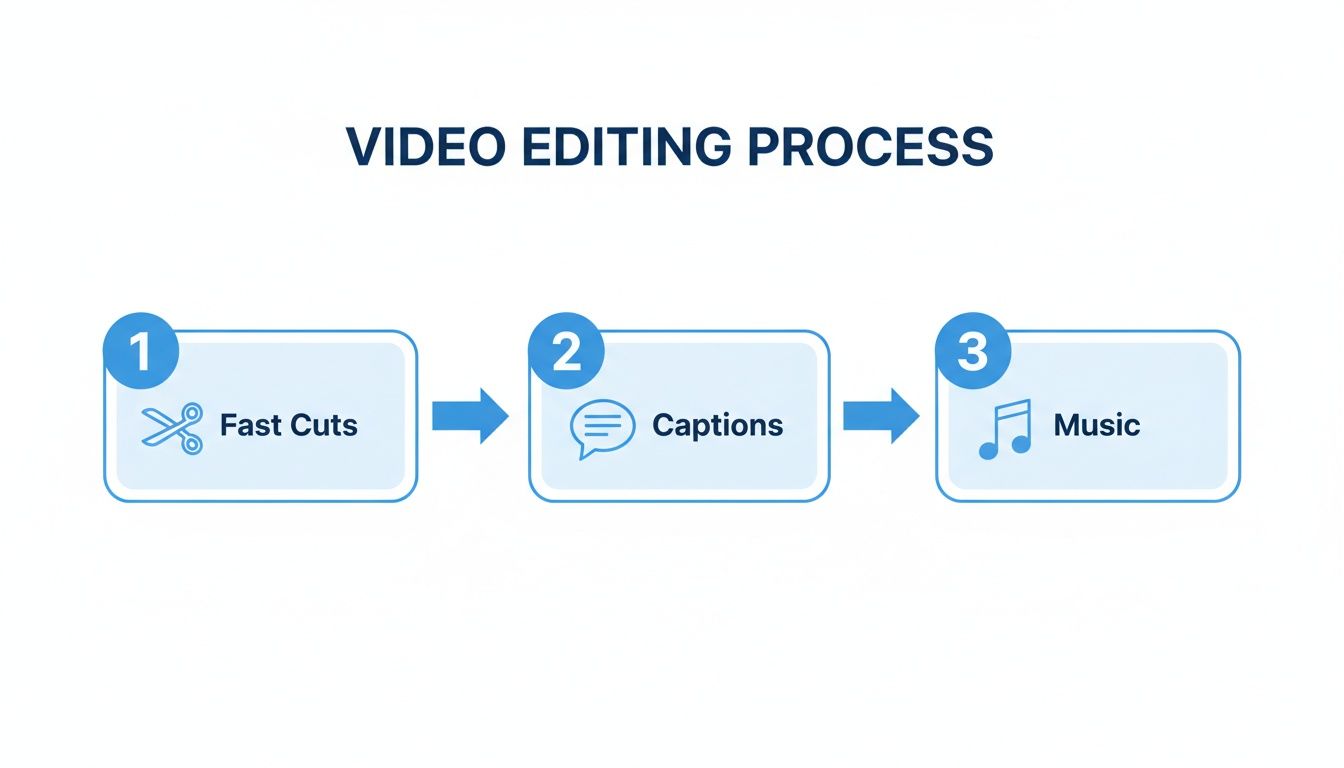
This quick, three-part process—fast cuts, clear captions, and good music—is what creates a high-retention Short that’s primed and ready for your automated publishing schedule.
Automation isn't just about saving a few minutes here and there. It's about building a reliable system that fuels your growth. When you schedule content in advance, you kill the daily pressure to publish and can finally shift your brainpower to long-term strategy and coming up with better ideas.
When your whole process, from brainstorming to hitting "publish," lives inside one intelligent platform, you’ve basically built a content factory. It lets you batch-create and schedule dozens of Shorts at once, building that steady presence that attracts new subscribers and keeps them coming back for more. This is how you grow on YouTube today without losing your mind.
Got Questions About AI Video Creation?
If you're new to the world of AI-driven content, you probably have a few questions floating around. It's totally normal. Many creators wonder if these tools can really hold a candle to manual editing or if they're just a shortcut that kills originality. Let's tackle some of the most common concerns you might have.
The whole point here is to demystify the process. AI isn't here to replace your creativity—it's here to amplify it. By taking over the tedious, repetitive tasks, platforms like these free you up to think about what really matters: your strategy, your next big idea, and connecting with your community.
Can an AI YouTube Shorts Editor Actually Make Unique Content?
You bet it can. Modern AI video platforms like ShortsNinja aren't just glorified template editors. They use generative models that build visuals from scratch based on the text prompts you feed them. That means every single video is unique to your script.
You're not just picking from a limited library of pre-made clips that thousands of other people have already used. You're directing an AI to create visuals that perfectly match the story you've written. The result is truly one-of-a-kind content, every single time.
How Much Time Will I Realistically Get Back?
Let's be real—the traditional way of making Shorts is a grind. Creators often sink 3-5 hours per Short into scripting, recording, hunting down B-roll, editing, and doing voiceovers. An AI-powered workflow shrinks that entire process down to about 5-10 minutes.
If you're trying to post daily, that adds up to a savings of over 20 hours per week. That's a massive chunk of your life back. You can finally shift your focus from the production hamster wheel to genuine growth strategies and community building.
This isn't just about being a little more efficient. It's a complete shift in how content gets made. The time you save lets you scale up from struggling to post one video a day to effortlessly pushing out several high-quality videos.
Is AI-Generated Faceless Content Actually Effective for Growth?
Yes, and it’s incredibly effective. Right now, faceless channels are some of the fastest-growing on YouTube. This format lets you focus entirely on delivering value and entertainment, which means you can appeal to a massive audience without ever needing to step in front of a camera.
At the end of the day, viewers want engaging stories and useful information. AI tools now make it possible to deliver exactly that with professional quality and consistency, at a scale that used to be impossible for a solo creator. The YouTube algorithm loves consistency, and this kind of workflow is the key to unlocking it.
Ready to stop grinding and start growing? With ShortsNinja, you can create high-quality, unique YouTube Shorts in minutes, not hours.
Start your free trial and create your first AI-powered video today!