

Let's get straight to it: the sweet spot for your shorts video size is a 1080×1920 pixel resolution with a 9:16 aspect ratio. This vertical format is the gold standard across YouTube Shorts, TikTok, and Instagram Reels, and it’s non-negotiable if you want to create that immersive, full-screen experience viewers expect.
Think of it as the key that unlocks your content’s potential on mobile.
Unlocking Viral Potential Starts With the Right Size
In this guide, we're diving deeper than just the numbers. We’ll explore why things like file size, format, and duration are just as crucial for hooking viewers and keeping the platform algorithms happy. Getting these specs right isn't just a technical chore—it's your first real step toward going viral.
So, why does the right video size matter so much? Imagine you’ve just poured your heart into creating the most brilliant 30-second clip. It's funny, it's valuable, it's perfect. But if you upload it in the wrong format, it might show up stretched, blurry, or boxed in by those hideous black bars. This screams low-quality to viewers and, worse, to the platform's algorithm.
The Algorithm and the Human Experience
Social media platforms are built to deliver a smooth, addictive user experience. When your video fits a phone screen perfectly, it keeps people glued. That sends a powerful signal to the algorithm: "Hey, this content is good. Show it to more people!"
On the flip side, a poorly formatted video creates a jarring experience. It makes users want to swipe away, which tanks your watch time and tells the algorithm your content isn't worth promoting.
Getting your video specifications right is the digital equivalent of dressing for success. A perfectly formatted video looks professional, captures attention instantly, and tells the algorithm that your content deserves to be seen.
Manually tweaking every single video to meet the precise rules for each platform is a total drag. It’s tedious, time-consuming, and takes you away from what you do best: creating. This is where a smarter approach comes in.
An AI-powered tool can handle all that optimization for you, ensuring every short video is perfectly sized and formatted for maximum impact, without the manual grind. For example, ShortsNinja is designed to be that go-to AI tool for creating flawless short-form videos effortlessly. It takes care of the technical headaches so you can focus on making amazing content that actually connects with your audience and grows your channel.
To give you a quick overview, here's how the big three platforms stack up when it comes to their video specs.
Quick Guide to Shorts Video Size by Platform
| Specification | YouTube Shorts | TikTok | Instagram Reels |
|---|---|---|---|
| Aspect Ratio | 9:16 (Vertical) | 9:16 (Vertical) | 9:16 (Vertical) |
| Resolution | 1080×1920 pixels | 1080×1920 pixels | 1080×1920 pixels |
| Max Duration | Up to 60 seconds | Up to 10 minutes | Up to 90 seconds |
| Max File Size | 256 GB | 287.6 MB (iOS), 72 MB (Android) | 4 GB |
While the core dimensions are the same, notice the differences in duration and file size limits. These details are exactly why a one-size-fits-all approach doesn't quite work if you want to get the best performance everywhere.
Why Aspect Ratio and Dimensions Are Critical
Ever tried watching a widescreen Hollywood blockbuster on your phone while holding it vertically? You get those massive black bars that shrink the action and completely ruin the vibe. That’s exactly what it feels like when short-form video isn’t formatted correctly. Getting your shorts video size right is like getting a custom-tailored suit—it just fits perfectly.
The vertical 9:16 format isn't some random industry standard. It’s designed specifically for how we all naturally hold and use our phones. When your video fills the entire screen, you command 100% of the viewer's attention, leaving no room for distracting borders.

This simple trick maximizes every single pixel, pulling your audience straight into the story from the first frame. It’s a small detail with a huge psychological payoff.
The Power of Professional Polish
Beyond just the shape, the specific dimensions—1080×1920 pixels—are what give your video that sharp, professional look. This resolution, often just called Full HD, delivers a crisp and clear image that immediately signals quality. In a feed overflowing with shaky, amateur clips, high-resolution video helps you stand out and build credibility in seconds.
Think of it like this: a blurry, pixelated video is the digital equivalent of a storefront with a dirty window. It suggests you don't care, and it gives viewers an easy reason to swipe away before they even get to your message. Clean, sharp visuals build trust.
Avoiding the Algorithm Penalty
There's another, less obvious cost to getting the formatting wrong, and it has nothing to do with how your video looks. When you upload a video that isn't 9:16, platforms like YouTube, TikTok, and Instagram will often force it to fit by adding black bars. This is called letterboxing (for horizontal videos) or pillarboxing (for square ones).
Letterboxing doesn't just make your content look smaller; it sends a negative signal to the platform's algorithm. It screams "poor user experience," which can tank your reach and engagement before you even get started.
You're essentially telling the algorithm that your content isn't optimized for its audience. This can seriously hurt your video's performance from the get-go. If you want to go deeper, you can explore the best aspect ratios for TikTok, YouTube, and Instagram in our 2025 guide.
And it's not just about the frame. Video length is just as important for holding viewer attention. Learning the optimal video length sweet spots for various short-form platforms can make a huge difference in how your audience responds. At the end of the day, mastering these technical details is what gives your content its best shot at connecting with people and truly taking off.
Decoding the Data Behind Short-Form Video
Getting your shorts video size right is more than just a technical chore—it’s a strategic move that taps into huge trends in user behavior. Short-form video is eating the internet, and platforms are actively rewarding creators who play by their formatting rules. This isn't just them being picky; videos formatted correctly create a seamless, immersive experience that keeps people watching longer and drives up engagement.
Think about it. When your content fills the screen perfectly, viewers are less likely to scroll away. This sends a powerful signal to the platform's algorithm that your video is high-quality, which in turn encourages it to push your content to a much wider audience. Every technical spec you nail is another step up the algorithmic ladder.
The Numbers Don't Lie
The sheer scale of short-form video is mind-boggling, which means every little optimization you make can have a massive impact. For example, YouTube Shorts is now pulling in an incredible 90 billion views per day. But a flood of views doesn't always mean people are actually sticking around.
Data shows that TikTok often wins on watch rates. Creators with 1k-5k followers are seeing an average 25% watch rate on TikTok, while similar creators on YouTube Shorts get just 10%. You can dig into more of these platform differences by exploring the full Awisee analysis.
This data reveals something critical: while YouTube offers an enormous audience, TikTok’s users might be more captivated on average. A perfectly optimized shorts video size helps you compete on both fronts by delivering an experience that hooks viewers from the very first frame.
Your video's format is its first impression. A perfectly sized short tells both the viewer and the algorithm that you're a serious creator who values quality, giving you an immediate edge in a crowded feed.
By aligning your content with what each platform wants, you’re not just uploading a video—you're setting the stage for real growth. This attention to detail is what turns fleeting views into a loyal, engaged audience. If you want to go deeper on what makes a video perform, check out our guide on the top 5 metrics for YouTube Shorts growth. Understanding these metrics helps you connect your formatting choices to tangible results, turning your content strategy from guesswork into a data-backed plan for success.
Getting the Technical Details Right
Nailing the 1080×1920 resolution is a huge first step, but a truly great short video is about more than just its dimensions. If you want to create content that algorithms and audiences both love, you need to master the other technical specs—things like file format, duration, and frame rate.
Think of it like building a high-performance car. The body (your dimensions) might look perfect, but it's the engine components (the format, file size, and frame rate) that determine how well it actually performs. For short-form video, these details are what deliver that smooth, seamless experience that keeps people watching.
File Format and File Size Limits
When it comes to video formats, the undisputed champion is MP4 with an H.264 codec. There's a reason it's the universal standard: it strikes the perfect balance between high quality and a manageable file size. It’s compatible with pretty much every platform you can think of, from YouTube Shorts to TikTok, ensuring your content looks sharp everywhere.
Platforms also have strict file size limits, and for good reason. A huge file takes longer for you to upload and, more importantly, longer for a viewer to load. That friction is a recipe for a quick swipe-away. Staying within these limits ensures your video gets seen without any frustrating delays.
A smaller, optimized file isn't about sacrificing quality—it's about respecting your viewer's time and data. Fast-loading content leads to better retention and sends all the right signals to the platform's algorithm.
To get a handle on all these technical settings, you'll need the right tools. For a deep dive into the top options, check out this guide to the best video editing software for ambitious creators.
Duration and Frame Rate Sweet Spots
This is where strategy really comes into play. A platform might let you upload a 60-second video, but viewer attention spans are much shorter. Imagine crafting the perfect short only to have people bail after 3.75 seconds—that’s the average reality on TikTok. The sweet spot is often between 9-15 seconds, a window that perfectly aligns with how people consume content today.
Finally, let's talk about frame rate, which is just a fancy way of saying how smooth the motion in your video looks. The standard options are pretty simple:
- 24 FPS: Gives your video that classic, cinematic feel.
- 30 FPS: This is the standard for most online video. It offers clean, smooth playback.
- 60 FPS: Perfect for high-action content like sports or gaming, creating an ultra-fluid look.
For most creators, 30 FPS is the safest and most effective bet. It delivers a crisp, professional look that works perfectly for the vast majority of short-form content.
Optimal Export Settings for Short-Form Video
Getting these settings right during export is the final step to ensuring your video looks amazing on every platform. Here’s a quick-reference table to take the guesswork out of it.
| Setting | Recommendation | Why It Matters |
|---|---|---|
| Resolution | 1080×1920 pixels | The standard for vertical video, ensuring a full-screen, immersive experience. |
| Aspect Ratio | 9:16 | This is the native vertical format for mobile devices and platforms like Reels and Shorts. |
| Format/Codec | MP4 (H.264) | Offers the best combo of high quality and small file size, with universal compatibility. |
| Frame Rate | 30 FPS | Provides smooth, clean motion that looks professional for most content types. |
| Bitrate | 8-15 Mbps | A higher bitrate means better quality, but this range keeps file sizes reasonable. |
Using a preset in your editing software with these settings will guarantee a flawless upload every single time. And if you're looking to automate the whole process, tools like ShortsNinja can handle these technical details for you, so you can focus on creating.
Designing for the Platform Safe Zones
Ever spend hours crafting the perfect short video, only to watch your brilliant call-to-action get smothered by a username or the ‘like’ button? It’s a classic, frustrating problem, and it all comes down to safe zones. You can nail the technical shorts video size, but if your main message gets covered up, all that hard work goes down the drain.
Think of your 9:16 canvas as a stage. The very center of the screen is your spotlight—this is where you need to keep every critical visual. The edges, especially the bottom third and the right side, are where the platform’s user interface lives. We're talking captions, usernames, engagement icons, and those little progress bars.
Navigating the Interface Overlay
Every platform—TikTok, Instagram Reels, YouTube Shorts—has a slightly different layout, but they all follow a similar pattern. The golden rule? Keep the important stuff away from the edges.
- Top: Usually clear, but sometimes platforms will drop banners or alerts here. Best to keep it open.
- Bottom: This is the most crowded real estate on the screen. It’s home to the caption, sound details, and the creator’s channel name.
- Right Side: This is where you'll almost always find the like, comment, and share buttons.
To help you picture how all these pieces fit together, check out this breakdown of the core technical specs that every great short is built on.
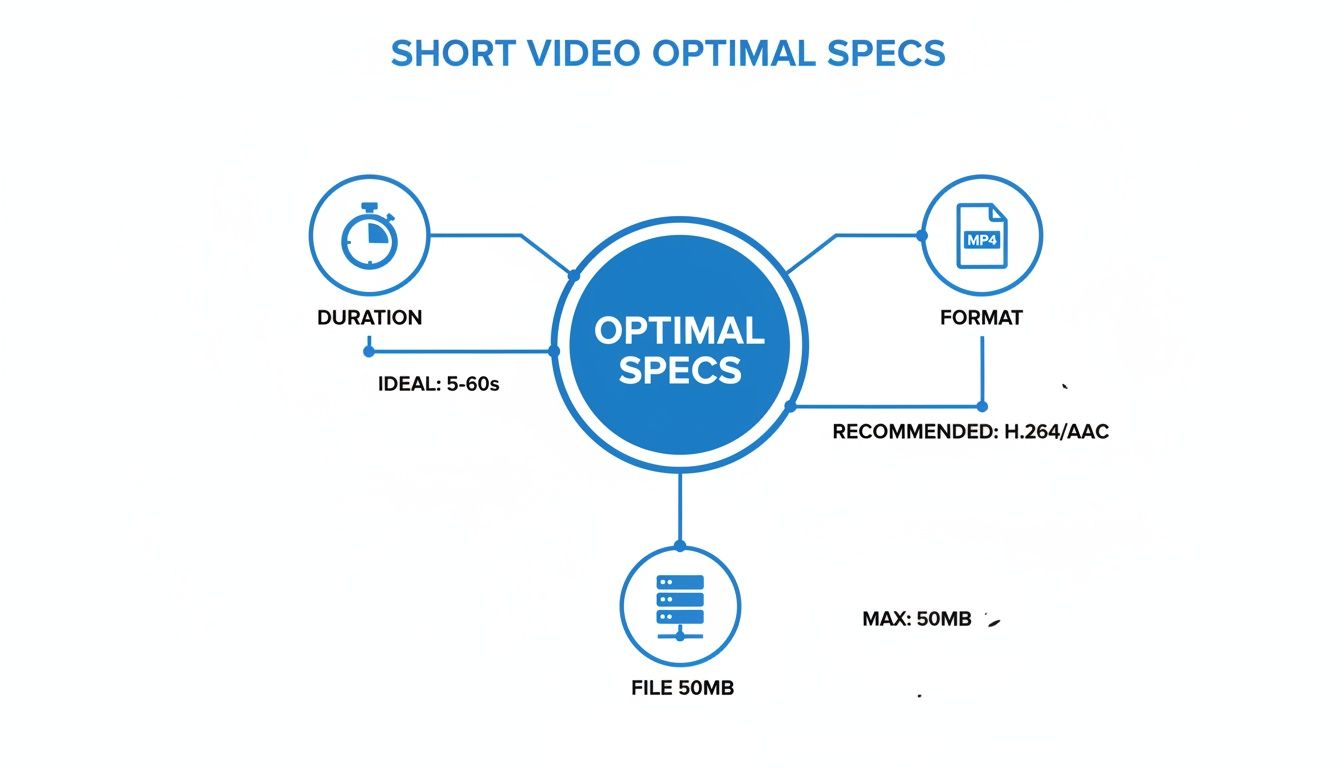
This graphic drives home that while duration, format, and file size are crucial, none of it matters if the platform’s own interface ends up hiding your content.
The safe zone isn’t just a guideline; it's a fundamental rule of composition for mobile video. Keeping your most important content—like text, faces, or products—tucked into this central area ensures your message is always seen exactly as you intended.
Most video editing software comes with built-in safe zone guides or overlays that you can toggle on while you work. Using them is a game-changer, helping you see the "no-go" areas so you can frame your shots perfectly.
Or, you can let technology do the heavy lifting. AI tools like ShortsNinja automatically account for these platform-specific safe zones, making sure your visuals and text are always clear and unobstructed without any manual tweaking. It’s a simple step that prevents embarrassing mistakes and ensures every video you publish is ready for prime time.
Troubleshooting Common Video Size and Upload Issues
Nothing kills the creative vibe faster than spending hours on a video only to have it fail to upload or look like a blurry mess once it’s live. It’s a frustratingly common problem.
When your content hits a snag, it almost always comes down to a mismatch between your export settings and what the platform expects. Let's walk through how to fix the most common headaches.
The classic issue? A video that looks perfectly sharp on your computer but turns into a pixelated mess online. This happens when platforms over-compress your file. If your video's bitrate is too low to begin with, the platform’s compression algorithm has very little data to work with, and the quality tanks.
On the other hand, if an upload fails completely, it’s usually a sign that your file is too big or in the wrong format. Every platform has strict limits, and breaking them means an instant rejection.
Fixing Blurry and Pixelated Videos
When your uploaded video looks fuzzy, the solution is almost always in your export settings. Your goal is to give the platform a high-quality file, so its own compression has more to work with, leaving you with a much cleaner final product.
Here are the key settings to dial in:
- Bump Up the Bitrate: Export your video with a higher bitrate. Aim for the 8-15 Mbps range for 1080p content. Think of bitrate as the amount of visual information you're giving the platform—more is better.
- Confirm Your Resolution: Double-check that you’re exporting at the right dimensions: 1080×1920 pixels. Exporting at a lower resolution and expecting the platform to upscale it is a guaranteed recipe for a blurry video.
- Use the Right Codec: Always, always stick with MP4 (H.264). It's the universal standard that every major short-form video platform loves, ensuring maximum compatibility and the best compression.
Solving Upload Failures and Errors
If your video won't upload at all, the culprit is usually file size, format, or duration. Platforms are picky and will reject anything that doesn’t meet their specific technical rules.
A failed upload is the platform's not-so-subtle way of saying your video file is too large or in a format it doesn't recognize. Think of it like a bouncer at a club—if you don't meet the dress code (the technical specs), you're not getting in.
First, check the platform’s max file size. TikTok, for example, has a much smaller limit than YouTube Shorts. If your file is too large, you can re-export it with a slightly lower bitrate to shrink it down without a huge quality drop. Also, make sure your video is under the maximum allowed duration.
For a detailed walkthrough on platform-specific requirements, you can learn more about uploading YouTube Shorts in our complete guide.
Of course, using a tool like ShortsNinja helps you sidestep these problems entirely. It automatically handles all the technical optimizations—from resolution and format to file size—so every video you create is perfectly formatted for a flawless upload, every single time.
Your Top Questions About Shorts Video Size, Answered
Even with all the specs laid out, sometimes you just need a quick answer. Let's tackle the questions that pop up most often when creators are trying to get their Shorts dimensions just right.
What’s the Absolute Best Size for a Short?
If you want a one-size-fits-all answer, here it is: 1080×1920 pixels. That gives you a 9:16 aspect ratio, which is the native, full-screen vertical format for YouTube Shorts, TikTok, and Instagram Reels.
Locking in these dimensions guarantees your video fills the entire phone screen, giving viewers that immersive experience you’re aiming for. It’s the professional standard for a reason.
Can I Get Away With Uploading a Square (1:1) Video?
Technically, yes, you can upload a square video (1080×1080 pixels), but I really wouldn't recommend it. When you do, the platform just slaps black bars on the top and bottom to force it into the vertical 9:16 frame.
Not only does this make your video look smaller and less professional, but it also sends a subtle signal to the algorithm that your content isn't optimized for the platform. That can end up hurting your reach.
Sticking to the native 9:16 aspect ratio is a simple yet powerful way to signal quality. It tells both viewers and the platform’s algorithm that you are a creator who understands how to deliver a great mobile experience.
Why Does My Video Look Blurry After I Upload It?
Ah, the dreaded blurriness. This is almost always a compression issue, and it usually boils down to one of a few things:
- Low Export Bitrate: Think of bitrate as the amount of data in each second of your video. If you export with a low bitrate, you're not giving the platform's compression algorithm much to work with, and it has to throw away quality to shrink the file.
- Wrong Resolution: Uploading a video at a resolution lower than 1080p and hoping the platform will magically make it sharp is a recipe for pixelation. Always start with a high-quality source file.
- Incorrect File Format: Stick with MP4 (H.264). It’s the gold standard for a reason—it strikes the perfect balance between maintaining quality and keeping file sizes from getting out of hand.
Does File Size Really Matter If I Have Fast Internet?
It absolutely does. Your upload speed is one thing, but the viewer's experience is what truly matters. A massive file might upload quickly for you, but it can cause frustrating buffering for someone watching on a shaky mobile connection.
If a viewer has to wait for your video to load, they're not going to wait. They'll just swipe away. Following each platform's file size recommendations is a critical part of ensuring a smooth, instant-play experience for everyone.
Getting these technical details right is becoming more important every day. Short-form video is on track to make up a mind-blowing 90% of all internet traffic. This wave is powered by giants like YouTube Shorts, which now pulls in 90 billion daily views, and Instagram Reels, where content creation jumped 71% in just one year. With 51% more accounts jumping into the format, mastering your shorts video size isn't just a nice-to-have—it's how you compete. You can discover more about these short-form video trends and see why the numbers are too big to ignore.
Stop wasting time on tedious manual edits and start creating high-quality, perfectly optimized short videos in minutes. With ShortsNinja, our AI-powered platform handles the scripting, visuals, and technical formatting for you, so you can focus on growing your channel. Try ShortsNinja today and see the difference!