
If you're trying to grow on Instagram in 2025, the game has one simple rule: you have to make short videos. It’s not even a debate anymore. The platform's algorithm is practically screaming for Reels, making them the single best way to get in front of new people and keep your current followers hooked.
This guide will walk you through exactly how to create high-performing Reels using AI, even if you’ve never edited a video in your life.
So, Why Are Short Videos Such a Big Deal on Instagram Now?
Let's get one thing straight: the shift from pretty pictures to punchy videos isn't just a phase. It’s a seismic change in how we all consume content. Instagram, the app we once knew for filtered photos of our brunch, has completely transformed into a video powerhouse. And the reason is simple—short videos keep people glued to their screens longer, which is the holy grail for any social media platform.
This isn't just a hunch; it's baked into how the app works now. Instagram Reels are the new storefront for discovering creators and brands. The algorithm is literally designed to blast compelling, short-form videos out to a massive audience, far beyond the people who already follow you.
For creators and businesses, this is huge. A single, well-made Reel can reel in more new followers and likes than a dozen traditional posts put together. The trick is knowing how to churn them out consistently without sacrificing quality.
It’s All About the Algorithm
You have to think like the algorithm. It's not personal; it's a machine that rewards specific behaviors. It loves content that people watch to the end, re-watch, share with friends, and drop a comment on.
Short, snappy videos are practically engineered to trigger these signals. They get to the point fast, delivering a quick hit of value or entertainment that makes you want to watch again or send it to a friend.
Just look at how Instagram pushes Reels right in your face.
They’re not hiding them in some forgotten corner of the app. Reels are front and center in the main navigation and discovery tabs. That’s a massive signal telling you exactly what Instagram wants you to create and consume.
The Numbers Don't Lie
The scale of this shift is pretty mind-blowing. As of 2025, Reels are played over 140 billion times every single day across Instagram and Facebook.
Even more telling? Reels now make up over 50% of the total time people spend on Instagram. Just a few years ago, that number was a tiny fraction of what it is today. You can dig into more of these stats, but the story is the same across the board.
Here's the bottom line: The Instagram algorithm doesn't just prefer short videos; it's built for them. If you’re not making Reels, you’re basically invisible to a huge chunk of the platform’s audience and its incredibly powerful discovery engine.
To stay in the game, you need to be aware of the latest short-form video trends. This guide isn't just about jumping on the bandwagon; it's about using AI to do it faster and smarter than everyone else.
Generate Viral Reel Ideas with AI
Let’s be real—the hardest part of creating consistent **short videos for Instagram** isn’t the filming or editing. It’s the relentless pressure to come up with fresh ideas that actually work. Staring at a blank page is the fastest way to content creator burnout.
This is exactly where AI can become your secret weapon. Think of it as a creative partner that can turn that empty document into a goldmine of viral-worthy concepts.
The trick is to stop using basic prompts like "give me video ideas." To get brilliant output, you need to give the AI quality input. Don't treat it like a magic eight ball; treat it like a highly skilled assistant who needs clear instructions to do their best work.
Instead of a generic ask, you need to feed the AI specific details about your niche, your target audience, what keeps them up at night, and the exact video style you’re going for. That level of detail is what separates useless, generic suggestions from scroll-stopping video ideas you can actually use.
Crafting the Perfect AI Prompt for Reel Ideas
A great prompt is like a creative brief for your AI. The goal is to give it enough context to understand your brand's personality and what your audience truly cares about. The winning formula involves layering several key pieces of information to steer the AI toward the content you want to create.
Here’s a simple breakdown of what to include:
- Your Role and Niche: Start by telling the AI who you are. A fitness coach? A local coffee shop owner? A B2B SaaS marketer? This sets the stage for everything that follows.
- Target Audience Persona: Get specific about your ideal follower. What are their goals, their biggest struggles, and their pain points? The more detail, the better.
- Desired Content Format: Tell the AI what kind of video you're after. Are you looking for a "myth-busting" clip, a "how-to" tutorial, a "common mistakes" video, or maybe a "day in the life" story?
- The Desired Outcome: What should the viewer do or feel after watching? Do you want them to feel motivated, learn a new trick, or jump into the comments?
When you combine these elements, you force the AI to think strategically about your unique situation. The result? Far more relevant and creative ideas for your short videos on Instagram.
Key Takeaway: The quality of AI-generated ideas is a direct mirror of the quality of your prompts. Vague inputs get you vague outputs. Detailed, context-rich prompts deliver strategic, targeted content ideas that hit home with your audience.
A Real-World Example for a Fitness Coach
Let's see how this works in practice. Imagine you're a fitness coach who helps busy professionals find time to work out. A weak prompt would be something like, "Give me fitness Reel ideas." It’s just too broad.
Instead, let's build an advanced prompt:
- Role: "You are an expert fitness coach."
- Audience: "Your target audience is busy professionals aged 30-45 who work from home and feel they have no time to exercise. Their main pain point is guilt over their sedentary lifestyle and confusion about where to start."
- Format: "Generate 5 ideas for short Instagram videos (Reels) using a 'Myth vs. Fact' format."
- Objective: "Each idea should bust a common fitness myth that prevents them from starting and provide a simple, actionable tip they can do in under 10 minutes. The tone should be encouraging and non-judgmental."
This kind of detailed prompt gives you specific, empathetic ideas like, "Myth: You need an hour at the gym for a real workout. Fact: A 10-minute HIIT circuit at home can boost your metabolism for hours. Here's one you can do on your lunch break." That’s a real concept you can immediately script out.
To take it a step further, check out our guide on how to track emerging video trends with AI to make sure your ideas are always hitting on what's current.
Bring Your Reel to Life with AI Visuals and Voiceovers
With your script locked and loaded, it’s time for the fun part. This is where you’ll turn those words into a thumb-stopping Instagram Reel without ever needing to step in front of a camera. It all comes down to two things: generating a compelling voiceover and creating the visuals to go with it.
First up, you need to give your script a voice. AI text-to-speech (TTS) generators are incredibly good at this now. Forget the robotic, monotone computer voices of the past—modern AI can deliver narration with genuine emotion, tone, and pacing.
Crafting a Professional AI Voiceover
I've had great results with platforms like ElevenLabs. You just paste your script in and start auditioning voices from their library. The key is to find one that fits your brand's personality, whether that’s high-energy and fun or calm and authoritative. I always listen to at least five or six options before I commit.
When you're generating the audio, remember the fast-paced nature of Reels. Keep your sentences short and punchy. You can even add extra commas or line breaks in your script to force little pauses, which makes the narration sound more like a real person breathing. It’s a small tweak, but it makes a massive difference in holding attention.
For more great options, check out our guide on the top 5 AI voice generators to elevate your content.
Pro Tip: Don't just generate the audio once and call it a day. Play around with the punctuation in your script. Sometimes, swapping a period for a comma can completely alter the inflection on a word and make the delivery sound far more human and engaging.
Generating Your Video Scenes with AI
Once your voiceover is ready, it's time to build the visual story. This is where AI video generators like InVideo AI come in. They take your script and voiceover and automatically build a sequence of high-quality clips to match.
The process is pretty simple. You feed it your script, and the platform’s AI chews on the text to find or generate corresponding video clips. It then syncs everything up with your narration, essentially building the entire Reel for you.
This screenshot shows just how easy it is—you describe the video you want, and the AI handles the heavy lifting of finding and sequencing all the clips. The biggest win here is speed. A task that could easily take hours of scrolling through stock footage sites is done in just a few minutes.
To get a broader look at the tools available, this list of the best AI tools for content creation is a great resource for streamlining this entire process.
Maintaining Brand Consistency
One of the biggest risks with AI-generated content is that it can end up looking generic. The secret to avoiding that is giving the AI very specific instructions to make sure the final product matches your brand's unique vibe.
Here are a few tips I've picked up for getting a polished, on-brand look:
- Specify Your Visual Style: Don't be vague. Use descriptive words in your prompts like "cinematic," "minimalist," "vibrant," or "documentary-style" to steer the AI's clip choices.
- Provide Color Palette Cues: If your brand has a specific color scheme, tell the AI. For example, add "using a color palette of cool blues and greys" to your instructions.
- Request Consistent Elements: Ask the AI to include a recurring visual motif or a certain type of character across the scenes. This helps create a cohesive story instead of a random collection of clips.
This kind of detailed direction ensures the final video feels like it came from you, not a machine. This is huge when you realize that only 20.7% of creators are even posting Reels consistently. That gap is a massive opportunity to stand out with high-quality, AI-powered content while everyone else is still figuring it out.
You can dig into more insights on this untapped potential by reading the full research on Instagram Reels statistics on cropink.com. By really dialing in your AI production process, you can build a serious competitive edge with professional-looking short videos Instagram loves.
Putting It All Together: Assembling Your AI-Generated Reel
You've got your AI-generated visuals and a crisp voiceover. Now for the fun part: stitching it all together into a polished Reel that the Instagram algorithm will love. This is where you add the final touches that can make or break your video's performance.
You don't need a Hollywood-level editing suite for this. A simple, user-friendly tool like CapCut gets the job done perfectly. The goal here is to merge your voiceover track with your AI video clips into one seamless file. As you arrange them on your timeline, focus on quick, snappy cuts that match the rhythm of your narration. On Reels, slow and steady definitely does not win the race.
This flowchart lays out the entire AI production workflow, from the initial script to the final visuals you've just created.
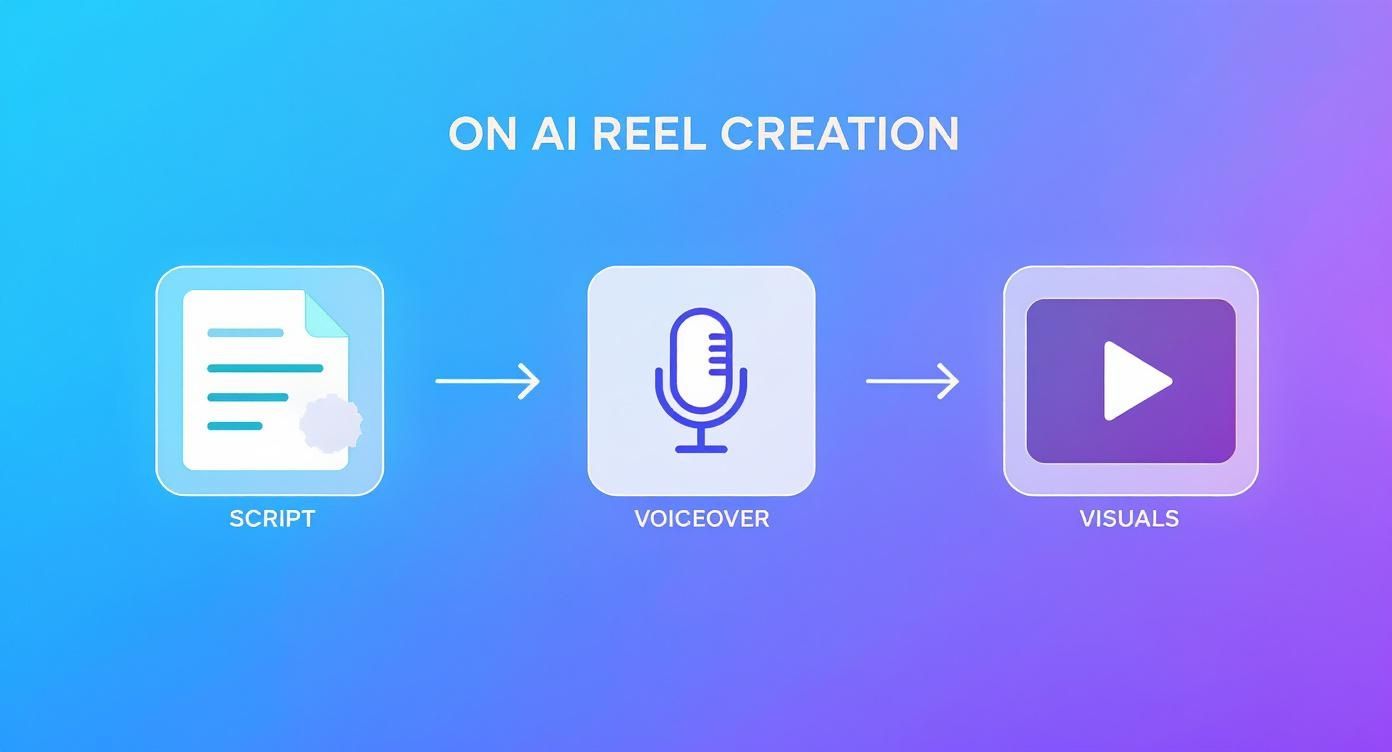
It shows how each AI-powered step builds on the last, creating a smooth path from a simple idea to a finished video.
Add Dynamic On-Screen Captions
A huge number of people watch short videos on Instagram with the sound off. If you're not adding on-screen text, you're immediately losing a massive slice of your audience. Forget Instagram's default caption feature—take full control inside your editor.
Modern editors can automatically transcribe your audio and generate animated captions. This gives you the power to:
- Customize the look: Match the font, color, and style to your brand's vibe.
- Emphasize key words: Make important words pop with a different color or a quick animation to keep viewers glued to the screen.
- Boost accessibility: Ensure your content is easy to follow for everyone, no matter how they're watching.
Getting this right is crucial. Mastering the art of captioning videos for SEO and engagement is a non-negotiable step for optimizing your AI-generated Reels.
Sneak in a Trending Sound for an Algorithmic Boost
Here's a pro tip that a lot of creators sleep on: layer a trending audio track underneath your AI voiceover. You can drop the volume down to just 1-5%—so it's barely audible—but the Instagram algorithm will still pick it up.
This tiny trick can give your Reel a serious algorithmic advantage. Instagram loves promoting content that uses popular sounds, and this method lets you tap into that reach without letting the music drown out your message.
Key Takeaway: Quietly layering trending audio under your main voiceover is a simple but powerful way to signal relevance to the Instagram algorithm. This can boost your video's visibility without compromising your core message.
Final Technical Checks Before You Export
Before hitting that export button, a few quick technical checks are essential. These small details prevent common mistakes that can make your hard work look amateurish.
Your Final Export Checklist
- Nail the Aspect Ratio: Make sure your project is set to a 9:16 vertical aspect ratio, which is 1080×1920 pixels. This guarantees your video fills the entire screen on mobile phones without those clunky black bars.
- Mind the Safe Zones: Keep all your important text and visuals away from the very top and bottom edges of the frame. Instagram's interface—your username, the caption, the like and share buttons—will cover up these areas.
- Check the Final Length: Is your video tight and impactful? The sweet spot is usually just long enough to get your point across and not a single second longer.
It’s these small optimizations that help Reels outperform other formats by a wide margin. Data shows that Reels from influencers hit the highest engagement rate at 2.08%. That blows carousels (1.7%), photos (1.17%), and regular video posts (0.42%) out of the water.
Once these final checks are done, you're ready to export your video and move on to the final step: getting it published.
Publish and Amplify Your Content
You've done the hard work, and your AI-generated video is finally ready. It’s tempting to hit "publish" and call it a day, but that’s like building a beautiful car and leaving it in the garage. This is where your amplification strategy kicks in.
A great Reel without a smart publishing plan is like a billboard in the desert—it looks good, but no one sees it. To give your short videos on Instagram the best shot at success, you need a solid workflow that covers everything from the caption and hashtags to the cover image and posting time.
Writing Captions That Convert
Your caption has two very different jobs: it needs to hook a human reader while also feeding the Instagram algorithm the right keywords. Think of it as a mini-blog post that gives your video context and sparks a conversation.
Always start with a strong opening line that grabs attention. Most people will only see that first sentence before they have to tap "more," so make it count.
From there, weave in keywords your audience would actually search for. If your Reel is about a 10-minute home workout, your caption should naturally include phrases like "quick home workout," "fitness for busy people," or "no equipment exercise." This is how you tell Instagram who to show your video to.
And don't forget to end with a clear call to action (CTA). Ask a question, tell people to save the post for later, or prompt them to share their own experiences in the comments. This is a direct invitation to engage, a signal the algorithm absolutely loves.
Choosing Your Hashtag Mix
Hashtags are basically the filing system for your Reels. The right ones connect your content with conversations and communities already looking for what you’ve made. Forget the old advice about cramming in 30 generic tags; a strategic mix of 5 to 15 highly relevant hashtags is way more effective.
I use a simple three-tiered approach for my short videos on Instagram:
- Broad Hashtags (2-3): These are the big, high-volume tags that describe your general industry, like
#socialmediamarketingor#fitnessmotivation. - Niche Hashtags (3-5): Now get more specific. These tags hit a more defined audience, like
#videocreationtipsor#veganrecipeshare. - Community Hashtags (1-2): These connect you with a very specific group, like
#yourbrandnameor#localbusinessowner.
This balanced mix helps Instagram quickly figure out what your video is about and who will find it most valuable.
Your cover image is your Reel's first impression on your profile grid. It needs to be clean, compelling, and consistent with your brand's aesthetic. Use a tool like Canva to create a simple template with a bold title and a high-quality still from your video.
Schedule for Peak Activity
When you post really does matter. Dropping your Reel when your audience is most active gives it an immediate engagement boost, which can trigger the algorithm to push it out to an even wider audience.
Just head over to your Instagram Insights and look under the "Total Followers" section. It will show you the exact days and hours your audience is online the most. Schedule your posts for those peak times. Even if you're only posting a couple of times a week, consistency is what builds momentum.
Repurpose Your Content to Multiply Your Reach
One of the best things about short-form video is how versatile it is. That Reel you just made for Instagram can—and absolutely should—be repurposed for other platforms like TikTok and YouTube Shorts. It’s a simple move that can easily triple your content's ROI with very little extra effort.
Here’s a quick framework for adapting your content:
- Remove the Watermark: Use a watermark removal tool to get a clean version of your video.
- Adjust for Platform Trends: The video itself can stay the same, but you might want to swap the audio for a sound that’s trending on TikTok or YouTube.
- Optimize the Captions and Hashtags: Each platform has its own discovery engine. Tweak your captions and research platform-specific hashtags to match where you're posting.
This strategy turns one piece of content into three, maximizing your output and helping you build a presence across all the key short-form video channels.
A Few Common Questions About AI Video Creation
Jumping into AI for your short videos on Instagram can feel like a big step. It’s totally normal to have questions—and maybe a little skepticism—about whether a machine can actually create content that real people will want to watch. Let's tackle some of the most common worries to get you comfortable with the idea.
The first question I always get is about performance. Can a video made by AI actually go viral? The short answer: absolutely.
The Instagram algorithm has no idea how you made your video, and frankly, it doesn’t care. It’s not judging your production process; it’s judging your audience’s reaction. The algorithm is laser-focused on metrics like watch time, completion rate, shares, and comments. If your AI-generated Reel tells a great story and keeps people hooked, it has the same shot at success as something filmed on a fancy camera. Think of AI as your super-efficient production crew, not the creative director. The strategy, the hook, and the story are still all you.
Can AI-Generated Videos Actually Perform Well on Instagram?
Yes, they can. The trick is to remember that AI is just a tool, not a substitute for a solid content strategy. A smart, AI-powered video that speaks directly to your audience’s problems will always crush a poorly planned, traditionally filmed one.
For example, a real estate agent could use AI to create a Reel on the "3 Biggest Mistakes First-Time Homebuyers Make." The AI could generate clips of people looking stressed about paperwork, followed by shots of a happy family getting their new keys. An AI voiceover could deliver sharp, valuable advice. This kind of video delivers immediate value, is highly shareable, and solves a real problem—and the algorithm will reward that engagement, no matter where the pixels came from.
The Instagram algorithm rewards engagement, not production methods. A valuable, well-structured story will win every time, whether it was filmed on an iPhone or generated by an AI.
What Is the Ideal Length for an Instagram Reel?
Instagram lets you make Reels up to 90 seconds long, but that doesn't mean you should. When it comes to short-form video, shorter is almost always better. The real sweet spot for engagement usually falls somewhere between 15 and 45 seconds.
Why? Because people actually finish shorter videos, and a high completion rate is a massive signal to the algorithm that your content is good. Even better, a short, punchy, and helpful video is far more likely to get rewatched—another huge algorithmic boost.
I usually suggest starting around the 20-second mark. It forces you to cut the fluff and get straight to the point. You can always dive into your Instagram Insights later to see your average watch time and pinpoint where viewers are dropping off, then tweak your length from there.
How Many Hashtags Should I Use on My Reels?
The old strategy of stuffing 30 random hashtags into your caption is dead. These days, a focused approach works much better. Aim for a strategic set of 5 to 15 highly relevant hashtags to help Instagram categorize your content and serve it to the right people.
I like to think of it in three tiers:
- Broad (2-3): High-level tags like
#digitalmarketingor#contentcreation. - Niche (3-5): More specific tags that describe the video, like
#videomarketingtipsor#AIforbusiness. - Community (1-2): Hyper-targeted tags related to your brand or location, like
#yourbrandchallengeor#nycrealestate.
This layered approach gives the algorithm clear signals about what your video is about and who will find it most valuable, which is your best shot at landing on the Explore page.
How Do I Find Trending Audio for My Reels?
Using trending audio is one of the easiest ways to give your short videos on Instagram an instant reach boost. The algorithm actively promotes content that uses popular sounds because it wants to keep people on the platform.
Finding these sounds is pretty simple. When you’re scrolling through your Reels feed, keep an eye out for a small, upward-pointing arrow next to the audio’s name at the bottom of the screen. That little arrow is your signal that a sound is on the rise.
You can also tap on any audio to see how many Reels have been made with it. If the count is in the tens of thousands and climbing fast, it's a good one to save for later. It’s also a good idea to follow official accounts like @creators for direct updates from Instagram on new features and trends.
Ready to stop brainstorming and start creating? ShortsNinja uses advanced AI to turn your ideas into a month's worth of high-quality, engaging videos for Instagram, TikTok, and YouTube in minutes. Generate your first video for free and see how easy it can be!