
Making TikTok videos used to be a hobby. Now, it's a full-blown strategy for building a serious online presence. The secret isn't just posting randomly; it's about adopting a solid workflow that handles everything from ideation and AI creation to analytics and repurposing. This approach turns content creation from a grind into an efficient, scalable system.
The New Playbook for Making TikTok Videos
Welcome to the modern creator's guide for making TikTok videos that actually get noticed and drive growth. Let's be real—the platform is saturated. A smarter workflow is your only real competitive edge. This guide unpacks a complete, AI-enhanced process, starting with how to spark viral ideas and script killer narratives, then using AI for visuals and voiceovers.
Forget the old way of doing things that burned hours on filming, editing, and brainstorming. The new playbook is all about working smarter, not harder. It’s built for efficiency without ever compromising on quality, helping you stay consistent—which is exactly what the TikTok algorithm loves to see.
This whole approach boils down to a simple, three-step process, supercharged by AI.
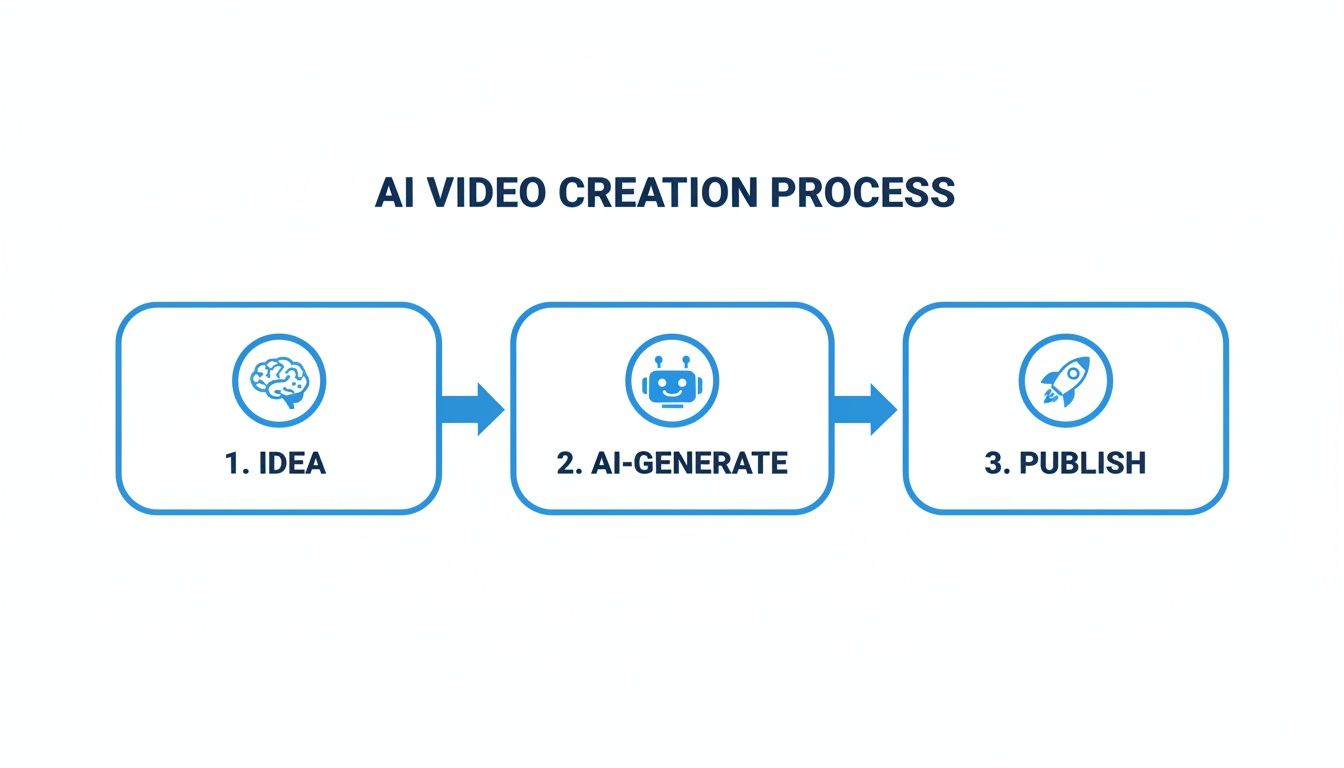
This diagram strips the workflow down to its essentials: kick things off with a strong idea, let AI handle the heavy lifting of asset generation, and then get it published. This is the model that lets you scale your content production without losing your mind.
Why a Modern Workflow Matters
In this fast-moving space, the creators who win are the ones who can pump out high-quality content consistently. The average user is glued to the platform for over 24 hours a month, which means endless chances to connect. But it also means the competition is absolutely relentless.
A structured workflow helps you:
- Save a Ton of Time: When you automate tedious stuff like sourcing visuals and recording voiceovers, you free yourself up to focus on the creative strategy.
- Keep Quality High: AI tools can generate professional-grade visuals and audio, giving your content that polished feel that stops the scroll.
- Post More Often: Consistency is everything for growth. An efficient system makes daily posting possible without leading to total burnout.
To really get ahead, you'll need to understand the nuts and bolts of the algorithm. Learning How to Go Viral on TikTok is a great place to start, as it gives you a look under the hood.
The real challenge isn't just coming up with great ideas; it's having a system that can turn those ideas into engaging videos, day in and day out. This is where an AI-assisted process becomes a game-changer for any serious creator.
Let’s look at the time savings in black and white. For anyone who has done this the old-fashioned way, these numbers will hit home.
AI-Powered vs Traditional TikTok Video Creation
| Stage | Traditional Method (Hours) | ShortsNinja Method (Minutes) | Key Advantage |
|---|---|---|---|
| Ideation & Research | 2-4 | 15-30 | AI trend analysis finds viral topics instantly. |
| Scripting & Storyboarding | 1-3 | 10-20 | AI generates multiple script options in seconds. |
| Filming/Asset Sourcing | 2-5 | 5-15 | No filming needed; AI finds or creates visuals. |
| Voiceover Recording | 1 | 5 | AI voiceovers are generated instantly. |
| Editing & Formatting | 3-6 | 15-30 | AI handles captions, transitions, and formatting. |
| Total Time | 9-19 Hours | 50-100 Minutes | Massive time savings allows for daily posting. |
The difference is staggering. You're not just saving a few minutes here and there; you're reclaiming entire days.
By adopting this new playbook, you’re not just making TikTok videos; you’re building a content engine. Throughout this guide, we'll get into the weeds of each stage, from finding your next big idea to analyzing what works and repurposing your wins. It also helps to stay on top of the latest short-form video trends to keep your content fresh.
Finding and Scripting Your Next Viral Idea
Every viral video starts with an idea that connects, but let's be real—finding that spark can feel like the hardest part of the job. The secret isn't waiting around for inspiration to strike. It's about building a system for discovery. Your best ideas are already out there, hiding in plain sight within trends, competitor content, and even your own audience's comments.
Where to Look for Winning Concepts
First things first, make the TikTok Creative Center your new best friend. This isn't just some random third-party tool; it's TikTok's own data hub, showing you exactly which hashtags, songs, and creators are popping off right now. Don't just skim the top trends, though. Filter by your industry to see what’s actually resonating with the people you want to reach. This simple step shifts your strategy from guesswork to data-driven ideation.
Next, become a student of your niche. Find five to ten creators who are absolutely crushing it with the audience you want to attract. Dive into their best-performing videos from the last 30 days. What formats are they leaning on? What pain points are they hitting? You’re not here to copy them, but to spot the patterns and find the gaps where your unique voice can shine.
Brainstorming Ideas That Don't Require a Ring Light
A common roadblock is feeling like you have to be perfectly polished and on-camera for every single video. But here's the thing: some of the most successful content on the platform is completely "faceless." This style works so well because it puts the spotlight squarely on the value and the story, not the person telling it.
Here are a few prompts to get your creative gears turning for faceless content:
- Problem/Solution: What’s a nagging frustration your audience deals with? Frame a video around a quick, satisfying fix. A finance creator could make a clip titled, "How to spot hidden bank fees in 30 seconds."
- Myth Debunking: What's a popular misconception in your field that drives you crazy? Make a short video that blows it up. Think of a fitness coach creating a clip called, "Why crunches will never give you a flat stomach."
- Quick Tutorials: Break down one tiny, actionable tip from a much bigger process. A graphic designer could easily show how to create a cool text effect in Canva in under a minute.
These formats are perfect for going faceless. You can use screen recordings, text on screen, AI-generated visuals, or simple stock clips to tell a compelling story without ever needing to show your face.
The Three-Second Rule and Scripting for Retention
On TikTok, you have about three seconds to stop the scroll. That's it. This is where a tight, punchy script becomes your most powerful tool. The most effective structure I've seen is the Hook-Story-CTA model. It's simple, direct, and practically built for the platform's relentless pace.
Your hook is everything. If it doesn't immediately grab attention with a bold claim, a relatable problem, or an intriguing question, the rest of your video might as well not exist.
The Hook makes a promise ("This is the biggest mistake you're making…"). The Story is where you deliver on that promise with quick, valuable points. Finally, the Call-to-Action (CTA) tells the viewer exactly what to do next ("Follow for more daily tips" or "Drop your biggest question in the comments").
Let's see what this looks like in a real-world script for a faceless video:
| Script Component | Example Voiceover/Text |
|---|---|
| Hook (0-3s) | "Stop wasting money on marketing tools. Here are three powerful ones that are 100% free." |
| Story (4-12s) | "First, use [Tool 1] for keyword research. Second, [Tool 2] for designing amazing graphics. And third, [Tool 3] to schedule all your posts." |
| CTA (13-15s) | "I broke down how to use each one in my latest blog post. Check the link in my bio to read it. And follow for more hacks!" |
This structure is lean, mean, and delivers value fast. If you really want to get this down to a science, our complete guide on script writing for beginners has more advanced templates you can steal.
Of course, modern tools can put this whole process on hyperdrive. With a platform like ShortsNinja, you can feed it a simple idea like "three free marketing tools," and its AI will generate a polished script—hook, story, and CTA included—in seconds. This lets you move from a rough idea to a ready-to-produce script almost instantly, which is a massive time-saver.
Using AI for Visuals and Voiceovers

This is where the whole game changes. Forget spending hours trying to nail the perfect shot or getting lost in stock footage libraries searching for a clip that kind of works. AI tools can now spin up custom visuals and slick, professional voiceovers in minutes.
It’s a massive shortcut, especially for faceless channels or anyone trying to make high-quality content without a Hollywood budget or a complicated camera rig. You can feed a simple text prompt into an AI model and get back a dynamic, eye-catching clip that brings your script to life.
Generating Custom Visuals from Text Prompts
The heart of AI visual generation is the prompt. Think of it as giving crystal-clear directions to a lightning-fast digital artist. The more detail you pack in, the better your results. Vague prompts get you generic visuals; specific prompts create something truly unique.
Let's look at how this plays out with a few real-world examples.
- For a history channel: Don't just ask for "a Roman soldier." Try something like, "Cinematic shot of a lone Roman legionary standing on a misty hill at sunrise, hyperrealistic, 8k, detailed armor reflecting the morning light."
- For a finance video: Instead of "money growing," go for, "Abstract animation of glowing digital coins flowing upwards in a futuristic data stream, plexus effect, dark background with blue and gold highlights."
- For a cooking tutorial: Swap out "baking a cake" with a prompt like, "Close-up shot of flour being dusted over a wooden countertop, soft natural lighting from a window, rustic kitchen aesthetic, slow motion."
These prompts give the AI crucial details on style, lighting, mood, and composition. Platforms like ShortsNinja build these powerful models right into the workflow, so you can move from script to final visual without ever leaving the app. It just makes everything seamless.
The real magic here is creating scenes that would be tough, expensive, or flat-out impossible to film yourself. You’ve basically got a full production studio at your fingertips, and the only limit is your imagination.
Crafting the Perfect AI Voiceover
Once you've got your visuals sorted, it's time to add a voice that grabs your audience. AI voice tech has come a long way from the robotic, monotone voices we all used to make fun of. Today's tools can deliver narration that sounds natural, carries emotion, and comes in dozens of languages, opening you up to a global audience instantly.
This is a huge advantage if you're looking to scale. You can create content for viewers around the world without hiring a team of voice actors. If you want a deeper dive into the tech behind it all, this piece on What Is Voice Synthesis is a great read.
Choosing the right voice is everything. It needs to match the vibe of your content.
| Content Type | Recommended Voice Profile | Why It Works |
|---|---|---|
| Educational/Informative | Clear, confident, moderate pace | Establishes authority and makes complex info easy to digest. |
| Storytelling/Narrative | Warm, engaging, varied intonation | Pulls the listener in and keeps them hooked on the story. |
| Motivational/Inspirational | Energetic, upbeat, strong delivery | Inspires action and creates a positive, high-energy feeling. |
| News/Updates | Crisp, professional, neutral tone | Delivers information clearly and maintains credibility. |
Most AI tools let you tweak the speed, pitch, and even the pauses in the narration, giving you tight control over the final delivery. This is crucial for making sure the voiceover syncs up perfectly with your visuals—a key ingredient for high-retention TikTok videos. If you're shopping around for a tool, our guide on the best AI voice generators to elevate your content is the perfect place to start.
By pairing AI-generated visuals with a killer voiceover, you're building a super-efficient system for producing top-tier content. It removes the technical roadblocks and lets you focus on what really matters: telling great stories. It’s simply a smarter, faster way to bring your ideas to life.
Editing and Optimizing Your Video for the Algorithm
A great idea with killer visuals is only half the battle. If your editing doesn't feel native to TikTok, your video is dead on arrival. This is the stage where you transform your raw assets into a polished piece that speaks the algorithm's language, holding onto every precious second of viewer attention.
It’s about way more than just slapping a few clips together. Smart editing is about ruthless trimming, adding text that actually gets read, and picking audio that gives your video a fighting chance at discovery. This final polish is what separates a video that fizzles out at a few hundred views from one that skyrockets onto the For You page.
Mastering the TikTok Native Format
Before you even think about making your first cut, you need to get inside the platform's head. TikTok is a vertical world, and playing by its rules is non-negotiable.
Your entire video must be formatted in a 9:16 aspect ratio. This isn't just a suggestion; it's the standard. A 9:16 video fills the entire screen, creating an immersive experience that feels right. Posting a horizontal video with big black bars is an instant red flag that your content wasn't made for TikTok, and performance will suffer.
Just as important are the "safe zones." Remember, the TikTok interface—with its icons, username, and captions—sits on top of your video. Keep your crucial visuals and on-screen text away from the edges, especially the bottom third, to make sure nothing important gets covered up.
Editing for Pace and Retention
Let's be real: attention spans on TikTok are microscopic. Your editing has to match that energy. The mission is to build a fast-paced, dynamic video that gives people zero reason to swipe away.
- Aggressive Trimming: Cut every single unnecessary pause, breath, and dead-air moment. If a clip doesn't actively push the story forward, it's gone.
- Quick Cuts: Keep your scenes short and punchy. Aim for cuts every 1-3 seconds to maintain visual momentum and keep things interesting.
- Dynamic On-Screen Text: Use text overlays and animated captions to hammer home your key points. This makes your video accessible for people watching without sound (a huge portion of users) and reinforces your message.
The editing bay is your first line of defense against the swipe. Every cut, transition, and text pop-up should be a deliberate move to keep someone watching for just one more second.
Thankfully, modern tools have caught up. The editor inside ShortsNinja, for example, makes it easy to trim clips and has features like auto-captioning that save a ton of time while optimizing your video for silent viewers. This kind of efficiency is no longer a luxury; it's a necessity.
The sheer volume of content on TikTok is mind-boggling. As of 2023, users were uploading 20 million new videos daily. To compete in that ocean, you have to be consistent, with most creators aiming for at least three videos a week. With 90% of users hopping on the app every day, the platform rewards a relentless flow of high-quality content, making a fast and efficient workflow essential. You can discover more insights about TikTok’s incredible scale to see why speed matters so much.
Choosing Your Audio and Final Touches
On TikTok, audio isn't an afterthought—it's half the experience. Tapping into a trending sound can give your video a massive algorithmic boost by putting it in front of an audience that's already engaging with that audio.
But don't just grab the most popular sound you see. Find a trend that actually fits the vibe and message of your video. A forced audio pairing feels awkward and inauthentic, and savvy TikTok users will see right through it.
Your thumbnail and caption are the last critical pieces of the puzzle.
- Create a Scroll-Stopping Thumbnail: Think of your thumbnail as the cover of your video. Pick a visually compelling frame and add a bold text hook that sparks curiosity (e.g., "You're Doing This Wrong").
- Write an SEO-Friendly Caption: Keep it short and impactful. Ask a question to spark comments and include 3-5 relevant hashtags to help the algorithm categorize your content.
- Use a Mix of Hashtags: Combine broad, high-volume hashtags like
#marketingtipswith more targeted, niche ones like#smallbusinessmarketinghacksto maximize your reach across different discovery paths.
When you bring together a fast editing pace, native formatting, and strategic audio, you’re not just making a video—you're engineering content designed to win.
Posting Analytics and Content Repurposing
Hitting "post" doesn't mean the work is done. In fact, it’s just the start of your video's journey. This final phase is what turns a single video into a long-term growth engine, and it’s where you master scheduling, decode your analytics, and multiply your reach.
Without this feedback loop, you're basically just throwing content at a wall and hoping something sticks. A smart approach to posting and analysis is what separates the creators who grow consistently from those who burn out.
Scheduling Your Content for Maximum Impact
Consistency is the name of the game on TikTok. Posting randomly sends mixed signals to the algorithm, but a steady flow of content tells the platform you’re a serious creator worth pushing. This is where scheduling becomes your secret weapon.
Tools like ShortsNinja let you batch-create your videos and then line them up to go live at the perfect times. It's a hands-off way to keep your content pipeline full, even when you're not actively working.
But what's the best time to post? Your own TikTok Analytics holds the answer. Pop over to the "Followers" tab, and you'll see a detailed breakdown of the days and hours your audience is most active. Schedule your posts to go live just before these peak times to give your video the best shot at immediate traction.
Decoding Your TikTok Analytics
Your analytics dashboard is a treasure map. It shows you exactly what your audience loves and what makes them swipe away. Don't get caught up in vanity metrics like likes; focus on the numbers that actually tell you something useful.
Here are the metrics that really matter:
- Average Watch Time: This is arguably the most important metric of them all. A high average watch time is a massive signal to the algorithm that your video is compelling, which means it will get pushed to more For You pages.
- Audience Retention Graph: This chart is gold. It shows you, second-by-second, where people are dropping off. Use it to spot boring intros, slow sections, or confusing points so you can avoid those mistakes next time.
- Traffic Sources: Keep a close eye on the percentage of views coming from the "For You" page. A high number here means the algorithm gets what your content is about and is serving it to new, relevant audiences.
The sheer scale of TikTok is hard to wrap your head around. One analysis found that between March and August 2023, over 3.4 million videos were posted from just 85,261 accounts, with Saturdays being the busiest day. With 167 million videos watched every single minute and an average engagement rate of 4.64%, the opportunity is massive. This is precisely why an efficient system for making videos is no longer optional. You can read the full research about TikTok's creator landscape to really understand the scale.
A Framework for Smart Content Repurposing
Why let a fantastic video live and die on just one platform? Repurposing your best-performing TikToks for YouTube Shorts and Instagram Reels is the ultimate growth hack. You're effectively tripling your content's reach with very little extra work.
But a simple copy-paste job isn't going to cut it. Each platform has its own vibe, and a smart repurposing strategy respects those differences.
Repurposing isn't just about saving time; it's about meeting different segments of your audience where they already are. Someone who follows you on Instagram might never see your TikToks, and vice versa.
Here’s a simple workflow to adapt your content like a pro:
- Remove the TikTok Watermark: First things first, use a watermark removal tool to get a clean version of your video. Posting content with another platform's watermark is a guaranteed way to have its reach suppressed.
- Adapt the Audio: While some TikTok audio trends cross over, it’s always best to use trending audio native to Instagram Reels and YouTube Shorts. This helps your video plug into each platform's unique discovery engine.
- Rewrite Captions and Hashtags: Tailor your captions to the platform's style. Instagram lets you write longer, more descriptive captions, while YouTube Shorts benefits from keyword-rich titles. Do a little research on relevant hashtags for each platform—the popular ones can be surprisingly different.
This multi-platform approach turns every video you make into three potential touchpoints with your audience. By mastering this final step, you transform your content creation from a series of one-off tasks into a scalable system for building a powerful, multi-channel brand.
Common Questions About Making TikTok Videos
Jumping into TikTok always kicks up a lot of questions. Once you get past making your first few videos and start thinking about a real strategy, you'll notice the same challenges and uncertainties pop up over and over. Let's tackle the big ones with clear, straight-up answers to help you build your strategy and grow with confidence.
How Often Should I Post on TikTok to See Growth?
While there isn't a single magic number that works for everyone, the TikTok algorithm absolutely loves consistency. A great starting point for most creators is posting 3-5 times per week.
The real key is finding a rhythm you can stick to without sacrificing quality. Posting once a day is fantastic if your workflow can handle it without burning you out. This is where AI-powered tools give you a serious edge, letting you pump out quality videos daily without all the heavy lifting. Experiment a bit, keep a close eye on your analytics, and see what schedule really clicks with your audience and brings in the best results.
Can You Really Grow on TikTok Without Showing Your Face?
Absolutely. "Faceless" channels aren't just a niche thing; they're a massive, thriving category on TikTok. At the end of the day, your success comes down to the value and entertainment you're providing—not whether you're on camera.
Channels that lean into captivating AI-generated visuals, slick animations, or satisfying B-roll footage paired with a strong voiceover often do incredibly well. The game just shifts to building your brand through other elements:
- Your Visual Style: Develop a look and feel that's instantly recognizable.
- Your Sound Design: Use a signature voiceover tone or a specific style of music.
- Your Content Themes: Become the go-to account for a certain type of information or entertainment.
Modern AI tools are practically built for this, making high-quality, scalable faceless video production easier than ever.
What TikTok Analytics Metrics Actually Matter?
It’s way too easy to get caught up in likes and follower counts, but if you want to understand what's really working, you need to dig deeper. Forget the vanity metrics and focus on the numbers that signal real engagement—the ones that tell the algorithm your content is worth pushing.
These are the big three:
- Average Watch Time: This is the clearest sign of how long people are actually sticking around. A high watch time is one of the best signals you can send the algorithm.
- Audience Retention Graph: This chart is your secret weapon. It shows you the exact moment viewers drop off, helping you pinpoint slow intros or boring parts so you can fix them next time.
- For You Page Views: Check the percentage of your views coming from the "For You" page. A high number here means the algorithm is successfully serving your content to new audiences, which is the key to explosive growth.
Focusing on these three metrics will give you a far more accurate picture of your content's health and potential than just chasing likes. They tell you if your videos are truly holding attention, which is the ultimate currency on TikTok.
How Can I Find Good Trending Audio for My Videos?
Using trending audio can give your video an instant, powerful visibility boost. The algorithm often prioritizes content that uses popular sounds, which can put your video in front of a massive built-in audience.
The easiest way to find what's hot is to just scroll your 'For You' page. Pay attention to any sounds you hear over and over again. You can also tap the "Add Sound" button when creating a video to see TikTok’s own trending lists, which are usually broken down by category.
Another pro tip is to see what sounds the top creators in your niche are using. When you find one you like, just tap on it and add it to your 'Favorites'. That way, it’s ready to go when you are. Just make sure the sound actually fits the vibe of your video—a forced trend can feel awkward and kill your engagement.
Ready to stop guessing and start creating high-performing TikTok videos in minutes? ShortsNinja uses AI to turn your ideas into stunning, faceless content with custom visuals and professional voiceovers, all within a simple workflow. Start your free trial and claim your 30% lifetime discount with code NINJA30.