
Learning how to post on TikTok is pretty intuitive: hit the big '+' button, record or grab a clip, throw in some sounds and effects, then write your caption and tap 'Post'. Getting this down is the first real step to jumping into a platform where creativity just explodes.
From Recording to Ready: Your First TikTok Post
Every viral video you’ve ever seen started the same way: with a tap of that unmistakable plus icon at the bottom of the TikTok app. This little button is your gateway to the creator studio, the command center for everything you’re about to make.
Once you’re in, you hit your first fork in the road. Do you record something new, right here and now? Or do you upload a polished clip you’ve already got sitting in your camera roll?
The In-App Experience vs. Pre-Edited Uploads
Shooting directly in the app is all about capturing the moment. You get access to a bunch of real-time tools that are perfect for spontaneous content. Set a timer for hands-free filming, flip between your front and back cameras, or play with the recording speed to create cool slow-mo or fast-forward effects. It’s built for quick, on-the-fly creativity.
On the other hand, uploading a video gives you the chance to bring in something a bit more refined. Maybe you’ve already spent time color-grading a clip in another app or piecing together a slick montage. The upload option ensures your hard work doesn’t go to waste and finds a home on TikTok. For a deeper dive into perfecting your clips before they even touch the app, our guide on how to edit a video for TikTok is a great resource.
No matter which path you choose, the next step is adding that extra layer of personality.
Adding Sounds and Quick Edits
With your footage locked in, it’s time to give it some life. Tap "Add sound" at the top of the screen to dive into TikTok’s massive audio library. Grabbing a trending sound can be one of the fastest ways to get your video seen by more people—it’s like a cheat code for visibility.
After you've picked your audio, you can start making some quick, impactful adjustments. Apply a filter to set the mood or trim your clips to get the pacing just right. This isn't the time for deep, complex editing; it's about making those final tweaks that get your video ready for the world.
The whole process is designed to be a straight shot from idea to final post.

As you can see, the platform’s workflow is all about speed and simplicity, pushing creators from concept to completion without unnecessary friction.
Before we move on to the final posting screen, it helps to have a quick mental checklist of the core features you'll be using.
Core Posting Features at a Glance
This little table breaks down the essential tools you’ll encounter right before you hit that final post button. Think of it as your pre-flight check.
| Feature | What It Does | Pro Tip |
|---|---|---|
| Add sound | Lets you browse and select from TikTok’s vast library of trending audio and music. | Pick sounds that are currently trending in your niche to increase the chance of your video being discovered. |
| Effects | Offers a huge collection of AR filters, green screens, and visual enhancements. | Experiment with effects before recording to see how they interact with your environment. |
| Filters | Applies color grading and stylistic overlays to change the mood of your video. | A subtle filter can make your footage look more polished and professional. Don't overdo it. |
| Adjust clips | Allows you to trim the start and end points of your video clips for better pacing. | Keep your pacing tight. Cut out any dead air or unnecessary pauses to hold viewer attention. |
| Timer | Sets a countdown for hands-free recording, perfect for solo creators. | Use the timer to line up your shot perfectly, especially for dance trends or skits. |
Getting comfortable with these tools is what separates a good TikTok from a great one. They’re the building blocks of virtually every video on the platform.
Writing Captions and Hashtags That Work
You've edited your video and it's looking sharp, but don't just slam that "Post" button yet. This final screen is where you give crucial context to both your audience and the TikTok algorithm. A killer video can easily get lost without a smart caption and hashtag strategy to help it find the right people.
Think of your caption as the opening line in a conversation. A good one does more than just state the obvious; it asks a question, shares a relatable thought, or drops a surprising tidbit that makes people want to jump in. Instead of a flat "Making a Sunday roast," try something like, "The one secret ingredient I add to my roast that changes everything." See the difference? That sparks curiosity and practically begs for comments.
Building Your Hashtag Strategy
Hashtags are basically the signposts that tell the algorithm where to send your video. A classic mistake is loading up on massive, generic tags like #fyp or #viral. Sure, they have their place, but a more balanced approach works way better for actually reaching your ideal audience.
A winning strategy is all about mixing different types of hashtags to hit that sweet spot between reach and relevance. Here’s a simple formula I use for almost every video:
- Broad Appeal Tags (1-2): These are the heavy hitters like #fyp, #foryoupage, and #tiktok. Just a couple is all you need to give your video a shot at wide exposure.
- Niche-Specific Tags (3-4): This is where the magic happens. Get laser-focused on your content. Baking sourdough? Use tags like #sourdoughbaking, #bakingtok, or #breadmaking. These are the tags that pull in viewers who are genuinely into what you're doing.
- Trending/Challenge Tags (1-2): If your video fits a trend or challenge that's currently hot, you absolutely want to use that hashtag. It's an easy way to tap into a conversation that's already happening and get an immediate visibility boost.
Pro Tip: Your hashtag mix should be a blend of wide nets and targeted spears. Broad tags offer a shot at mass visibility, but niche tags are what build a loyal, engaged community that actually wants to see more of your content.
Using Mentions and Links Effectively
Beyond captions and hashtags, this final screen has a few other tricks up its sleeve for driving engagement. The '@' mention feature is perfect for collaborations or just giving a shout-out to another creator. When you tag someone, they get a notification, which makes it much more likely they'll engage with or even share your post. For example, if you tried a recipe you saw from another foodie creator, tagging them is a great way to connect.
The 'Add link' option is another gem, especially if you're a business or creator promoting something specific. You can drop a link directly to a product, a blog post, or another one of your social profiles right in the video.
Struggling to brainstorm fresh captions every single time? We've all been there. You might find our guide on how to auto-generate TikTok captions with AI a huge help for streamlining your workflow. Every single element on this final screen—from the words you pick to the tags you use—is a signal telling TikTok who needs to see your work. Getting it right is a huge part of learning how to post a TikTok video that actually performs.
Choosing the Right Privacy and Sharing Options
Okay, you’ve done the hard part—your video is edited and ready to go. Before you smash that "Post" button, you'll land on a final screen packed with some seriously important choices. These settings control who sees your masterpiece and how they can play with it, so getting them right is crucial for hitting your goals.
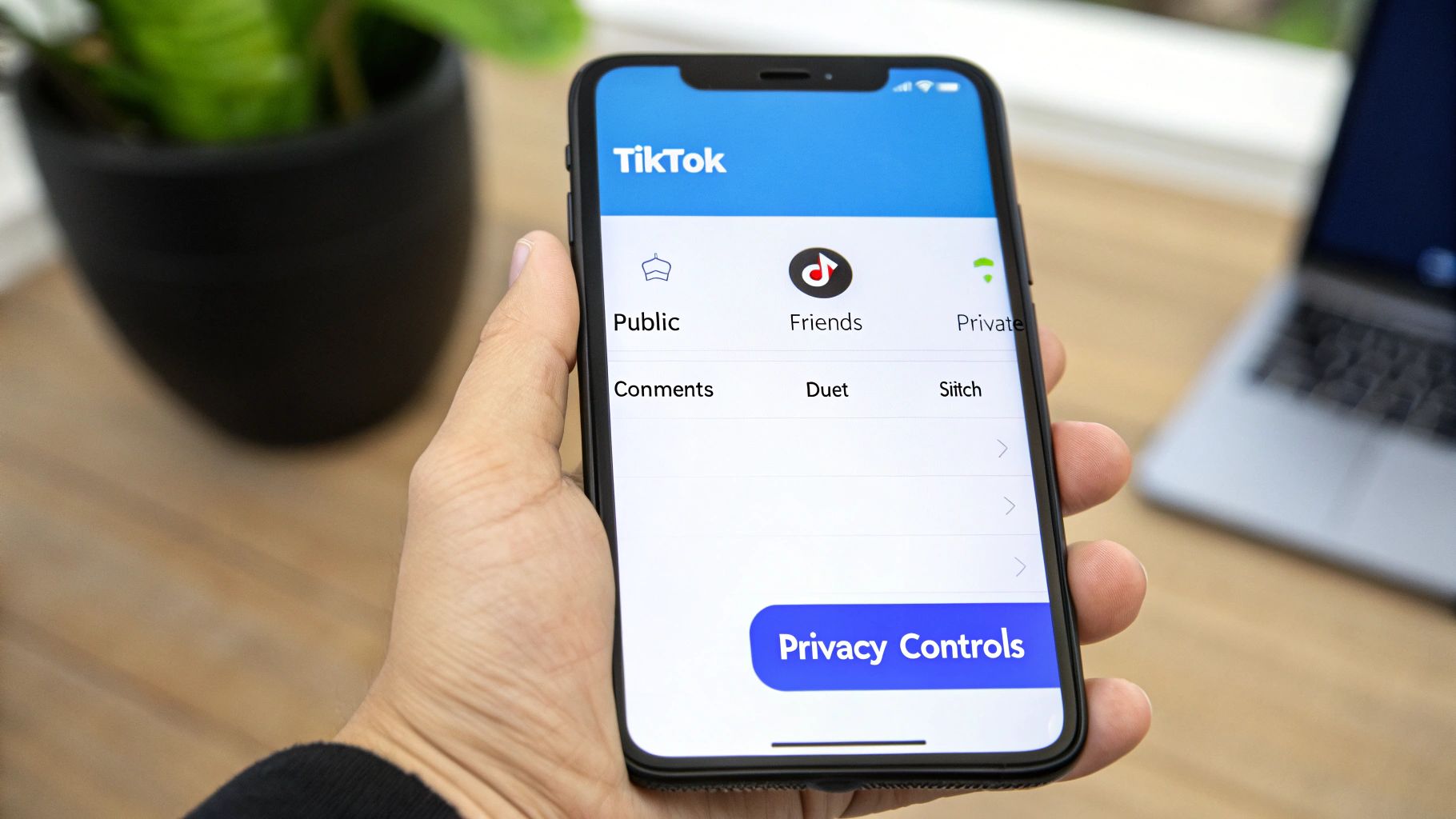
The biggest decision here is who gets to see your video. You've got three main flavors to choose from:
- Everyone: This is the default setting and your ticket to the big leagues. It makes your video public, giving it a shot at landing on anyone's For You Page. If growth is your game, this is the one you want.
- Friends: This option keeps things cozy, limiting your audience to mutuals—that is, people you follow who also follow you back. It’s perfect for content that’s more personal or for sharing inside jokes with a smaller circle.
- Only you: Think of this as your private locker. The video is saved to your profile, but nobody else can see it. A lot of creators use this as a final "draft" mode to preview how the video looks with the caption and music before unleashing it on the world.
Controlling User Interactions
Beyond just viewership, you also get to call the shots on how people interact with your video. These toggles are the secret sauce for community building and can directly impact your video's chance of catching fire.
Here are the key interaction settings you need to know:
- Allow Comments: Honestly, you should almost always leave this on. Comments send a huge signal to the TikTok algorithm that your video is sparking conversation, which can give it a nice boost.
- Allow Duet: This is a classic TikTok feature. It lets other creators make a split-screen video reacting to or building on yours. If a big creator Duets your video, it can give your content a massive second wind.
- Allow Stitch: Similar to Duets, Stitch lets someone clip the first few seconds of your video and use it as an opener for their own. It’s a core part of how trends and memes spread across the platform.
- Save to device: A simple but handy toggle. It automatically saves a copy of the final posted video—watermark and all—right to your phone. Great for having a backup or for cross-posting to other platforms.
It might be tempting to disable Duets and Stitches to "protect" your content, but think twice. These features are the engine of TikTok's collaborative culture. Turning them off closes a major pathway to going viral.
Ultimately, this final screen puts you in complete control. Understanding what each of these toggles does lets you make smart, strategic choices that line up with your goals—whether that's blowing up on the FYP or just sharing a moment with friends.
Advanced Tactics for Posting Consistently
Posting a video is one thing. But posting great content consistently? That’s where most creators hit a wall. If you want to move past random uploads and build a real strategy, you need to change how you approach your workflow. It's about working smarter, not just harder.
The secret is batching your content. Instead of the daily scramble to brainstorm, film, edit, and post, block out a few hours one day a week to create everything at once. Film three recipe tutorials on a Sunday morning or five quick fashion clips on a Saturday. This simple shift frees you from the daily pressure and gives you a library of ready-to-go videos.
Once you have a bank of content, you can focus on the next game-changer: timing.
Scheduling For Maximum Impact
Posting when your audience is scrolling is a simple way to boost your initial views and engagement. That early traction is a huge signal to the TikTok algorithm that your content is worth pushing to more people. But how do you find that perfect window? Your analytics are your best friend here.
Just head over to your Creator Tools and tap into the Analytics tab. Under the "Followers" section, you'll find a goldmine of data on your audience's most active hours. This isn't a guess—it's a direct look at when your specific community is online. If you see a big spike in activity around 8 PM, that’s your prime time.
With 16,000 new videos uploaded every single minute, timing can make or break your content. An analysis of over 1 million videos actually found that the best time to post is Sunday at 8 PM, when users are most active. You can find more insights into TikTok video statistics on browseract.com.
Using Automation To Stay Ahead
Let's be real—relying on your memory to post at the perfect time every single day just isn't sustainable. This is where automation tools become a non-negotiable for serious creators. They let you upload your batched videos and schedule them to go live during those peak engagement hours you found in your analytics.
Key Takeaway: Automation isn't about being lazy; it's about being strategic. It guarantees your content goes live at the optimal moment for maximum impact, even if you're busy, asleep, or in a different time zone.
Using a scheduler transforms your process from a daily chore into a manageable, set-it-and-forget-it system. That consistent output tells the TikTok algorithm that you're a reliable creator worth promoting. If you're looking to really streamline your workflow, learning more about the benefits of automated TikTok posting can give you a major edge.
So, when does it make sense to post in the app versus using a tool? It really comes down to your content strategy and goals.
Posting Method Comparison In-App vs Automation
Choosing between posting directly on TikTok and using an automation tool depends on your workflow. Spontaneous, in-the-moment content is perfect for the app, while a planned content calendar benefits from scheduling.
Here’s a quick breakdown of the two approaches:
| Feature | Manual Posting (In-App) | Automated Posting (Scheduling Tool) |
|---|---|---|
| Best For | Spontaneous, in-the-moment content | Planned, consistent content schedules |
| Timing | Requires you to be online at the exact post time | Posts automatically at pre-selected peak hours |
| Workflow | Create and post one video at a time | Batch create, then schedule multiple videos at once |
| Consistency | Can be difficult to maintain daily | Makes maintaining a consistent schedule effortless |
Ultimately, both methods have their place. The best creators often use a mix—scheduling their planned pillar content while leaving room for spontaneous, trend-driven videos posted directly from the app. Mastering how to post a TikTok video effectively means mastering both the creative side and the strategic side of the platform.
Creating Content the Algorithm Loves
Knowing the technical steps for posting on TikTok is just the starting line. If you want to get noticed, you need to create content that speaks the algorithm's language. It's all about understanding the psychology of the For You Page and engineering your videos to be seen and shared.
The platform is built for rapid-fire consumption, which means you have just a few seconds to make an impression and stop the scroll. A powerful hook in the first two seconds isn't just a good idea—it's essential. This could be a controversial statement, a surprising visual, or a question that makes someone stop and think.
Think about it this way: a recipe video could start with someone slowly gathering ingredients. Or, it could open with a shot of the incredible final dish, captioned, "You won't believe this only took 10 minutes." The second approach hooks the viewer instantly, making them want to see how it's done.
Leverage Trends and Human Connection
One of the fastest ways to get your content in front of more eyes is to tap into what's already popular. Using trending sounds and effects is like joining an ongoing conversation, making your video far more discoverable.
These elements signal to the algorithm that your content is timely and relevant. Here’s how to make them work for you:
- Trending Sounds: Don't just tack a popular song onto your video. Find audio that genuinely fits the mood or enhances the comedic timing. The best videos often use a sound in a creative or unexpected way.
- Effects and Filters: From the classic green screen to the latest AR filter, these tools add a layer of entertainment and polish. Jumping on a trend that uses a specific effect can get your video grouped with other popular content.
- Hashtag Challenges: Joining a trending challenge is like getting an invitation to a massive party. You're tapping into a huge, built-in audience that's actively searching for videos with that specific tag.
Beyond trends, the human element is a massive signal. The data doesn't lie: TikTok’s average engagement rates of 2.88% to 7.5% are huge, the first 2 seconds determine 70% of viewer retention, and including a human face can boost engagement by 35%. These numbers are practically a playbook for what the algorithm wants. You can learn more about what these TikTok stats mean for creators on socialchamp.com.
Build Your Signature Style
Trends are a fantastic launchpad, but you can't build a loyal community on them alone. People might come for the trend, but they'll stay for you. This is where developing a signature style or a recurring series comes into play.
A "Sunday Reset" cleaning series or a weekly "Thrift Store Finds" segment gives your audience something to look forward to. This consistency builds a relationship and turns casual viewers into dedicated followers who seek out your content specifically.
Ultimately, making content the algorithm loves is a mix of art and science. It’s about pairing your unique creative voice with a smart understanding of what makes people stop, watch, and engage.
Common Questions About Posting on TikTok
Even after you've nailed the basics of posting, a few tricky questions always seem to pop up. It happens to everyone. Whether it's a weird technical glitch or a question about your content strategy, getting a straight answer can save you a ton of frustration.
Let's walk through some of the most common hurdles I see creators run into.
"Why is My TikTok Stuck at 0 Views?"
This is probably the most anxiety-inducing issue for any creator. You post a video you're proud of, and then… crickets. If your video is stuck at "0 views" for more than an hour, it's likely being held for review by TikTok's moderation system.
This usually happens when something in your video—a sound, a visual, even a hashtag—accidentally triggers their automated filters for potential community guideline violations. Most of the time, it's a false alarm.
The video will typically process and go live within a few hours. But if it stays stuck, the best move is to private the video, double-check it for anything that could be misinterpreted, and try re-uploading it.
Can I Edit a TikTok After Posting?
This is a big one, and the short answer is no—not in the way you'd hope. Once a video is live on your profile, you cannot go back and edit the video clips, change the sound, or add new effects. The core content is locked in the moment you hit "Post."
You do, however, have some limited control after the fact. You can still:
- Adjust the privacy settings (public, friends only, or private).
- Toggle comments on or off.
- Enable or disable Duets and Stitches.
If you spot a glaring typo in your on-screen text or an editing mistake you just can't live with, your only real option is to delete the video and upload the corrected version.
Pro Tip: Always save your finished video to your drafts before posting. This gives you a chance to watch it one last time with fresh eyes, away from the pressure of the posting screen, to catch any little mistakes before it goes public.
How Often Should I Post on TikTok?
Figuring out the right posting frequency feels more like an art than a science, but a great starting point for anyone serious about growth is one high-quality video per day. This consistency shows the algorithm you're an active creator and gives you a daily shot at connecting with your audience.
Some creators with a ton of ideas find a sweet spot posting 3-5 times a day. On the flip side, if your videos are more polished and time-consuming, posting 3-4 times per week is a perfectly sustainable goal.
The real key is choosing a schedule you can actually stick to without burning out. Consistency trumps volume. Your audience will appreciate a reliable stream of content far more than a random burst of 10 videos followed by a week of silence. It’s all about building that routine and setting an expectation.
Ready to stop the daily grind of filming, editing, and manually posting? ShortsNinja uses AI to create and schedule engaging faceless videos in minutes, not hours. Let our automation handle the consistency so you can focus on the ideas. Start your free trial and see how easy it is to grow your channel.