
If you want to create a short video that actually performs, the formula is surprisingly simple: hook your audience in the first three seconds, give them something valuable, and wrap it up with a clear call-to-action. All in about 15 to 30 seconds.
This isn't just a creative exercise; it's a blueprint for mastering platforms like TikTok, YouTube, and Instagram, where consistency and volume are the name of the game.
The Blueprint For Viral Short-Form Video
Let's be clear: short-form video isn't just a fun trend anymore. It's the engine driving modern content strategies. The old way of posting whenever you feel like it and just hoping for the best is dead. Today, the algorithms on TikTok, Reels, and YouTube Shorts reward creators who can pump out a steady stream of high-impact content.
Success really boils down to having a repeatable workflow that lets you get from a raw idea to a published video without pulling your hair out.
The anatomy of a viral short is pretty straightforward. You have to start with a hook that stops the scroll. Think of a provocative question, a shocking statistic, or an opening frame that just looks weird. Once you’ve snagged their attention, you have just a few seconds to deliver your main point before they swipe on to the next thing.
This whole process breaks down into a few core phases, and the good news is, the right tools can speed everything up dramatically.
This diagram lays out the entire workflow, from coming up with an idea to getting it live.
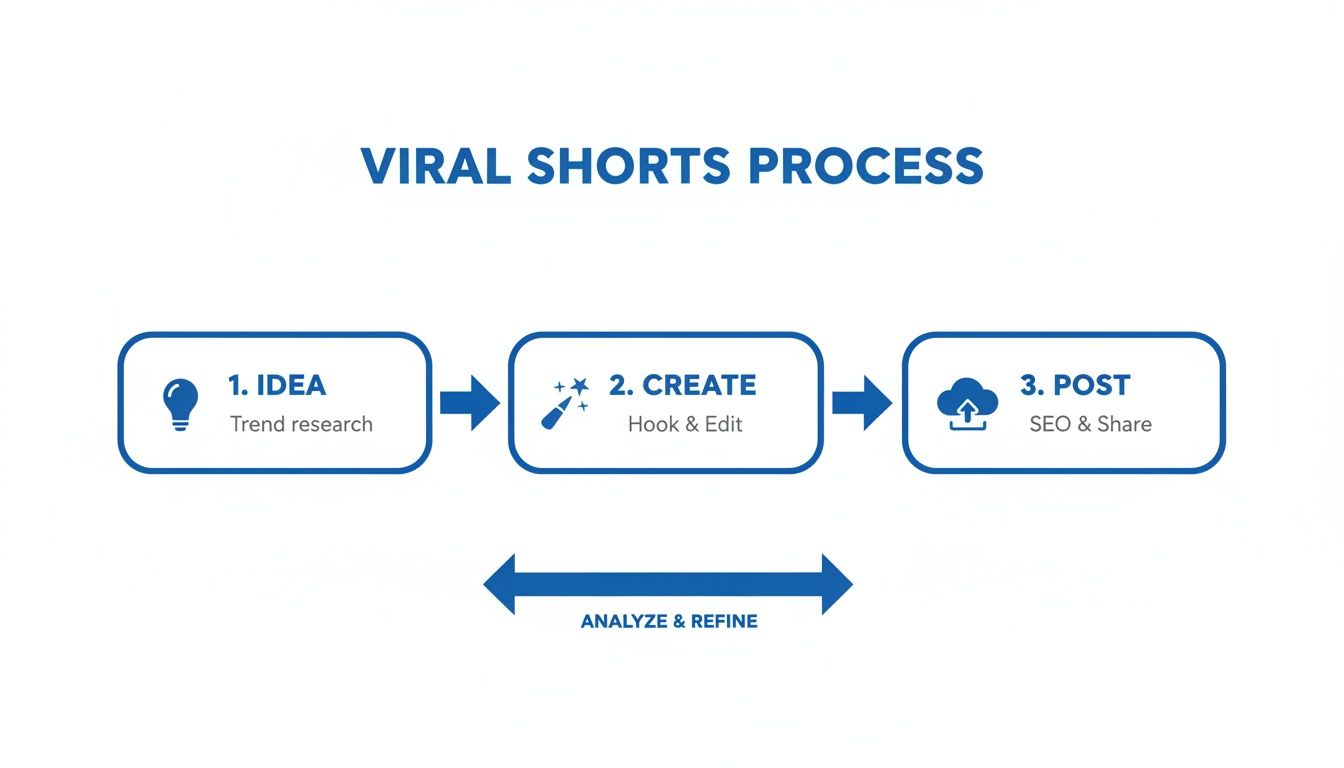
As you can see, the journey from concept to finished short can be turned into a clear, repeatable system. Nailing this down is what allows top creators to maintain the high posting frequency needed to grow an audience.
Why Volume and Speed Matter
The explosion of short-form video has turned platforms like YouTube Shorts, TikTok, and Instagram Reels into goldmines for creators. But the creators who are really winning are the ones producing content at scale.
Just look at the numbers. YouTube Shorts now pulls in over 70 billion daily views. That's an insane amount of eyeballs, but it also means the competition is fierce. In this environment, your biggest advantages are speed and consistency.
The key takeaway is that you don't need a Hollywood budget or a massive production team. What you need is a system that allows you to consistently generate quality content that resonates with a specific audience.
Before we dive into the workflow, let's look at how much time you can save.
Shorts Video Creation At A Glance
This table breaks down the time commitment for creating a short video, comparing the old-school manual approach with a modern, AI-assisted workflow. The difference is staggering.
| Phase | Traditional Method (Hours) | AI-Assisted Method (Minutes) |
|---|---|---|
| Concept & Scripting | 1-2 hours | 5-10 minutes |
| Filming/Visuals | 1-3 hours | 5-15 minutes |
| Voiceover & Audio | 0.5-1 hour | 2-5 minutes |
| Editing & Formatting | 1-2 hours | 10-20 minutes |
| Captions & Posting | 0.5 hours | 5-10 minutes |
| Total Time | 4-8.5 hours | 27-60 minutes |
As you can see, what used to be a half-day or even a full day's work can now be knocked out in under an hour. This efficiency is what makes a high-volume strategy possible for solo creators and small teams.
A Modern Workflow for Creators
Modern tools, especially those powered by AI, have completely changed the game. A process that used to take hours—from brainstorming and scripting to filming, editing, and scheduling—can now be squeezed into a fraction of the time.
This guide will walk you through a practical, step-by-step workflow that covers:
- Concept & Scripting: How to come up with ideas that grab attention and structure them for maximum impact.
- Visual & Audio Generation: Using AI to create stunning video clips and professional voiceovers without ever touching a camera or microphone.
- Editing & Formatting: Quickly optimizing your video for each platform’s unique specs and audience expectations.
- Distribution Strategy: Mastering captions, hashtags, and scheduling to make sure your content actually gets seen.
Of course, creating the video is only half the battle. To truly succeed, you need to understand how to get it in front of people, which means learning how to promote your shorts on TikTok and actually go viral. This holistic approach will prepare you not just to create a video, but to build a successful and sustainable channel.
Crafting Your Viral Idea and Script
Every killer short starts with a solid idea. You don't need to be a creative genius; you just need a repeatable system for finding concepts that actually connect with your audience. I've found the best ideas come from just listening to the conversations already happening in your niche.
Start by diving into the comments on popular videos in your field. What questions pop up over and over? What problems are people stuck on? Every single one of those is a potential video idea begging to be made. Another goldmine is tapping into trending topics and audio, but—and this is key—with your own unique spin. Don't just copy a trend. Adapt it to your message. If a specific audio clip is blowing up, think about how you can use it to illustrate a common frustration your audience deals with.
Structuring Your Script for a Short Attention Span
Once you've got your idea, you have to frame it for the blink-and-you'll-miss-it pace of short-form video. The old-school AIDA marketing model (Attention, Interest, Desire, Action) is a surprisingly perfect fit, but it needs to be squeezed into a 15-second format.
Here’s how I break it down:
- The Hook (Seconds 0-3): This is everything. You absolutely have to stop the scroll. Hit them with a bold claim, a weird visual, or a painfully relatable problem. Think "You're cleaning your air fryer all wrong" or just showing a bizarre, unexpected result from the get-go.
- The Value (Seconds 4-12): Get straight to the good stuff. This is the core of your video where you quickly deliver the solution, the "how-to," or the surprising fact. Keep it lean and focused on one single point. Don't try to cram a novel in here.
- The CTA (Seconds 13-15): End with a clean, simple instruction. Tell them exactly what to do next. "Follow for more tips," "Try this yourself," or "Comment your results."
This structure forces you to grab attention immediately and deliver value before their thumb even thinks about moving on.
Writing for a Natural Voiceover
Remember, your script isn't an essay; it's a conversation. Write like you talk. Use simple language and short, punchy sentences. This is a game-changer if you're using an AI voice generator, because a conversational script will always produce a much more natural and believable result.
The goal is to make your script sound like authentic advice from a knowledgeable friend, not a corporate presentation. A great script makes the final video feel effortless and engaging.
Here’s a pro tip I swear by: read your script out loud. Does it flow? Are there any clunky phrases or long, rambling sentences? If it feels weird to say, it's going to sound ten times worse in the final video. Trim everything down to its absolute essentials.
To dig deeper on this, there’s a great script writing for beginners guide that covers these techniques in more detail. By nailing this first phase of brainstorming and scripting, you're building the foundation for a video that doesn't just get views—it gets results.
Using AI to Generate Stunning Visuals and Voiceovers
With your script locked in, you’ve hit the part of the process that used to be the most expensive and time-consuming: filming. Not anymore.
The rise of powerful AI tools means you can now create shorts with stunning, original visuals without ever picking up a camera. This is a total game-changer for creators who need to churn out high-quality content at scale.
Platforms like Luma Labs and RunwayML can generate incredible video clips from just a simple text prompt. Instead of digging through stock footage libraries for the perfect shot or spending hours filming your own, you can just describe what you want to see. For instance, a prompt like "a hyper-realistic shot of a single coffee bean falling into a cup of espresso in slow motion" can spit out a unique visual that perfectly matches your script.
And this isn't just a gimmick; it's quickly becoming a core part of modern content strategy. Data already shows that 41% of businesses are using AI for video creation, and a whopping 96% of marketers are calling AI personalization a game-changer. For creators trying to keep up with daily posting demands, this is a lifesaver. Tools like ShortsNinja can condense what was once a multi-hour process into just a few minutes, taking care of everything from scripting and visuals to voiceovers and scheduling. You can find more stats on the impact of AI on video marketing on sellerscommerce.com.
Crafting Effective AI Visual Prompts
Getting the right visuals from an AI model is definitely an art form. Your prompts have to be descriptive and specific, because vague requests will always give you generic, boring results. The trick is to think like a film director—don't just describe the subject, but also the style, lighting, and camera movement.
Here’s how to level up your prompts:
- Specify the Style: Don't just say "a futuristic city." Try something like, "a cyberpunk city at night with neon signs reflecting on wet streets, cinematic style."
- Dictate the Shot: Use actual camera terms. "A close-up shot of a vintage watch" is way better than "a video of a watch." Something like "A dynamic drone shot flying over a mountain range at sunrise" immediately sets a specific mood.
- Add Emotional Context: Weave in words that convey a feeling. Think "a serene, peaceful forest stream" versus "a chaotic, bustling market scene."
The more detail you feed the AI, the closer it will get to what you're picturing in your head. Play around with different combinations of styles, actions, and perspectives to figure out what really clicks with your brand's aesthetic.
Generating Lifelike AI Voiceovers
Just like with visuals, AI can now produce incredibly realistic voiceovers. Forget the robotic, monotone narrations from a few years ago.
Today’s services, like ElevenLabs and Speechify, can generate audio with genuine emotional inflection, natural pacing, and the right tone. It's gotten to the point where it's nearly impossible to tell the difference between an AI voice and a human voice actor.
This is a massive advantage for creating shorts. A high-quality voiceover adds a layer of professionalism and helps you build a much stronger connection with your audience. You can browse through dozens of voices to find one that perfectly fits your brand—whether you need something energetic and upbeat or calm and authoritative. The best part? The final audio is ready in seconds, all set to be dropped into your video editor.
To help you pick the right tool for the job, check out our detailed guide on the top 5 AI voice generators to elevate your content. By combining slick AI-generated visuals with a compelling AI voiceover, you can produce professional-grade videos quickly and, more importantly, affordably.
Editing Your Video for Maximum Platform Impact
You’ve got a brilliant idea and some killer visuals, but that's only half the battle. The final edit is where you turn good content into a thumb-stopping short that the algorithm can't ignore. This whole stage is about speed, clarity, and tailoring everything for the specific platform you're targeting.
Think of editing as the final polish. It's where you weave in the dynamic elements that actually hold someone's attention, like quick cuts that sync perfectly with the audio or captions that pop right off the screen. These aren't just fancy additions; they're essential for keeping viewers hooked in a feed that moves a mile a minute.
Nail the Pacing and Visuals
The heart of a great short is its relentless pace. You want to aim for cuts every 1-2 seconds to keep the viewer’s brain firing on all cylinders. There's just no room for slow, lingering shots. Every single frame has to earn its place by either pushing the story forward or giving the viewer something new to look at.
Dynamic on-screen captions are another absolute must. A massive chunk of people watch videos with the sound off, so your message has to land visually. Go for bold, easy-to-read fonts and think about animating them word-by-word to really pull the viewer's eye along.
And don't forget the power of trending audio. Using a popular sound can give your video a serious initial boost, but the trick is to match its vibe to your content. When the audio and visuals feel like they were made for each other, you've created a seamless, entertaining experience.
Platform-Specific Formatting
Sure, the core video can be the same, but each platform has its own little quirks. Ignoring them is a surefire way to sabotage your video's engagement before it even has a chance. You have to format your video for its intended home.
- Aspect Ratio: Always, always use a 9:16 vertical format. This is the standard for YouTube Shorts, TikTok, and Instagram Reels, and it guarantees your video fills the entire screen.
- Text-Safe Zones: Each app overlays its interface (likes, comments, descriptions) in different spots. Get familiar with these "no-go" zones at the bottom and right edges of the screen so your crucial text and visuals don't get covered up.
- Length Optimization: Getting the length right is key. For product or service videos, the 15-30 second sweet spot is where 71% of marketers see the best results. This lines up with what viewers want, too, as 63% of them prefer these snappy clips over longer ones. You can read more about the impact of video length on marketing from visla.us.
The psychology here is simple: a video that's formatted perfectly feels native to the platform. It looks more trustworthy and is just more enjoyable to watch. A video with cropped text or ugly black bars screams "low effort" and makes people swipe away instantly.
For a deeper dive, our guide on how to edit YouTube Shorts is packed with more platform-specific tips to make your content pop. Trust me, these small tweaks can make a huge difference in how your video is received—and promoted—by the algorithm.
Mastering Captions, Hashtags, and Scheduling
You’ve exported your video. Done, right? Not even close.
Honestly, the work you do after the edit is just as critical as the creation process. This is where you package your short for the algorithm, give it a fighting chance to get seen, and make sure it lands in front of the right people. It's all about crafting the perfect caption, picking smart hashtags, and posting at the exact right moment.
Think of your caption as the opening line of a conversation. Just describing what's in the video is a massive missed opportunity. Instead, use that space to hook people in. Ask a question they can't resist answering. State a bold, maybe even controversial, opinion related to your topic. Tell a tiny story that adds a layer of context. Your goal is to create an "open loop" that makes scrolling past without commenting feel impossible.
Especially on platforms like YouTube Shorts, getting traction means understanding what drives real virality. It's about moving beyond simple views to focus on the deeper signals, like the relationship between likes versus engagement on YouTube Shorts. A solid caption is your best tool for kicking off that crucial interaction.
Building Your Hashtag Strategy
Hashtags aren't just decorative; they're direct instructions to the algorithm about who needs to see your content. So many creators get this wrong by either spamming irrelevant tags or using none at all. The real sweet spot is a strategic mix that balances broad reach with laser-focused targeting.
For each video, aim for a tight blend of 3 to 5 highly relevant hashtags.
- Broad Hashtags (1-2): These are the high-volume tags like
#shortsor#tiktok. They toss your video into a massive pool of viewers, giving it a shot at widespread visibility. - Niche Hashtags (2-3): Get specific here. Think
#digitalmarketingtipsor#veganrecipes. This is how you attract your ideal audience—the people who are actually looking for what you're posting. - Branded Hashtag (Optional 1): If you have a unique hashtag for your brand, pop it in. It’s a great way to build a library of your content and encourage user-generated posts down the line.
This balanced approach helps the platform categorize your video instantly, making sure it gets served to users who are most likely to watch, like, and comment.
Your hashtag mix is a direct command to the algorithm. The right combination signals precisely who your target audience is, dramatically increasing the odds of your video landing on the right 'For You' pages.
The Power of Consistent Scheduling
Finally, let's talk timing. When you post is a huge piece of the puzzle. Dropping your short during peak user activity gives it the best possible launchpad for that initial burst of engagement—a key signal to the algorithm that your content is a winner. This "golden hour" is different for every account, so dive into your analytics and find out when your followers are actually online and scrolling.
And above all, be consistent. The algorithms on every major platform reward creators who show up reliably. Posting at least once a day signals that you’re an active, serious creator, which can earn you preferential treatment in the feed over time.
This is where automation becomes your secret weapon. Using a tool like ShortsNinja lets you schedule your content weeks in advance, so you never miss a peak posting time. You can batch your creation, set everything up, and let the platform handle the rest while you’re already working on your next video. It turns a daily chore into a hands-free, streamlined growth strategy.
Still Have Questions About Making Shorts?
Even with a solid workflow, jumping into short-form video can feel like there are a million little details to get right. From how long your video should be to how often you need to post, it's easy to get stuck. Let's clear up some of the most common questions creators run into.
Think of this as the final checklist before you hit publish. Getting these fundamentals down will make sure all your hard work actually translates into views and growth.
How Long Should My Shorts Video Be for the Best Engagement?
For platforms like YouTube Shorts and TikTok, the sweet spot is usually between 15 and 30 seconds. That’s just enough time to deliver a powerful, valuable message without giving viewers a chance to swipe away.
The name of the game is efficiency. You have to hook them in the first three seconds to stop the scroll. After that, get straight to the point and deliver your core message, then wrap it up with a clear call-to-action before their attention moves on.
Can I Really Create High-Quality Videos Using Only AI Tools?
Absolutely. Modern AI video generators can churn out incredible, high-definition visuals from just a few lines of text, completely eliminating the need for a camera. When you pair those AI-generated clips with a realistic AI voiceover, you get a professional-grade video that can easily go head-to-head with content made the old-fashioned way.
This is a massive advantage if you want to maintain a high posting volume. It lets you create compelling stories, tutorials, or product demos without ever touching a camera, saving you a huge amount of time and money.
The ability to generate entire videos from text isn't some futuristic fantasy anymore; it's a practical tool that top creators are using right now to scale their output and own their niches. It levels the playing field, making high-quality production accessible to everyone.
What’s the Best Hashtag Strategy for Short Videos?
A killer hashtag strategy is all about a balanced mix of 3 to 5 highly relevant tags. Forget about spamming your video with dozens of generic tags—a focused, strategic selection is way more effective.
Here’s a simple formula that just works:
- 1-2 Broad Hashtags: Think high-traffic tags like
#shortvideoor#youtubeshorts. These give your content a shot at getting in front of a massive audience. - 2-3 Niche Hashtags: Get specific here. Tags like
#socialmediatipsor#healthyrecipeswill attract the exact people you want to reach. - 1 Branded Hashtag (Optional): If you’ve got one, use it (e.g.,
#YourBrandName). This helps build a library of your content over time.
This combination helps the algorithm figure out what your video is about and who to show it to, striking the perfect balance between broad reach and targeted visibility.
How Often Do I Need to Post to See Real Growth?
Consistency is king in the world of short-form video. The algorithms on TikTok and YouTube love creators who stick to a regular, predictable schedule.
If you’re serious about seeing sustained growth, you should aim to post at least once per day. This consistent output signals to the platform that you're an active creator, which often gets you more visibility in the feed. This is where automation tools become a lifesaver, letting you batch-create and schedule your content weeks in advance so you never miss a beat.
Ready to stop spending hours on a single video and start pumping out high-quality content at scale? ShortsNinja uses AI to turn your ideas into stunning shorts in minutes. Just type in your concept, generate professional visuals and voiceovers, and schedule everything to post automatically.
Start your free trial and create your first AI-powered video today at https://shortsninja.com!