
If you're looking to grow your YouTube channel, creating Shorts isn't just a fun side project anymore—it's a core strategy. Shorts are vertical videos, almost always under 60 seconds, built for quick consumption and high engagement. They tap directly into modern viewing habits, making them one of the most powerful tools in a creator's arsenal.
Why YouTube Shorts Are a Game-Changer for Growth

Let's be clear: short-form video is here to stay. For anyone serious about growing their channel and brand, jumping into YouTube Shorts is no longer optional. The format is tailor-made for today's audiences, offering a direct line to visibility that longer videos sometimes struggle to find.
The secret sauce is the Shorts algorithm. It operates differently from the main YouTube recommendation engine, prioritizing immediate engagement and watch time. What does that mean for you? It means even a brand-new channel with zero subscribers can go viral overnight if a Short hits the right nerve.
Tapping Into Massive Reach
The sheer scale of the Shorts platform is staggering. It's one of the fastest-growing video formats ever, now pulling in over 70 billion daily views. And with 2.3 billion monthly active users, nearly one out of every four people on the planet is watching Shorts each month.
This creates a massive, built-in audience just waiting to discover new content. If you want to dig deeper, check out these mind-blowing YouTube Shorts statistics that paint the full picture.
Think of the Shorts feed as a discovery engine on steroids. Every Short you post is like buying a lottery ticket for the algorithm, giving you a fresh chance to introduce your channel to thousands of potential subscribers who might have never stumbled upon your long-form videos.
The Benefits Go Way Beyond Views
Sure, the chance to go viral is a huge draw, but the real power of creating YouTube Shorts lies in sustainable, long-term channel growth. It’s not just about one-hit wonders.
Consistently posting Shorts can deliver some serious results:
- Skyrocket Your Subscriber Count: A Short that takes off almost always brings a wave of new subscribers who are then exposed to the rest of your content.
- Test Ideas on the Fly: Got a new concept but don't want to commit to a 20-minute video? Make a Short. It’s the perfect low-stakes way to test topics and styles to see what your audience loves.
- Boost Your Entire Channel: Shorts can act as trailers for your longer videos, driving traffic and lifting your overall channel engagement. It’s all connected.
Developing Ideas for Your First Viral Short
Let's be real: viral Shorts rarely happen by accident. They're almost always the result of a smart pre-production workflow that perfectly blends your creative spark with what an audience actually wants to watch. Your journey to a successful YouTube Short starts long before you even think about hitting record—it begins with an idea that has viral potential baked right in. The trick is to validate your concepts before you sink a ton of time into them.
A great way to start is by just diving into the Shorts feed. What's that one sound you keep hearing over and over? What formats are popping up constantly in your niche? Spotting these patterns gives you a massive head start because you're brainstorming ideas that are already proven to work. You can either jump on a current trend for a quick visibility bump or lean into evergreen hooks—think "3 mistakes everyone makes" or "a day in my life"—that stay relevant forever.
Crafting a Compelling Narrative
Once you’ve landed on a concept, you need to give it a backbone. A simple but powerful scripting formula is your best friend here. This isn't about writing a Hollywood screenplay; it’s about mapping out the viewer's journey in a few critical beats to stop you from rambling and make sure every single second counts.
- The Hook (1-3 seconds): You have to grab their attention immediately. This could be a bold claim, a weird visual, or a question that makes them stop scrolling.
- The Core Value (5-40 seconds): Now, deliver on what you promised in the hook. This is the meat of your video where you share the tip, tell the story, or show off your skill.
- The Payoff (1-5 seconds): End with a satisfying bang. This might be a final reveal, a punchline, or a clear call-to-action asking viewers to subscribe or drop a comment.
The first three seconds are everything. Data shows that a huge percentage of viewers swipe away almost instantly. Your hook isn't just important; it's the gatekeeper to the rest of your video.
For instance, a cooking Short could open with a hook like, "You've been making grilled cheese all wrong." The core value section would then quickly reveal the secret technique, and the payoff is that final, glorious shot of the perfectly gooey, golden-brown sandwich. This simple structure turns a basic idea into a story people need to see the end of. For a deeper dive, check out our guide on how to create viral videos for more advanced strategies.
Before you start filming, taking a moment to plan your pre-production can save you a world of headaches later on. A solid checklist ensures all your bases are covered.
Your Pre-Production Checklist for Creating YouTube Shorts
Use this checklist to ensure your Shorts are well-planned before you hit record, maximizing your chances of going viral.
| Checklist Item | Key Action | Why It Matters |
|---|---|---|
| Concept Validation | Research trends and evergreen topics in your niche. | Ensures your idea has an existing audience and potential for high engagement. |
| Hook Development | Brainstorm 3-5 powerful hooks for the first 3 seconds. | A strong hook is critical for stopping the scroll and retaining viewers. |
| Scripting Outline | Map out the hook, core value, and payoff for your Short. | Provides structure, prevents rambling, and keeps the narrative tight and focused. |
| Sound/Music Choice | Identify a trending sound or suitable background music. | Audio is a massive driver of virality on Shorts; the right sound can amplify reach. |
| Visual Plan | Decide on the key shots, angles, and visual elements you need. | A clear visual plan helps you film efficiently and tell a more compelling story. |
| Call-to-Action (CTA) | Determine what you want viewers to do next (like, comment, subscribe). | A clear CTA encourages engagement and helps grow your channel. |
This checklist isn't just about ticking boxes; it's about setting a foundation that lets your creativity shine through during production.
Streamlining Your Production Setup
Okay, with your idea scripted and ready, it's time to figure out your technical workflow. This infographic breaks down the essential choices you'll make in your production process.
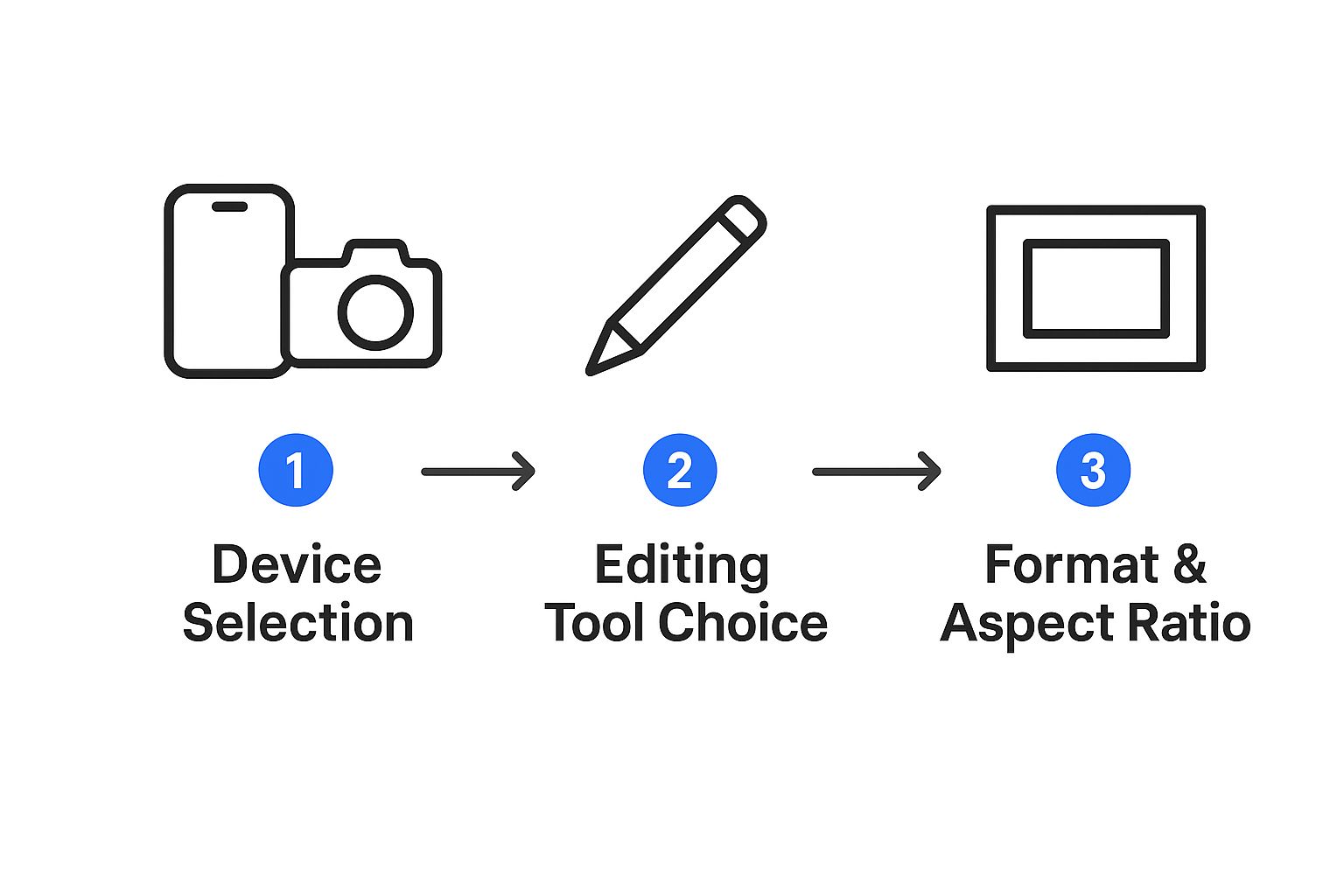
Making these decisions—like what device you'll use, which editing software you prefer, and your aspect ratio—before you start removes all the technical friction when it's time to film and edit. This simple bit of prep allows you to put all your energy into executing your creative vision and bringing that killer script to life.
How to Film High-Quality Shorts with Your Phone

Forget the myth that you need a cinema-grade camera to create polished YouTube Shorts. The ridiculously powerful camera you already have in your pocket is more than capable of producing professional-looking content. It all comes down to technique, not technology.
Creativity and a few smart habits will always trump expensive gear.
The first, unbreakable rule of YouTube Shorts is to film vertically. Always. Hold your phone in portrait mode to capture that perfect 9:16 aspect ratio. This makes sure your video fills the entire screen, creating an immersive, native experience for anyone scrolling the Shorts feed.
Mastering Your Lighting and Audio
Great lighting is non-negotiable, but you don't need a complicated studio setup. Your best friend here is the sun. Just position yourself facing a window to get soft, natural light that makes your video look crisp and clear. It’s the cheapest and most effective lighting kit you'll ever find.
Poor audio is just as bad, if not worse. Viewers will swipe away instantly if they can't hear you clearly. While your phone’s built-in mic can work in a pinch (if the room is dead silent), a simple lavalier mic that clips to your shirt is a small investment with a massive payoff. It isolates your voice and cuts out all that distracting background noise and echo.
Nail these two elements—lighting and audio—and you're already way ahead of most creators.
Pro Tip: Your phone’s back camera is almost always better than the front-facing selfie cam. It might feel a bit awkward at first, but propping your phone up and using the main camera will give you a significantly sharper and more vibrant image.
Adding Dynamic Visuals to Your Shorts
Okay, so your lighting and audio are sorted. Now it's time to make your shots visually interesting. A static, single-angle video can feel monotonous, especially in a feed where the next video is just a swipe away. You have to keep the viewer’s eyes engaged.
Here are a few simple techniques to try:
- Vary Your Angles: Don't just film everything from eye level. Try shooting from a low angle looking up to create a sense of power, or a high angle looking down for a different perspective. Even small shifts make a big difference.
- Incorporate Movement: Don't just stand still. A simple push-in (moving the camera slowly toward your subject) can add emphasis. A pan can reveal something new. A little motion goes a long way.
- Master the Jump Cut: The jump cut is an abrupt transition between two shots of the same subject. It’s perfect for cutting out pauses and creating a high-energy, fast-paced vibe that works incredibly well for Shorts.
Thinking about viewer attention is everything. Data shows that while the average watch time per Short is around 14.3 seconds, a surprising 72% of videos exceed 15 seconds. YouTube has even expanded the maximum length to 3 minutes to allow for deeper storytelling. You can dig into more of these fascinating YouTube Shorts trends and statistics on affiliatebooster.com. This just proves how important it is to use dynamic techniques to keep people hooked beyond that initial swipe.
Editing Techniques That Maximize Engagement
Filming is just step one. The real magic that turns raw footage into a viral YouTube Short happens in the edit. This is where you craft a fast-paced, thumb-stopping story designed to hook viewers from the first frame to the last.
The name of the game in a great Short edit is speed. Your audience is wired for quick cuts, dynamic motion, and constant visual stimulation. Stop thinking like a traditional video editor and start thinking like a rhythm creator. Every single cut, zoom, and text pop has to keep the energy high and the momentum going.
The Power of Captions and Text Overlays
A massive chunk of Shorts are watched on mute, which makes on-screen text an absolute must. Simple, clean captions get the job done, but you can do so much more. Use bold text overlays to punch up key points or try animated captions that pop up word-by-word to direct the viewer’s eye.
These text elements aren’t just for conveying information—they add another layer of visual interest that keeps people locked in. This is especially true for educational or storytelling content where you need every word to land perfectly.
The scale we're talking about here is just staggering. YouTube Shorts now pulls in over 2 billion monthly users, generating a mind-boggling 90 billion daily views. With an engagement rate of 5.91%—higher than its main rivals—every tiny editing choice you make is a chance to grab a piece of that massive attention pie.
Leaning on AI for a Smarter, Faster Workflow
Modern editing is getting a huge boost from AI, and tools like ShortsNinja can slash your production time while delivering a far more polished final product. Forget about manually timing captions or spending hours digging for B-roll; AI can handle those tedious jobs for you.
This interface gives you a peek at how you can generate an entire video—visuals, voiceover, and all—from a simple script. This completely frees you up to focus on the fun, creative parts of editing instead of getting stuck in the technical weeds.
For instance, AI-powered tools can:
- Generate Animated Captions: Automatically create stylish, word-by-word captions that sync perfectly with your audio.
- Find Relevant B-Roll: Suggest and drop in supplemental footage to make your story more visually interesting.
- Select Trending Audio: Analyze what's hot right now and recommend sounds that could give your video a discoverability boost.
The goal isn't to have AI do everything. It's about using it as a super-efficient assistant. It handles the heavy lifting, giving you more time to polish the story, nail the pacing, and inject your own unique creative touch.
To really put these ideas into practice, you'll need the right software. Check out some of the best video editing tools on the market. Pairing a great tool with a smart, AI-assisted workflow is the secret to churning out high-quality content consistently. For a full breakdown of these techniques, dive into our detailed guide on how to edit YouTube Shorts.
How to Optimize and Publish for the Algorithm

You’ve finished editing your Short, and it looks amazing. High five! But don’t hit publish just yet. The final sprint is arguably the most important: optimizing your video to get the YouTube algorithm’s attention.
Think of the algorithm less like a mysterious gatekeeper and more like a system hungry for signals. It's constantly looking for clues that a video is high-quality, engaging, and worth showing to more people.
The two signals that matter most are watch-time percentage and engagement velocity. The algorithm absolutely loves a Short that people watch all the way through—or even better, on a loop. It also pays close attention to how quickly the likes, comments, and shares roll in right after you publish. A sudden burst of interaction is a massive green flag for YouTube.
Nailing Your Title and Hashtags
Your title is your first impression. It's your best shot at hooking both a human viewer scrolling their feed and the algorithm trying to figure out what your content is about. It has to be punchy, clear, and loaded with keywords people are actually searching for.
So, instead of a forgettable title like "Cool new recipe," try something that sparks curiosity, like "This 3-Ingredient Dessert Will Shock You." See the difference?
Hashtags are just as vital for categorization. They’re like signposts telling YouTube exactly what your video is about and who it's for. A messy, random hashtag strategy will get you nowhere. You need to be focused.
Here’s a simple formula I’ve seen work time and time again:
- The Mandatory Tag: You absolutely must include
#shortsin either your title or description. This is the official tag that flags your content as a Short for YouTube's system. - Topical Tags: Add 2-4 other hashtags that are super specific to your video's topic. Filming a review of a new camera? Use something like
#camerareviewand#photographygear.
Resist the urge to spam your description with dozens of irrelevant tags. This can backfire and confuse the algorithm, hurting your reach. When it comes to hashtags, relevance and quality always crush quantity.
Maximizing Discoverability and Reach
Beyond the basics, a few extra moves can give your Short a serious advantage. The upload process itself is packed with opportunities to feed the algorithm more context about your masterpiece. For a complete walkthrough of that process, our guide on https://shortsninja.com/blog/uploading-youtube-shorts/ breaks down every single step.
Ultimately, you want your optimization to be part of a bigger content strategy, not an afterthought. To really get the algorithm on your side, you should be integrating crucial YouTube SEO optimization tips from the very beginning. This means thinking about keywords, what your audience wants, and how they’ll find you before you even hit record.
Your goal is to make it as easy as possible for YouTube to understand your video and serve it up to a massive, hungry audience.
Common Questions About Creating YouTube Shorts
Even with a solid game plan, you’re bound to have questions when you start diving into YouTube Shorts. It happens to everyone. Let's walk through some of the most common hurdles creators face and get you some clear, practical answers.
What Is the Ideal Length for a YouTube Short?
Just because you can make a Short that’s 60 seconds long doesn't mean you should. The real sweet spot for keeping people hooked is usually somewhere between 15 and 40 seconds. Your goal isn’t to use every second available; it’s to deliver your point and get out.
Think about how the algorithm sees it. Shorter videos, especially those clocking in under 20 seconds, often score a much higher average view duration percentage. That’s a huge signal to YouTube that people are loving your content, which means they'll push it out to more viewers. If you can tell your story in 15 seconds instead of 30, go for it. The best move? Experiment with different lengths and see what your specific audience responds to.
Can I Repurpose TikToks as YouTube Shorts?
Absolutely, but you have to be smart about it. The golden rule is to always remove the watermark before you upload it to YouTube. The algorithm has been known to deprioritize content with visible watermarks from other platforms, and that could seriously ding your reach.
Also, remember that what’s trending on one platform might be old news on another. That viral sound on TikTok could be completely played out on Shorts. For the best shot at success, try to use audio from YouTube’s own library whenever you can.
Repurposing is a great way to squeeze more life out of your content, but videos made specifically for Shorts almost always perform better. Native content just feels more authentic to the YouTube crowd.
How Important Are Titles and Hashtags for Shorts?
They’re everything when it comes to getting discovered. Your title is your first impression and a massive factor in getting someone to stop scrolling. Keep it short, punchy, and packed with keywords people would actually search for.
Hashtags are just as crucial. They’re like little signposts that tell YouTube what your video is about so it can show it to the right people. Here’s a simple strategy that just works:
- The Must-Have Tag: Always include
#shortsin your title or description. This is the official tag that flags your video as a Short. It's not optional. - Get Specific: Add 2-4 other highly relevant hashtags that nail down your topic. Making a quick pasta dish? Use tags like
#pastarecipeor#15minutemeals.
Don't fall into the trap of stuffing your description with a dozen generic tags. A few specific, relevant hashtags are way more powerful than a long list of random ones.
How Do I Find Trending Audio for My Shorts?
Honestly, the best way is to just use the platform. Spend some time scrolling through the Shorts feed yourself. When you start hearing the same songs or sounds pop up over and over again, you’ve found a trend. It’s the most direct way to see what’s catching on right now.
When you stumble upon a sound you like, tap on it at the bottom of the screen. YouTube will show you how many other Shorts have used it and give you the option to save it for later or jump right into creating with it. You can also hit the 'Add sound' button in the creator to browse a huge library of licensed music. Active scrolling is the best research you can do.
Ready to stop spending hours on a single video? ShortsNinja uses AI to help you create high-quality, engaging faceless content in just minutes. Input your idea, generate visuals and voiceovers, and let our platform handle the rest. Start your free trial and see how easy it is to grow your channel.