
Making YouTube videos with AI is a total game-changer. What used to be a days-long grind is now something you can knock out in minutes. This isn't just about speed; it's about being able to generate ideas, write scripts, create visuals, and produce voiceovers with an efficiency and quality that was once unthinkable. It levels the playing field, opening up content creation for everyone.
The New Reality of YouTube Content Creation
Remember the old days of YouTube? You needed expensive cameras, confusing editing software, and hours of your life spent recording and re-recording. The barrier to entry was sky-high, demanding a ton of time, money, and technical know-how. For a lot of us, starting a channel felt like a pipe dream.
Well, that's not the reality anymore.
AI tools have completely flipped the script on video production, making it accessible to anyone with an idea. The modern workflow cuts out the most tedious parts of the process. No more staring at a blank page trying to write a script or getting lost in complex editing timelines. Now, you can focus on your creative vision while AI does the heavy lifting. This shift is about more than saving time—it’s about letting solo creators and small teams achieve a level of consistency that used to be impossible.
A Radically Faster Workflow
The difference between the old way and the new AI-powered way is just staggering. A project that might have taken a full week can now be done in an afternoon. This speed lets you pump out more content, test new ideas, and grow your channel faster than you ever thought possible. If you want to dive deeper into scaling up, check out our guide on YouTube automation.
To see just how much time you save, let’s break down the traditional workflow versus the AI-powered one.
Traditional vs AI YouTube Workflow at a Glance
| Production Stage | Traditional Method (Hours) | AI-Powered Method (Minutes) |
|---|---|---|
| Ideation & Research | 4 – 8 | 5 – 15 |
| Scriptwriting | 3 – 6 | 10 – 20 |
| Asset Creation | 5 – 10 | 15 – 30 |
| Voiceover Recording | 1 – 2 | 5 – 10 |
| Video Editing | 6 – 12 | 20 – 40 |
| Optimization & Upload | 1 – 2 | 5 – 15 |
| Total Time | 20 – 40+ Hours | 60 – 130 Minutes |
As you can see, the time savings are massive at every single stage. AI doesn't just chip away at the hours; it brings the entire production cycle down to a fraction of the original time.
This side-by-side comparison shows how AI collapses the traditional, multi-day production timeline into a series of quick, manageable steps.
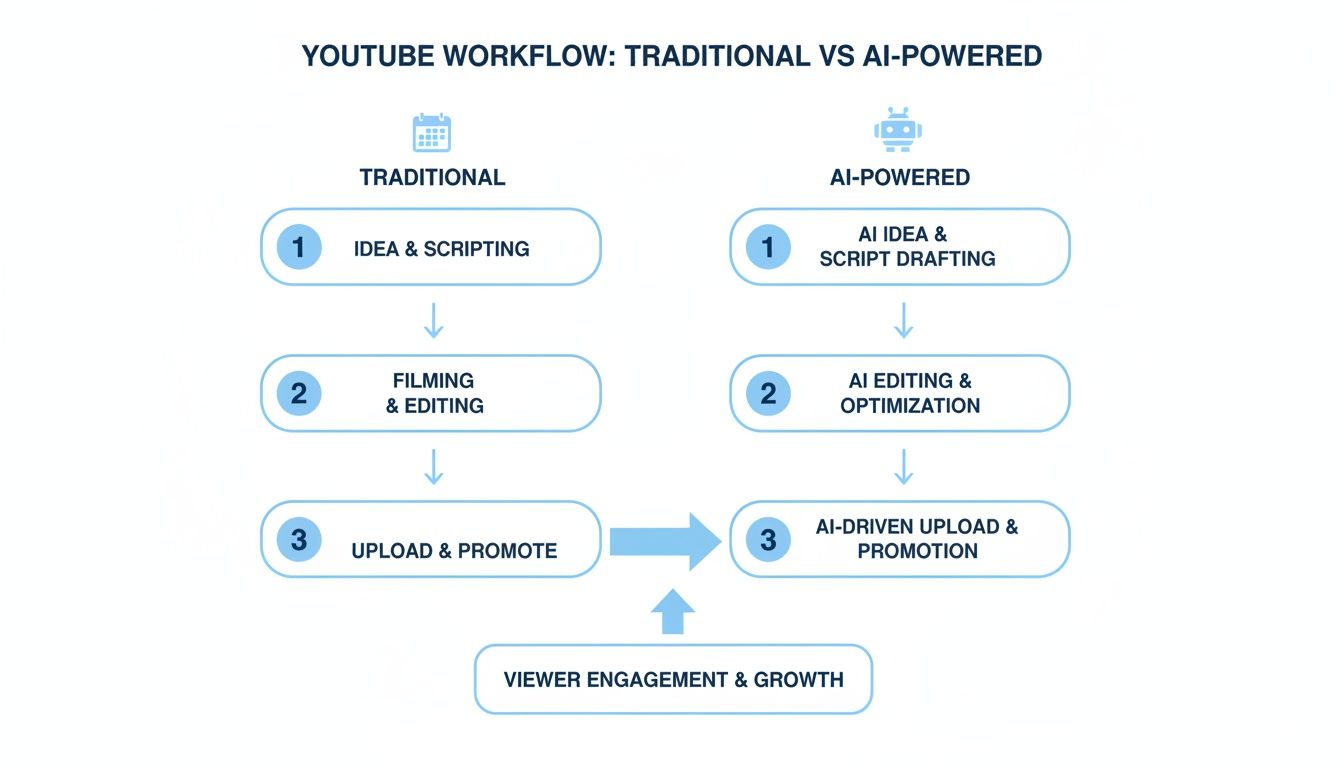
The visualization really drives the point home: the AI workflow automates or dramatically speeds up everything from brainstorming to the final edits, turning a multi-hour slog into a task you can finish in minutes.
Embracing the Creator Economy
This new way of working is the engine of the modern creator economy. Success on YouTube is all about consistency and being able to jump on trends fast. By letting AI handle the technical stuff, you're free to focus on what really matters: strategy, connecting with your community, and building your brand. If you're just starting out, getting a handle on the basics of how to become a content creator is a great first step.
The real advantage of using AI isn't just speed—it's creative freedom. When you're not bogged down by technical hurdles, you have more mental space to explore unique ideas and connect with your audience on a deeper level.
In this guide, I'm going to walk you through the entire AI-driven process, giving you a clear, actionable roadmap to create incredible videos from start to finish.
Generating Viral Ideas and Scripts with AI
Let's be honest, the core of a killer YouTube video isn’t fancy editing or a pricey camera. It’s a powerful idea wrapped in a script that hooks viewers from the first second. This is where most creators hit a wall, staring at a blank page, waiting for a spark. But when you create YouTube videos with AI, you can completely sidestep that creative block and get right to developing concepts with viral potential.
Instead of just guessing what your audience wants, AI can dig into trends, search data, and your specific niche to spit out topics that are already catching fire. Think of it as a tireless brainstorming partner that can generate hundreds of unique angles in minutes.
Prompting Your Way to Viral Concepts
The ideas you get from an AI are only as good as the instructions you give it. Vague prompts like, "Give me video ideas about history," will get you generic, boring results. The secret is to be specific and give the AI context. You have to guide it.
Imagine you're launching a channel about "forgotten historical events." A weak prompt is useless. A much stronger approach layers in the details.
Example Prompt for Viral Ideas:
"Act as a YouTube growth strategist for a new channel called 'History Unearthed.' My target audience is curious millennials who love short, surprising documentaries (like Vox). Generate 10 viral video ideas about forgotten historical events. For each idea, provide a catchy, high-CTR title, a one-sentence hook, and a brief summary of the story. Focus on human-centric stories with unexpected twists."
See the difference? This prompt gives the AI a clear role, a target audience, a content style, and specific formatting instructions. The results will be way more targeted and ready to use.
- Catchy Titles: AI is fantastic at writing titles that make people click, like "The Doctor Who Discovered Handwashing Was Laughed Out of Medicine."
- Compelling Hooks: It can also generate opening lines designed to stop the scroll, such as, "What if the most important medical discovery in history was ignored because of pride?"
This approach turns brainstorming from a frustrating guessing game into a strategic ideation session.
From Idea to Full Script in Minutes
Once you've landed on a winning concept, the same logic applies to scripting. An AI can absolutely draft a full narrative for you, but you need to tell it how to structure it for YouTube. A great script isn't just a wall of text; it has a flow designed to hold attention.
To get this right, you need to embed a clear structural template right into your prompt. This is how you go from a simple idea to a full-blown story that's ready for production.
Example Prompt for a Video Script:
"Write a 5-minute video script for the title 'The Great Molasses Flood of 1919: Boston's Sweet Disaster.' Structure the script with the following sections:
- Hook: Start with a shocking, little-known fact about the event.
- Introduction: Briefly set the scene in Boston's North End in 1919.
- The Incident: Describe the tank rupture and the wave of molasses. Use vivid, sensory language.
- The Aftermath: Detail the rescue efforts and the bizarre challenges rescuers faced.
- Conclusion: Share the final death toll and the long-term impact on building regulations. End with a call-to-action to subscribe for more forgotten history."
This structured prompt ensures the AI delivers a script with a proper beginning, middle, and end, hitting all the storytelling beats a great YouTube video needs.
Adding Your Unique Human Touch
An AI-generated script is an incredible head start, but it’s not the finish line. That final 10% is where you inject your own personality. Read the script out loud. Does it sound like you? Tweak the words until it flows naturally.
The best AI-powered content never sounds like it was made by a robot. It uses technology as a powerful foundation, but the final polish comes from a human touch that connects with the audience on an emotional level.
This is your chance to add personal anecdotes, a bit of humor, or opinions that only you can bring. This final editing pass is what elevates your video from generic content to something that truly represents your channel.
For creators looking to really master their narrative craft, exploring an AI story creator can unlock even more advanced tools for building compelling tales. This blend of AI efficiency and human creativity is the real secret to producing high-quality content at scale.
Bringing Your Vision to Life with AI Visuals and Voice
With your script locked in, it's time for the fun part: building the world your audience will see and hear. This is where you turn words on a page into a full sensory experience.
And no, you don't need a fancy camera, a studio, or a pricey microphone. When you're creating YouTube videos with AI, all you need are the right tools and a clear vision.
This whole stage is about generating your assets. We're talking about the background footage, the images that drive your points home, and the voice that guides your viewers through the story. The quality of these elements is what separates an amateur video from something that looks and feels truly professional.
The good news? AI has made incredible leaps in both visual and audio generation, letting creators produce stunning content without any of the traditional gear.
Crafting a Consistent Visual Style for Your Channel
For a "faceless" channel, your visual identity is your brand. A consistent aesthetic helps viewers instantly recognize your videos and builds a sense of professionalism that keeps them coming back. The key is to establish a visual theme and stick with it.
AI image generators like Midjourney and DALL-E 3 are perfect for this. The trick I've found is to develop a "master prompt" that defines your unique style. Think of it as a reusable template you can tweak for every single video.
Here’s a quick breakdown of what to include in that master prompt:
- Style: Get specific. Is it "cinematic," "photorealistic," "flat vector illustration," or maybe an "anime key visual"?
- Color Palette: Mention specific colors or a mood, like "warm, earthy tones" or "vibrant neon cyberpunk."
- Composition: Guide the AI on the shot. Do you want a "wide-angle landscape shot" or a "close-up portrait"?
- Lighting: Describe the lighting to set the mood—think "soft, diffused morning light" versus "dramatic chiaroscuro lighting."
By creating this consistent visual language, you ensure your channel looks cohesive and high-quality, which helps build viewer trust and loyalty from the jump.
Your visual style is your digital handshake. A consistent and professional look tells viewers they're in the right place and that your content is worth their time, even before they hear a single word.
This approach not only saves a ton of time but also cements your brand identity across all your videos.
Prompting AI for Professional Visuals
Let's put this into practice. Imagine your "History Unearthed" channel needs visuals for that video on the Great Molasses Flood. You're going for a gritty, historical, and slightly dramatic feel.
Example Visual Prompt:
"A cinematic, photorealistic image of a 1920s Boston street in chaos. A massive, dark wave of molasses is engulfing old-fashioned cars and brick buildings. The style should be gritty, sepia-toned, with dramatic shadows and a sense of slow-motion disaster. Aspect ratio 16:9."
See how detailed that is? This gives the AI all the information it needs to generate a specific, high-quality image that perfectly matches your video's tone.
With platforms like ShortsNinja, this process is even more straightforward, as the AI automatically generates visuals based on your script. Still, understanding these prompting principles helps you fine-tune the output to perfection.
This shift in visual creation is causing huge waves in the creator economy. In fact, 63% of video marketers now use AI tools for creating or editing their videos. This rapid adoption signals a major move toward efficiency, allowing creators to produce more content than ever before. You can explore more data on this trend in the latest Wyzowl video marketing report.
Finding the Perfect AI Voice for Your Narrative
The final layer of your video is the voiceover. The right voice can make your story engaging and memorable, but the wrong one will have viewers clicking away in seconds. Fortunately, AI voice technology has become astonishingly realistic.
Services like ElevenLabs and Speechify offer huge libraries of voices, accents, and languages. You can pick a voice that perfectly matches your channel's persona—whether that's authoritative and deep for a documentary or friendly and upbeat for an explainer video.
When you're picking a voice, consider these factors:
- Pacing: How fast or slow does the voice speak?
- Tone: Is it energetic, calm, serious, or humorous?
- Clarity: Is the enunciation crisp and easy to understand?
Many of these platforms even let you fine-tune the delivery by adjusting pauses, emphasis, and inflection, giving you incredible control over the final performance. If you want to dive deeper, we have a helpful comparison of the top 5 AI voice generators to help you find the one that best suits your needs.
By thoughtfully combining AI-generated visuals and a lifelike voiceover, you can produce a polished, professional video that captivates your audience from start to finish.
Streamlining Your Editing and Publishing Workflow
The final stretch—editing and publishing—is where so many creators run out of gas. We've all been there. Traditional video editing is a notorious time-suck, bogged down by tedious tasks like slicing out dead air, syncing audio tracks, and getting the color just right. But when you create YouTube videos with AI, this whole stage gets a complete makeover. It goes from a grind to a quick, satisfying final check.
Forget wrestling with complex timelines and manual tweaks. The whole point of an AI-first workflow is efficiency. Tools like ShortsNinja are built to do the heavy lifting, automatically stitching your visuals, voiceover, and background music into a pretty solid first draft. Your job is just to come in at the end to review and refine.
This completely shifts your role from a technical editor to more of a creative director. You get to focus on the high-impact changes that actually make the video better, instead of getting lost in the weeds.
Quick and Impactful AI Editing
Honestly, your AI-generated video is probably going to be about 90% complete right out of the box. Your only task is to add that last 10% of human polish. This usually just means a few quick, intuitive adjustments that don't require any real editing skills.
Most AI video platforms have simple, user-friendly interfaces where you can:
- Trim Clips: Easily shorten or extend a visual to get the timing perfect with your voiceover.
- Swap Visuals: If an AI-generated image doesn't quite hit the mark, regenerate it or swap it out in seconds.
- Adjust Audio Levels: Tweak the volume of your narration and background music to make sure everything sounds crisp and professional.
- Add Text Overlays: Slap on some simple text to emphasize a key point or add a call-to-action.
These small tweaks can make a massive difference, giving the final video a clean, polished feel that helps it connect with your audience.
The Power of Automated Publishing
Now for the real game-changer: automation. Once your video is ready, you shouldn't have to spend another minute on it. This is where smart scheduling and multi-platform distribution come into play, letting you build a content pipeline that practically runs itself.
Modern AI tools let you connect your YouTube, TikTok, and Instagram accounts directly. This means you can knock out an entire month's worth of videos in one sitting, schedule them, and walk away. That hands-off approach is what builds the consistency you need for real channel growth.
The most successful AI-driven channels are built on consistency. When you automate the publishing process, you eliminate the daily grind of uploading and optimizing. That frees you up to focus on what really matters: creating the next great piece of content.
This isn't just a theory; it's a proven strategy for growing a channel and generating serious revenue. For example, back in 2023, one creator in the AI history niche pulled in over $10,000 entirely from AI-generated videos. In just 28 days, this "faceless" channel racked up 2.6 million views and over 5,000 subscribers, with AI handling everything from the script to the final upload. You can check out the full story of this AI creator's YouTube success to see just what's possible.
Advanced Scheduling for Global Reach
To really maximize your impact, you need to post when your audience is actually online and watching. This is where advanced scheduling features become your best friend.
Look for tools that offer:
- Time Zone Support: Schedule content to go live during peak hours in different regions, whether your viewers are in New York, London, or Tokyo.
- Series Automation: Set up an entire video series to publish at regular intervals, like every Monday, Wednesday, and Friday at 9 AM, without you having to lift a finger.
- Cross-Platform Optimization: Automatically adapt video formats and descriptions for different platforms, making sure your content looks native everywhere it's posted.
To really kick your video creation into high gear, you should explore the best AI tools out there that can help you grow. By combining smart, intuitive editing with fully automated publishing, you can turn content creation from a chore into a seamless, scalable system.
Scaling Your Channel with AI-Powered YouTube Shorts
If you're serious about using AI to grow your YouTube channel, you can't afford to ignore Shorts. Think of it this way: long-form videos build your core community, but Shorts are the rocket fuel for getting discovered. They're designed for quick consumption and massive reach, putting your channel in front of fresh eyes every single day.
The numbers here are just staggering. YouTube Shorts is a global phenomenon, pulling in over 70 billion daily views from a pool of more than 2 billion monthly users. For creators, that translates to a huge growth opportunity. On average, Shorts bring in about 16.9 subscribers for every 10,000 views—and for bigger channels, that number skyrockets to 29.2. It's a powerful engine for audience growth. You can dive deeper into these powerful YouTube Shorts statistics on voomo.ai.
This is where AI really proves its worth. To win on Shorts, you have to be consistent. Relentlessly consistent. Trying to manually churn out a new short-form video every day is a fast track to burnout. But AI flips the script, turning what used to be a multi-hour grind into a quick, five-minute task.
Adapting Your AI Workflow for Shorts
Making Shorts work requires a slight tweak to your AI workflow. You're still scripting and generating visuals, but everything has to be faster, punchier, and built for a vertical screen. The mission is simple: grab attention in the first two seconds and deliver a satisfying punchline before the viewer can swipe away.
Here’s how you can tailor your AI process specifically for short-form content:
- Script for Speed: Tell your AI to keep scripts under 150 words. The story needs a killer hook, one single point, and a swift exit. No fluff.
- Think Vertically: This is non-negotiable. When prompting for visuals, always, always specify a 9:16 aspect ratio. This ensures your video fills the whole screen on mobile and looks professional.
- Optimize for the Feed: Use your AI to brainstorm a few title and description options. Shorts titles need to be short and snappy, often posing a question or a shocking fact to spark curiosity.
By fine-tuning your prompts for this format, you can create a steady pipeline of content that’s perfectly engineered for the Shorts algorithm.
The secret to success with Shorts isn't one viral hit—it's a consistent stream of quality content that keeps your channel active and constantly pushed to new audiences. AI is the only practical way for most creators to achieve this level of output.
Scripting Fast-Paced Narratives
The attention span on Shorts is brutally short. Your script has to be a masterclass in efficiency. A great way to nail this is by giving your AI a clear template, which ensures every Short follows a proven formula for engagement.
Check out this prompt for a history-themed Short:
Example Shorts Script Prompt:
"Write a 60-second YouTube Short script about the shortest war in history.
Hook (0-3 seconds): Start with the shocking fact: 'Did you know a war once lasted only 38 minutes?'
Core Content (4-25 seconds): Briefly explain the Anglo-Zanzibar War of 1896, covering the cause and the swift outcome. Keep sentences short and punchy.
Visual Cue (for AI image generation): Suggest visuals like 'Victorian-era British warships firing cannons' and 'the Sultan of Zanzibar's palace flag falling.'
Call-to-Action (26-30 seconds): End with 'Subscribe for more weird history facts!'"
This level of detail gives the AI guardrails, forcing it to produce a script that's perfectly paced for the format. It even includes visual ideas to help the AI video generator create a compelling final product. This kind of repeatable system is how you maintain quality while producing content at a scale that would be impossible to manage by hand.
Got Questions About Making Videos With AI?
Diving into AI video creation is exciting, but it's totally normal to have a few questions before you jump in headfirst. It’s a new way of working, after all, and you want to know what you’re getting into.
This section is all about tackling the most common questions and concerns we hear from creators. We'll give you clear, straight-up answers on everything from monetization rules to the quality you can actually expect. Let's get any doubts out of the way so you can start creating with confidence.
Can I Actually Monetize a YouTube Channel With AI Content?
Yes, you absolutely can. This is probably the biggest question on everyone's mind, and the answer is simple. YouTube’s monetization policy doesn't care what tools you use—it cares about the value you bring to the table.
As long as your videos are original, follow the platform's Community Guidelines, and give viewers something unique, they're perfectly eligible for the YouTube Partner Program. The magic word here is "transformative value." You can't just pump out generic, repetitive stuff. You have to add your own creative angle.
Plenty of successful channels are already using AI for everything from visuals to voiceovers. They make it work because they use AI as a tool to bring a unique vision to life, not as a replacement for creativity. Your ideas and direction are what make the content valuable and, ultimately, monetizable.
Will My AI Videos Look and Sound Robotic?
That's a valid fear, but one that’s becoming a thing of the past. The AI tools available now are light-years ahead of where they were, moving far beyond the clunky voices and cookie-cutter visuals you might be picturing.
Modern AI voice platforms like ElevenLabs can generate narration that's so natural and emotive, it's almost impossible to tell it's not a human. In the same way, high-end image and video generators can create visuals that are stunningly realistic, beautifully stylized, or perfectly matched to whatever vibe you're going for.
The real secret to avoiding that "robotic" feel comes down to your input.
- Detailed Prompts: The more specific you are with your visual instructions, the better the AI can match your style.
- Voice Selection: Take a minute to choose a voice tone that fits the mood of your video.
- Script Polish: Make sure your script reads like a human wrote it before you hand it off to the AI for audio generation.
At the end of the day, your creative direction is what breathes life into the final video.
How Much Technical Skill Is Really Required?
Almost none. Seriously. The whole point of platforms designed to create YouTube videos with AI is to get rid of the steep learning curve that comes with traditional video production. These tools are built to be accessible to everyone.
The workflow is designed to feel intuitive. You don't need any background in complicated editing software, graphic design, or audio mixing. The process typically boils down to three simple stages:
- Drop in an idea or a topic.
- Tweak the AI-generated script.
- Generate the video and make a few quick adjustments.
If you can type out your ideas and click a few buttons, you have all the technical skill you need to start making great content for your channel.
Should I Focus on Long-Form Videos or Shorts?
For the best results, you'll want to use both. A balanced strategy is almost always the most effective way to grow a channel, as each format plays a different—but equally important—role.
YouTube Shorts are for discovery. Their viral potential and incredible reach are perfect for grabbing the attention of new viewers and driving fast subscriber growth. They're amazing for delivering quick facts or short, punchy stories.
Long-form videos are for community. These are what help you build a loyal, engaged audience that sticks around. They let you go deeper into subjects, rack up your channel's watch time, and establish yourself as an authority. You can use AI to pump out a steady stream of Shorts to attract an audience and then create longer videos to keep them.
Ready to stop wondering and start creating? ShortsNinja makes it possible to build an entire AI-powered YouTube channel in just minutes a day. Turn your ideas into stunning videos and automate your growth. Try ShortsNinja today!