
If you have a library of long-form videos just sitting there, you're missing out on a massive opportunity. The truth is, learning how to create a short from a YouTube video is one of the easiest ways to repurpose your best content, reach a whole new audience, and give your channel a serious growth spurt. It's all about making every minute of footage work harder for you.
Why Turning Videos Into Shorts Is a Growth Superpower
Chopping up your existing videos isn't just a time-saver. It's a clever way to tap into a completely different discovery engine on YouTube. The algorithm for Shorts works on its own, totally separate from your long-form content, which means your channel gets exposed to millions of viewers who probably would have never found your main videos otherwise.
This strategy pulls double duty for your channel's overall health:
- Finding New People: Shorts are built for quick discovery. One solid clip can catch fire and introduce your brand to thousands of new potential subscribers, sometimes in just a few hours.
- Keeping Your Audience Hooked: Dropping Shorts between your bigger, more polished uploads keeps your channel active and your subscribers engaged. It’s a simple way to remind them why they hit that subscribe button in the first place.
The Massive Shift in How People Watch
Let's be real—viewer habits have changed. Attention spans are shorter than ever, and almost everyone is watching on their phone. In fact, over 70% of YouTube watch time now happens on mobile devices.
Shorts are perfectly built for this world. They deliver quick, satisfying hits of entertainment or information that people can squeeze into any part of their day.
If you're not creating Shorts, you're basically ignoring the content format that a huge chunk of YouTube's audience prefers. It's a core piece of modern video marketing. For a look at how this fits into the bigger picture, especially for smaller brands, check out these essential small business video marketing tips.
The best part about this whole strategy is the feedback loop it creates. A great Short doesn't just get its own views; it acts like a killer trailer that sends curious viewers back to the original long-form video to get the full story.
This turns a single piece of content into a marketing machine with multiple touchpoints. If you want to get into the weeds of what makes this format tick, our guide on the top metrics for YouTube Shorts growth breaks it all down.
Finding and Clipping Your Next Viral Moment
Your long-form videos are basically goldmines, filled with pockets of untapped short-form content. The real trick isn't just chopping out a random 30-second chunk. It's about spotting what I call "golden nuggets"—those standalone moments that are powerful enough to stop someone mid-scroll. Once you learn how to create a short from a YouTube video, you start seeing your own content in a whole new, much more strategic way.
You're hunting for the peaks in your video's story arc. These are the moments that grab attention, no questions asked.
What Makes a Clip Worthwhile
To find the perfect clip, you need to scan your longer videos for moments that pack a concentrated punch of value or emotion. Think less about raw information and more about an experience you can bottle up into 60 seconds or less.
Keep an eye out for these specific triggers:
- High-Emotion Reactions: Genuine laughter, a shocked expression, or even a moment of pure frustration. These are incredibly human and connect instantly.
- A "Lightbulb" Moment: Is there a single, mind-blowing tip or a surprising stat that makes someone go, "Wow, I never thought of that"?
- The Punchline or Climax: Pinpoint the absolute peak of a story, the big reveal of a project, or the punchline to a joke you've been building up.
- A Controversial Take: A strong, debatable opinion is one of the fastest ways to get the comments section fired up.
Let’s say you have a 20-minute video on financial planning. Buried inside is a 45-second bit where you break down a common but incredibly costly mistake people make. That right there? That’s your golden nugget. It’s specific, actionable, and perfect for a Short. To get a better feel for what’s popping off right now, it's a great idea to learn how to find viral trends from competitor videos and see how you can apply those same ideas to your own footage.
Extracting Your Clip The Easy Way
Once you’ve identified your clip, you have two main ways to pull it out. The simplest, by far, is using YouTube's own built-in tool right from your phone.
You'll see a "Create a Short" option on your own published videos, just like this:
This tool is fantastic for grabbing a quick clip without firing up any external software. It's a fast and efficient way to get started.
But if you want more control, downloading the original video file and using a dedicated editor is the way to go. This approach gives you the freedom to reframe shots, add slick captions, and nail the timing down to the millisecond—all things we'll get into in the next section.
Don't sleep on the power of a single, well-chosen clip. The goal is to isolate a moment that gives maximum value with minimum context. It needs to feel like a complete thought on its own, while also making people curious enough to check out the original video.
The growth behind this format is just wild. YouTube Shorts has exploded, rocketing from 30 billion daily views back in 2021 to an insane 200 billion daily views as of 2025. With an average engagement rate of 5.91%, the audience isn't just there—they're tuned in and ready to interact. You can dig into more stats about YouTube Shorts' growth on eMarketer.com. This isn't just about being creative; it’s a strategic play to tap into a massive, hungry viewership.
Mastering the Vertical Video Edit
Turning a horizontal clip into a vertical powerhouse is more than a quick crop. If you simply slice off the sides of a 16:9 frame, viewers notice right away. To create a short from a YouTube video that feels built for Reels or Shorts, approach it with a vertical-first mindset.
Every adjustment should guide the eye. Your star element—be it a face, a product demo, or a key action—must occupy center stage throughout the clip.
Strategic Reframing for Maximum Impact
Think of your vertical canvas as a laser-focused spotlight. What once spread across a wide frame now demands precision.
- Subject Tracking: Let your software or manual adjustments keep the action centered. If you move, the frame should follow.
- Dynamic Zooms: A gentle zoom in can intensify your message, while a quick pull-back reveals context. Timing is everything.
- Quick Cuts: Micropause? Trim it. The pace in vertical content feels urgent.
Before you start cutting, run through this quick reference. It’s your safeguard against common slip-ups when editing for mobile screens.
Essential Editing Checklist for Vertical Video
| Editing Element | Best Practice | Why It Matters |
|---|---|---|
| Aspect Ratio | Use 9:16 for mobile-first platforms | Keeps content native to Shorts, Reels, and TikTok |
| Framing | Center your subject or key action | Prevents viewer distraction |
| Motion Stability | Add subtle easing or stabilization | Delivers a polished, professional look |
| Pacing | Trim pauses to under 0.5 seconds | Maintains energy and engagement |
| Captions | Sync text to dialogue or highlight sound cues | Improves accessibility and watch time |
Check these off to keep every vertical clip sharp and ready for upload.
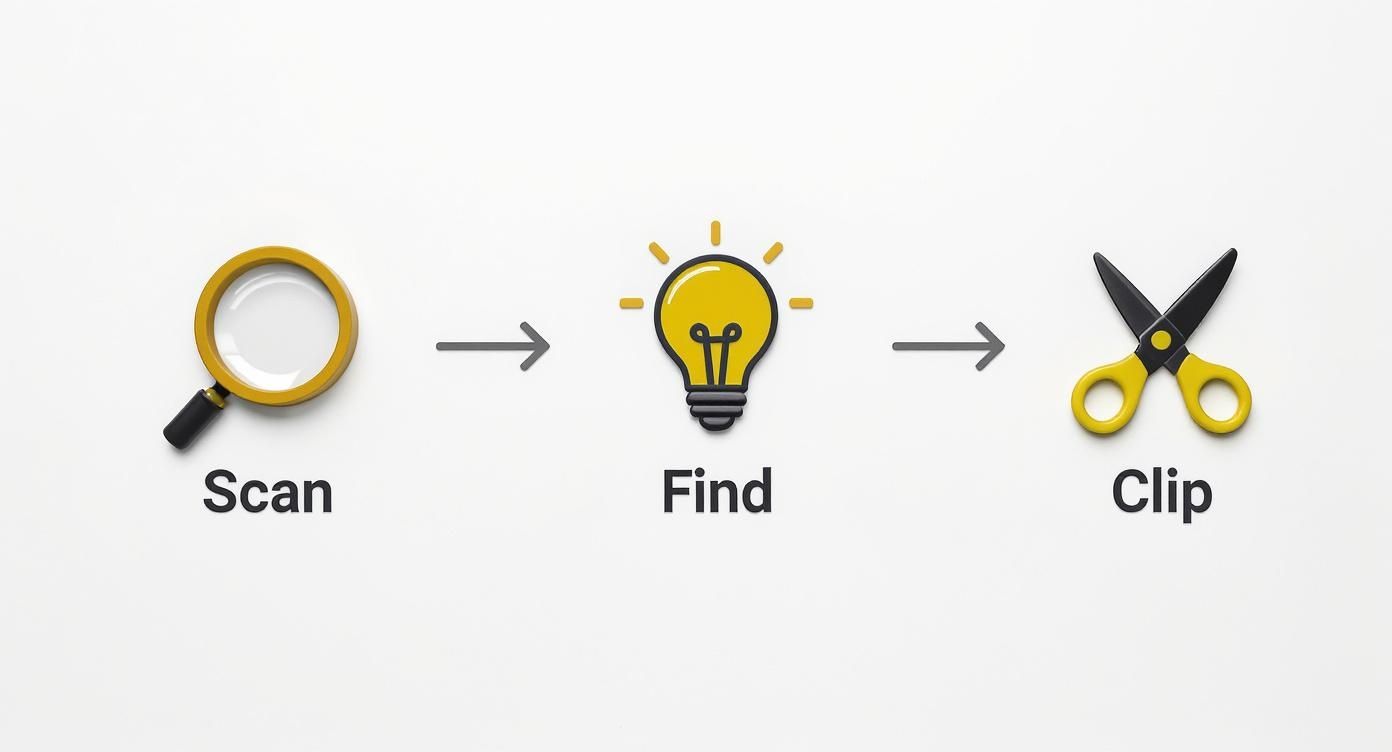
This graphic pulls three steps—scan for possibilities, pinpoint the ideal moment, then cut for impact—into a neat, repeatable routine. It’s the blueprint for mining long videos and striking gold in short-form.
The Art Of The Perfect Trim
The opening moments are everything. Nail the first two seconds with a hook that answers “Why should I watch this?” Dive straight into the peak of action or drop a bold statement.
Your ending matters just as much. Wrap the clip with a punchline, a final thought, or a question that nudges viewers to comment. A limp finish can undercut all your hard work.
A well-edited Short doesn't feel like a repurposed clip. It feels intentional. Every zoom, cut, and reframe should serve the purpose of delivering a concentrated, high-impact viewing experience designed specifically for a mobile screen.
Remember, most of your audience is scrolling on phones. Data shows that over 70% of YouTube's watch time now happens on mobile, and 72% of the top-performing Shorts fall between 16 and 60 seconds. If you’re curious about wider Shorts trends, you can discover more insights about YouTube Shorts trends from Awisee.com.
Mastering vertical editing is essential for any creator. For a deeper dive into the technical side, check out our guide on the best aspect ratios for TikTok, YouTube, and Instagram to ensure every clip looks its best.
Using Captions And Audio To Boost Engagement
Once your footage is clipped and reframed, it’s time to layer in the details that grab attention. On mute or with sound, every element you add—text, captions, audio—needs to work in harmony to keep thumbs from scrolling past. In fact, most viewers never unmute, so your visual cues and sound design become the stars of the show.
Why Captions Are Non-Negotiable
Think of captions as more than just accessibility—they’re your built-in retention tool. When you turn a YouTube video into a Short, clear, animated text does the heavy lifting, even in total silence.
- Grab Attention Instantly: A bold, moving caption can act like a visual exclamation point.
- Improve Comprehension: Quick, readable text helps viewers absorb complex points in a flash.
- Boost Watch Time: Audibly silent or not, people stick around longer when they understand what’s happening.
Don’t settle for plain white type. Play with fonts, color pops and subtle motion to match your channel’s vibe.
The Power Of Sound Design
Even if half your audience never turns audio on, the right track adds an emotional undercurrent. A well-chosen sound can transform a simple clip into something funny, suspenseful or downright inspiring.
Great audio choices fill in the gaps visuals leave behind, giving your Short an extra layer of personality.
When your clip carries your voice, treat it like a narrative anchor:
- Clean up background noise and balance levels so your words cut through.
- Let your tone guide the story—authentic voice recordings build trust fast.
If your clip is more visual—think product demos or time-lapses—consider tapping into a trending sound. That way, you’re riding existing engagement waves and helping the algorithm slot your Short into popular feeds.
Using Text For Context And Action
Beyond verbatim transcriptions, on-screen text steers the viewer from A to Z. A punchy opener teases the payoff, while a strong call-to-action (CTA) at the finish line tells people exactly what to do next.
Keep these text cues in your toolkit:
- Magnetic Headlines: Jump in with a tease like “My Biggest Lesson” or “Stop Making This Mistake.”
- Context Labels: Use small pop-up notes to highlight details or inject a dash of humor.
- Direct CTAs: Wrap up with clear instructions—“Drop your thoughts below” or “Watch the full tutorial in bio.”
When you weave captions, sound and text together, your Short feels like a mini production, not just a clipped moment.
With 70 billion daily views on Shorts and a potential audience of 2.53 billion users, mastering these elements gives you a real shot at standing out. Creators who hone this mix are the ones who break through. Learn more about YouTube’s growth and monetization opportunities on TheSocialShepherd.com.
Optimizing And Publishing For Maximum Reach
Creating a killer Short is only half the battle. If nobody sees it, all that editing work goes to waste. Now it's time to get your masterpiece in front of as many eyes as possible by optimizing it for each platform and publishing it with a smart strategy.
https://www.youtube.com/embed/7GSPxzK8HIM
It all starts with a title that balances search-friendly keywords (like "create short from youtube video") with a hook that piques human curiosity. This is where you turn a passive impression into an active click.
Crafting Headlines That Pop
On platforms like YouTube Shorts, your title is your first impression. It needs to be clear, concise, and promise some kind of value.
Keep your headlines under 40 characters if you can. Anything longer often gets awkwardly cut off on mobile screens, which is where almost everyone is watching. Get your main point in early, like "Quick Way to Create Short From YouTube Video." From there, you can test out different words—swap "Quick" for "Simple" or even "Secret" to see what gets more traction.
A few tried-and-true tips for writing better headlines:
- Start with punchy action verbs like “Boost” or “Master.”
- Use numbers when you can. “3 Hacks to Create Short From YouTube Video” feels more specific and actionable.
- Write like you talk. A conversational tone connects far better than sounding like a corporate memo.
Using Hashtags For Visibility
Think of hashtags as signposts that guide the algorithm—and viewers—to your content. The trick is to use a mix of broad, high-traffic tags and more specific, niche ones.
Combine something general like #Shorts or #ReelItFeelIt with a tag that speaks directly to your ideal viewer, like #VideoEditingTips. I also like to peek at the Shorts feed for 2–3 trending tags and see if I can creatively tie them to my video. This strategy helps you get discovered by both casual scrollers and people actively searching for your topic.
But don't go overboard. 4–6 hashtags per post is the sweet spot. Too many can dilute your focus or even get flagged as spam by the platform's algorithm. When you're cross-posting, it also helps to add a platform-specific tag like #TikTokTips for your TikTok upload.
Scheduling For Growth
When you post can be just as important as what you post. Nailing your timing can boost your engagement by up to 30%.
Your best friend here is your analytics. Head into the Audience tab in YouTube Studio and find out when your viewers are most active. I like to export the watch time report and look for days that have +15% spikes in viewership.
Once you have that data, your plan is simple:
- Pinpoint your top three performing days based on views and engagement.
- Use a scheduling tool to queue up your content for those peak windows.
- Experiment by posting about 15 minutes before the peak time to give the algorithm a chance to pick it up.
“Posting at audience peak times transforms reach into retention,” says a top Shorts creator.
Remember, peak times vary by platform. Instagram Reels often do well around lunchtime, while TikTok's sweet spot tends to be late afternoon. Scheduling your posts consistently also trains the algorithm to anticipate and promote your new content.
Building A Content Ecosystem
Every Short you create should act as a mini-trailer for your long-form content. Don't let that opportunity slip by.
A simple visual cue at the end, like text that says “Full Tutorial in Bio” with an arrow, works wonders. In the description or comments, always link back to the original source video: “Learn more in the full YouTube video: Watch here”. This turns viewers into subscribers.
Platform Optimization at a Glance
Each platform has its own quirks and best practices. A one-size-fits-all approach just doesn't work if you want maximum reach. Tailoring your title, tags, and calls-to-action for YouTube Shorts, Instagram Reels, and TikTok is crucial.
This table breaks down the key differences to help you optimize your publishing strategy for each one.
| Feature | YouTube Shorts | Instagram Reels | TikTok |
|---|---|---|---|
| Title Length | 100 characters | 125 characters | 100 characters |
| Tag Strategy | #Shorts + 2 niche tags | #Reels #Topic + challenge tags | #ForYou #Trend + brand tags |
| Best Time To Post | Evenings and weekends for 18–34 demo | Weekday mornings and evenings | Late afternoon (4–6 PM local) |
| CTA Format | “Watch Full Video” link in description | Sticker link to profile bio | End-screen prompt with sound tag |
Treating each platform as its own unique ecosystem allows you to connect with different segments of your audience more effectively.
By following this approach, you turn every single clip into a tiny growth engine for your channel. Track your performance, tweak your titles and tags, and keep refining your process. Before you know it, each Short will be driving more views and subscribers back to your long-form content. It's all about consistency and analysis.
Common Questions About Creating Shorts
Even with a solid game plan, turning a long video into a snappy Short brings up a few questions. Let's tackle the ones that pop up most often so you can start repurposing with confidence.
What Is the Best Length for a Repurposed Short?
While YouTube lets you go up to 60 seconds, the sweet spot for a repurposed clip is usually much tighter—think 15 to 45 seconds.
That’s just enough time to land one killer point, share a quick, compelling story, or showcase a single "aha!" moment. You're looking for a self-contained nugget of value that leaves the viewer feeling like they learned something, fast. If you're just starting, aim for the 30-second mark. It's the perfect length to hold attention without feeling rushed.
The best repurposed Shorts don't feel like they've been cut down. They feel intentionally brief, isolating one core idea and delivering it with maximum impact.
If you want to get a better handle on the format, it’s worth digging into what YouTube Shorts are and how their unique algorithm influences content strategy.
Can I Monetize Shorts Made From Existing Videos?
Absolutely. If you’re already in the YouTube Partner Program (YPP), any Shorts you create—including those repurposed from your long-form videos—are eligible for the Shorts ad revenue sharing model.
This is a fantastic way to open up an extra income stream from content you've already put the work into. Plus, the views your Shorts get count toward your channel's overall view count, helping you maintain your YPP status. It's a true win-win.
Will Making Shorts Hurt My Long-Form Content?
This is a common fear, but the reality is usually the opposite. A smart Shorts strategy is one of the best marketing funnels you can build for your main channel.
Shorts are built for discovery. They put your content in front of a massive new audience that probably would have never found your longer videos otherwise. Think of each Short as a trailer. If someone likes what they see, they're far more likely to click over to your channel to watch the full thing. This is how you turn casual scrollers into loyal subscribers.
Ready to streamline this entire process and produce high-quality Shorts in minutes? ShortsNinja uses AI to turn your ideas into engaging, faceless videos perfect for TikTok, YouTube, and Instagram. Go from script to scheduled post in under five minutes. Start your free trial at ShortsNinja.