
For creators and marketers, the best AI video maker isn't just a tool—it's the one that takes a simple idea and turns it into a ready-to-publish video in minutes. Seriously, minutes. Leaders in this space, like ShortsNinja, are nailing it by automating everything from scripting and visuals to social media scheduling, slashing production time and costs for anyone trying to keep up with TikTok and YouTube.
Why AI Video Makers Are a Game Changer
The pressure to create consistent, high-quality video content is relentless. Traditional video production? It's still expensive and painfully slow. AI video makers have stepped in as the solution, moving from a niche tech toy to an essential part of the toolkit for creators, agencies, and businesses everywhere.
These tools cut right to the heart of modern content creation challenges. Forget spending days scripting, finding footage, recording voiceovers, and then editing it all together. Now, you can generate a complete video from a single prompt. That kind of speed is what it takes to stay relevant on platforms that reward you for posting frequently.
The Shift from Manual to Automated Production
The real superpower of using a top-tier AI video maker is scalability. A workflow that used to demand a whole team can now be handled by one person. This unlocks some huge advantages:
- Drastic Cost Reduction: AI gets rid of the need for pricey cameras, actors, and complicated editing software. Suddenly, high-quality video is within everyone's reach.
- Massive Time Savings: What once took hours—or even days—can now be done in under five minutes. This frees you up to think about strategy and the next big idea.
- Effortless Scalability: You can crank out dozens of unique videos for different platforms and audiences without multiplying your effort. It’s a core tactic for effective AI social media content creation.
- Creative Consistency: AI helps you lock in a consistent style, voice, and brand look across all your content, which is crucial for building a recognizable presence online.
This isn't just hype; the market growth reflects this massive shift. The AI video generator market was valued at USD 614.8 million in 2024 and is expected to explode to USD 2,562.9 million by 2032, with a compound annual growth rate of nearly 20.0%. This boom is being driven by social media's insatiable appetite for short-form content and the incredible efficiency AI brings to the table. If you want to dig deeper into the numbers, you can explore some great insights on AI video generator statistics and see what it means for creators.
How We Judged the Best AI Video Tools
To find the best AI video maker, we cut through the marketing noise and set up a solid framework for testing. Our goal was to see what actually matters for creators day-to-day, grounding our comparisons in real-world performance, not just a checklist of features. We zeroed in on four core areas that separate a decent tool from a great one.
First up was workflow efficiency. We timed how long it took to go from a simple idea or prompt to a finished, shareable video. This wasn't just about raw processing speed; it was about the entire user experience—scripting, finding visuals, and making those final tweaks. A tool that shaves hours off your workflow is a game-changer for any content strategy.
Quality, Control, and Reach
Next, we put output quality under a microscope. This meant really looking at the AI-generated visuals and listening closely to the AI voiceovers. Does the final video look sharp and professional, or does it scream "low-effort AI"? The whole point is to create content that grabs attention, not just clutters up a social feed.
Just as critical is customization. The best tools let you steer. We tested how easy it was to edit scripts, swap out clips, add branding like logos and specific colors, and fine-tune the video's pacing. If a tool forces you into a rigid template, it's holding your brand back.
A great AI video tool doesn't just automate; it collaborates. It should handle the heavy lifting while still allowing the creator's unique vision and brand identity to shine through in the final product.
Finally, we looked at publishing power. A video doesn’t do much good if you can’t get it in front of your audience easily. We checked for built-in schedulers and direct publishing to platforms like TikTok and YouTube. This is a big deal, especially when you think about the global market.
While North America made up about 40.61% of the AI video generator market in 2024, the Asia-Pacific region is poised for the fastest growth. Tools offering multi-language voiceovers and seamless publishing integrations are in the best position to help creators tap into both established and emerging markets. You can dig into more of the numbers in this market research on AI video trends.
These criteria are the foundation of our guide, giving you a clear window into how we rank the top AI tools for content creators.
A Head-to-Head Comparison of Leading AI Video Makers
Alright, let's get down to what really matters—pitting the top AI video makers against each other to see how they actually stack up in the real world. Forget a generic feature list. This is about the practical differences in workflow, output quality, and customization that make or break your creative process.
We'll look at how a tool like ShortsNinja, built for cranking out faceless short-form content, compares to a platform like Synthesia, which is king when it comes to corporate training videos with digital avatars.
To make this a fair fight, I'm evaluating these tools on three pillars that every creator needs to consider. These are the things that determine whether a tool is a time-saver or just another headache.
This simple framework boils it all down to three core components: the efficiency of the Workflow, the final Quality of the video, and the level of Customization you get.
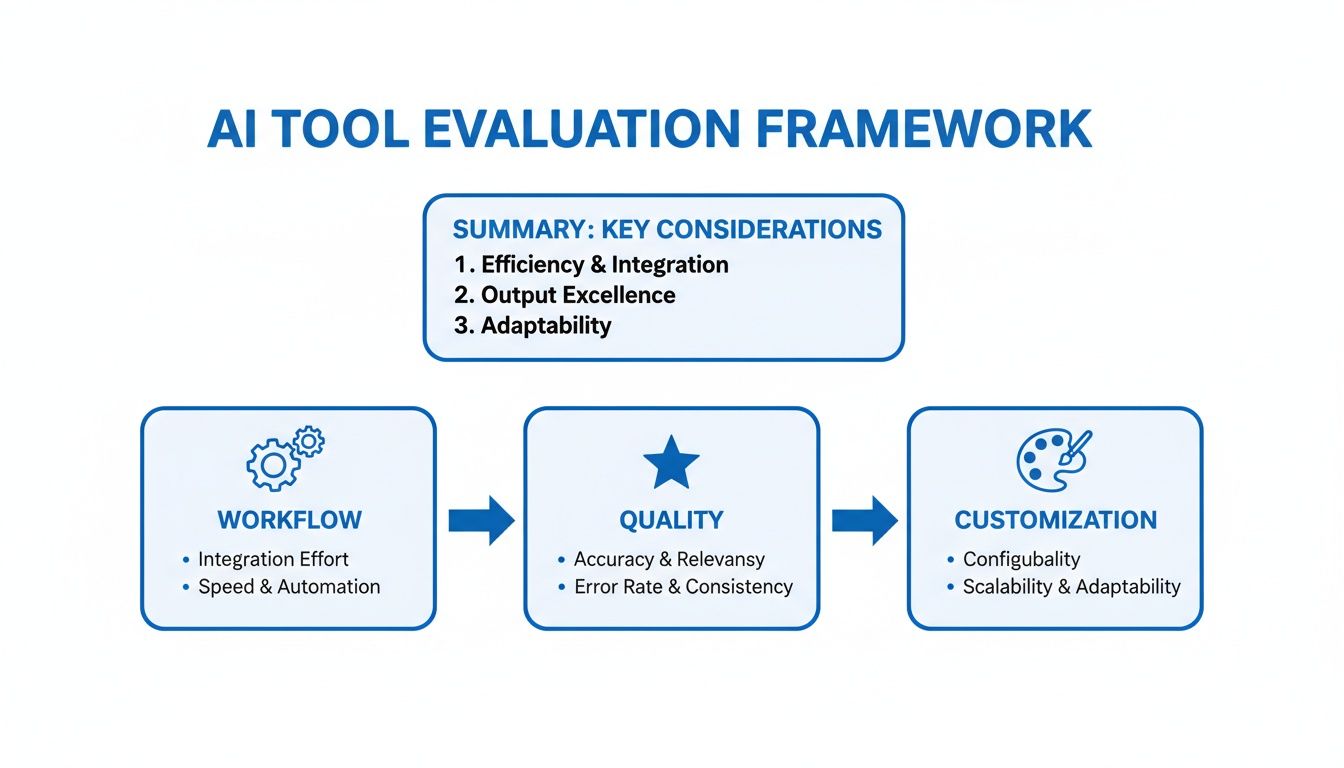
This graphic is a great reminder that the best AI video maker isn't just about one shiny feature. It’s about finding the right balance between a fast, intuitive process, professional-looking output, and the creative control you need to make content that's actually yours.
Workflow and Speed From Idea to Published Video
The first big test is how fast you can go from a simple idea to a published video. This isn’t just about raw processing power; it’s about the entire experience from start to finish. Let's compare the workflows of ShortsNinja, InVideo AI, and Synthesia.
ShortsNinja is built around a super-efficient three-step process: drop in an idea, tweak the AI-generated script, then generate the visuals and schedule it. The whole system is optimized for producing multiple short videos every single day, turning what used to take hours into a task that takes about five minutes. Plus, its built-in scheduler for TikTok and YouTube means you don't even have to leave the platform to publish.
InVideo AI also kicks things off with a prompt, but its main game is pulling together videos from a massive stock footage library. While it's quick, this approach can sometimes mean you spend extra time hunting for the perfect clips to match your script. It adds a bit of manual work back into the process. Its prompt-based editing is a cool feature, but it can feel a little like a trial-and-error game to get the exact result you want.
Synthesia operates in a completely different world. You don’t generate videos from a prompt; you create presenter-led videos using digital avatars. You pick an avatar, paste in a script, and the AI spits out a talking-head video. It’s a clean, straightforward process for its specific niche—like corporate training or employee onboarding—but it's way too rigid for the fast-paced, visual storytelling needed for social media.
The real difference in workflow isn't just speed—it's the kind of speed. ShortsNinja is all about creative velocity for social media, while Synthesia is built for predictable consistency in a corporate setting.
Output Quality Visuals and Voiceovers
What good is a fast workflow if the final video looks and sounds cheap? The visual models and voice tech each platform uses create some very noticeable differences in the end product.
ShortsNinja taps into top-tier AI models like Flux and RunwayML for visuals and ElevenLabs for voiceovers. This combo delivers incredibly dynamic visuals and some of the most realistic, human-sounding narration you can get, available in over 50 languages. The goal here is to create "faceless" content that looks and sounds premium enough to stop the scroll.
InVideo AI mostly leans on stock media libraries like iStock. The footage itself is high-quality, but it can sometimes lack that unique, AI-generated flair that makes content feel fresh. While it has AI video generation, its core strength is piecing together existing assets, which can sometimes make the final video feel less cohesive than one generated from a single AI vision.
Synthesia is the undisputed leader in its niche: AI avatars. They are incredibly realistic, with natural lip-syncing and subtle movements. But that’s where the visual magic ends. The video is just the avatar against a simple background. This makes it a non-starter for the visually rich, fast-paced content that dominates platforms like TikTok or Instagram Reels.
Customization and Creative Control
How much control do you actually have over the final video? The ability to tweak a script, swap out visuals, and inject your brand’s personality is what separates a good tool from a great one.
ShortsNinja strikes a nice balance. It handles the heavy lifting of scriptwriting and visual generation but gives you a simple, powerful editor to polish the final video. You can easily edit the script, regenerate specific scenes, adjust timing, and add background music. It gives you the final say without trapping you in a complicated editing interface.
InVideo AI offers a lot of customization through its prompt-based editor. You can tell the AI to "make the music more upbeat" or "change the third clip to a sunset." It’s an interesting approach, but it can feel less precise than just clicking and dragging. If you like talking to your tools, it's great; if you prefer hands-on control, it might feel a bit indirect.
Synthesia gives you deep customization, but only within its narrow scope. You can create a custom avatar of yourself (for a hefty fee), upload brand assets for backgrounds, and control the avatar's tone. However, you can't customize the visual story beyond the presenter format. You get total control over the avatar but almost none over the video's broader creative direction.
A side-by-side look makes their intended purposes crystal clear.
AI Video Maker Feature and Use Case Comparison
This table breaks down how each platform stacks up based on its core features, automation, and who it's really built for. Choosing the right one comes down to what you're trying to accomplish.
| Feature | ShortsNinja | Competitor A (InVideo AI) | Competitor B (Synthesia) |
|---|---|---|---|
| Primary Workflow | 3-step prompt-to-video | Prompt-to-stock-video | Script-to-avatar-video |
| Ideal Use Case | Faceless social shorts at scale | B-roll heavy content, explainers | Corporate training, internal comms |
| Visual Source | Top-tier AI Models (Flux, Runway) | Stock Media Libraries (iStock) | AI Avatars |
| Voice Tech | Premium (ElevenLabs) | Standard Text-to-Speech | Premium Avatar Voices |
| Automation Level | High (script, visuals, publishing) | Medium (visual assembly) | Medium (avatar generation) |
| Publishing | Integrated Scheduler | Manual Export | Manual Export |
As you can see, the "best" tool really depends entirely on the job you need to do. There’s no one-size-fits-all solution here.
For creators, the level of control you have directly impacts your brand's voice.
- For brand consistency in corporate videos, Synthesia’s controlled environment is perfect.
- For fast-paced social content, ShortsNinja’s mix of automation and simple editing is the sweet spot.
- For videos that rely on stock footage, InVideo AI offers a flexible, prompt-driven experience.
Ultimately, the decision boils down to your specific goals. If your mission is to dominate short-form video platforms with engaging, visually stunning content that you can produce at scale, ShortsNinja's purpose-built workflow is tough to beat. If you're making corporate presentations or assembling videos from existing media, one of the other tools is likely a better fit.
Which AI Video Maker Is Right for You
Choosing the right AI video maker isn’t about chasing the longest feature list. It’s about matching a tool's fundamental strengths to your specific goals, audience, and daily workflow.
What a marketing agency needs to produce polished training videos is worlds away from what a solo creator needs to dominate TikTok. This is where we need to look past feature comparisons and dive into real-world scenarios to figure out which tool actually gets the job done for you.
For the Solo Creator and Social Media Manager
If you're flying solo as a creator or managing social media, your world revolves around speed, consistency, and volume. The goal is simple: pump out engaging content every single day for platforms like TikTok, YouTube Shorts, and Instagram Reels without getting tangled up in a complex production mess.
Scenario: You want to publish three unique, faceless videos daily. Your strategy is built on educational or motivational content that demands compelling visuals and a clear, authoritative voiceover.
In this situation, your perfect AI video maker must deliver on a few key things:
- Rapid Generation: Going from a simple idea to a finished video in under five minutes is essential.
- Integrated Publishing: A built-in scheduler that posts directly to your social channels is a massive time-saver and removes the friction of manual uploads.
- High-Quality Voiceovers: You need access to premium, human-sounding voices (like those from ElevenLabs) to keep viewers hooked.
This is exactly where a platform like ShortsNinja shines. It was built from the ground up for this very purpose. Its simple three-step process—idea, script, generate—is fine-tuned for cranking out short-form content at scale. The direct integration with TikTok and YouTube cuts out the tedious manual steps, letting you build a content pipeline that practically runs itself.
For the Marketing Agency and Small Business Owner
Marketing agencies and small business owners operate on a different wavelength. Speed is still a factor, but brand consistency, customization, and team collaboration are the real priorities. You’re likely creating a much wider range of content, from social media ads and product demos to internal training modules.
Scenario: Your agency needs to produce a series of branded training videos for a corporate client. The videos must feature a consistent presenter, follow strict brand guidelines (logos, colors, fonts), and be easy to update as policies change.
For this job, you need an AI video maker with:
- Robust Customization: Deep control over branding, including custom asset uploads and reusable templates.
- Team Collaboration: Features that let multiple people review, edit, and approve projects.
- Specialized Output: The ability to generate specific video types, like those with realistic AI avatars for a professional touch.
This is the sweet spot for a tool like Synthesia. Its core strength is creating polished, avatar-led videos that are perfect for corporate communications. While it doesn't have the creative chaos needed for viral social content, its controlled environment guarantees every video is perfectly on-brand. The trade-off is a more structured, less flexible workflow that values consistency over speed.
The key is to align the tool with the content's purpose. For audience growth on social media, you need speed and engagement. For corporate branding and training, you need control and consistency.
For the Course Creator and Educator
If you're a course creator or educator, your focus is on one thing: delivering clear, instructional content. Your primary challenge is turning complex information into video lessons that are easy to digest. Visuals must support the script, and the voiceover needs to be exceptionally clear.
Scenario: You’re building an online course and need to produce 50 short, educational videos explaining key concepts. The material is text-heavy, and you need a way to visualize it without spending weeks digging for B-roll.
The ideal tool for an educator offers:
- Excellent Text-to-Video Logic: The AI needs to be smart enough to interpret a script and pull relevant, high-quality visuals to match.
- Script and Scene Editing: An intuitive editor is crucial for tweaking the script and regenerating specific scenes to ensure everything is accurate.
- Multi-Language Support: The ability to generate videos in multiple languages can massively expand your course’s market reach.
Platforms like InVideo AI and ShortsNinja are both strong options here. InVideo's main advantage is its enormous stock media library, which is great for creating traditional explainer videos. However, if you want more dynamic and unique visuals that actually hold a student's attention, ShortsNinja's use of advanced AI models gives it an edge. It helps make educational content feel more engaging and less like a generic slideshow.
By matching your role to the right tool, you can make sure your video creation efforts are not just efficient, but truly effective.
Your First Project with ShortsNinja
Theory and comparisons are great, but the real test is seeing how a tool works in practice. So let's create your first short video with ShortsNinja. This process is designed to take you from a simple idea to a publish-ready video in less than five minutes. Seriously.
The entire workflow is built on a simple three-step philosophy: Idea, Script, Generate. This approach cuts out all the usual friction—scripting, finding visuals, recording voiceovers—so you can stay focused on your core message.
Step 1: Enter Your Video Idea
It all starts with a single text prompt. This is where you tell the AI what you want to create. It can be a broad topic, a specific question, or a detailed instruction.
For example, you could start with something like "The history of ancient Rome" or get more specific with "A motivational video about overcoming procrastination using the two-minute rule." The more context you give it, the better the script will be. Think of it as your creative brief for the AI.
Step 2: Refine the AI-Generated Script
Once you hit enter, ShortsNinja instantly generates a full script formatted for a short video, complete with a hook, body, and call to action. It all appears in a simple editor, giving you total control.
You can tweak sentences, add your own perspective, or shift the tone to match your brand. This step is where the magic happens, blending AI efficiency with your human touch to make sure the final video feels genuinely yours.
The best AI video makers don't just spit out content—they give you a solid framework that you can quickly refine and personalize. This is what saves hours of writing time while keeping you in the driver's seat.
After you've polished the script, just pick a voice and language. With support for over 50 languages and premium voices from providers like ElevenLabs, your content will sound natural and connect with viewers anywhere in the world.
Step 3: Generate and Schedule Your Video
With the script and voice locked in, all that's left is to click "Generate." The AI gets to work, analyzing your script scene-by-scene to find or create perfectly matched, high-definition visuals. It automatically adds captions, background music, and smooth transitions, pulling everything together into a polished video.
When it's done, the video shows up in a simple editor for a final look. If a visual isn't quite right, you can regenerate a specific scene or make a few timing tweaks. Once you're happy, you can use the built-in content scheduler to publish it directly to TikTok and YouTube without ever leaving the platform.
Ready to try it yourself? You can create your first video for free and see just how fast it is.
- Start Your Free Trial: Head over to the official ShortsNinja website to sign up and create your first video at no cost.
- Experience the Workflow: Follow the simple idea-to-video process we just walked through.
- Apply Your Discount: If you love it, use the exclusive code NINJA30 at checkout for a 30% lifetime discount on any plan.
This straightforward process turns video creation from a time-sucking chore into a quick, creative, and scalable part of your workflow.
Common Questions About AI Video Makers
Diving into AI video creation brings up a few practical questions. Before you settle on a tool, it's smart to get a handle on what to expect—from ease of use and output quality to the actual cost. Getting these common questions answered upfront will help you pick the right AI video maker with confidence.
Making the right call from the start means your creative flow stays smooth and your investment actually pays off. Let's tackle some of the most common things creators ask.
Which AI Video Maker Is Best for Beginners?
If you're new to making videos, the best place to start is with a platform that keeps things simple and guided. The goal is to find a tool that cuts down the technical learning curve so you can focus on your ideas, not on wrestling with complicated editing software. You want an interface that just makes sense from the get-go.
Tools built around a straightforward, step-by-step process are perfect. Think of a workflow that takes you from a single prompt to a finished script, and then straight to a video with visuals and a voiceover. This setup removes almost all the old-school barriers, meaning you can be producing solid content on day one without any video editing background.
The most beginner-friendly tools don't just throw features at you; they offer a clear path from an idea to a finished video. You should feel empowered, not overwhelmed, from your very first project.
A platform like ShortsNinja is designed around this idea. Its simple "Idea, Script, Generate" model was made for people who want professional results without the headache of a complex production process. It’s the perfect fit for beginners trying to build a consistent presence on social media.
Can AI Videos Look and Sound Authentic?
A big worry for many creators is whether AI-generated content can actually connect with an audience. The answer, more and more, is a definite yes. The tech behind modern AI video tools has come a long way, especially in the last year, making it possible to create videos that are both visually sharp and sound genuinely human.
The authenticity of the visuals really comes down to the underlying AI models the platform is using. The best tools use sophisticated models that produce dynamic, high-res images and clips—a world away from the generic, sterile look of early AI. This works especially well for faceless content channels, where a strong visual narrative is everything for building a brand.
The voice is just as critical. The quality of text-to-speech has improved dramatically.
- Premium Voice Synthesis: Platforms that partner with leaders like ElevenLabs deliver narration that’s nearly impossible to tell apart from a human voice, complete with natural pacing and emotion.
- Multi-Language Support: The ability to generate authentic-sounding voiceovers in dozens of languages opens the door to a global audience without the cost of hiring voice actors.
These improvements mean AI videos no longer have to feel robotic. When you use the right tools, they look and sound professional, helping you build a real connection with your viewers.
How Much Do AI Video Makers Cost?
The cost of an AI video maker can vary, but it's almost always a tiny fraction of what you'd pay for traditional video production. Knowing the common pricing models will help you figure out if it's a good investment for what you're trying to do.
Most platforms run on a subscription model, usually with a few different tiers.
- Monthly Subscriptions: This is the most common setup. You get a set number of video credits or generation minutes each month for a flat fee. Plans are usually scaled based on how much you produce and whether you need premium features.
- Credit-Based Systems: Some tools use a credit system where different actions—like generating a video or using a premium voice—cost a certain number of credits. This gives you flexibility since you only pay for what you actually use.
When you compare these costs to hiring a videographer, editor, and voice actor—which can easily run into thousands of dollars for a single project—the value is obvious. The right AI video maker gives you a scalable, affordable way to produce more content for less money, maximizing both your creative output and your budget.
Ready to see the speed and quality of a top-tier AI video maker for yourself? ShortsNinja offers an intuitive platform that turns your ideas into publish-ready videos in minutes.
Start your free trial and create your first video today at ShortsNinja!