
Using AI for your YouTube videos is easily the fastest way to scale your content. It gives solo creators and small teams the power to automate just about everything—scripting, voiceovers, even generating the final video. You can take a simple idea and turn it into a publishable video in minutes, slashing production time and costs without killing quality.
The New Reality of AI-Powered YouTube Content
Welcome to the new frontier of video production. The days when you needed a big studio and a hefty budget to create high-quality videos are long gone. The rise of accessible AI tools has completely changed the game, empowering anyone with a story to tell. If you're a solo creator, you can now produce professional-looking, engaging videos faster than you ever thought possible.
This isn't just about a new set of tools; it's a fundamental shift in how we work. The stuff that used to take hours or even days—brainstorming, scripting, recording, editing—can now be squeezed into a much shorter, more efficient process. This lets you spend less time wrestling with technical details and more time on the creative strategy that actually grows your channel.
Democratizing Video Creation
The real magic of AI is that it levels the playing field. You no longer need expensive cameras, a soundproof recording booth, or expert-level editing skills to build a successful YouTube channel. Instead, platforms like ShortsNinja can do the heavy lifting for you, generating entire videos from a single prompt.
This newfound accessibility has triggered an explosion of AI-generated content. It's becoming so common that by 2025, an estimated 58% of all video ads on YouTube will be made using AI. Why? Because it's incredibly efficient and cost-effective, allowing creators to pump out more content while keeping the quality high.
This infographic breaks down the simple, three-stage workflow that AI brings to video production.
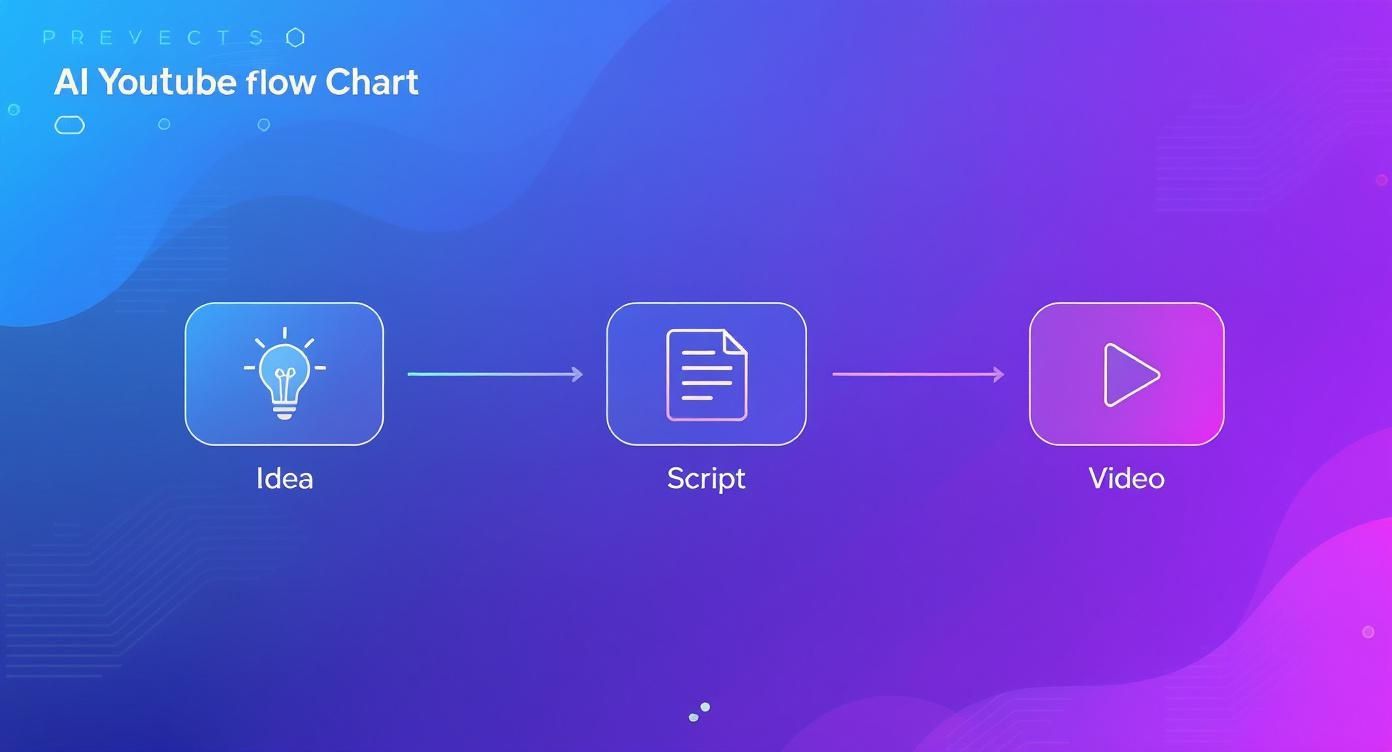
As you can see, AI neatly consolidates the most time-consuming steps—ideation, scripting, and generating visuals—into one automated pipeline.
This table provides a quick look at how AI transforms each part of the traditional YouTube workflow, making the whole process faster and more efficient.
AI's Impact Across the YouTube Workflow
| Production Stage | Traditional Method | AI-Powered Method | Key Benefit |
|---|---|---|---|
| Ideation | Manual brainstorming, keyword research, trend analysis. | AI generates video ideas, titles, and topics based on trending data. | Speed & Relevance |
| Scripting | Writing and editing scripts from scratch. | AI generates a complete, structured script from a simple prompt. | Efficiency |
| Visuals/Audio | Filming, finding stock footage, recording voiceovers. | AI generates video clips, selects B-roll, and creates synthetic voiceovers. | Cost Savings |
| Editing | Manually cutting clips, adding transitions, captions, and effects. | AI handles video assembly, adds auto-captions, and suggests edits. | Automation |
| Publishing | Writing descriptions, tags, and scheduling uploads manually. | AI drafts optimized descriptions and tags, and can schedule posts. | Optimization |
By handling the tedious, repetitive tasks, AI gives you back the time to focus on what really matters: the creative vision behind your content.
Embracing the Paradigm Shift
For creators, this means you can ramp up your output and experiment with different formats without burning out. Imagine testing five different video ideas in the same amount of time it used to take you to produce just one. That’s the kind of power AI puts in your hands. If you want to dig deeper into how AI is changing creative workflows, check out this a comprehensive guide to AI-powered content creation.
Key Takeaway: The goal isn't to replace human creativity but to amplify it. Think of AI as your super-efficient assistant, freeing you up to focus on the big-picture ideas that will actually grow your channel.
Crafting Compelling Scripts with AI Assistants
Every great YouTube video is built on one thing: a solid script. Long before you hit record or pick out background music, the script is the foundation that determines if someone watches for 30 seconds or all the way through. This is where using AI for YouTube videos gives you a massive leg up, helping you turn a vague idea into a structured, engaging narrative.
The trick is to treat AI not as a magic button but as a creative partner. Think of it as your own personal brainstorming machine and rapid-fire drafter. You feed it the core concept, who you're talking to, and the vibe you're going for, and it spits back a framework. This completely bypasses the dreaded "blank page" problem, letting you jump straight to the fun part: refining and adding your own unique flavor.
From Prompt to Polished Draft
Learning to write a killer prompt is the single most important skill for AI scriptwriting. A lazy prompt like "Write a video script about productivity" is guaranteed to get you a bland, cookie-cutter result that sounds like a Wikipedia article.
To get something great, you have to give the AI some guardrails. A strong prompt needs a few key ingredients:
- The Core Topic: Get specific. Not just productivity, but "The Pomodoro Technique for students."
- The Target Audience: Who is this for? Be clear: "college students studying for final exams."
- The Desired Tone: How should it feel? For example: "energetic, encouraging, and slightly humorous."
- The Video Structure: Map it out. Tell the AI you want "a hook, an explanation of the technique, three common mistakes to avoid, and a call-to-action to subscribe."
When you provide this level of detail, you’re not just asking for a script—you’re directing the AI to create something that actually fits your channel and resonates with your audience.
Pro Tip: Your first AI-generated script is just a starting point. Don't be afraid to tweak your prompt and run it again, ask the AI to rewrite a specific section, or cherry-pick the best lines from a few different outputs. Iteration is your friend here.
Refining and Personalizing Your AI Script
Once the AI gives you a solid first draft, it's your turn to shine. This is where you inject your personality, drop in a personal story, and make sure the script sounds like a real person—specifically, you. AI is a master of structure and information, but it can’t fake your lived experiences or unique voice.
Here are a few steps I always take to refine an AI script:
- Read it Aloud: Does it actually sound natural when you speak it? AI-generated text can sometimes come off as stiff or overly formal. Reading it out loud is the fastest way to catch awkward phrasing.
- Add Personal Stories: Find spots to insert a quick anecdote or a personal example. This is what builds a real connection with your viewers. If you want to dive deeper into crafting compelling narratives, our guide on using an AI story creator has some great techniques.
- Check for Accuracy: Always, always fact-check any stats, dates, or claims the AI makes. These models are incredibly smart, but they're not perfect and can sometimes pull incorrect information.
To get even better at this, check out guides on using an AI paragraph writer to learn how to refine text one chunk at a time. The goal isn't to let AI replace your creativity but to amplify it, making sure your final video is both incredibly well-structured and uniquely yours.
Automatically Generating Your Video and Voiceover
Once you've got a killer script, it's time to bring it to life. This is where AI video tools really come into their own, letting you create an entire video from text without ever touching a camera. It’s a huge advantage if you’re trying to scale your content, especially for channels that aren’t built around a talking-head personality.
Tools like Synthesia or InVideo were made for this. You just copy and paste your script, and the AI takes over. It can pull from massive libraries of high-quality stock footage, whip up some slick animations, or even generate a surprisingly lifelike AI avatar to act as your presenter. The whole process turns what used to be hours of filming and hunting for B-roll into something you can knock out in a few minutes.
This approach works wonders for explainer videos, tutorials, or news-style updates where the visuals are there to back up the narration. Instead of blowing your budget on fancy camera gear, you can let the AI handle the visuals while you stay focused on delivering great information.
To help you decide which tool is the right fit, here’s a quick breakdown of some popular options.
Comparing AI Video Generation Tools
| Tool Name | Best For | Key Features | Pricing Model |
|---|---|---|---|
| ShortsNinja | Bulk video creation and social media automation | AI voiceovers, series automation, direct publishing to YouTube & TikTok, template library. | Subscription-based, starting around $19/month. |
| InVideo | Beginners and creators needing a vast media library | Script-to-video conversion, 5,000+ templates, extensive stock media, easy-to-use editor. | Freemium, with paid plans for more features. |
| Synthesia | Corporate training and professional explainer videos | Realistic AI avatars, 120+ languages, screen recording, custom branding. | Subscription-based, targeting business users. |
| Pictory | Repurposing long-form text like blog posts into video | Automatically extracts key points, adds stock footage and music, auto-captioning. | Subscription-based, with a free trial available. |
Each platform has its strengths. ShortsNinja is built for speed and volume, InVideo is great for getting started without a steep learning curve, Synthesia excels at creating polished, avatar-led presentations, and Pictory is perfect for turning your existing written content into a new video asset.
Choosing The Right AI Voice For Your Brand
A great video is nothing without great audio. Thankfully, AI voiceovers have gotten so realistic that they’re often tough to tell apart from a human narrator. This gives you a consistent, professional sound for every piece of content you produce. The trick is finding a voice that actually sounds like your brand.
When you're browsing through AI voices, think about these things:
- Tone and Style: Are you going for an energetic, upbeat vibe for a marketing channel? Or do you need a calm, authoritative voice for an educational series? Most platforms categorize their dozens of voice options by style, which helps narrow it down.
- Pacing and Inflection: A good AI voice generator won't just read the script; it'll let you direct the performance. You can add pauses for dramatic effect, tweak the speed, and even adjust the emotional inflection to make sure it doesn't sound robotic.
- Language and Accent: If you're building a global audience, using AI to create videos in multiple languages is incredibly efficient. You can produce your video once and then generate several different audio tracks for different regions.
Picking the right audio is so important for keeping people watching. If the voice feels off or doesn't match your channel's personality, viewers will click away in a heartbeat. To help you sort through the options, we put together a list of the top 5 AI voice generators to elevate your content that offer high-quality, customizable voices.
Syncing Visuals and Narration
Okay, so you have your visuals and your voiceover. The last piece of the puzzle is making sure they line up perfectly. Modern AI for YouTube videos tools actually automate a huge part of this. For example, when you drop your script in, the platform analyzes the text and starts suggesting relevant video clips for each sentence.
Let's say a line in your script is, "successful remote teams rely on clear communication." The AI might instantly pull up a clip of a team collaborating over a video call. Your job then is to simply review its suggestions, swap out anything that doesn't quite hit the mark, and add your own branding, like a logo or specific brand colors.
This automated syncing saves a massive amount of time. It ensures your video has a professional rhythm where the visuals directly reinforce what's being said, keeping your audience locked in from the intro all the way to your call-to-action.
Enhancing Your Video with AI Editing Tools
Think of your first AI-generated video as a fantastic rough cut. You've got all the raw materials, but the real magic happens in post-production. This is where AI editing tools come in—not to take over your creative vision, but to handle all the tedious, time-consuming tasks that used to take hours.
Instead of manually slicing out every awkward pause or filler word, AI can do it for you. Features like automatic jump-cut removal clean up your narration in seconds, making you sound more confident and keeping the video's pace snappy. That feature alone can easily save you an hour on a ten-minute video.
Automating the Final Touches
Beyond just making cuts, AI is brilliant at handling the finer details that give your video that professional sheen. These tools can analyze your footage and apply automatic color grading, giving every clip a consistent, cinematic feel with a single click. No more messing around with color wheels and saturation sliders unless you actually want to.
Another game-changer is audio cleanup. If your recording has background noise or the volume is all over the place, AI-powered enhancers can isolate your voice, remove the distractions, and balance the levels. The result is crisp, clear audio that makes your content instantly more watchable.
This automation also helps with accessibility. We all know creating accurate subtitles used to be a mind-numbing job. Now, tools like Descript or even YouTube's built-in features can generate and sync them for you, boosting viewer retention and SEO in the process.
Key Insight: The best AI editing tools don't just speed up your workflow; they elevate the final product. By automating the technical chores, they free you up to focus on storytelling, pacing, and creative polish.
Your AI Post-Production Checklist
Before you hit that publish button, run through a quick checklist. This final pass ensures your AI-assisted video is polished and truly ready for your audience. It makes all the difference.
- Review AI Jump Cuts: Always double-check that the AI didn't remove an intentional pause you added for dramatic effect.
- Verify Subtitle Accuracy: Auto-generated captions are good, but they're not perfect. Do a quick read-through to fix any weird phrasing or misheard words.
- Check Audio and Music Levels: Make sure your background music isn't drowning out your narration. AI can help you find royalty-free tracks that fit the mood, but you're still in charge of the final mix.
- Add Your Branding: Manually drop in your channel's logo, intro/outro, and any other on-screen graphics to keep your branding consistent.
The goal is to use AI for YouTube videos as a powerful assistant, not a total replacement for your own judgment. This strategic approach is also being adopted on the platform itself. YouTube's AI allows advertisers to deploy various video formats in one campaign, which can lift ad recall and brand awareness by up to 30%. You can learn more about YouTube's statistical trends and see how AI is shaping the platform.
By blending AI efficiency with your creative oversight, you create a final product that is both high-quality and distinctly yours.
Optimizing Your Videos for YouTube Discovery
Making an amazing video is a huge win, but it's only half the battle. If nobody finds it, all that time and effort feels wasted. This is where using AI for YouTube videos shifts from pure content creation to smart distribution, helping you get your work in front of the right eyeballs.
The YouTube algorithm is a complex beast. At its core, though, it’s just trying to match the right video with the right viewer. AI tools give you a direct line into understanding what both the algorithm and your audience are looking for. You can stop guessing which keywords might work and start analyzing real search trends, identifying low-competition topics, and finding the exact phrases people are typing into the search bar.
Uncovering High-Demand Keywords with AI
Manual keyword research can feel like fumbling around in the dark. You might stumble upon a high-volume keyword, but it’s often so competitive that a smaller channel has zero chance of ranking for it.
AI tools flip that script entirely. They chew through massive datasets to pinpoint "opportunity keywords"—terms with healthy search volume but relatively low competition. This lets you target topics where your video can actually climb the search rankings and get discovered.
Instead of a super broad term like "fitness tips," an AI tool might suggest a much more specific, achievable keyword like "15-minute dumbbell workout for beginners at home." That’s the kind of targeted insight that gets videos seen. For a deeper look, check out our guide on the best AI tools for YouTube keyword trends to find the right one for your channel.
My Personal Tip: Don't just stop at the main keyword. Ask your AI tool for a list of related long-tail keywords and LSI (Latent Semantic Indexing) terms. Sprinkling these naturally into your description and tags tells YouTube precisely what your video is about, which can seriously boost its relevance.
Generating SEO-Friendly Metadata Instantly
Once you've got your keywords, you need to weave them into your video's metadata—the title, description, and tags. Writing all this from scratch is a drag, but AI makes it fast and incredibly effective.
Just feed your video script or a brief topic summary into a tool and ask it to generate several compelling, SEO-friendly titles. This lets you A/B test different angles or just pick the one that grabs attention while still including your target keyword. The same goes for your description. AI can draft a detailed, keyword-rich paragraph that both helps the algorithm and entices humans to click.
This isn't just theory; it has a real impact. Advertisers using AI-driven campaigns on YouTube saw a stunning 111% increase in sales compared to those sticking with manual methods. That’s the power of AI’s ability to analyze user data and predict behavior. You can discover more YouTube statistics and insights that show just how much AI is changing the game.
Analyzing Competitors to Find Content Gaps
One of the most powerful uses of AI for YouTube videos is spying on your competition—ethically, of course. AI tools can scan the top-ranking videos in your niche and break down exactly what's working for them.
You can see things like:
- The exact tags they're using to capture traffic.
- How they structure their descriptions for maximum SEO impact.
- Which of their topics are getting the most engagement.
This information is pure gold. It helps you identify content gaps—valuable topics your competitors have completely overlooked. This gives you a clear shot to create a video that serves an unmet need and captures an audience waiting for content just like yours.
Common Questions About AI on YouTube
As creators start using these powerful new tools, a lot of good questions pop up. Using AI for YouTube videos can feel like stepping into uncharted territory, so let's tackle some of the biggest concerns head-on.
The elephant in the room is usually monetization. Can you actually earn money from a channel that relies on AI? The short answer is yes, but there's a catch. YouTube cares about the value you provide, not the tools you used to make the video.
Your content still has to be original, engaging, and give viewers a good experience. A channel that just mindlessly churns out low-effort, repetitive AI videos will probably get flagged as spam and demonetized. The real trick is using AI as a super-powered production assistant for your unique ideas, not as a substitute for your creativity.
Will My Content Be Considered Original?
Originality is another hot topic. If an AI writes the script, finds the visuals, and generates the voiceover, is the video really yours? This is where your job as the creative director comes in.
You're the one steering the ship. You provide the initial spark, polish the script, and make all the final editing calls. By weaving in your own stories, unique takes, and specific branding, you turn the AI's raw output into something that is genuinely your own.
To make sure your content always feels distinct, try this:
- Customize Everything: Never, ever use the first draft an AI gives you. Tweak scripts until they sound like you, swap out generic visuals, and direct the tone of the voiceover.
- Add a Human Layer: This is your secret weapon. Sprinkle in your own personal stories, opinions, or data you've analyzed. It's a layer of value the AI simply can't create on its own.
- Develop a Unique Style: Use consistent branding, editing quirks, and a storytelling approach that makes your channel instantly recognizable.
What About YouTube's Policies?
It's worth remembering that YouTube uses AI to enforce its own rules. In a single quarter, the platform's automated systems took down over 11.4 million videos for violating community guidelines. That shows just how central AI is to their moderation. You can read more about YouTube's content moderation statistics to see the sheer scale of it all.
The platform's stance is pretty clear: your content has to follow their policies, no matter how it was made. Using AI the right way means making sure your videos are compliant, valuable, and a positive contribution. As long as you keep your focus on quality and originality, AI is just another tool in your creative arsenal.
Ready to scale your video production without sacrificing quality? ShortsNinja automates the entire process, turning your ideas into engaging, publish-ready videos in minutes. Start creating with ShortsNinja today!