

So, what exactly is a YouTube video scheduler? Think of it as your personal content assistant. It's a tool that lets you upload videos ahead of time and pick the exact date and time they go live. This means you can drop your content right when your audience is most active, maximizing those crucial initial views and engagement, all without having to be glued to your computer for every single launch.
Why a YouTube Video Scheduler Is a Growth Engine
Let's be real—staying consistent on YouTube can feel like a full-time job on its own. The constant pressure to create, edit, and publish can quickly lead to burnout. This is where a scheduler stops being a simple convenience and becomes a powerful engine for growing your channel. It’s not just about saving a few hours; it’s about taking back your creative freedom and operating like a professional.
When you start scheduling uploads, you shift your entire workflow from being reactive to proactive. No more rushing to finish a video right before your audience expects it. Instead, you can work ahead. This is a game-changer known as content batching, where you film and edit several videos in one go. Suddenly, your week opens up, giving you time to focus on engaging with your community, promoting your content, and dreaming up your next big idea.
Feed the Algorithm and Build Audience Trust
Consistency is king on YouTube, and both the algorithm and your viewers will thank you for it. When you publish on a predictable schedule—like clockwork, every Tuesday and Friday at 4 PM—you're sending some pretty powerful signals. The algorithm starts to see your channel as reliable, which can give your videos a nice little boost in recommendations.
Even more important, though, is the trust you build with your audience. They learn exactly when to expect new content, making your channel a dependable part of their routine. This loyalty is huge. It encourages viewers to hit the notification bell and jump on your videos the second they drop, and that initial wave of engagement is a critical factor in a video's long-term success.
A quick look at how scheduling directly moves the needle on your channel's key metrics shows just how impactful this strategy can be.
How Strategic Scheduling Impacts Key Channel Metrics
| Metric | Direct Impact of Using a Scheduler |
|---|---|
| Initial Views (First 24 Hours) | Maximized by publishing at peak audience hours, which drives early momentum. |
| Audience Retention | Consistent, high-quality releases build anticipation and keep viewers coming back. |
| Subscriber Growth | A reliable schedule turns casual viewers into loyal subscribers who trust your channel. |
| Watch Time | Scheduling allows for batching, freeing up time to create better, more engaging videos. |
| Engagement Rate (Likes/Comments) | Releasing content at optimal times encourages immediate interaction from an active audience. |
Ultimately, a scheduler isn't just about automation. It's about showing up for your audience consistently, which builds the foundation for sustainable growth.
A scheduler isn't just a tool for automation; it's a commitment to your audience. It demonstrates professionalism and respect for their time, turning casual viewers into dedicated subscribers who show up for every premiere.
Conquer Timezones and Reduce Burnout
If you have a global audience, timezones can feel like your worst enemy. A scheduler solves this problem instantly. You can release a video at the perfect viewing time for your audience in another country without pulling an all-nighter. Imagine capturing peak engagement in Europe while you're fast asleep in North America—that's the magic of strategic scheduling.
The personal benefits are just as important. The relentless demand for new content is one of the biggest causes of creator burnout. A scheduler acts as a buffer, giving you the freedom to take a vacation, deal with life's surprises, or just take a mental health day without your channel going silent.
To really streamline your releases, setting up an automatic upload to YouTube workflow can completely reshape your content strategy. This shift from a constant content grind to a managed, sustainable operation is what separates the channels that thrive from those that eventually burn out.
Using YouTube Studio's Built-In Scheduler
Before you even think about third-party tools, you need to get comfortable with the powerful—and completely free—youtube video scheduler that’s already built into YouTube Studio. This isn't just some basic "set it and forget it" feature. It's a surprisingly robust system that gives you precise control over your content launches.
You'll find it right at the end of the upload process. After you've uploaded your video and painstakingly filled out all the metadata, you’ll land on the "Visibility" screen. This is where the magic happens. Instead of just clicking "Public," you’ll select "Schedule." A simple calendar and time selector will pop up, letting you pinpoint the exact moment your video goes live.
If you want a full breakdown of the entire upload workflow, our guide on how to post a YouTube video walks you through every single step.
Getting a Handle on Visibility Options
Knowing the difference between the visibility settings is crucial for a smart scheduling strategy. Each one has a specific job and can seriously level up how you manage your content and engage with your community.
- Private: Think of this as your personal draft space. Only you and specific people you invite via email can see the video. It's perfect for getting final approval from a client or your team before the big launch.
- Unlisted: Anyone with the direct link can watch, but it’s invisible otherwise—no showing up in search, on your channel, or in subscriber feeds. I love using this to give my Patreon supporters or email subscribers a sneak peek as a special thank you.
- Public (Scheduled): Your video stays locked down and private until the scheduled time. Then, BAM! It goes public for everyone, hitting subscriber feeds and showing up in search.
This final screen in YouTube Studio is your launch control.
It puts you in the driver's seat, giving you complete authority over when and how your hard work is finally released to the world.
Turn Your Launch into an Event with Premieres
Want to build some serious hype? Instead of a standard scheduled release, try the "Premiere" feature. When you schedule a video as a Premiere, YouTube automatically creates a public watch page for it ahead of time, complete with a countdown timer. This lets your audience set a reminder and builds anticipation for the launch.
By scheduling a video as a Premiere, you transform a simple video launch into a live, interactive community event. The real-time chat function lets you engage directly with your most dedicated fans as they watch your new content for the first time together.
This feature is a game-changer for big moments, like kicking off a new series, a major channel announcement, or a special collaboration. The live chat during the Premiere can send initial engagement through the roof, flooding the video with early comments and likes—all powerful signals to the YouTube algorithm right from the get-go.
By mastering these native tools, you can ensure every video you publish is perfectly polished. Schedule your upload, then use that extra time to add your end screens, info cards, and a killer pinned comment. That way, the moment your video goes live, every single element is already in place to maximize watch time and viewer interaction.
How to Find Your Channel's Prime Posting Time
Posting a video at the wrong time is like throwing a party and forgetting to send out the invites. You could have the best content in the world, but if nobody's around to see it right away, it's going to struggle to get that crucial initial traction. Using a YouTube video scheduler is only half the battle; knowing when to schedule for maximum impact is the other.
Luckily, the most powerful tool for this is hiding in plain sight right inside your YouTube Studio. It’s the "When your viewers are on YouTube" report, and it’s a personalized roadmap to your audience's online habits. This graph shows you, hour by hour, exactly when your viewers are most active on the platform.
Don't just glance at it—live by it. The darkest purple bars are your peak traffic hours. Think of these as the golden windows when the largest slice of your audience is online and ready to watch.
Deciphering Your Audience's Digital Clock
Every channel's data is different. A gaming channel might see huge spikes late on a Friday night, while one focused on home cooking could find its sweet spot on Sunday mornings. General advice is a decent starting point, but your own analytics tell the real story.
Look for consistent patterns over the last 28 days. Are there specific days or times that consistently light up with activity? That's your target. If you see a bright purple block from 6 PM to 9 PM on Thursdays, that’s your cue to schedule your next big video for 5 PM that day. This gives it a little time to index before the rush hits.
Pro Tip: Don't just publish during peak hours—publish just before them. Scheduling your video to go live 1-2 hours before your audience's busiest time lets YouTube's system process and index it. That way, it's ready to be served to viewers the moment they log on.
General data from 2025 shows that peak viewing times often land in the late afternoon and early evening, which makes sense—it’s when people are unwinding after work or school. Weekday videos tend to do best when uploaded between 12 PM and 3 PM local time, prepping them for the prime consumption window of 3 PM to 5 PM. For U.S. audiences, that sweet spot is typically between 7 PM and 10 PM EST.
Sample Weekly Schedule for a Multi-Format Channel
To put this into practice, here’s what a balanced weekly schedule might look like. This example shows how a creator can strategically time both long-form videos and Shorts to catch different waves of audience activity throughout the week.
| Day of Week | Long-Form Video Post Time (Example) | YouTube Shorts Post Times (Example) |
|---|---|---|
| Monday | No Post | 7:00 AM, 12:00 PM, 4:00 PM |
| Tuesday | 4:00 PM EST | 8:00 AM, 1:00 PM, 5:00 PM |
| Wednesday | No Post | 7:30 AM, 12:30 PM, 4:30 PM |
| Thursday | No Post | 8:00 AM, 1:00 PM, 5:00 PM |
| Friday | 5:00 PM EST | 7:00 AM, 12:00 PM, 4:00 PM |
| Saturday | 11:00 AM EST | 9:00 AM, 2:00 PM, 6:00 PM |
| Sunday | No Post | 10:00 AM, 3:00 PM, 7:00 PM |
This kind of structured approach ensures you're consistently reaching your audience when they are most likely to engage, whether they're looking for a quick Short or a longer video.
Fine-Tuning Your Schedule with A/B Testing
Once you've zeroed in on a potential prime time, it's time to test it. Treat it like a science experiment to make sure your hypothesis holds up.
- Week 1: Schedule your video for your best-guess time (e.g., Thursday at 5 PM).
- Week 2: Post a similar video at a slightly different time (e.g., Thursday at 7 PM).
- Week 3: Try another variable, like a different day entirely (e.g., Friday at 5 PM).
After a few weeks, dive into your analytics and compare how these videos performed in their first 24 hours. Pay close attention to view velocity—how quickly the views roll in—and initial engagement metrics. This data-driven approach takes the guesswork out of the equation and helps you build a reliable, optimized posting schedule.
This strategy works for both long-form content and Shorts. For a more detailed breakdown, check out our guide on the best times to post YouTube Shorts in 2025. Combining these insights will help you build a powerful, multi-format content calendar that truly works.
Advanced Scheduling with Third-Party Tools
While YouTube Studio's built-in scheduler is a solid place to start, it’s just that—a starting point. When you're ready to get serious about scaling your channel, third-party tools are where you can really start to automate your workflow and get some of your valuable time back.
Think about it: what if you could plan out an entire month of content in a single afternoon? That's what these platforms are built for. They go way beyond scheduling one video at a time, introducing powerful features like bulk uploading. You can line up an entire batch of videos in a content calendar with just a few clicks. For anyone doing batch production, this is a total game-changer.
Streamlining Your Global Reach and Content Series
One of the biggest wins of using an external youtube video scheduler is how they handle timezones. If you’ve got viewers tuning in from all over the world, these tools can automatically post your videos at the sweet spot for each region. No more manual calculations trying to figure out the best time for your audience in London versus your audience in Los Angeles.
Many of these tools also offer series automation. Let’s say you run a weekly tutorial series. You can set up a recurring schedule so that every time you upload a new video and tag it for your "Weekly Tips" series, the tool takes over. It’ll publish it like clockwork every Tuesday at 4 PM, adding it to the right playlist with all your pre-set tags.
This simple process—analyze, test, and schedule—is the core of a smart publishing strategy, and it’s something these advanced tools help automate.
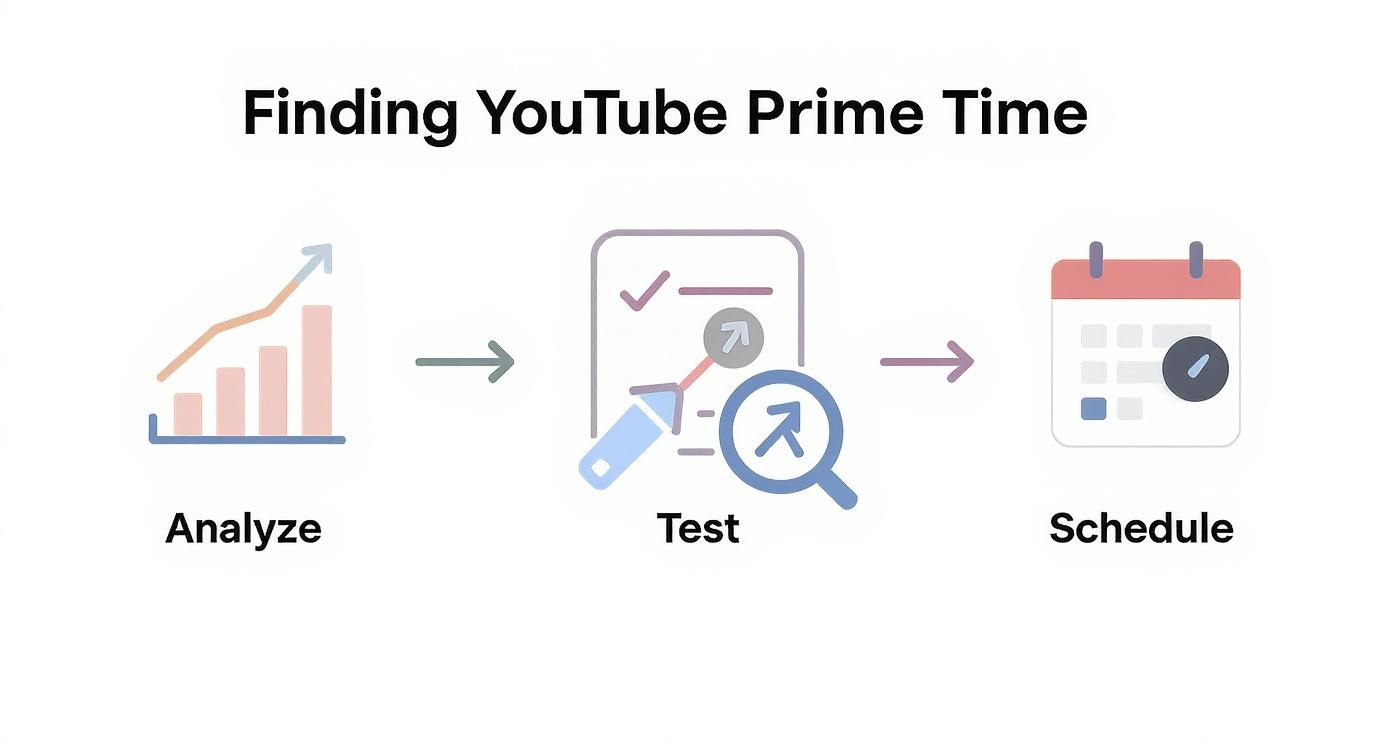
Managing this workflow through one centralized dashboard makes the whole thing far more efficient.
Harnessing AI for Smarter Scheduling
The most powerful tools are now baking AI right into the pre-publication process. This is where you shift from just scheduling content to building a data-backed content machine.
Here's a real-world example: A creator uploads a raw video file about "beginner drone photography." The platform's AI immediately gets to work.
- Title and Description Generation: It analyzes top-ranking videos in that niche and suggests several SEO-friendly titles and a compelling description draft.
- Predictive Engagement: The AI dives into your channel's historical data to pinpoint the absolute best time to publish for maximum views in the first 24 hours.
- Tag Recommendations: It generates a list of relevant, high-traffic tags to give your video a boost in discoverability.
What used to take hours of manual research and optimization now becomes a quick, five-minute review process. If you're interested in taking this even further, our ultimate guide to YouTube video upload automation dives deep into building a truly hands-free system.
When you use a third-party tool with AI features, you're not just scheduling a video. You're launching it with a data-driven strategy designed to give it the best possible chance to succeed from the moment you hit publish.
These platforms often give you a bird's-eye view of your entire content calendar across multiple channels. You can see your long-form videos, Shorts, and community posts all in one place, which helps you build a much more cohesive brand presence. For serious creators, the investment pays for itself pretty quickly in reclaimed time, less stress, and more strategically published content.
Fine-Tuning Your YouTube Shorts Scheduling Strategy
If you're trying to schedule YouTube Shorts like your long-form videos, stop. It's a completely different ballgame. Forget what you know about weekly uploads and deep audience retention metrics. The Shorts algorithm is a fast-moving river that rewards frequency, freshness, and immediate engagement above all else.
Your primary goal is to stay visible in the Shorts feed, period. A long-form video can gain steam over weeks, but a Short’s entire lifespan is often measured in just a few hours. This means a higher posting volume isn't just a good idea—it’s non-negotiable. Many creators I've seen crush it are posting anywhere from one to three Shorts per day.
Capitalize on Speed and Trends
The whole point of Shorts is speed, so you need to be nimble. A killer strategy is to schedule content around trending audio or challenges right as they peak. For example, if a specific sound starts blowing up, you can film a few takes, edit them quickly, and schedule them to go live over the next 48 hours. This gives you multiple shots at catching the viral wave before it crashes.
The Shorts algorithm is hungry. It rewards creators who feed it a steady stream of fresh, relevant content. If you schedule multiple Shorts to drop during peak mobile usage times—like morning commutes and late-night scrolling sessions—you dramatically increase your odds of getting seen.
The rise of Shorts has completely reshaped how we think about scheduling. With YouTube Shorts projected to hit 70 billion daily views in 2025 and engaging 164.5 million users in the U.S. alone, your timing has never been more critical. Since Shorts are made for quick hits of entertainment, scheduling them for early mornings or late evenings just makes sense.
Weave Shorts into Your Content Calendar
While Shorts definitely need their own rhythm, they're most powerful when they work with your long-form videos. Think of them as little promotional power-ups for your main content.
Here’s how you can make that happen:
- Drop Teasers: Schedule a compelling 30-second clip from an upcoming long-form video to post the day before it goes live. This builds hype.
- Repurpose Key Moments: After you publish a new video, chop up its best moments or key takeaways into several Shorts. Schedule them to go out throughout the week to keep the conversation going.
- Boost Community: Use Shorts for quick polls, Q&As, or to reply to comments from your main videos. It's a great way to drive community interaction.
For creators who are all-in on short-form content, an AI YouTube Shorts Generator can automate the creation process, making it way easier to keep up with a demanding schedule. By building a dedicated Shorts strategy into your youtube video scheduler, you create a powerful flywheel that boosts both discoverability and community engagement across your entire channel.
Got Questions About Scheduling on YouTube?
Even with the best strategy, a few questions always pop up when you start scheduling YouTube videos. Let's clear up some of the most common ones so you can schedule your content with total confidence.
Lots of creators get nervous about locking in a video. What if you spot a mistake after hitting "schedule"? Good news: you're not locked in at all.
Can I Edit a Scheduled Video Before It Goes Live?
Yes, absolutely. Think of a scheduled video as being in a waiting room, not on stage. Right up until its publish time, you have complete freedom to make changes.
Jump back into YouTube Studio and you can tweak the title, polish the description, add better tags, or even swap out the thumbnail for a new one. This is actually one of the biggest perks of scheduling—it gives you a built-in buffer to catch typos or make last-minute improvements. It's your final chance for a review before the video goes public.
Another big question is whether scheduling messes with the algorithm.
Scheduling a video doesn't hurt its performance; it helps it. The YouTube algorithm rewards consistency and strong initial engagement. By scheduling content for your audience's peak viewing times, you give your video the best possible chance to get traction right away.
Does Scheduling a Video Hurt Its Performance?
Not one bit. In fact, scheduling usually gives your video a head start. The algorithm is watching closely to see how a video does in its first few hours.
When you schedule your content to drop right when your audience is most active, you're setting it up for that critical first wave of views, likes, and comments. That early momentum signals to YouTube that your video is resonating, which can lead to it being recommended more widely. This isn't some sneaky trick; it's a best practice YouTube itself encourages.
Finally, people often wonder what the difference is between a regular scheduled upload and a Premiere.
What Is a Premiere vs a Scheduled Video?
A standard scheduled video just flips from "private" to "public" at the exact time you set. Simple.
A Premiere, however, is more of a live launch party. When you schedule a video as a Premiere, YouTube creates a public watch page for it ahead of time, complete with a live countdown. Your subscribers can get a notification reminder, and when the countdown hits zero, everyone watches the video for the first time together. There’s even a live chat, just like a livestream. It's an awesome tool for building hype around a big video, a series finale, or a special announcement.
Ready to stop manually uploading and start building a hands-free content machine? With ShortsNinja, you can auto-generate, edit, and schedule an entire month of high-quality short videos in minutes, not hours. Try it for free and see how easy it can be.