
Using TikTok auto share is about way more than just saving a few minutes here and there. It’s a strategic move to get your creative energy back and make sure your content actually lands with maximum impact. At its core, it's about using tools to schedule and publish your videos for you, so they go live at the best possible times without you having to be glued to your phone.
The Real Impact of TikTok Auto Share on Your Workflow
Are you constantly checking the clock, just waiting for that perfect window to post your next video? That whole manual song and dance eats up time you could be using to brainstorm, film, or actually talk to your community. Switching to an automated system completely flips your content process from reactive to proactive.
This shift in strategy is huge if you're serious about scaling your presence. The whole point of workflow automation is to let technology handle the boring, repetitive stuff. This frees you up to focus on what actually matters. When you set up a TikTok auto share system, you're not just scheduling posts—you're building a content engine that runs on its own.
Building Consistency and Reaching Peak Hours
A consistent posting schedule is one of the biggest green flags you can wave at the TikTok algorithm. And automation makes achieving that consistency a total breeze.
- Hit Peak Audience Times: You can schedule posts to go live exactly when your audience is most active, even if that’s 3 AM your time or right in the middle of a meeting.
- Maintain Content Rhythm: Pushing out a steady stream of content keeps your audience engaged and tells the algorithm your account is active and worth showing to more people.
- Batch Your Content: This is the real game-changer. Film and edit a bunch of videos in one go, then schedule them to drip out over the next few days or even weeks. It's a massive productivity hack.
The true power of automation isn't just about being efficient; it’s the freedom to step away. Knowing your content is going out and working for you while you’re doing other things is the secret to avoiding creator burnout.
The Algorithmic Advantage of Engagement
Here’s something interesting: the simple act of sharing is a massive trigger for the algorithm. Industry benchmarks from folks like Socialinsider.io show that videos with higher share rates get a huge boost in visibility.
Yet, the average share rate is shockingly low—around 0.01% of total views. Think about that. A video with 10,000 views might only get a single share. But that one share sends a powerful signal to TikTok that your content is resonating with people, encouraging the platform to push it out to a wider audience.
Choosing the Right TikTok Automation Method
So, how should you actually handle your TikTok auto share strategy? The honest answer is: it depends entirely on your specific needs, your team's size, and where you're trying to take your content. There’s no magic bullet here, just the best fit for your current workflow. You really have two main paths to go down: using TikTok's own built-in scheduler or bringing in a more powerful third-party automation tool.
Your Two Main Options
Your journey into automation will probably start with TikTok’s native scheduler, which you can find on the desktop version of the platform. This is the simplest, most direct option, especially for solo creators or anyone just testing the waters. It's totally free, doesn't require connecting your account to any outside services, and gets the job done. You can upload your finished video, pop in your caption and hashtags, and schedule it to go live up to 10 days from now.
But that simplicity is also its biggest weakness. You're pretty limited on how far ahead you can plan, and it's missing key features like a real content calendar, deep analytics, or the ability to manage everything from one central hub. If you're juggling content for a client or working with a team, this barebones approach will start feeling like a bottleneck fast.
This is where third-party automation platforms come into play. These tools plug into your TikTok for Business account through the official API, unlocking a much more robust set of features built for serious creators and marketing teams.
For example, while the native tool is a basic "set it and forget it" function, a dedicated platform can give you detailed analytics to pinpoint your actual best posting times—based on your account's real performance, not just generic advice. They also typically come packed with team collaboration features, approval workflows, and the ability to manage your TikTok presence right alongside your Instagram Reels and YouTube Shorts.
Comparing TikTok Auto Share Methods
To really see the difference, it helps to put them side-by-side. While the native scheduler is a great starting point, the limitations become clear when you see what a dedicated tool can offer.
Here’s a look at how the two approaches stack up:
| Feature | TikTok Native Scheduler (Desktop) | Third-Party Automation Tools |
|---|---|---|
| Scheduling Window | Up to 10 days in advance | Often unlimited or several months |
| Platform Support | TikTok only | Multi-platform (TikTok, IG, YT, etc.) |
| Analytics | Basic account analytics | Advanced post-performance data |
| Team Collaboration | Not available | Yes, with user roles & approvals |
| Content Calendar | None | Visual drag-and-drop calendar |
| Cost | Free | Monthly/annual subscription |
As you can see, the choice boils down to your scale and complexity. For simple, one-off scheduling, the native tool is fine. But for building a real content machine, third-party tools are in a league of their own.
Making Your Decision
Let's be practical. If you're a solo creator who batches content once a week and only posts to TikTok, the native scheduler is a perfectly solid starting point. It works, and it doesn't cost you a dime.
On the flip side, if you're a marketing agency managing a roster of clients or a creator trying to build a synchronized empire across all the short-form video apps, a third-party tool is pretty much non-negotiable. The investment pays for itself in saved time, smarter data, and a workflow that can actually scale with you. If you're weighing your options, checking out a roundup of the best scheduling tools for social media can give you a better feel for what's out there.
The right tool is the one that removes friction from your process. If scheduling feels like a chore, you’re using the wrong method for your current scale.
Ultimately, the goal is to make your content strategy work for you, not against you. My advice? Start with the native scheduler to get a feel for the basics. Once you start feeling its limitations, you’ll know exactly what you need when you graduate to a more advanced solution.
How to Use TikTok's Native Scheduler
Sometimes, the simplest approach is the best one. If you want to set up a basic TikTok auto share system without juggling third-party apps, your best bet is to use the platform's own tool. TikTok has a native scheduling feature built right into its desktop browser version, and it's a clean, no-cost way to get your posts automated.
This method is perfect for creators who just want to plan out their content for the week without getting bogged down by complicated software. To get started, you’ll need a TikTok Business Account, which is a free switch you can make right in your app's settings. Once that's handled, just head over to tiktok.com/upload on your computer.
So, when should you stick with the native tool versus upgrading to something more powerful? It really comes down to what you need.
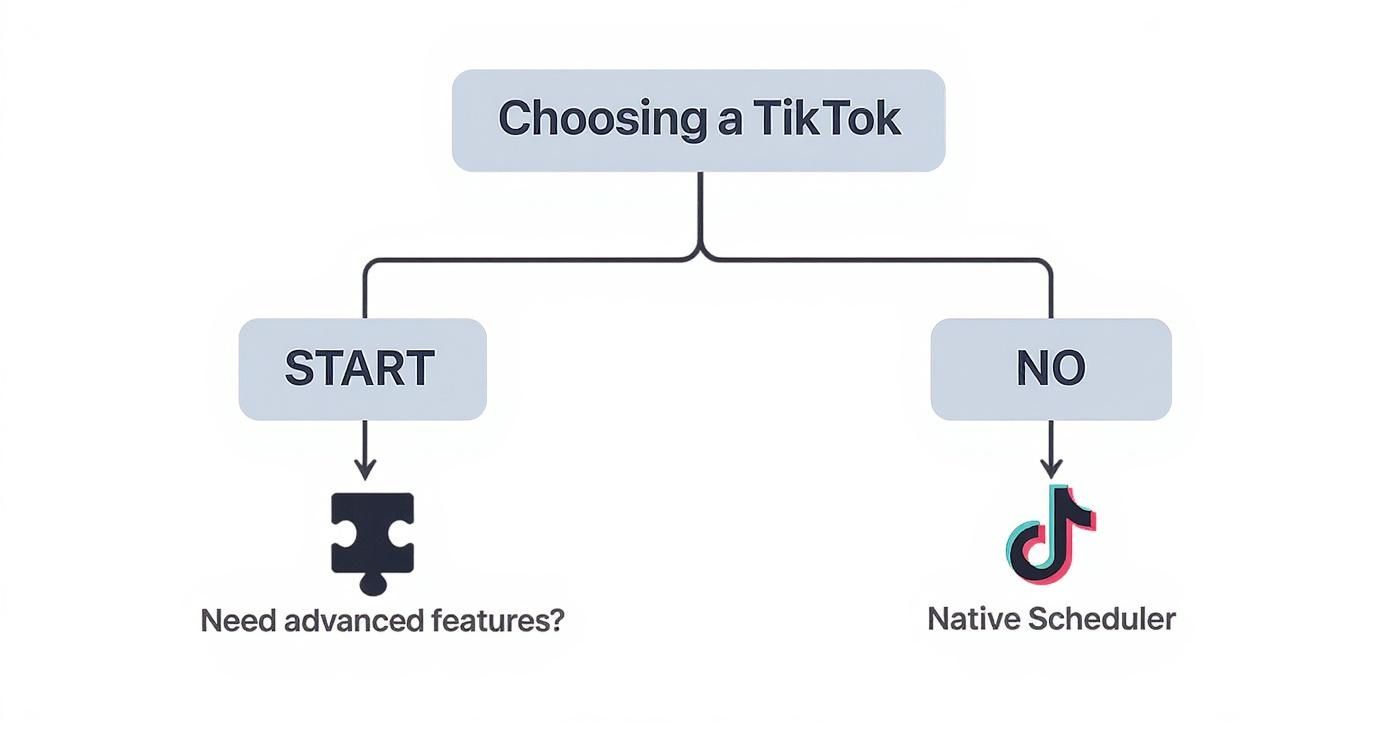
As you can see, if your needs are pretty straightforward, the native scheduler is the way to go. But if you’re looking for more advanced features, you'll want to explore other options.
Accessing the Desktop Uploader
Once you log in, you'll find yourself on the upload interface. This is your command center for scheduling videos directly on TikTok. It's designed to be dead simple—you can either drag and drop your video file or browse your computer to find it.
The whole process lives on a single screen, from writing your caption and adding hashtags to picking the exact time you want it to go live. That streamlined design is a huge plus for creators who don’t want a ton of extra bells and whistles getting in the way.
Crafting Your Scheduled Post
With your video uploaded, it's time to add all the details that will help it perform well. This is where you’ll write a catchy caption, throw in some relevant hashtags, and choose a cover image that will pop on your profile grid. The interface gives you all the same fields you'd see if you were posting from your phone.
Here’s a quick rundown of what you’ll be doing:
- Upload Your Video: Drag your MP4 or WebM file into the upload box.
- Write Your Caption: Craft your text, making sure to include any mentions (@) and hashtags (#) you need.
- Pick a Cover: Scroll through the video frames and choose the perfect thumbnail for your profile.
- Set Privacy: Decide who can see your video. For most of us, this will be Public.
One major thing to remember: you can't edit a scheduled video or its caption after you've set it. If you catch a typo or want to swap out a hashtag, you have to delete the post and start all over again.
This is a huge pain point for many creators and a key reason why some turn to more flexible third-party tools. But for simple scheduling, it's a manageable quirk.
Setting Your Schedule
The final move is to actually schedule the post. Look for a toggle labeled "Schedule video." Flip that on, and you'll see options to pick the exact date and time for your video to go live.
One limitation here is that TikTok’s native scheduler only lets you plan up to 10 days ahead. This is great for batching your content for the upcoming week, but it won’t work if you're trying to do long-term planning.
For more in-depth strategies on content planning across different platforms, you should check out our guide on how to schedule social media posts.
Once your date and time are locked in, just hit "Schedule." Your video will sit in a queue, ready to be published automatically without you having to lift another finger.
Unlocking Advanced Automation with Third-Party Tools
TikTok's built-in scheduler is a great starting point. Think of it like learning to ride a bike with training wheels. It gets you moving, but if you want to really pick up speed and compete, you eventually have to take them off. That's where third-party platforms for TikTok auto share come in, offering a much more powerful engine for your content strategy.
These tools are built for creators and marketers who have simply outgrown the basics. Instead of being limited to a 10-day scheduling window, you get long-term content calendars, deep performance analytics, and team collaboration features that are absolutely essential for scaling up. It’s like graduating from a simple to-do list to a full-blown project management system built specifically for your social media.
Connecting Your Account Securely
Getting started with one of these tools almost always involves connecting your TikTok for Business account. The good news is that this process is handled through TikTok's official API—a secure gateway that lets approved applications interact with your profile without you ever handing over your password.
This secure connection is what makes it all work. Once you grant authorization, the tool can access the functions needed to upload your videos, add your captions, and post at the scheduled time, all without you having to lift a finger.
Key Takeaway: Always use an official TikTok API partner. These platforms are vetted by TikTok for security and compliance, so you know your account is safe. Steer clear of any service that asks for your login credentials directly.
The Real Perks Beyond Simple Scheduling
The true value here isn't just about scheduling further in advance; it's the strategic layer these platforms add to your entire process. They turn TikTok auto share from a simple time-saver into a data-driven growth strategy.
Here are a few of the game-changing features you can expect:
- Data-Driven Posting Times: Stop guessing or relying on generic advice. These tools analyze your account's unique follower activity to pinpoint the exact times your content is most likely to pop off.
- Unified Content Calendar: See the bigger picture by managing your TikTok posts alongside your Instagram Reels and YouTube Shorts in one visual, drag-and-drop calendar.
- Team Collaboration: For agencies or brands with multiple hands on deck, these features are non-negotiable. You can assign roles, set up approval workflows, and leave feedback for team members right inside the platform.
A Quick Look at a Fully Automated Workflow
To see how this works in the real world, let's take a tool like ShortsNinja. It’s designed to push automation even further, handling not just the publishing but the content creation itself. You can feed it an idea, and its AI will generate a script, create visuals, add a voiceover, and then schedule the finished video for auto-publishing.
This is pretty much the peak of hands-free content creation. The platform connects to your TikTok account just once, and from that point on, it can maintain a consistent posting schedule without you ever needing to manually upload a file again. For creators looking to learn more about their options, exploring different types of TikTok automation software can give you a clearer picture of what's out there.
At the end of the day, these advanced tools are for creators who see TikTok as more than just a place to post videos—it's a critical channel for growth. They provide the infrastructure you need to run your content operations like a business, with a sharp focus on efficiency, data, and scalability.
Smart Habits for Your Automated Content Strategy
Automation is a game-changer, but it’s not a magic button. Treating it like a "set it and forget it" tool is the fastest way to pump out content that feels robotic and completely misses the mark. To make your TikTok auto share strategy actually work, you need to build some smart habits around your workflow.
The real goal here is to make a video scheduled weeks in advance feel like it was posted at the perfect moment. It all starts with how you handle your captions and hashtags.
Write Evergreen Captions and Hashtags
When you're scheduling content way ahead of time, you can't jump on every fleeting trend. Instead, your best bet is to write captions that will still make sense a week, or even a month, from now.
- Nail the Core Message: Your caption should add real value or context to the video. Don't just piggyback on a trending sound or meme that will be old news by the time your post goes live.
- Create a Smart Hashtag Mix: Stop chasing only the biggest viral tags. A better approach is to build a balanced mix of broad category tags (#digitalmarketing), niche community tags (#smmaowner), and your own branded tags (#YourBrandHere). This strategy helps you reach both a wide audience and the specific people who will actually care about your content.
For instance, instead of using a temporary hashtag like #HolidaySale2024, try something more timeless like #GiftIdeasForHim. That small shift keeps your content relevant long after the sale ends.
The best automated content doesn't feel automated at all. It feels like you posted it right at that moment because it was relevant, valuable, and perfectly timed—even if you scheduled it ten days ago.
Periodically Review Your Scheduled Queue
Think of your automated queue less like a fire-and-forget missile and more like a garden that needs a little tending. A major news event, a sudden cultural shift, or an unexpected viral trend can make a perfectly fine video suddenly seem tone-deaf or out of touch.
Get into the habit of doing a quick weekly scan of your upcoming posts. Just ask yourself: does this still make sense in today's context? This simple check can save you from an embarrassing post and gives you a chance to swap in something more timely if needed.
And remember, automation isn't just about posting. You can apply similar principles across platforms. For example, learning to automate Instagram messages for engagement can help you build a more cohesive and efficient strategy everywhere.
Stay Compliant with TikTok Policies
Finally, don't forget about TikTok's Community Guidelines. Automation makes it easy to post a lot, but it won’t shield you from violations. Continuously posting content that toes the line is a quick way to put your account at risk.
Keep in mind that third-party tools are required to comply with TikTok's API rules. Using an approved partner tool is a good start, but the ultimate responsibility for what you post is always on you. Stay up-to-date on policy changes to keep your automated strategy running smoothly and your account in good standing.
Solving Common TikTok Auto Share Problems
Even the best TikTok auto share setups hit a snag every now and then. It's frustrating when a scheduled post fails to go live or you're hit with a cryptic error message, but the fix is usually pretty simple. Don't panic; let's walk through what typically goes wrong and get your content back on schedule.
More often than not, the problem is a simple authentication glitch. The permission you gave a third-party tool to post on your behalf can expire, which usually happens after a few months. Think of it as a security feature, not a bug.
Another common culprit is the video file itself. TikTok is pretty strict about its technical specs for things like aspect ratio, video length, and file size. If your video doesn't tick all the right boxes, the API will simply reject it, causing your auto-post to fail.
Quick Fixes for Common Errors
When something breaks, run through this quick diagnostic checklist before you start digging deeper. I've found these three steps solve the vast majority of auto-share issues.
- Re-authenticate Your Connection: This is the number one fix. Just disconnect your TikTok account from your scheduling tool and immediately reconnect it. This simple action refreshes your account's security token and restores its posting permissions.
- Check Video Specifications: Make sure your video is in a 9:16 aspect ratio, is between 3 seconds and 10 minutes long, and comes in under the file size limit of your specific tool.
- Review Captions and Hashtags: On rare occasions, a banned or restricted hashtag can get your post blocked. Give your text a quick once-over to ensure you haven't included anything that might trip up TikTok's community guidelines.
The most common culprit is an expired authentication token. I make it a habit to refresh my connection every 60 days or so. It's a small step that prevents most of these errors from ever happening in the first place.
Got Questions About TikTok Automation? Let's Clear Them Up
Diving into TikTok auto share for the first time usually brings up a few common questions. Let's tackle the big ones so you can build your automation strategy without any guesswork.
Does Auto Share Hurt My Video Performance?
Nope. There’s a common myth that using schedulers hurts your reach, but it’s just not true. Whether you use TikTok's own scheduler or an official API partner tool, the algorithm doesn't penalize your video.
Your performance still comes down to the quality of your content and whether you post when your audience is most active. In fact, automation can actually help you nail that timing consistently, giving your videos a better shot at performing well.
Can I Edit a Scheduled TikTok?
This is a big one. Once you’ve scheduled a post using TikTok’s native scheduler, you cannot edit the video or the caption. If you spot a typo or want to change the video, your only move is to delete the scheduled post and re-upload everything from scratch.
Some third-party tools give you a little more wiggle room, often letting you tweak captions before they go live. But when it comes to the video file itself, a full re-upload is almost always the only way. Plan ahead!
Do I Need a Business Account?
Yes, you absolutely do. To unlock almost any kind of automation feature—from the native desktop scheduler to connecting your profile with a third-party tool via the API—you’ll need a TikTok Business Account.
Good news is, switching from a personal to a Business Account is free and takes just a few seconds right in your app settings. It's a non-negotiable step for any serious TikTok auto share workflow.
Ready to put your content creation on autopilot, from idea to final post? ShortsNinja uses AI to generate and schedule your videos, so your channel can grow while you focus on other things. Give it a try at https://shortsninja.com.