
Picture this: You publish a new video at the exact moment your audience is most active, without having to be anywhere near your computer. That’s the magic of scheduling your YouTube uploads. This isn't just a neat trick for convenience; it's a core strategy for training the YouTube algorithm, building anticipation with your viewers, and keeping a rock-solid content calendar.
Why Scheduling YouTube Uploads Is a Secret Growth Lever
Adopting a scheduling strategy is what separates amateur creators from professional ones. It shifts your channel from being reactive—scrambling to get a video out—to proactive, turning random content drops into a predictable growth engine.
It’s about more than just hitting "publish" at a certain time. By setting your content to go live in advance, you free yourself up to focus on promotion and community engagement right when your video launches, which is critical for its initial performance.
Here’s why it’s a game-changer:
- It keeps you consistent. A reliable schedule trains your audience to expect new content at a specific time, and the YouTube algorithm absolutely loves that predictability.
- It improves your work-life balance. You can batch-produce and upload videos whenever you have time, which means no more burnout from last-minute creative sprints.
- It optimizes for peak viewing times. Your video can go live when your audience is most active, even if you’re asleep or on vacation.
- It prevents technical headaches. Uploading hours or days ahead of time gives YouTube plenty of time to fully process your video in HD or 4K. No more blurry launches.
Scheduled Uploads vs Manual Uploads at a Glance
For many creators, the move from manual to scheduled uploads marks a turning point in their channel's professionalism and growth trajectory. This table breaks down the key differences.
| Feature | Scheduled Upload | Manual Upload |
|---|---|---|
| Consistency | High. Easily maintain a predictable publishing cadence. | Low to Medium. Relies on being available at the exact publish time. |
| Audience Engagement | High. Frees you up to interact with comments the moment the video goes live. | Inconsistent. You're busy with the upload process during launch. |
| Peak Time Targeting | Excellent. Publish anytime, regardless of your personal schedule. | Limited. Restricted to times when you are physically at your desk. |
| Video Quality | Guaranteed. Ensures full HD/4K processing before the premiere. | Risky. Can result in standard definition at launch if rushed. |
| Workflow | Proactive. Allows for batching content and planning ahead. | Reactive. Often leads to a last-minute rush to create and publish. |
Ultimately, scheduling empowers you to treat your YouTube channel like a business, not just a hobby. It puts you in control of your content strategy instead of letting it control you.
Build Audience Trust and Algorithmic Favor
Consistency is the currency of the YouTube algorithm. When you publish on a predictable schedule—say, every Tuesday at 9 AM—you send strong signals that your channel is active, reliable, and worth recommending.
This builds trust with your viewers, but just as importantly, it builds trust with the platform itself. YouTube's built-in scheduler has become an essential tool for creators who want to achieve this. Those who stick to a schedule train both their subscribers and the algorithm to anticipate new videos, which often leads to a spike in views right at launch.
By mastering the scheduled upload, you transform your content calendar from a source of stress into a strategic asset. It's the difference between constantly chasing the next upload and confidently executing a long-term vision for your channel.
To really dial in your strategy, it helps to map everything out. Using a social media content calendar template is a fantastic way to plan your themes, titles, and publication dates weeks or even months ahead. You can strategically plan for holidays, collaborations, or video series, creating a clear roadmap for your channel’s growth.
How to Schedule a YouTube Video From Desktop and Mobile
Ready to get your upload calendar under control? Let's walk through scheduling videos using YouTube's built-in tools on both desktop and mobile. This turns scheduling from a last-minute scramble into a core part of your content strategy.
Scheduling From Your Desktop
Most creators schedule videos right from their computer's browser, and for good reason. Using YouTube Studio gives you the most control over every single detail of your upload.
First, you'll want to head over to YouTube Studio and hit the big Create button in the top-right corner, then select Upload videos. Once you've chosen your video file and it starts uploading, you'll move through the Details, Video elements, and Checks tabs. If you want a full breakdown of that initial process, check out our complete guide on how to publish a video on YouTube.
The real action happens on the final Visibility tab. This is where you set your schedule.
- Instead of making your video Public or Private, you'll want to select the Schedule option.
- A calendar will pop up, letting you pick the exact date and time you want the video to go live.
- Here's a critical step: double-check the Time zone. YouTube is usually smart enough to default to your local time, but it's always worth confirming. The last thing you want is to publish at 3 AM for your target audience because the timezone was set incorrectly.
Once your date and time are locked in, just click the Schedule button. That's it. Your video is officially in the queue and will publish automatically at your chosen moment.
The screenshot below shows exactly where you'll find this setting in YouTube Studio.
See how "Schedule" is a completely separate option from "Save or publish"? This is intentional. It lets you get all your metadata, thumbnails, and checks finalized before you ever commit to a public launch time.
Scheduling From the Mobile App
For creators who are always on the go, the YouTube Studio mobile app is a lifesaver for managing your content calendar. The process is pretty similar to the desktop version, just streamlined for a smaller screen.
After you upload a video from your phone, pop open the YouTube Studio app. Head to the Content tab, find your video (it'll probably be marked as Private or Unlisted), and tap on it.
From there, tap the little pencil icon to edit the video's details. Find the Visibility setting, and switch it from Private to Scheduled. You’ll get the same prompts to pick a date, time, and timezone that you see on the desktop.
Pro Tip: When uploading from mobile, always set the video to "Private" first. This gives it plenty of time to fully process in HD before you schedule it. This simple trick prevents your viewers from seeing a pixelated mess the moment it goes live.
This kind of mobile flexibility is fantastic. It means you can manage your entire upload schedule from just about anywhere, ensuring you never miss a post, even when you're away from your desk.
Choosing Between a Schedule and a Premiere
Once you click "Schedule" in YouTube Studio, you'll spot another option right next to it: Set as Premiere. This isn't just a small technical choice; it can completely change how your video launches. Understanding the strategic difference is key to getting the most out of your upload.
Basically, you're deciding between a quiet, steady release and a live, community-focused event.
A standard scheduled YouTube upload is straightforward. Your video simply goes public at the exact time you set. It pops up in subscription feeds and becomes discoverable like any other video on the platform. This method is super reliable and perfect for keeping a consistent content calendar.
A YouTube Premiere, on the other hand, is a whole different beast. It turns your video's debut into an interactive experience. When you set a Premiere, YouTube creates a public watch page that your audience can visit before the video goes live. This page builds anticipation with a live countdown timer and a chat box, turning the launch into a shared event.
When to Stick with a Standard Schedule
Think of a simple schedule as your workhorse for consistent content. It’s the best option when your main goal is to maintain a steady flow of uploads without the extra buzz of a live launch for every single video.
A standard schedule is perfect for:
- Regular weekly content: If you publish vlogs, tutorials, or series episodes on a fixed day, this is your go-to.
- Evergreen videos: Content that isn't time-sensitive, like how-to guides or product reviews, works great with a simple scheduled release.
- Low-key announcements: Minor channel updates or less critical videos don't always need the fanfare of a Premiere.
A Premiere is an event; a schedule is a routine. Use events to launch your most important content and routines to build a loyal, consistent audience. Choose wisely based on the video's strategic importance.
This decision tree helps visualize the choice between uploading from your computer versus your phone.
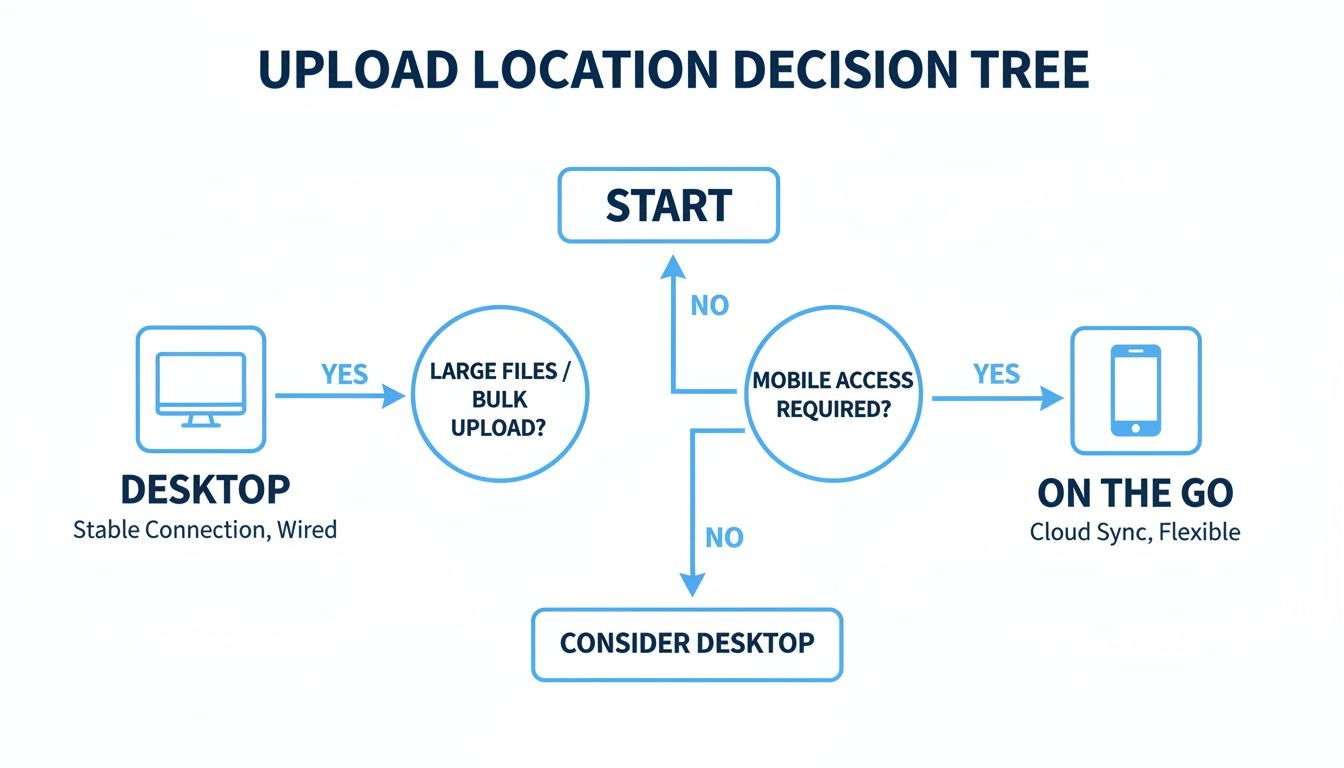
As you can see, the desktop offers a more controlled, feature-rich environment, while mobile is all about getting the essentials done when you're on the move.
When to Use a YouTube Premiere
A Premiere is a seriously powerful tool for building hype and driving a ton of immediate engagement. By creating a sense of occasion, you get your audience to watch together at the same time, which can send some powerful positive signals to the YouTube algorithm.
A Premiere is the perfect strategy for:
- Major launches: Think series finales, music video debuts, documentary releases, or a big product announcement.
- Collaborations: Launching a video with another creator as a Premiere is a fantastic way to bring both communities together to interact in the live chat.
- High-effort content: If you've poured weeks or months into a video, a Premiere gives it the grand unveiling it truly deserves.
For instance, a gaming channel might use a Premiere for the first episode of a highly anticipated new series. The live chat explodes with fans reacting in real-time, which juices the initial watch time and comment count. That early momentum can make a huge difference in the video's long-term discoverability.
YouTube Schedule vs Premiere Feature Comparison
To make the choice even clearer, here’s a direct comparison of what each option offers. This table breaks down the key features to help you decide whether a standard schedule or an interactive Premiere is the right move for your next video.
| Feature | Scheduled Upload | YouTube Premiere |
|---|---|---|
| Launch Experience | Video becomes public instantly at the set time. | Creates a shareable watch page with a countdown; a 2-minute intro plays before the video. |
| Audience Interaction | Standard comment section after launch. | Live chat and Super Chat/Stickers are enabled for viewers to interact in real-time. |
| Notifications | Standard "new video" notification. | Sends a notification 30 minutes before the Premiere and another when it starts. |
| Hype Generation | Minimal; relies on existing audience habits. | High; builds anticipation and creates a community event. |
| Creator Presence | None required at launch. | Creators can participate in the live chat, engaging directly with their audience. |
| Monetization | Standard ad revenue. | Can enable Super Chat, Super Stickers, and Channel Memberships for additional income. |
| Best For | Consistent, routine content (e.g., weekly vlogs). | Major content releases, collaborations, series premieres, and community events. |
Ultimately, the choice comes down to your video's goal. If it's part of your regular programming, a schedule works perfectly. If it's a special broadcast meant to make a splash, a Premiere is almost always the better call.
Finding Your Channel's Perfect Upload Time
Forget everything you've read about the "best time to post" on YouTube. Most of that advice is generic, outdated, and frankly, pretty useless for your specific channel. The real answer isn't hiding in some industry-wide study; it's waiting for you inside your own channel's data.
To find your unique sweet spot for a scheduled upload, you need to play detective in your own analytics.
Your best clue is the "When your viewers are on YouTube" report. You can dig this up by heading over to YouTube Studio > Analytics > Audience. This little chart is gold, showing you the exact days and hours when your audience is most active on the platform.
Look for the darkest purple bars—that’s your peak traffic. The lighter the bar, the fewer of your viewers are online. Your mission is to schedule your videos to go live just one or two hours before these peak times. This gives the YouTube algorithm a running start to index your video and begin pushing it into feeds right as your audience starts to log on.
What If You Have No Data?
Newer channels often face the classic chicken-and-egg problem: you need data to find the best time, but you need to upload videos to get data. When you're just starting out, you have to rely on educated guesses and a whole lot of testing.
A solid starting point is to experiment with weekday evenings and weekends. Track everything. Use a spreadsheet to log your upload times and the real-time view counts over the first 48 hours. After a month, you'll start to see patterns emerge.
You might also find an edge by publishing on Monday through Wednesday. This window often has less competition, especially for business or educational content, helping your new uploads stand out. In a world where 68% of marketers now prioritize video, a consistent, smart schedule is your key to winning over the algorithm and turning casual viewers into loyal subscribers.
Your first few months are all about gathering intelligence. Don't just upload; upload with a purpose. Every video is a test to see what time resonates with the audience you're trying to build.
Think of it like finding the best time to post on Instagram. The principle is identical: meet your audience where they are, when they're there. This is a core concept that applies across your entire content strategy. If you want more ideas on this, our guide to building a social media posting schedule offers a broader look.
Fine-Tuning with Real-Time Performance
Once your video is live, the work isn't done. The first 48 hours are absolutely crucial for a video's long-term success, and your real-time analytics are your best friend during this period.
- Check the Hourly View Count: Dive into the video's specific analytics and look at the real-time report. Do you see a sharp spike in views right after publishing? Or does it take a few hours to gain momentum?
- Analyze Traffic Sources: Where are those initial views coming from? A strong start from "Browse features" and "Notifications" is a great sign that your timing was perfect for your existing subscribers.
If you consistently notice your videos have a slow start before picking up steam hours later, that’s your signal. You're posting too early. Try adjusting your scheduled upload time forward by a couple of hours and run the test again.
This simple loop—upload, analyze, adjust—is how you graduate from guesswork to a data-driven strategy that gets your videos seen.
Advanced Scheduling and Automation Tactics
Once you’ve nailed down a consistent schedule, the real fun begins. It’s time to scale up your content engine and think bigger—not just about one video at a time, but about your entire content strategy. This is where you move past the basics and into advanced tactics and automation.
One of my favorite advanced strategies is the content burst. Instead of a slow, steady trickle of new videos, you launch a channel or a new series with a concentrated blast of content. It’s a powerful move that sends a big signal to the YouTube algorithm that your channel is a serious, binge-worthy destination.
Kickstart Momentum with a Content Burst
Let's say you're launching a new educational series. A content burst could look like scheduling three videos to go live on day one, then one new video every day for the rest of the week. This instantly gives new viewers a solid library to dive into, making them much more likely to hit subscribe.
This isn’t just a theory. In a real-world experiment, one creator in a tough niche tested this exact method. They dropped three videos on launch day, followed by daily uploads for a week. They then tapered off to three per week and eventually settled into a rhythm of two videos a week. The results spoke for themselves: each new video got a noticeable bump in views within the first 24 hours.
You can read the full breakdown of how that aggressive schedule trained the algorithm over on SocialVideoPlaza.com.
A content burst isn't just about flooding the platform with videos. It's a strategic play to grab attention and establish authority fast. You're telling both viewers and the algorithm, "Hey, this channel is the real deal."
The Power of Automation Tools
For creators, agencies, and brands pushing out a high volume of content, manual scheduling quickly becomes a massive bottleneck. This is especially true with short-form content like YouTube Shorts, where the name of the game is relentless consistency. Automation tools are built to eliminate this headache, turning your daily grind into a "set it and forget it" system.
These platforms can completely change your workflow:
- Bulk Scheduling: Forget setting up each scheduled upload one-by-one in YouTube. Plan and schedule out an entire month's worth of content in one sitting.
- AI-Powered Creation: Some tools even help with the creation process itself, generating scripts, finding visuals, and adding voiceovers before queuing everything up.
- Cross-Platform Management: Manage and schedule everything for YouTube, TikTok, and Instagram from a single dashboard. So much easier.
By automating the boring, repetitive parts of content distribution, you get your time back. That time can be reinvested into what really matters: big-picture strategy, diving into your analytics, engaging with your community, and planning your next big content burst. For a deeper look into this, check out our ultimate guide to YouTube video upload automation. It's how you turn your content calendar into a hands-free growth machine.
Common Questions About Scheduling YouTube Videos
Even with the perfect content calendar, you're bound to run into a few questions. Getting the hang of scheduled uploads can feel a little tricky at first, but most issues are surprisingly easy to solve. Let's walk through some of the most common ones I hear from creators.
One of the biggest worries? Flexibility. What if you schedule a video and then spot a typo in the title? Or you come up with a much better thumbnail idea an hour before it's set to go live?
Relax, you're in the clear. You can edit the title, description, tags, and thumbnail of a scheduled video at any point before it publishes. YouTube applies these changes instantly without messing with your scheduled time. This is a lifesaver for last-minute SEO tweaks or swapping in a new thumbnail to jump on a trend. I'd just recommend finalizing any changes at least an hour before launch to be safe.
Handling Video Visibility and Timing
Creators often ask if they can schedule a video to be Unlisted or Private first, maybe to show a sponsor or get feedback from a collaborator. The answer is yes, but it’s a two-step dance.
First, upload your video and set its visibility to "Private" or "Unlisted." That lets you share a private link for review. Once you get the green light, just pop back into the video's settings, switch its visibility to "Scheduled," and lock in your public launch date and time. Keep in mind, though, that you can't use YouTube's built-in tools to schedule a video to automatically switch from public back to private later on.
There's a common myth that scheduling a video can hurt its performance in the algorithm. It's actually the opposite. Scheduling gives YouTube’s system plenty of time to process your video in full HD or 4K and to run its checks for any content claims.
This means your audience gets a flawless, high-quality viewing experience the second it goes live. More importantly, it lets you target your audience's peak viewing hours, which is crucial for getting that initial surge of views the algorithm loves to see.
Planning Your Content Pipeline
So, you're thinking about batch-recording a bunch of videos and getting ahead for the next few months. How far out can you actually schedule your uploads?
YouTube lets you schedule videos several months ahead of time. This is an absolute game-changer for building a long-term content pipeline. A travel vlogger, for instance, could edit and schedule an entire series from a single trip in one go. This frees you up to work on other critical parts of growing your channel, like promoting your content, engaging with your community, and planning what's next. It turns your content calendar from a simple to-do list into a real strategic weapon.
Ready to stop manually scheduling and put your channel on autopilot? ShortsNinja uses AI to create and schedule a month's worth of high-quality short videos in minutes, freeing you to focus on growth. Start automating your content calendar today.