
Ready to connect your Instagram and TikTok? The quickest way is to drop your Instagram profile link right into your TikTok bio. Doing this adds a neat, clickable icon to your TikTok page, giving your followers a direct path to find you on Instagram.
Why Bother Connecting Your Instagram and TikTok?
Before we get into the nuts and bolts, let's talk strategy. A lot of people treat TikTok and Instagram like they live on separate planets, and that’s a huge missed opportunity. The real magic happens when you get them working together as a team.
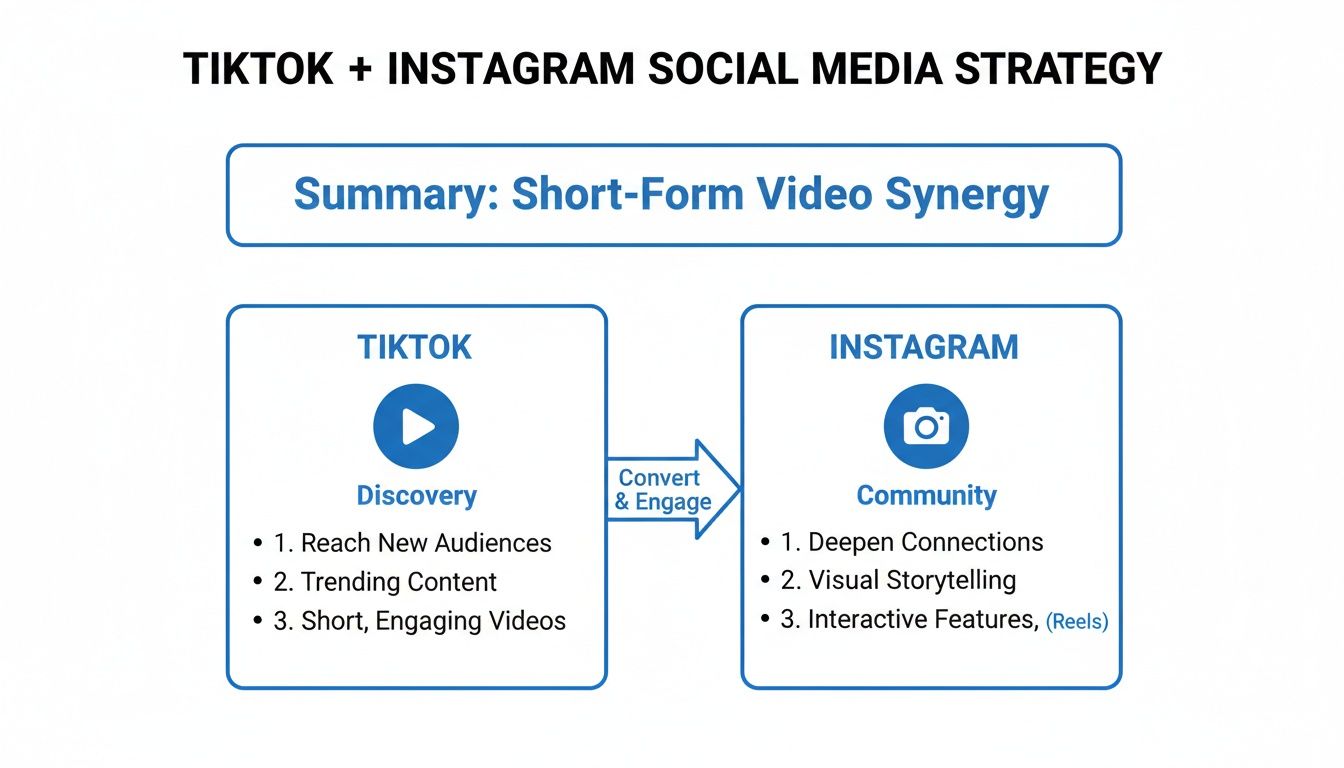
Think of it this way: TikTok is your discovery engine. Its algorithm is a beast, built to push your content out to massive new audiences who have no idea who you are… yet. Instagram, on the other hand, is your community hub. It's where you build deeper relationships, tell stories, and even sell products directly.
When you link the two, you’re building a bridge between that initial discovery and a long-term community.
Bridging The Gap Between Platforms
This simple connection creates a seamless journey for someone who stumbles upon your viral TikTok. They can go from a casual viewer to a dedicated Instagram follower in a single click. You’re essentially funneling all that high-volume traffic from a discovery-first app to one designed for building real relationships. This integrated approach isn't just a nice-to-have; it's a core part of a strong social media marketing strategy.
It's no surprise that top brands and creators are all over this. Both platforms pull in massive, often overlapping, global audiences. In fact, industry reports show that 57% of brands see Instagram as their top choice for influencer campaigns, while 52% choose TikTok. This tells you most successful campaigns are intentionally built to leverage both.
Marketers use TikTok's viral nature to get seen, then drive that engaged traffic over to Instagram where the community-building and monetization features are more robust.
TikTok vs Instagram At a Glance: Why Linking Matters
To really see why a linked strategy works so well, it helps to look at what each platform does best. They aren't competitors so much as they are complementary tools in your marketing toolkit.
| Feature | TikTok's Strength | Instagram's Strength |
|---|---|---|
| Primary Goal | Massive reach and content discovery | Deeper community engagement |
| Algorithm | Pushes content to new audiences (For You Page) | Prioritizes content from accounts you follow |
| Content Format | Short-form, trend-driven video | Photos, Reels, Stories, and long-form video |
| Monetization | Creator Fund, TikTok Shop, brand deals | Direct shopping, subscriptions, robust ad tools |
| Audience Vibe | Entertainment-focused, fast consumption | Curated, lifestyle-focused, relationship-building |
This table makes it clear: TikTok finds the people, and Instagram helps you keep them. By linking your profiles, you create a powerful funnel that turns fleeting attention into a loyal, monetizable audience.
A linked profile strategy transforms fleeting viral moments on TikTok into a stable, long-term audience on Instagram—an audience you can nurture and monetize more effectively.
If you're looking to dive even deeper into platform integration and multi-channel strategies, it's worth checking out Branditok's blog for social media insights. They offer some great perspectives on making your brand's presence felt across the board.
Add Your Instagram Link to Your TikTok Profile
The most direct way to connect your accounts is by dropping a clickable Instagram icon right onto your TikTok profile. I've found this is one of the most effective things you can do because it gives your audience a clean, one-tap path to find you on Instagram, catching them right when their interest is highest.
To get this set up, just open your TikTok app and navigate over to your profile page. You'll see an "Edit Profile" button right below your follower count. Give that a tap. This opens up all your profile customization options, which is where the magic happens. It’s a simple first step, but it's the one that builds a bridge between your two most important platforms.
Find the Social Links Section
Once you're in the "Edit Profile" menu, scroll down a bit until you spot the "Social" section. TikTok has dedicated fields here to link Instagram to TikTok and even your YouTube channel. This isn't just a generic website link; it creates that official, clickable icon on your main profile page that looks super professional.
From here, simply tap on "Add Instagram." The app will then prompt you to log in to your Instagram account to authorize the connection. After you’ve authenticated, your Instagram handle will show up in that field, and a small camera icon will appear on your public TikTok profile. Boom, you're connected.
This simple link does more than just connect profiles. It acts as a silent call-to-action, nudging every new profile visitor to deepen their connection with your brand by following you on Instagram.
Just a quick pro-tip: double-check that you've entered the correct handle with no typos. A small mistake can send potential followers to a dead end or, even worse, someone else's page.
If you want to take this a step further, you can learn how to use CTAs in TikTok videos to actively point viewers toward this new link on your profile.
Put Your TikTok Link in Your Instagram Bio
Alright, let's flip the script. Driving traffic from TikTok to Instagram is a solid move, but don't sleep on sending your engaged Instagram followers over to your TikTok. Your Instagram bio is prime real estate, so using it to plug your TikTok profile creates a direct path for your community to find all your short-form video content.
The process itself is pretty simple. First up, you need to grab your TikTok profile URL.
Just open the TikTok app, head to your profile, and tap the three lines in the top-right corner. From there, select "Settings and privacy," then tap "Share profile" and "Copy link." That URL is your golden ticket.
With your link copied, hop over to Instagram. Go to your profile page and hit the "Edit profile" button. You'll see a field labeled "Links." Paste your TikTok URL right in there. The great thing is Instagram lets you add multiple links, so you don't have to sacrifice your main website link.
Beyond a Single Link
But what happens when you need to showcase more than just your TikTok and your website? This is where link-in-bio tools become your best friend. They essentially turn that one clickable link into a mini-landing page for all your important stuff.
Using a link-in-bio tool transforms your single link into a curated hub. It allows you to prominently feature your TikTok alongside your website, shop, and other social profiles without cluttering your bio.
Services like Linktree or Beacons are popular for good reason. They let you create a clean, customized page to house multiple links. You can make your TikTok profile the very first button, giving it the spotlight it deserves.
For example, a creator could set up their link-in-bio page to look something like this:
- Follow me on TikTok! (Right at the top)
- My Latest YouTube Video
- Shop My Merch
- Join My Newsletter
This strategy is easily the best way to link Instagram to TikTok because it also directs your audience to other valuable resources. It just gives you way more flexibility than a single link ever could.
Create a Smart Cross-Platform Content Strategy
Connecting your profiles is just the first step. The real magic happens when you build a content strategy that actually respects what makes each platform unique.
Just dumping the same exact video everywhere is a huge missed opportunity. Instead of cloning your content, think about how you can tweak it to fit the vibe and algorithm of both TikTok and Instagram.
So many creators make the mistake of treating them as identical twins. They’re not. For example, a TikTok caption that’s just a nod to a trending sound will completely flop on Instagram Reels. Over there, captions that start a conversation or ask a question get way more love from the algorithm.
The goal isn’t to shoot two totally different videos. It's all about changing the packaging.
Tailor Your Captions and Hashtags
Think about how you frame the same exact clip. On TikTok, your caption can be short, punchy, and tied directly to a sound. But on Instagram, you have more room to tell a longer story or drop a direct question to get your followers talking.
Your hashtag strategy needs to be different, too:
- For TikTok: Go for a mix of massive, broad hashtags (like #fyp) and super-niche, community-specific tags. This helps you hit both the mainstream For You Page and find your core audience.
- For Instagram: Get laser-focused. Use hyper-relevant, niche hashtags that perfectly describe your content and who it's for. Instagram's discovery is much more topic-driven.
Nailing this is a huge piece of the puzzle. We break down even more tactics in our guide on powerful content repurposing strategies.
This all comes down to how people behave on each app. The numbers show why cross-posting is a no-brainer: viewers are just wired differently on each platform. One study projected that TikTok users would watch around 92 videos daily by 2025, which shows just how fast they scroll and discover.
Meanwhile, Instagram Reels engagement for creators with 100k-500k followers hovered around 6.59%, while TikTok hit 9.74% for the same group. That gap makes it clear you need both platforms to maximize your reach.
Don't just clone your content—adapt it. A simple tweak to a caption, hashtag, or call-to-action can make your video feel native to each platform. That small effort can seriously boost its performance and help you properly link Instagram to TikTok with a unified, smart strategy.
If you're ready to scale your presence beyond just these two platforms, it's time to learn how to truly unlock cross-platform growth.
Having Trouble Linking Your Accounts? Let's Fix It.
So you've followed the steps, but for some reason, the link between Instagram and TikTok just isn't working. Maybe an option is greyed out, or the connection just won't stick. Don't worry—this happens all the time, and the fix is usually something surprisingly simple.
Nine times out of ten, these little hiccups are caused by a minor software glitch or some old data clogging up the works. Before you get too frustrated, let’s run through the basics.
Often, the simplest solution is the right one. I always recommend starting with the easy stuff before you start digging deep into account settings.
Start with the Quick App Resets
Think of this as your first line of defense. These three steps are incredibly effective and solve a huge number of common connection problems.
- Update Both Apps: Head over to your phone’s app store and check for updates. Developers are constantly pushing out small fixes, and an outdated version of either TikTok or Instagram is a classic culprit for linking bugs.
- Clear the Cache: Go into your phone's settings, find the TikTok app, and tap "Clear Cache." This gets rid of temporary files that could be tripping up the authentication process.
- Restart Your Phone: You’ve heard it a million times, but turning your device off and on again works wonders. A quick restart can clear out your phone's memory and stop any background processes that might be interfering.
If you've tried all that and you're still stuck, the issue might be a little more specific to your account setup.
Here's a pro tip I've seen trip up countless creators: The ‘Social’ link option can sometimes disappear if your TikTok account is set to ‘Business.’ If you don't see it, try switching back to a ‘Creator’ or ‘Personal’ account in your settings. This often brings the feature right back.
Another common scenario is when the authentication window for Instagram just keeps closing on you. This usually points to a problem on the Instagram side. Try logging completely out of Instagram on both the app and your mobile browser, then go back to TikTok and try the linking process again. This forces a fresh login and usually solves the connection error for good.
Got Questions About Linking Your Accounts?
So, you’ve linked your Instagram and TikTok profiles. Awesome. Now, a few questions are probably popping into your head. Let's clear up the common ones so you can move forward with confidence.
What Data Is Actually Shared Between TikTok and Instagram?
Don't worry, this isn't some deep data-sharing pact. When you link the two, you’re basically just giving TikTok permission to display a clickable icon on your profile.
TikTok doesn't get to peek at your Instagram DMs, and Instagram has no idea what you've been watching on your For You Page. All that's really shared is your public profile info, like your username and picture, to make the link work. Think of it as a signpost, not a merger.
Can I Link a Business Instagram Account?
Yes, absolutely. The steps are exactly the same whether you’re linking a personal or a Business Instagram account.
That said, some users have run into a weird glitch where the "Social" link option in TikTok’s profile editor doesn't play nice with certain Business accounts. If that happens to you, a quick workaround is to temporarily switch your TikTok profile from a Business to a Creator account, add the link, and then switch it back.
The key thing to remember here is that this is a one-way connection you start from TikTok. You're just letting TikTok show a link to your Instagram. You're not actually merging the accounts or their backend data.
Should I Post the Same Video on Both Platforms at the Same Time?
This is the big strategic question, and honestly, there's no single right answer. It really depends on your goals.
Posting simultaneously is super efficient, no doubt. But staggering your content can be a smarter play. Try posting on TikTok first to see how it lands. If a video starts to catch fire and get some real traction, you can post it to Instagram Reels a day or two later to ride that wave of proven appeal.
This two-pronged approach is pretty standard for influencers and brands. While research shows 57% of brands prefer Instagram for campaigns, 52% also favor TikTok, which tells you they're being used together. Find out more about these key marketing insights on stackinfluence.com. By leveraging both, you give your content the best possible shot at getting discovered.
Ready to create amazing videos for both platforms without all the work? With ShortsNinja, you can generate engaging, faceless content for TikTok and Instagram in just minutes. Our AI platform handles everything from scripts to visuals, letting you focus on growth. Try ShortsNinja today and see the difference.