
Posting your YouTube videos on Facebook isn't a one-size-fits-all deal. It really boils down to two paths: do you want to drive traffic back to your YouTube channel, or do you want to absolutely crush it with engagement on Facebook?
Each method gets you a completely different result. Your main goal is the deciding factor here.
Choosing Your Sharing Strategy: Native Uploads vs. Direct Links
Before you even think about hitting "post," you need to get crystal clear on what you're trying to accomplish. Are you building your YouTube empire or trying to go viral on Facebook? One strategy feeds your YouTube channel, while the other is designed to win over the Facebook algorithm.
Sharing a direct link is the quickest, most straightforward option. It's essentially a signpost pointing your Facebook followers straight to your YouTube channel. This is your go-to move if your primary mission is to rack up YouTube subscribers, boost your channel's watch time, and keep all your video analytics in one place. Every single click from Facebook directly fuels your YouTube growth.
Why You Might Want to Prioritize Facebook Engagement
On the flip side, uploading your video file directly to Facebook—what we call a native upload—is the secret sauce for unlocking massive organic reach on the platform.
It's simple: Facebook's algorithm is designed to keep people on Facebook. Native videos autoplay silently in the feed, grabbing attention immediately and making it incredibly easy for users to watch, like, and comment without ever leaving the app.
The numbers don't lie. Native videos consistently outperform shared YouTube links because they create a frictionless experience for the viewer. People are just more likely to engage with content that doesn't force them to switch platforms.
If you're a visual person, this little decision tree should make it perfectly clear which path aligns with your goals.
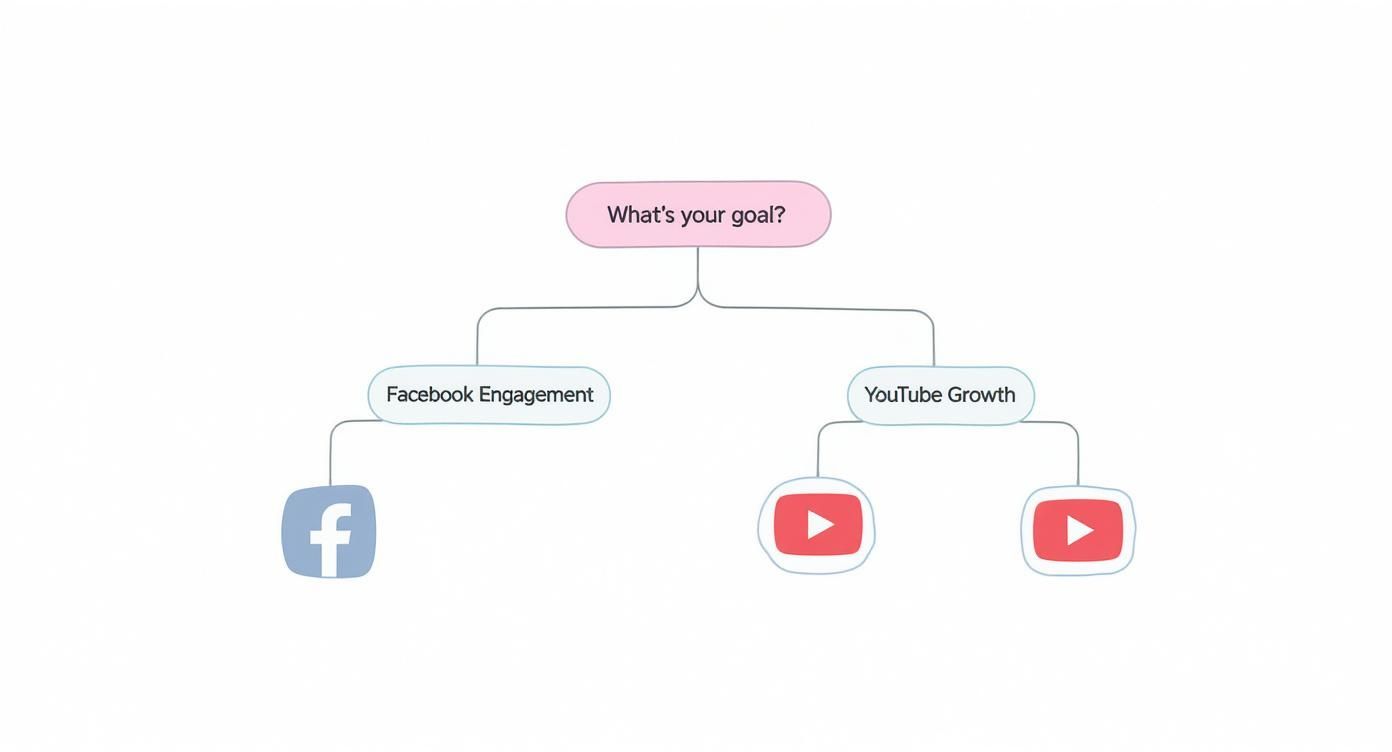
As the flowchart shows, it all comes back to your main objective. Are you aiming for YouTube traffic or Facebook reach? That's the question that should guide your strategy.
Making an Informed Decision
The evidence is overwhelming: if you want engagement on Facebook, native uploads are the way to go. To put a number on it, native Facebook videos get a staggering 1055% more shares than posts that just link out to YouTube. That stat alone highlights the insane potential for your content to spread like wildfire within Facebook's own world.
To help you weigh the options, here's a quick side-by-side comparison.
YouTube Link vs. Native Facebook Upload: A Quick Comparison
Deciding between linking and uploading can feel tricky, but breaking it down by features makes the choice much clearer based on what you're trying to achieve.
| Feature | Sharing a YouTube Link | Uploading Natively to Facebook |
|---|---|---|
| Primary Goal | Drive traffic to your YouTube channel | Maximize reach and engagement on Facebook |
| User Experience | Redirects users away from Facebook | Seamless, in-feed viewing experience |
| Algorithm Performance | Lower priority in the Facebook feed | Highly favored; gets more organic reach |
| Autoplay Feature | No (shows a static thumbnail) | Yes (silent autoplay in the feed) |
| Analytics | Centralized on YouTube | Tracked within Facebook Insights |
| Best For | Growing YouTube subscribers and watch time | Going viral and building a Facebook community |
Ultimately, choosing the right method depends entirely on the specific goal for that particular video.
A solid plan is your best friend here. Building out a modern church social media strategy, for example, ensures every piece of content you post has a clear purpose and direction.
Of course, you don't have to be a purist. The best approach might actually be a mix of both. Many savvy creators use a hybrid model as part of their larger content distribution strategies. This lets you target different audience segments and hit multiple goals at once.
The Direct Link Method: Driving Traffic to Your YouTube Channel
If your number one goal is building a powerhouse YouTube channel, then the direct link method is your best friend. This strategy is all about sending your Facebook audience straight to your YouTube content, which is the most effective way to rack up subscribers, increase watch time, and boost your channel's authority.
It’s the simplest way to get your video on Facebook, but don't just copy and paste. You need a little finesse.
The process kicks off on YouTube. Find your video, hit the "Share" button, and grab that link. That unique URL is the bridge connecting your Facebook followers to your YouTube kingdom. Once you've got it, pop over to Facebook to create a new post.
Crafting a Compelling Facebook Post
Just dropping a link into a new Facebook post and calling it a day is a massive missed opportunity. You have to build some excitement and give people a solid reason to leave their feed. Think of your post text as the trailer for your video—it needs to be punchy, engaging, and make people curious.
Start with a strong hook. Ask a question, drop a surprising fact, or make a bold statement pulled from your video. Instead of a bland, "Check out my new video," try something with more flavor, like, “I spent 50 hours testing the best budget microphones, and the results were not what I expected.”
Your goal is to interrupt the scroll. A well-crafted introduction piques curiosity and makes clicking the link feel like the natural next step, transforming a passive scroller into an active viewer on your YouTube channel.
After pasting the link, Facebook will automatically generate a preview with your video’s thumbnail, title, and description. This preview is the visual centerpiece of your post, so make sure your YouTube thumbnail is top-notch and designed to grab attention. A 1280×720 pixel thumbnail is ideal.
Maximizing Your Reach and Clicks
Here’s a pro tip: once the preview loads, you can actually delete the URL from the post text. The clickable preview box will remain, giving you a much cleaner, more professional-looking post. It's a small tweak, but it makes a big difference in presentation.
To really get your post seen, you'll want to use a few optimization tricks:
- Tag relevant pages: Did you mention another creator, a specific brand, or a location in your video? Tag their Facebook page. They'll get a notification, which could encourage them to share your post with their own audience.
- Add a strong Call-to-Action (CTA): Be direct and tell people what you want them to do. Phrases like, “Watch the full breakdown on YouTube to see the winner,” or “Click to discover all three tips,” guide your audience and seriously boost click-through rates.
- Adapt for your audience: Tailor your message to where you're posting. A post in a niche Facebook Group can be more technical and in-depth, while a share on your personal profile might benefit from a more casual, story-driven approach.
When you treat each share like its own mini-campaign, you turn a simple link into a powerful traffic-driving machine for your YouTube channel.
The Native Upload Method Dominating the Facebook Feed
If you want your videos to truly make a splash on Facebook, sharing a YouTube link just won’t cut it. The secret is uploading your video file directly to the platform. This is what we call a "native" upload, and it's the only method that really works if you're aiming for maximum reach.
By uploading natively, you’re playing by Facebook's rules. The platform wants to keep its nearly 3 billion monthly users on-site, not send them away to YouTube. This simple shift in approach turns your video from a boring external link into an immersive piece of content that stops the scroll.
The data backs this up. Facebook users spend about half their time on the app watching video, and native formats consistently crush external links in every engagement metric. You can dig into more of these stats over on Content Beta.
It all boils down to the user experience. Native videos autoplay silently in the feed, grabbing attention instantly. There’s no friction—no clicking, no waiting for a new page to load.
Getting Started with Native Uploads
Uploading your video file is pretty straightforward, but a few small details can make a huge difference. For the best results, manage your video content through Meta's Creator Studio or Business Suite. These tools offer far more advanced options than just posting from your page's timeline.
Before you even think about uploading, check your file format.
- Optimal Video Format: Stick with MP4 or MOV. These are the gold standard for Facebook, giving you the best quality and compatibility.
- Best Aspect Ratio: For the main feed, a 1:1 square video is your best bet. It takes up way more screen real estate on a phone than a traditional 16:9 widescreen video. If you’re posting a Reel or Story, 9:16 vertical is a must.
Nailing these technical specs from the start ensures your video looks professional and is built for how people actually watch content on their phones.
Tailoring your video's dimensions to the placement makes it feel more organic and less like a misplaced ad. It’s a small tweak that has a massive impact on holding a viewer’s attention.
Crafting the Perfect Native Video Post
Once your video file is ready, the real work begins. Uploading is just the first step; how you package it will determine whether it sinks or swims. You'll need a killer description, a custom thumbnail, and accurate captions.
Your description is your hook. Start with your most important message, ask a compelling question, or drop an interesting stat to make people curious. This text also helps with Facebook’s internal search, so sprinkle in a few relevant keywords naturally. Nailing your post copy is a huge part of building effective social media engagement strategies.
Next up: the thumbnail. Always upload a custom one. Facebook will offer to pull a random frame from your video, but a well-designed image with bold text and eye-catching graphics will always perform better. It's the first thing people see, so make it count.
Finally, add captions. With an estimated 85% of Facebook videos being watched with the sound off, captions are absolutely non-negotiable. They make your content accessible and guarantee your message gets across, even in complete silence.
Making Your Facebook Video Impossible to Ignore
Getting your video onto Facebook is just the starting point. If you really want it to perform, you need to switch gears from creator to marketer. It’s all about optimizing every little detail to stop the scroll and turn a simple upload into content that gets results.
It all starts with a solid foundation. You can have all the optimization tricks in the world, but they won't save a bad video. Investing in professional video production services ensures your content is top-notch from the get-go. With a great video in hand, your first job is the thumbnail—it’s the billboard for everything that follows.
Design a Scroll-Stopping Custom Thumbnail
Think of your thumbnail as the single most important visual you’ll create. It’s the split-second deciding factor for someone scrolling through their feed. A blurry, random frame from your video just isn't going to cut it.
You absolutely have to create and upload a custom thumbnail. Make it bright, clear, and intriguing. Use bold, easy-to-read text that hints at the value inside. High-contrast images with a person's face almost always perform better because they create an instant human connection. Treat it like a book cover; it has to be compelling enough to make someone want to open it.
Master the Art of the Hook
The thumbnail gets their eyes, but the first sentence of your post has to get their brain. You have just a few seconds to convince someone your video is worth their time. Don't blow it with a boring intro.
Lead with a powerful hook that sparks curiosity:
- Ask a provocative question: "Ever wonder why some videos go viral and others just… don't?"
- Share a shocking statistic: "73% of people admit they ignore videos with bad audio. Here’s how you can fix yours."
- Create an information gap: "I tried the 'viral' productivity hack for a week. The biggest result was one I never saw coming."
That first line is everything. It sets the stage and pulls the viewer into the rest of your description and, hopefully, into your video.
Your video might be a masterpiece, but if the packaging—the thumbnail and the hook—is weak, most people will scroll right on by. These aren't afterthoughts; they're essential parts of the creation process.
Boost Discoverability with Tags and Hashtags
To get your video in front of more than just your current followers, you need to make it discoverable. That’s where smart tagging and hashtagging come in.
Think about the keywords your ideal viewer would use to find content like yours. Include 3-5 relevant hashtags in your description. I've found a mix of broad tags (like #ContentMarketing) and niche ones (like #VideoSEOTips) works best.
Also, be sure to tag any people, brands, or locations you featured. When you tag another page, they get a notification. This simple action opens the door for them to share your content with their audience, instantly multiplying your reach.
One last thing: captions are a must. They make your video accessible, but more importantly, they keep people watching when their sound is off (which is most of the time). We have a whole guide on how captions improve Facebook video engagement if you want to dive deeper. These small tweaks are what turn a good video into a great one.
Navigating Copyright and Platform Policies
Sharing videos across different platforms is a fantastic way to grow, but you need to know the rules of the road to protect your channel and your brand. The question of how to post YouTube videos on Facebook gets a lot more complicated when you’re dealing with content that isn't yours.
Let's start with the easy stuff. If the video is 100% yours—meaning you shot it, you own the audio, and you made all the graphics—you're in the clear. You hold all the cards. Share the link, upload the file natively, do whatever you want. No legal headaches to worry about.
But the game changes completely when you want to share something made by another creator. Downloading someone else's YouTube video and just re-uploading it to your Facebook page? That’s a straight-up copyright violation. Plain and simple.
Understanding the Rules of Engagement
To keep your accounts safe, you have to understand the massive difference between sharing and re-uploading.
Sharing the original YouTube link is almost always fine. It drives traffic back to the creator’s channel and gives them proper credit by default. It's good etiquette and it’s legal. Re-uploading their video file as your own native post is where you cross the line into dangerous territory.
Here are the core principles I always follow:
- Always ask for permission. Before you even think about downloading and re-uploading someone else's video, you must get their explicit permission. A quick DM or a polite email can save you a world of trouble.
- Credit isn't a substitute for permission. Tagging the original creator is the right thing to do after you have their blessing, not instead of it. Attribution alone doesn't give you the right to use their work.
- Don't assume "Fair Use" will protect you. Fair use is a notoriously gray area in copyright law and it almost never applies to using an entire video for your own social media growth. It’s a risky bet that can easily blow up in your face.
The bottom line is this: re-uploading another creator’s content without permission opens you up to some serious risks. We're talking video takedowns from Facebook's rights management system, copyright strikes, and even getting your account suspended. It’s just not worth it.
With YouTube boasting over 2.7 billion viewers, tapping into both platforms is a smart move for growing your audience. But that growth has to be built on an ethical foundation that respects the work of other creators. If you want to dive deeper into the numbers, these comprehensive video engagement statistics show just how massive YouTube's user base really is.
Play by the rules, and you can build a sharing strategy that's both powerful and sustainable.
Got Questions About Sharing YouTube Videos on Facebook?
Figuring out the best way to post your YouTube videos on Facebook can feel like a moving target. Getting the little details right often makes the difference between a post that gets real engagement and one that just sits there. Let's clear up some of the most common questions creators run into.
Can I Post a YouTube Short as a Facebook Reel?
Yes, you can, but it’s not as simple as dropping a link. Facebook Reels and YouTube Shorts are direct competitors, so you can't just share a Short and have it magically appear as a Reel.
To do it right, you need to download the video file of your Short from your own YouTube channel first. Once you have that file saved, you can upload it natively using Facebook’s Reel creation tool.
Before you hit publish, keep these three things in mind:
- Format: Make sure the video is still in that perfect 9:16 vertical aspect ratio.
- Length: Check that it fits within Facebook's current time limit for Reels, which is usually around 90 seconds.
- Music: This is the big one. The music license you used on YouTube does not carry over to Facebook. To steer clear of copyright strikes, either pick a track from Facebook's own audio library or make sure you're using royalty-free music.
Why Does My YouTube Link Preview Look So Bad on Facebook?
If your link preview looks broken, stretched, or just plain ugly, it's almost always a thumbnail issue. When you paste a YouTube URL into Facebook, it pulls the video’s metadata—the thumbnail, title, and description—to build that little preview box. If any of that info is missing or messed up on YouTube's side, Facebook can't create a clean preview.
The fix is usually pretty simple. Jump into your YouTube Studio, find the video in question, and upload a high-resolution custom thumbnail. The sweet spot is 1280×720 pixels; that size almost always guarantees a crisp, professional look on Facebook.
Now, here’s a pro tip: updating your thumbnail on YouTube won't automatically fix links you've already shared. You’ll need to give Facebook a nudge with its "Sharing Debugger" tool. Just paste your YouTube URL into the debugger and click "Scrape Again." This forces Facebook to fetch the new, updated information.
Doing this ensures any future shares of that link will pull the correct, polished preview you worked so hard on.
Will Posting Natively on Facebook Hurt My YouTube Views?
This is a classic creator dilemma, and the answer really comes down to what you want to achieve with that specific piece of content.
When you upload your video file directly to Facebook (native video), all the views, likes, and comments it gets stay on Facebook. Those views do not count toward your YouTube channel's watch time or view count. This is the best approach if your main goal is to maximize engagement within the Facebook ecosystem.
On the flip side, sharing the direct YouTube link forces people to click through to watch. Every single one of those clicks counts as a view for your YouTube channel. This method is all about driving traffic back to your home base and growing your YouTube audience.
So, which is better? Many creators land on a hybrid strategy. You could post a short, punchy teaser clip natively on Facebook to grab attention in the feed. Then, in the description, add a strong call-to-action with the link to the full video, telling people to "Watch the rest on YouTube!"
Ready to create stunning videos without the hassle? ShortsNinja uses AI to help you produce engaging faceless content for TikTok, YouTube, and Instagram in just minutes. Try it for free and start growing your channels effortlessly.