
Figuring out how to create a short on youtube isn't just about jumping on the latest trend—it's one of the smartest moves you can make for explosive channel growth. Don't think of Shorts as some separate, gimmicky feature. See them for what they really are: a powerful gateway that funnels new viewers straight to your long-form content and helps you build a loyal community faster than you ever could with traditional videos alone.
Why Shorts Are Your Channel's Secret Weapon
Before we jump into making your first video with ShortsNinja, it’s worth taking a moment to understand why this format is such a game-changer. YouTube's algorithm is actively pushing Shorts, giving even the smallest channels a shot at reaching a massive audience that used to be completely out of reach. This is more than just a way to rack up quick views; it’s a total shift in how people discover content on the platform.
The numbers here are just wild. Since Shorts launched, the format has completely reshaped how we watch videos, now pulling in over 90 billion daily views around the world. With over two billion people a month scrolling through Shorts, getting good at this format is no longer optional. The engagement rates for Shorts are even outperforming competitors like TikTok and Facebook Reels, which tells you just how good they are at grabbing and holding attention. If you want to see the full picture, check out these YouTube Shorts statistics.
This all adds up to a massive opportunity for creators who figure out how to make short-form content that hits the mark.
The Strategic Value of Short-Form Content
Shorts are the perfect "top of the funnel" content. They introduce your personality and your brand to viewers who probably would have never stumbled upon your channel otherwise. A single, well-made 30-second clip can do what a 20-minute deep-dive can't: achieve instant, widespread reach.
This gives you a few key advantages:
- Rapid Subscriber Growth: Every Short is a new chance to get discovered. When someone enjoys your clip, they are literally one tap away from subscribing. This leads to much, much faster channel growth than sticking to long-form videos alone.
- Audience Testing Ground: Got a new idea for a video series? Don't spend hours filming a full-length video. Test the waters with a Short first. The instant feedback you get from views and engagement will tell you exactly what your audience wants to see.
- Driving Traffic to Long-Form Videos: A great Short can act like a trailer for your main content. You can tease a topic, answer a common question, and then point viewers to your full video for the complete story. It's a fantastic way to boost the performance of your hero content.
Think of each Short as an audition for a new subscriber. You have just a few seconds to make an impression, prove your value, and earn their click. It's high-stakes, high-reward content creation.
Planning a Short People Will Actually Watch
Ever wonder if viral Shorts are just happy accidents? Almost never. They're the result of smart, focused planning. Before you even think about hitting record, you need an idea that can hook someone in under three seconds.
Forget trying to tackle huge topics. The best Shorts are laser-focused and incredibly specific.
A killer strategy I use all the time is pulling snippets from my longer videos. Find that one golden nugget—a powerful quote, a shocking stat, or a hilarious blooper—and build a Short around it. This not only saves a ton of time but also works as a natural promo for your existing content.
Crafting a Compelling Narrative
Every great Short tells a tiny story, even if it's just a few seconds long. The ones that perform best almost always follow a simple but super effective three-part structure.
- The Hook: Kick things off with a burning question, a bold statement, or something visually jarring. Your only job in the first two seconds is to stop the scroll. Seriously, that's it.
- The Story: This is the meat of your video. It’s where you deliver the value or build the tension. Think quick tutorial steps or the build-up to a punchline.
- The Payoff: End with a satisfying conclusion. This could be the answer to your initial hook, the final result of a project, or a call to action that actually feels earned.
Getting this structure right is a cornerstone of our 10 Best Practices for Short-Form Video Content, because it directly ties into keeping people watching.
Here's a common mistake I see: creators treating Shorts like miniature vlogs. Don't do that. Think of them as single-serving solutions. Answer one question. Share one tip. Tell one joke. The more focused you are, the harder your content will hit.
Finding Your Angle and Audio
Another powerful approach is to tap into the micro-trends buzzing within your niche. What are people always asking about? Use ShortsNinja to whip up a quick, visually engaging answer to a single, nagging question from your community. It’s a fast way to provide value and position yourself as the go-to expert.
And you can't forget about trending audio. It’s a massive piece of the puzzle. Just scrolling through the Shorts feed will tell you what songs and sounds are blowing up. Using them helps the YouTube algorithm figure out who to show your content to, tapping into an audience that’s already engaging with that sound.
The trick is to find audio that matches the mood of your content without overpowering your message. If you're looking for inspiration that goes beyond just what's hot on YouTube, checking out general social media content ideas can spark some fresh angles for your Shorts. A little planning up front makes creating a killer Short a whole lot easier.
Filming and Editing Your Short Like a Pro
Alright, this is where your idea really starts to take shape. Knowing how to create a YouTube Short isn't just about the concept—it's about nailing the execution. And you don't need a high-tech studio to do it. Honestly, some of the biggest viral hits are shot on a smartphone using a few smart, simple tricks.
First things first: always shoot your video vertically. We're talking a 9:16 aspect ratio. This is a non-negotiable for the Shorts player, so get it right from the start. Next, hunt down some good lighting. You can get a surprisingly clean and professional look just by facing a window for some soft, natural light. Finally, make sure your audio is crisp and clear. Even your phone's built-in mic can do the job if you're in a quiet room.
This infographic breaks down a simple workflow to follow before you even hit record.
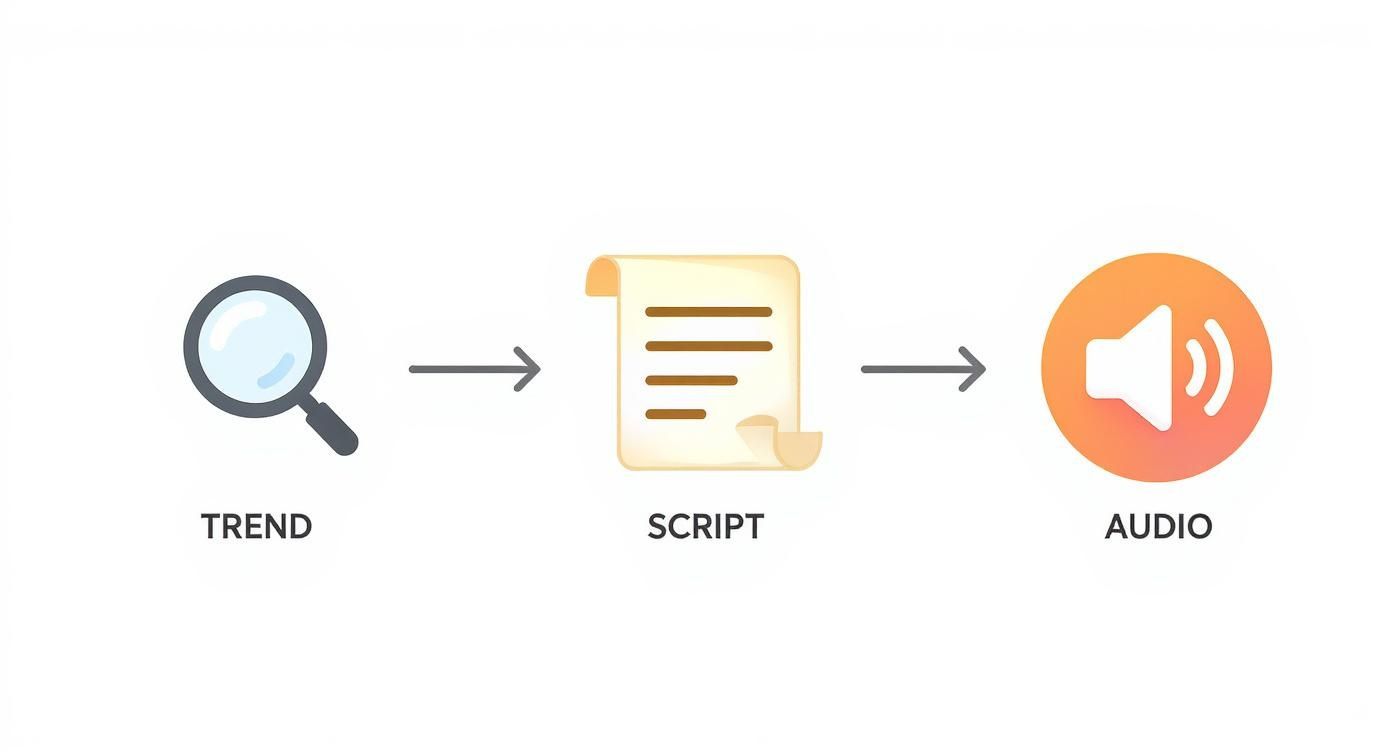
Following this process—spotting a trend, jotting down your key points, and picking your audio—will make the entire creation process smoother and set you up for a much easier editing session later.
Polishing Your Edit in ShortsNinja
Once you've got your raw footage, it's time to stitch it all together into something dynamic. This is where a tool like ShortsNinja really shines, helping you turn basic clips into content that stops the scroll. The platform is built for speed and efficiency, which is exactly what you need.
The real secret to a great Short is the pacing. You have to keep things moving.
- Quick Cuts: Use fast cuts between scenes or different angles to keep the energy high. Don't let a single shot drag on unless it's for a very specific dramatic effect.
- Dynamic Text: Add text overlays to punch up your key points. Animate them so they pop onto the screen, keeping the visuals fresh and engaging.
- Effective Filters: Settle on a consistent filter or color grade. This gives your Shorts a signature look that helps people recognize your content instantly.
If you want to dive deeper into the editing side of things, our full guide on how to edit YouTube Shorts has you covered.
Remember, the goal is to cut anything that doesn't serve the story. If a clip isn't adding value or moving things forward, get rid of it. Being ruthless in your edit is what makes a Short tight and engaging.
YouTube is always tweaking its platform to better support creators. For instance, they recently bumped the maximum length for Shorts to three minutes, giving you a bit more breathing room. And with over 70% of YouTube watch time now happening on mobile devices, a vertical format and captivating visuals are more critical than ever.
As you start leveling up your video skills, you might think about showcasing your work professionally. For anyone looking to build out an online portfolio, it’s worth exploring what a dedicated platform can do when it comes to creating a website for video production.
Optimizing Your Short for the Algorithm
Alright, you’ve created your Short. Hitting “publish” feels like the finish line, but it’s really just the beginning.
This next part is where so many creators drop the ball. A few simple tweaks can make all the difference between your Short getting lost in the void and the algorithm picking it up and showing it to thousands of potential new fans. Think of it as giving YouTube a clear roadmap to your content and the perfect audience for it.
Your Title and Description: The One-Two Punch
First up, your title. This is your hook. People scroll through Shorts at an insane speed, so you have milliseconds to grab their attention. Keep it short, snappy, and full of curiosity.
A killer title hints at the value inside without giving the whole game away. For instance, instead of a flat "My Morning Coffee Routine," try something like "The 1 Thing You're Doing Wrong With Your Coffee." See the difference? One is a statement, the other is an irresistible itch that needs scratching.
Next is the description. It plays a different role but is just as important. This is your space for a bit more context, a clear call to action, or even a link to a related long-form video on your channel. Don't stress about writing an essay here; a sentence or two is all you need to point your most engaged viewers in the right direction.
Mastering Hashtags and Timing
Hashtags are your direct line to the YouTube algorithm. When used correctly, they help the system categorize your video and serve it up to the right people.
There's one tag that's absolutely non-negotiable.
- The Golden Rule: You must always include #shorts in either your title or description. This is the big, flashing sign that tells YouTube your video belongs in the Shorts feed. No exceptions.
- Get Specific: After that, add two or three more hashtags that are super relevant to your video's topic. If you made a video about baking sourdough, tags like #sourdough and #bakingtips are perfect. Avoid the temptation to spam dozens of generic tags; precision beats volume every time.
Your goal with hashtags isn't to reach everyone; it's to reach the right people. A few well-chosen tags are far more powerful than a dozen generic ones. This targeted approach tells the algorithm exactly who will find your content most valuable, increasing the likelihood of it being pushed to a wider audience.
Finally, let's talk about when you post. While the Shorts algorithm isn't as sensitive to timing as traditional videos, giving your content an initial push by publishing when your audience is most active can work wonders. Dive into your YouTube Analytics to see when your viewers are typically online and schedule your posts for that sweet spot.
Combining a great title, a solid description, and smart hashtags sets your Short up for success from the second you publish. If you need a refresher on the technical side of things, our guide to uploading YouTube Shorts breaks down all the steps.
To help you keep track of everything, I've put together a quick checklist. Run through this before you publish every single Short to give it the best possible shot at going viral.
YouTube Shorts Optimization Checklist
| Element | Best Practice | Why It Matters |
|---|---|---|
| Title | Keep it short (under 60 characters), curiosity-driven, and include a keyword. | Grabs attention instantly in the fast-scrolling Shorts feed. |
| Description | 1-2 sentences with a clear call to action (CTA) and relevant links. | Guides engaged viewers to take the next step (e.g., watch another video). |
| Hashtags | Always include #shorts. Add 2-3 specific, niche-relevant tags. | Helps YouTube's algorithm categorize your content and find the right audience. |
| Thumbnail | Choose a compelling, high-contrast frame from your video. | A strong visual hook can increase click-through rates wherever Shorts appear. |
| Timing | Post when your target audience is most active (check YouTube Analytics). | Gives your Short an initial velocity boost from your existing subscriber base. |
| Sound | Use trending audio when it fits your content's theme and style. | Taps into viral trends and increases the chances of algorithmic discovery. |
Stick to this list, and you'll be giving the algorithm everything it needs to know to push your content out to a wider audience. Consistency here is what separates the creators who get views from those who don't.
Using Analytics to Make Better Shorts

If you think consistently great content comes down to luck, think again. It’s all about the data. To really get a handle on how to create a Short on YouTube that actually performs, you have to put on your detective hat and dig into your YouTube Studio analytics. This is where you stop guessing what works and start knowing what your audience craves.
It's easy to get lost in the sea of numbers, but for Shorts, you only need to laser-focus on a couple of key metrics. Forget the vanity stats and zoom in on what truly drives growth.
The single most telling metric for any Short is "Viewed vs. swiped away." This one percentage tells you almost everything you need to know about your hook. It’s a dead-simple breakdown of how many people saw your Short and stuck around versus how many bounced immediately.
Decoding Your Data
Seeing a high swipe-away rate? That's a huge red flag that your first three seconds are falling flat. Maybe the intro is too sluggish, the visuals aren’t punchy enough, or the music choice is an instant turn-off. That single data point gives you an immediate, concrete thing to fix in your next video.
Audience retention is the other piece of the puzzle. You need to pay close attention to where people are dropping off.
- Sudden Dips: If you spot a sharp drop-off at a specific point, go back and rewatch that exact moment. Did the energy die down? Was there a jarring cut or a boring stretch?
- Gradual Decline: A slow, steady bleed of viewers might signal that the core idea just wasn't compelling enough to hold their attention for the entire duration.
Your best-performing videos aren’t just wins; they're a blueprint for what to do next. Dive into their analytics and ask yourself, "What did this Short do differently?" Was it the topic? The editing style? The audio choice?
Start looking for patterns across all your top videos. Do they all kick off with a question? Do they use a certain kind of text overlay? These common threads are pure gold. By spotting these successful elements and replicating them, you start building a repeatable formula for Shorts that connect with your viewers and keep them coming back. This is what separates one-off viral hits from real, sustained channel growth.
Got Questions About Making YouTube Shorts?
Even if you've been creating content for years, jumping into YouTube Shorts can feel like learning a whole new game. The platform moves fast, and the best practices are always shifting. Let's clear up some of the most common questions creators run into.
What's the Real Sweet Spot for Short Length?
This one comes up all the time. While YouTube allows Shorts to be up to three minutes long, that doesn't mean you should use all that time. From what I’ve seen, the magic happens much faster.
Most viral Shorts land somewhere between 20 and 40 seconds. This range is long enough to tell a quick story or share a solid tip but short enough to keep someone from swiping away.
Can I Actually Make Money with Shorts?
Yes, you absolutely can, and there's more to it than you might think. Shorts are part of the YouTube Partner Program, so you earn a cut of the ad revenue that plays between videos in the Shorts feed.
Now, the payout for a single view is smaller than a traditional long-form video. But the sheer volume you can get with a successful Short can quickly add up to a serious income stream.
Pro Tip: Don't get stuck on just ad revenue. Think bigger. Shorts are an incredible tool to funnel viewers to your main channel, promote your merchandise, or drive traffic to affiliate links. They're a top-of-funnel powerhouse for your entire brand.
What’s the Deal with Using Popular Music?
Music can make or break a Short, but it's also a minefield if you're not careful. So, can you use that trending song you keep hearing?
The answer is yes—if you use the audio library built directly into the YouTube Shorts editor. That library contains tracks that are pre-cleared for you to use. Grabbing a copyrighted song from anywhere else is the fastest way to get your video demonetized or hit with a copyright strike. Just stick to the official library; it's the safest bet.
Ready to stop spending hours on a single Short? ShortsNinja uses AI to handle everything from scripting to visuals, so you can create amazing content in minutes. Give the free trial a spin and see for yourself.