
Connecting your TikTok and Instagram is surprisingly simple. You can either add a clickable Instagram link right in your TikTok bio or use the 'Share' feature inside TikTok to push videos directly to your Instagram Stories and Reels. It's a small tweak that essentially turns your TikTok profile into a discovery funnel for your Instagram account, amplifying your reach across both platforms.
Why Connecting TikTok and Instagram Is a Smart Move
Linking your TikTok and Instagram accounts goes way beyond just adding a vanity link to your profile. This is a strategic play to build a powerful synergy between two totally unique digital cultures. You're not just chasing followers; you're creating a more resilient online presence by giving your audience multiple ways to connect with you.
Here's how I like to think about it: TikTok is your viral testing ground, and Instagram is your community hub. You can throw spaghetti at the wall on TikTok, experimenting with trending sounds and raw, unpolished content to see what sticks. The videos that take off can then be repurposed for your Instagram Reels, where you can connect with a more established and loyal audience.
Capitalize on Viral Energy
The numbers tell a pretty compelling story. In 2024, TikTok user engagement went through the roof, with the average comments per post jumping by a massive 73.7%. That kind of viral energy is a goldmine for creators. By connecting your accounts, you can capture that lightning in a bottle and direct it over to Instagram, where Reels still pull in a 1.48% engagement rate—which is significantly higher than standard photo posts.
The real goal here is to cross-pollinate your audiences. Someone might discover your brand through a trending TikTok video and, with one tap, land on your Instagram. There, they might find an Instagram Shop, in-depth Stories, or a link to your website.
This connection serves different purposes for different creators, and I've seen it work wonders for both:
- E-commerce Brands: A brand can use a viral TikTok sound to show off a new product, then send all that traffic to their Instagram profile which features a shoppable catalog and glowing customer testimonials.
- Influencers: They can test out a dozen video concepts on TikTok. The ones that get the best response get a polished edit for Instagram Reels, maximizing their impact with an audience that's already bought in.
Ultimately, this integration is a core piece of any solid social media marketing strategy, allowing you to tell a cohesive brand story across both platforms.
Adding Your Instagram Link to Your TikTok Profile
One of the quickest wins for growing your audience is connecting your profiles. When you add a clickable Instagram icon to your TikTok bio, you're building a direct bridge for your followers. This small step turns casual viewers from your "For You" page into a dedicated community on a second platform.
Think of it this way: you’re funneling your most interested fans from TikTok's fast-paced feed straight to your more curated Instagram grid. Let's get it set up.
Finding the Right Settings
First things first, open up the TikTok app and tap the Profile icon in the bottom-right corner to land on your profile page.
From there, look for the big Edit Profile button sitting right under your follower count. Tap it. This is where you can change your username, bio, and—most importantly—link your other social accounts.
Inside the Edit Profile screen, scroll down a bit until you see the 'Social' section. You'll spot options for both Instagram and YouTube. Go ahead and tap on Add Instagram.
TikTok will then ask you to log into your Instagram to authorize the connection. Don't worry, this is a standard and secure process handled directly by the apps to make sure it's really you.
Once you’ve logged in and given the okay, a small Instagram camera icon will automatically pop up in your bio. It sits right next to your follow button, making it super easy for anyone visiting your profile to check out your Instagram with a single tap.
The app is designed to make this connection as painless as possible, which shows how much platforms now encourage cross-promotion.
Before we move on, let’s quickly look at the two main ways you can connect your accounts and why you might choose one over the other.
Linking Methods And Their Benefits
Deciding how to link your profiles depends on your goals. Do you want a simple, permanent link in your bio, or do you want to share content between platforms? This table breaks it down.
| Linking Method | Primary Benefit | Best For |
|---|---|---|
| Profile Link (Bio) | Creates a permanent, visible bridge for profile visitors. | Creators focused on funneling TikTok followers to Instagram for long-term community building. |
| Cross-Posting | Shares specific content (Reels/Stories) directly to the other platform. | Creators who want to save time by repurposing content and reaching both audiences simultaneously. |
For most creators, using both methods is the best strategy. The bio link acts as a constant call-to-action, while cross-posting keeps both audiences engaged with fresh content.
Remember, this isn't just about adding a link. It's about making life easier for your most engaged fans. Anyone who enjoys your TikToks enough to visit your profile is already curious; you want to make that next step to following you on Instagram as frictionless as possible.
Getting this simple integration right is a core part of building a cohesive brand online. It ensures the momentum you build on one platform doesn't just stay there—it fuels your overall growth everywhere.
Sharing Your TikTok Videos on Instagram
Alright, so you’ve connected your Instagram account to your TikTok profile. Now for the fun part: getting your content in front of a new audience.
You can share a TikTok directly to your Instagram Stories, Feed, or Reels right from the TikTok app’s native ‘Share to’ function. But—and this is a big but—each format has its own quirks and best practices.
The biggest hurdle? That pesky TikTok watermark. While sharing directly is super convenient, Instagram's algorithm is known to deprioritize content that has a visible watermark from a competing app. If you're serious about performance, it's almost always better to upload a clean, watermark-free version of your video straight to Instagram to give it the best possible shot at reaching more people.
Sharing to Different Instagram Formats
Your sharing strategy needs to be flexible. What works for a quick, unedited Story won't fly for a polished, trend-heavy Reel.
- Instagram Stories: This is the easiest one. Just hit the ‘Share to’ button on your TikTok and select ‘Instagram Stories.’ It’s perfect for casual, behind-the-scenes clips or quick updates where perfection isn't the goal.
- Instagram Reels: For Reels, you'll want to take a more hands-on approach. First, download the video from TikTok (ideally, a version without the watermark). Then, upload it manually within the Instagram app. This extra step is worth it because it lets you add trending audio and effects native to Instagram—a huge part of what makes Reels successful. For a deeper dive, check out our guide on Instagram Reels best practices.
This three-step visual shows you just how simple it is to link your Instagram account from inside TikTok's settings.
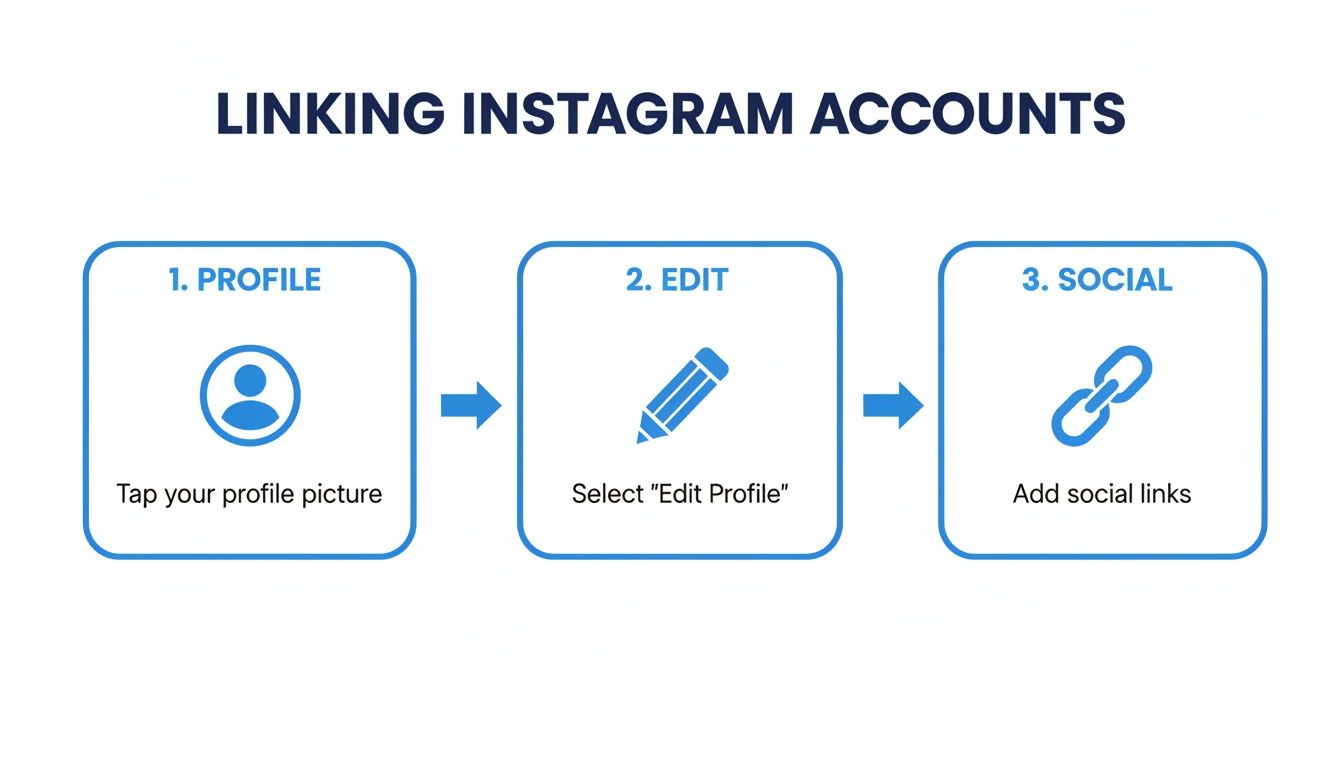
As you can see, it’s just a few taps to get from your main profile to the social linking section.
Cross-platform sharing is a game-changer for growth, especially when you consider that a whopping 99.9% of Instagram's users are also active on other social networks. And with Instagram Reels boasting an average reach rate of over 30%, reposting your top-performing TikToks can seriously amplify your visibility. You can dig into more Instagram user statistics on Recurpost.
Don't just dump your TikToks onto Instagram. Tailor your captions and hashtags for each platform. What works on TikTok might feel out of place on Instagram, so take a minute to adjust your message for the audience you're trying to reach.
Forging a Real Cross-Platform Strategy
Okay, so you’ve linked your accounts. That’s the easy part. The real magic happens when you build a smart, cohesive content strategy that actually respects what makes each platform tick.
So many creators fall into the trap of just dumping the exact same video everywhere. Your followers are sharp—they can spot a lazy repost a mile away, and it does more harm than good.
A much better way to think about it is treating TikTok and Instagram as two distinct channels with their own personalities. Let's say a raw, unpolished video using a trending sound blows up on your TikTok. Instead of just cross-posting it, why not create a more polished, behind-the-scenes version for your Instagram Reels? That simple move gives people a compelling reason to follow you in both places.
Tailor Everything: From Content to Captions
Think about the vibe of your captions. TikTok is all about short, punchy text that’s often part of the joke itself. Instagram, on the other hand, gives you room to breathe. You can write longer, more story-driven captions that invite deeper conversations.
- For TikTok: Lean into trending hashtags and keep those captions tight and clever.
- For Instagram: Write more descriptive captions. Use a mix of broad, high-traffic hashtags and smaller, niche ones to cover your bases.
This small shift in approach shows your audience you get it. You understand what they’re looking for on each app. It’s about adapting your message, not just mindlessly copying and pasting. If you really want to make sure these efforts pay off with more eyes on your content, it’s worth learning more about writing SEO articles that consistently rank, as many of the core principles apply to social media visibility, too.
A winning cross-platform strategy feels authentic. You’re not just broadcasting content; you’re building one unified community by jumping into the comments and DMs on both TikTok and Instagram.
Finally, you need to become best friends with your analytics. Dive into the data on both apps and pay close attention to what’s landing where. You might discover your TikTok audience lives for your comedy skits, while your Instagram followers are all about your educational tutorials. Use that data to sharpen your strategy, ensuring every piece of content you post hits the mark.
This is how a simple link between profiles transforms into a powerful engine for growth.
Automating Your Workflow with ShortsNinja
Let's be real: creating and cross-posting content manually is a massive time sink. If you're ready to grow your presence without the constant grind, automation tools like ShortsNinja are the way to go for managing your TikTok and Instagram workflow.
This isn't just about scheduling. The platform tackles the biggest hurdles in content creation itself. Instead of spending hours scripting and editing, you can start with a simple idea. The AI steps in to generate a script and find compelling faceless visuals, which you can then quickly tweak and get ready to post.
You can manage everything from a single dashboard, keeping your video projects organized and on track.

This kind of integrated system is a game-changer, especially for digital marketers, small businesses, and influencers who need to pump out high-quality content consistently.
Streamline Your Publishing Schedule
Once your video is polished, the scheduler lets you auto-publish to both TikTok and Instagram without ever leaving the platform. This is a huge time-saver and makes sure your content drops during peak engagement hours, no matter what time zone you're in.
The real power here isn't just saving time—it's about creating a consistent, hands-free content engine. You connect your accounts once and let the automation handle the rest, freeing you up to focus on strategy and community engagement.
With Instagram hitting 2 billion monthly active users and TikTok closing in on 1.56 billion in 2024, connecting these two platforms has become non-negotiable for growth. Automation makes this effortless. It helps you capitalize on trends, especially when you consider that 74% of shoppers find new products on social media.
If you want to dig deeper into the numbers, these social media demographic trends on Tigerpistol are worth a read.
For creators looking for more strategies, our guide on how to auto share from TikTok breaks down more ways to maximize your reach. And with extra features like multi-language voiceovers and series creation, ShortsNinja becomes a seriously powerful asset for growing your channels.
Got Questions About Linking TikTok and Instagram?
Connecting your accounts is pretty straightforward, but a few questions always seem to pop up. Let's run through the most common ones I hear from creators.
Will My Followers Get a Notification?
Nope. Neither TikTok nor Instagram sends out a push notification or an alert when you add your Instagram link to your bio.
The change is subtle—the little Instagram icon just shows up on your profile for visitors to click. This is actually great because it lets you start driving traffic between your accounts without feeling like you need to make a big, formal announcement about it.
Can I Connect a Personal Instagram Account?
You absolutely can. Any Instagram account type—Personal, Creator, or Business—will link up just fine.
But if you're serious about growing your audience, you really need to switch to a Creator or Business account. Why? Data. Only these account types unlock Instagram Insights, which is where you can see how many people are actually clicking the link in your TikTok bio. Without that data, you're just guessing if your efforts are paying off.
A Creator or Business account is the difference between hoping your strategy is working and knowing it is. The insights are that important.
Does Sharing TikToks to Reels Hurt My Reach?
This is a big one, and the short answer is: yes, it can.
Instagram’s algorithm is pretty savvy. It knows when you’ve uploaded a video with a competitor's watermark (looking at you, TikTok logo), and it often deprioritizes that content. That means fewer of your followers will see your Reel, and it's less likely to hit the Explore page.
The best move here is to always download the original, watermark-free video file from TikTok. Then, upload that clean version directly to Reels. You can add trending audio, effects, and text natively inside the Instagram app. It’s an extra step, for sure, but it makes your content feel organic to the platform and can give your visibility a serious boost.
Tired of the manual grind of posting the same video on different platforms? ShortsNinja uses AI to create and schedule your short-form videos across both TikTok and Instagram, saving you hours every single week. Start creating with a free video today.