
Before you even think about hitting that record button, let's get one thing straight: viral YouTube Shorts aren't accidents. They’re engineered. The whole game is about hooking viewers in the first few seconds, delivering a quick hit of value, and creating a satisfying loop that makes people want to watch it again. If you can nail that, the algorithm will be your best friend.
Crafting a Viral YouTube Short Concept
The battle for attention is won or lost in the first three seconds. A killer Short is built on a simple but powerful idea, not some complex masterpiece. The top creators I know don't just sit around waiting for inspiration to strike—they're out there hunting for it. They dig into trends, figure out what their audience is dying to see, and then put their own unique spin on it.
Forget about writing a formal screenplay. For Shorts, you just need a bare-bones framework. Think of it as a roadmap to keep viewers glued to the screen. Your goal is to make every single second count, cutting out anything and everything that could make someone swipe away.
The Hook, Middle, Punchline Framework
Every single great Short follows a basic story arc, even if it's crammed into just 15 seconds. This simple structure gives your video a clear purpose and, most importantly, a payoff.
For example, a DIY channel might show a frustrating problem as the hook (a tangled mess of cables), a rapid-fire middle showing a clever solution, and a punchline revealing the perfectly organized, satisfying result.
This is the basic flow you should be aiming for:
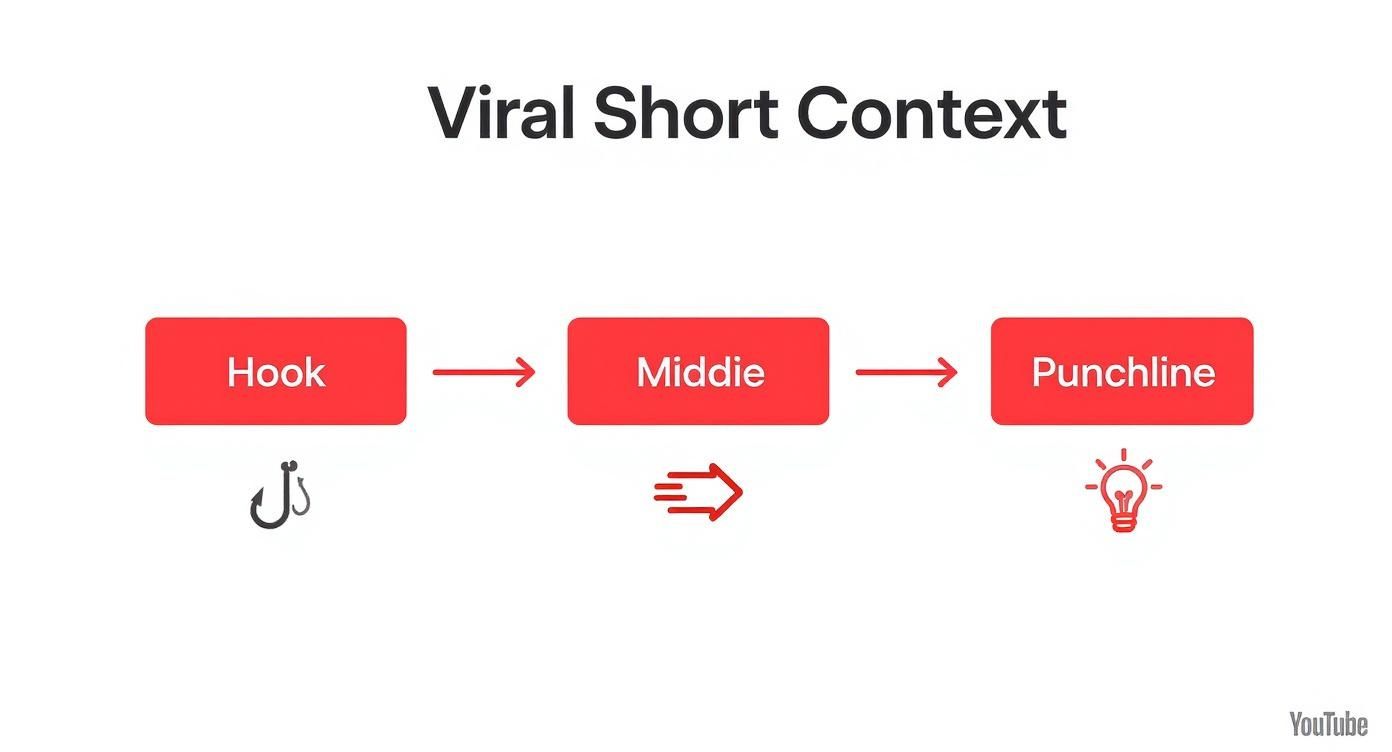
When you start thinking about your content this way—as a sequence of hook, middle, and punchline—it forces you to build momentum and give the viewer a rewarding finish.
Finding Your Unique Angle
Just mindlessly copying trends is a dead-end strategy. The real magic happens when you adapt a popular idea to your own voice and audience. Is there a viral dance taking over the platform? Great. How can you weave that into your cooking channel? Heard a trending audio clip? See if you can use it to tell a quick story about your small business.
It's this blend of the familiar and the original that makes content truly memorable. For a deeper dive into brainstorming, our guide on https://shortsninja.com/blog/how-to-create-a-short-video/ has some extra strategies you can use.
Key Takeaway: Your concept doesn’t need to be complicated, but it has to be crystal clear. A strong hook, a tight middle, and a solid payoff are the ingredients for a Short that people will watch over and over.
To really get the most out of Shorts, it helps to see how they fit into the bigger picture. Digging into comprehensive video marketing resources will give you a much stronger foundation for your entire content strategy, helping you understand how these quick videos can support your larger channel goals.
Filming Techniques for Standout Shorts

Let's get one thing straight: you don't need a Hollywood budget to create a Short that looks incredible. In fact, that smartphone in your pocket is probably the best tool for the job.
It’s not about the gear; it's about the technique. Mastering a few key filming principles is what separates amateur-hour content from videos that look sharp, professional, and impossible to scroll past.
First, the golden rule: always film vertically. YouTube Shorts are built for a 9:16 aspect ratio, matching how people hold their phones. If you film horizontally, YouTube will slap ugly black bars on the sides, screaming "low-effort" before your hook even has a chance to land. It's a non-negotiable.
Master Your Environment
Before you hit that record button, just take a second. Look around. The two things that will instantly make or break your video's quality are light and sound.
Good lighting doesn't mean expensive ring lights. The easiest trick in the book is to face a window and let natural daylight do the work. It creates a soft, flattering light that gets rid of any harsh shadows. Whatever you do, avoid having a bright light source behind you, or you’ll end up looking like a silhouette.
Audio is just as critical. Your phone's built-in mic can actually do a decent job if you're in a quiet spot and close to the device. To kill that annoying echo, try filming in a room with soft surfaces—think carpets, curtains, or even a cluttered bookshelf. For a massive upgrade, a simple lavalier mic that clips to your shirt is a cheap investment that makes your audio sound 10 times more professional.
Add Dynamic Movement
In the hyper-fast world of Shorts, a static shot is a boring shot. You need to keep things moving. Simple, intentional camera movements add energy and visual flair that keep viewers glued to the screen.
You can pull this off without any fancy gear. Try these simple moves:
- The Push-In: Slowly move the camera closer to your subject to build tension or emphasize a key moment.
- The Pull-Out: Start with a close-up on a small detail and then slowly move back to reveal the bigger picture. It's great for creating a sense of scale or surprise.
- The Pan: Gently move your camera from left to right (or vice versa) to follow an action or scan across a scene.
Pro Tip: Smoothness is key. Shaky, abrupt movements are just distracting. If you don’t have a gimbal, just tuck your elbows into your sides. It works wonders for stabilizing your hands.
Of course, as your channel grows, the right gear can definitely level up your game. While technique is king, pairing it with the right tools is how you consistently pump out killer content. If you're ready for an upgrade, check out the best camera for video content creation to see what options fit your style.
Using AI to Accelerate Content Creation
Consistency is one of the biggest walls creators hit when trying to make Shorts that actually get views. The pressure to pump out fresh content day after day can burn you out fast. This is exactly where AI tools become your secret weapon for both speed and creativity.
This isn't about letting a robot take over your channel. It's about using AI to handle the tedious, time-sucking tasks so you can focus on the bigger picture—strategy, creativity, and connecting with your audience.
Brainstorming and Scripting on Autopilot
Imagine taking a single, half-formed idea and spinning it into a dozen video titles and script outlines in just a few minutes. That's what AI platforms are built for. A tool like ShortsNinja, for example, can take a simple prompt and instantly spit out engaging hooks, structured scripts, and strong calls to action.
Let's say you want to make a Short about "healthy breakfast ideas." Here’s how it works in practice:
- You plug in your idea: Just type the basic concept into the tool.
- The AI generates concepts: It immediately offers different angles, like "3 Breakfasts That Kill Sugar Cravings" or "The 60-Second High-Protein Breakfast."
- You get a full script: Pick an angle you like, and the tool drafts a complete script with a hook, main points, and a punchy outro.
A process that used to take hours of staring at a blank page now takes a few clicks. The scripts you get are surprisingly solid, giving you a great starting point that you can easily tweak to fit your own voice and style.
Key Takeaway: Think of AI as an idea multiplier. It kills the friction of starting from scratch, letting you jump straight to refining and personalizing content instead of just trying to come up with it. For staying consistent, it's a total game-changer.
From Text to Voice and Visuals
Beyond just writing, AI is also incredible at creating the core assets for your Short. Getting a professional-sounding voiceover used to mean buying expensive mics and learning audio software. Now, AI can generate realistic, high-quality audio from your script in dozens of languages and accents.
This is a massive advantage for creators who prefer making "faceless" content, where the visuals and narration are the stars of the show. The AI handles the audio, letting you focus on finding or creating the perfect b-roll footage.
Some tools even take it a step further by generating video clips based on your script. If you want to go deeper, you can explore a full analysis of using AI for YouTube videos to see how these technologies are changing the game. By combining AI scripts, voiceovers, and visuals, you can create an entire YouTube Short without ever needing a camera or a microphone.
Editing Secrets for Maximum Engagement
https://www.youtube.com/embed/cguC42APeUY
The edit is where your raw clips get a soul. This is your chance to inject the pace, personality, and polish that takes a video from "just okay" to "wow, I have to watch that again." When it comes to Shorts, editing isn't just about trimming the fat—it's about making every single frame fight for the viewer's attention.
The absolute core of a great Short is momentum. You can't give the viewer a single second to get bored or their thumb will keep on scrolling. Think of it like a visual rollercoaster; you need constant energy to keep them locked in until the very end. This is how you create a Short people can't help but watch on a loop.
Pacing Is Everything
Short-form content lives and dies by its pacing. Forget those long, scenic shots you see in movies. Your edit needs to feel like a rapid-fire sequence of quick cuts that keeps the energy cranked to eleven.
A good rule of thumb is to make a new cut every one to two seconds. Seriously. This rhythm keeps the viewer's brain constantly processing new information, making it impossible to look away.
Let's say you're making a quick recipe Short. Don't show one long, boring clip of you chopping an onion. Instead, hit them with a flurry of cuts: a wide shot of the onion, a quick close-up of the knife slicing, a shot of the pieces falling onto the cutting board, and then bam—you're already on to the next ingredient. This tells the story faster and feels way more dynamic.
Punchy zooms are another great tool to have in your back pocket. A quick zoom-in can emphasize a crucial detail, add a bit of comedic timing, or build a little suspense. Just don't overdo it. Use them strategically to punctuate the most important moments.
Captions and Text Overlays Are Non-Negotiable
A massive number of people watch Shorts with the sound off. If your video's message is locked behind spoken words or audio cues, you're alienating a huge chunk of your potential audience right out of the gate. This is why captions and text overlays aren't just a nice-to-have; they're essential.
- Subtitles: Always burn subtitles directly into your video for any dialogue. This guarantees your message lands, whether someone is watching in a quiet library or a loud train.
- Text Callouts: Use big, bold, and sometimes animated text to highlight your key points. This text can literally guide the viewer's eye and reinforce what you want them to remember.
- Visual Storytelling: Think of your text as another character. It can add humor, ask a question to hook the viewer, or build curiosity about what's coming next.
Pro Tip: Keep your on-screen text big, clean, and ridiculously easy to read. Stick to high-contrast colors and try to place the text near the center of the screen. You want to avoid the very top and bottom where YouTube's interface elements might cover it up.
The Power of Sound
Okay, so while a lot of people watch without audio, sound is still a massive driver of virality on YouTube. Tapping into trending audio from YouTube's official library can give your video an instant algorithmic boost.
When you're putting your Short together, take a few minutes to browse the audio library and see what's popping off in your niche. Using a popular song or sound effect immediately connects your content to a larger trend, making it way more discoverable. The trick is to find a sound that actually fits the vibe of your video, not just one that's popular. The right audio can completely transform the emotional impact of your edit.
If you're ready to dive deeper into the editing process, our complete guide on how to edit YouTube Shorts gets into everything from advanced transitions to color grading.
Optimizing Your Short for the Algorithm

Let's be real: creating a killer Short is only half the battle. If nobody sees it, all that time you spent planning, filming, and editing was for nothing. The final step before you hit publish—optimization—is what clues the YouTube algorithm into who needs to see your masterpiece. This isn't about gaming the system; it's about giving your video the best possible shot at finding its audience.
Think of the Shorts feed as a fast-moving river. Your title, description, and hashtags are the signals that help YouTube guide the right viewers to your content. Get these right, and you’ll massively boost your chances of landing on the coveted Shorts shelf, which is where viral moments are born.
Writing Titles That Stop the Scroll
You’ve got less than a second to make an impression with your title. It's the first thing people see. On the Shorts shelf, titles often get cut off, so you absolutely have to front-load the most important words. The goal is to be short, punchy, and spark just enough curiosity to stop the scroll—without resorting to cheap clickbait.
A solid title for a Short is usually under 35 characters. This keeps the full idea visible on mobile. Don't overlook this—a great title can be the difference between a view and a swipe. The average engagement rate for YouTube Shorts is 5.91%, which is higher than its rivals. That means once you earn that tap, you have a good chance of keeping them hooked. You can find more YouTube user stats over at GlobalMediaInsight.com.
Let's look at a real-world example for a simple kitchen hack video:
| Weak Title (Too Long & Generic) | Strong Title (Short & Curious) |
|---|---|
| "A Quick and Easy Way to Perfectly Peel Garlic in Under 10 Seconds" | "This Garlic Hack Actually Works" |
See the difference? The second one is shorter, creates intrigue, and fits perfectly in the Shorts interface.
Pro Tip: Try ending your title with a question or a bold claim. Something like "Is This the Best Gadget Ever?" or "You're Cleaning Your Keyboard Wrong" practically dares the viewer to watch and find out what you're talking about.
Using Hashtags and Descriptions Strategically
Hashtags are direct signposts for the algorithm, so use them wisely. The most important rule? Always include #shorts in either the title or description. This is the official tag that helps YouTube identify your video as a Short, which is absolutely essential for getting it into the right feed.
Beyond that, add two or three more specific hashtags relevant to your niche and the video’s topic. For a quick pasta recipe Short, you might use:
- #shorts
- #pastahack
- #15minutemeals
Your description, while less visible than the title, is another chance to give the algorithm valuable context. You don't need to write an essay. A simple one or two-sentence description that builds on the title and includes a few relevant keywords is perfect. This helps YouTube's system understand the nuances of your content, leading to better targeting and a higher chance of your video being recommended to people who will actually watch it again and again.
To make sure you're hitting all the right notes before you publish, I've put together a quick checklist. Run through this every time, and you'll be in great shape.
YouTube Shorts Optimization Checklist
| Optimization Element | Best Practice | Why It Matters |
|---|---|---|
| Title | Keep it under 35 characters. Front-load keywords and create curiosity. | Ensures the full title is visible on mobile and grabs attention instantly. |
| Main Hashtag | Always include #shorts in the title or description. | This is the official tag that tells YouTube to categorize and distribute your video as a Short. |
| Niche Hashtags | Add 2-3 relevant hashtags specific to your content (e.g., #diycrafts, #techreview). | Helps the algorithm understand your video's topic and show it to the right niche audience. |
| Description | Write a 1-2 sentence summary including relevant keywords. | Provides extra context for the algorithm, improving targeting and discoverability. |
| Thumbnail | Choose a compelling, high-contrast frame from your video. | A great thumbnail can stop the scroll, even if the title is partially hidden. |
| Call to Action (CTA) | Add a subtle CTA in comments or description (e.g., "Full recipe in comments!"). | Encourages engagement and can drive traffic to your other content. |
Sticking to these best practices will give your Shorts a serious advantage. It’s all about making it as easy as possible for the algorithm to connect your great content with the people who are looking for it.
Analyzing Performance to Drive Growth
So you hit 'publish.' Nice work. But that's just the start of the journey, not the finish line. The real secret to making a YouTube Short go viral is buried in your data. It's time to become a data detective inside YouTube Studio—this is how you stop guessing and start creating content you know your audience craves.
Don't let the charts and graphs scare you off. You only need to track a few key metrics that tell the most important stories about your content. This is where you'll find the patterns that fuel real, sustainable growth for your channel.
Decoding Your Shorts Analytics
Your first stop is the "Content" tab in YouTube Studio. Make sure you filter it to show only your Shorts. This is where the magic happens. Instead of getting lost in a sea of numbers, just zero in on these crucial data points:
- Views: This is your big-picture metric. Sort your Shorts by views to instantly see what popped off. Think of this as your list of proven concepts.
- Audience Retention: This is arguably the most important number for any Short. It tells you the percentage of people who watched versus those who swiped away. A high retention rate is a massive signal to the algorithm that your content is a keeper.
- Traffic Sources: Take a peek at where your views are coming from. A high percentage from the "Shorts feed" means the algorithm is actively pushing your content to new eyeballs—exactly what you want to see.
Once you have this data, you can start asking the right questions. Did your top-performers all share a similar hook? Were they a specific length? Answering these turns raw data into your next batch of winning video ideas.
Creating a successful YouTube Short often starts with understanding the optimal video length. The most common duration for YouTube Shorts is between 30 and 40 seconds, accounting for 28.8% of all Shorts uploaded. However, videos between 50 and 60 seconds average 4.1 million views, showing that slightly longer content can still perform well if it maintains viewer interest. Discover more insights about YouTube Shorts statistics at AffiliateBooster.com.
Turning Views into Subscribers
A viral Short is great, but a loyal subscriber is so much better. Your real goal should be to convert those fleeting views into a dedicated community. A super powerful, yet simple, way to do this is with a pinned comment.
The moment you publish a Short, drop a comment with a strong call-to-action. You could ask a question to get a conversation going or, even better, link to a related long-form video on your channel.
Pinning this comment keeps it right at the top, making sure every new viewer sees it and has a clear next step. This simple action transforms a passive viewing experience into an active one, building a growth engine for your entire channel.
Common Questions About Making YouTube Shorts
Alright, let's tackle some of the most frequent questions I hear from creators just starting out with Shorts. Getting these fundamentals down early will save you a ton of headaches and help you make content with more confidence.
What Is the Best Length for a YouTube Short?
Even though YouTube gives you up to 60 seconds, the sweet spot for viral content is almost always shorter. In my experience, the most powerful Shorts land somewhere between 30-40 seconds.
That’s just enough time to deliver a punchy story or a valuable tip without any filler. It also nudges viewers to rewatch it, which is a massive signal to the YouTube algorithm that your content is sticky. Play around with different lengths and see what your audience responds to.
Should I Use Hashtags on My Shorts?
Yes, one hundred percent. Think of hashtags as a direct line to the YouTube algorithm—you're literally telling it what your video is about and who needs to see it.
The most important one is #shorts. You have to include this in either your title or description. It’s the official tag that gets your video properly categorized. After that, add two or three other highly relevant hashtags specific to your niche. Think #kitchenhacks or #workouttips. This helps the algorithm find the perfect audience for your content.
Key Insight: Hashtags are like road signs. The
#shortstag gets you on the right highway, but the niche-specific tags guide you to the exact exit where your target audience is waiting.
Can I Use Popular Music in My Shorts?
The only safe and smart way to add music is through YouTube's own Shorts library. It's a win-win situation.
First, you're guaranteed to avoid copyright strikes that could get your video taken down. Second, it lets you tap into trending sounds, which can give your Short a major boost in visibility. Pulling copyrighted music from outside the library is a gamble that usually ends with your video being muted or removed. Stick to the official library—it's safer and better for growth.
Ready to create stunning Shorts in minutes instead of hours? ShortsNinja uses AI to automate everything from scripting and voiceovers to visual generation, so you can focus on growing your channel. Start creating smarter at https://shortsninja.com.