
You can actually create a YouTube Short from an existing video without ever leaving the platform. YouTube has a built-in "Edit into a Short" tool right on your long-form video's watch page. It lets you find the perfect moment, trim it down to under 60 seconds, and get it posted—all in a few taps. It’s hands-down the fastest way to get started.
Why Turning Long Videos Into Shorts Is a Growth Superpower

Before we jump into the "how-to," let’s talk about why this is such a game-changer. Slicing up your long-form videos isn't just about saving time. It's a strategic move to tap into a completely different, highly engaged audience that lives on quick, snackable content.
Think of it this way: every Short you create is a new front door to your channel, built from a single piece of work you've already finished.
The scale of the Shorts world is just massive. We're talking over 70 billion daily views. That kind of viewership is a golden ticket for getting more eyes on your brand and your message.
Expand Your Reach and Attract New Subscribers
A lot of people discover channels only through the Shorts feed. They might not have the patience for a 20-minute deep dive, but a killer 30-second clip can get them hooked instantly.
By turning your best moments into Shorts, you can:
- Hook a new audience: You’ll start reaching viewers who almost exclusively watch short-form video.
- Boost your channel's visibility: Every Short is another lottery ticket in the YouTube algorithm game.
- Drive traffic back to your long videos: A great Short works like a movie trailer, making people want to see the full story.
This is a cornerstone of modern content repurposing strategies. It's all about wringing every last drop of value out of the content you worked so hard to produce.
Breathe New Life Into Your Content Library
Your archives are a goldmine. That killer point you made in a video a year ago? That funny outtake from a tutorial? They can find a brand new audience and spark fresh engagement as a Short.
This approach lets you keep your channel active with fresh content without the burnout of constantly filming something new.
By transforming your best moments into bite-sized clips, you create an efficient content engine that boosts discoverability and viewer engagement with minimal extra effort.
Before you start clipping away, it helps to have a solid grasp of what YouTube Shorts are and how they're different from your regular videos. Knowing the fundamentals ensures you’re creating content that feels native to the platform, which is exactly what you need for better performance and channel growth.
How to Find the Perfect Clip for a Viral Short
Let’s be honest, not every second of your long-form video has what it takes to become a YouTube Short. The real art of turning your existing videos into Shorts is learning how to spot that one "golden nugget"—a moment that's punchy, self-contained, and hits just right. This means you have to stop thinking like a long-form creator and start thinking like a Shorts viewer.
You're not just scrubbing through footage to find what you think is important. You're hunting for the moments that will physically stop someone from scrolling. Think of it as mining for diamonds in your own content library. You’re looking for a complete thought or feeling that lands perfectly in under 60 seconds.
Adopt a Shorts Viewer Mindset
The average person watching Shorts gives a video less than a second before swiping away. That’s your window. The clip you choose has to deliver value or a quick laugh almost instantly.
A good test is to ask yourself: "Does this clip make sense without any of the surrounding context?" If it needs a five-minute setup from the original video, it's not the one.
Look for segments that just work on their own. These are often things like:
- A powerful quote: A single sentence that makes people pause and think.
- A surprising reveal: A plot twist, a shocking statistic, or an unexpected outcome.
- A quick tutorial: A tiny lesson that teaches one specific thing, fast.
- A humorous outtake: Genuine, funny moments almost always do well. People love authenticity.
This process is a lot like studying what your competitors are doing to find trends. For a deeper dive on that, you can learn more about how to find viral trends from competitor videos, as the same principles apply to finding viral moments in your own content.
The best clips don’t just summarize your video; they act as a standalone piece of micro-content. They should feel complete, satisfying, and compelling enough to make someone hit the subscribe button.
Checklist for Evaluating Potential Clips
Once you’ve got a few potential clips in mind, you need to put them to the test. A clip that checks all these boxes has a much, much higher chance of taking off in the fast-paced Shorts feed.
Run your clips through this quick evaluation:
| Criteria | Description | Why It Matters |
|---|---|---|
| Hook Strength | Does it grab attention in the first 1-3 seconds? | Without a strong hook, viewers are gone. Instantly. |
| Clarity | Is the message or value proposition crystal clear? | Confusion makes people swipe. They want instant value. |
| Emotional Impact | Does it make someone feel curious, laugh, or go "whoa"? | Emotional content gets shared and rewatched. Simple as that. |
| Shareability | Is this something someone would immediately send to a friend? | Virality is built on sharing. The clip has to be relatable. |
Mastering the Vertical Reframe from 16:9 to 9:16
This is where so many creators trip up when they first try to create a YouTube Short from an existing video. Just slapping a vertical crop on your horizontal footage and calling it a day is a recipe for disaster. What you end up with is an awkward, jarring clip that feels completely alien in the Shorts feed.
The real magic is in strategic reframing. You aren't just cropping; you're actively redirecting the viewer's eye for a mobile-first world. This means the star of your clip—whether it's your face, a product, or a key action—has to stay front and center the entire time.
Before you even touch an editor, it's smart to have a quick process for picking the right moments. I've found a simple workflow helps weed out the clips that just won't work vertically.
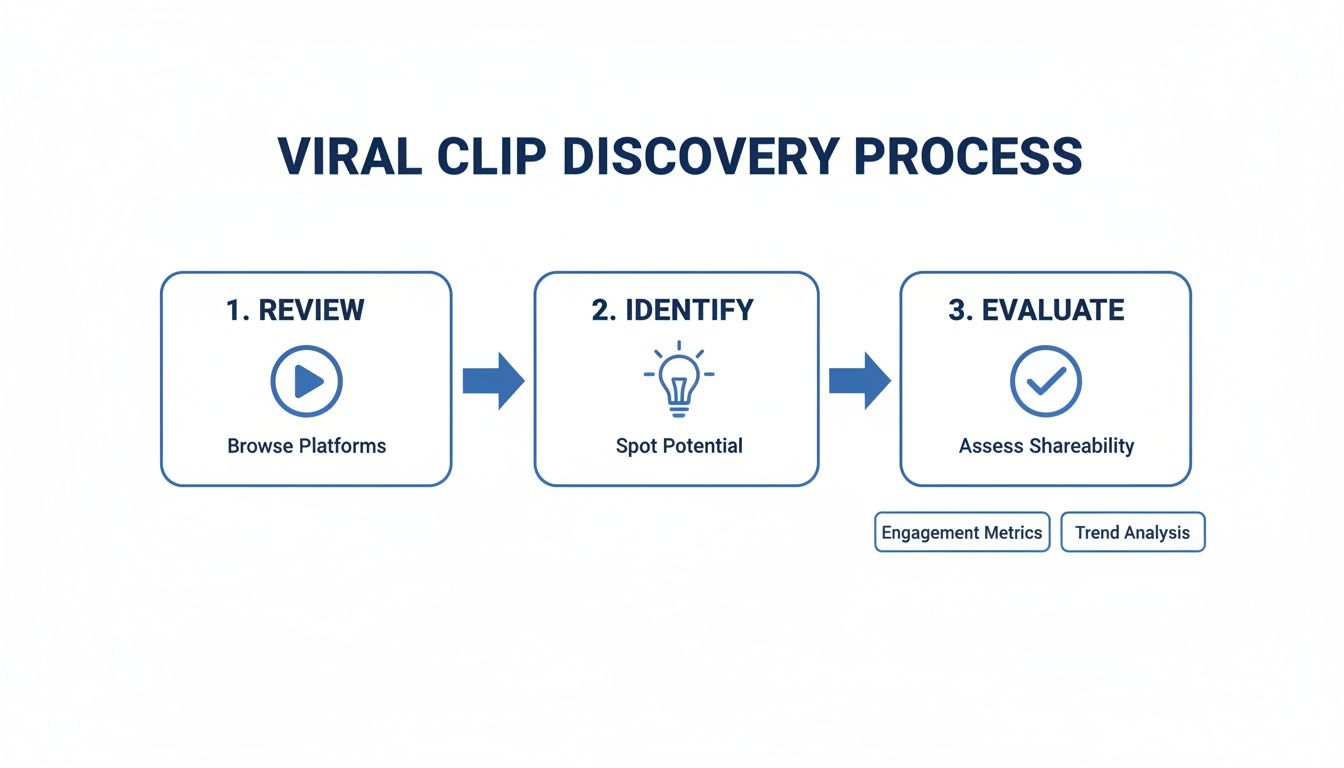
Following these steps ensures you're only spending time reframing the clips with the best shot at performing well.
Manual Reframing Techniques
If you're old school and comfortable in a traditional editor like Adobe Premiere Pro or Final Cut Pro, you’ll be doing this by hand. The most common method is what's known as pan and scan.
Think of your 9:16 vertical frame as a spotlight you're moving across a wide 16:9 stage.
When your subject moves, you have to create keyframes to manually adjust the position of your vertical crop so it follows the action. It's tedious, for sure, but it gives you absolute creative control over the final shot.
You can also get creative with layouts like a split-screen.
- Top-and-Bottom Split: This works great for showing cause-and-effect or putting a speaker on top and a relevant graphic on the bottom.
- Picture-in-Picture: A classic for gaming clips. You can show the high-octane gameplay and the streamer's reaction at the same time.
Getting a handle on these formats is a big deal. If you want to dive deeper, we have a whole guide on the best aspect ratios for social media.
Remember, reframing isn't just about making it fit. It's about recomposing the shot to tell a compelling story in a vertical box. You want it to feel like it was made for Shorts.
The Rise of AI-Powered Reframing
Let's be real: manually keyframing every little movement is a grind, especially if you want to pump out Shorts consistently. This is exactly where AI tools have stepped in and completely changed the workflow.
Platforms like ShortsNinja use AI to automatically detect the most important subject in your video.
Instead of you spending thirty minutes meticulously tracking a person across the screen, the software does it for you in seconds. It analyzes the footage, locks onto the person or object, and keeps them perfectly centered within the new 9:16 frame.
The time savings alone are massive, but the real win is the flawless consistency. AI doesn't miss a beat, ensuring every single frame is perfectly optimized—something that’s incredibly difficult and time-consuming to nail by hand.
Manual Reframing vs AI-Powered Reframing
Choosing between manual and AI-powered reframing really comes down to your priorities: control versus speed. Here’s a quick look at how they stack up.
| Aspect | Manual Editing (e.g., Premiere Pro) | AI Tools (e.g., ShortsNinja) |
|---|---|---|
| Time Investment | High; can take 15-30 minutes per clip depending on complexity. | Low; typically takes under a minute per clip. |
| Effort & Skill | Requires technical skill with keyframes and motion tracking. | Minimal effort; the AI does the heavy lifting automatically. |
| Precision | Total creative control, but prone to human error or inconsistencies. | Highly precise and consistent tracking of the subject. |
| Best For | Complex artistic shots or when you need absolute control. | High-volume production and creators prioritizing efficiency. |
Ultimately, while manual editing gives you that granular control, AI tools offer a powerful shortcut. They free you up from the tedious parts of the process so you can focus on what really matters: finding those killer moments in your content.
Editing and Enhancing Your Short for Maximum Impact

Okay, you’ve got your clip trimmed down and reframed for vertical. Now the real work begins. Just having a vertical video isn't going to cut it; you have to edit with the short-form viewer's ridiculously short attention span in mind. This is where you turn a raw clip into a piece of micro-content that actually stops the scroll.
The whole point here is to layer in elements that make your repurposed clip feel like it belongs on the Shorts feed. It’s all about pace, clarity, and visual flair that hooks people from the very first frame.
Craft a Powerful Hook in the First Three Seconds
No exaggeration—you have less than three seconds to convince someone not to swipe away. Your opening needs to be an undeniable hook that makes them curious or drops them right into the action. Forget slow intros or fancy branding animations. They’re a death sentence for a Short.
Jump straight to the most interesting part of the clip. That could be the climax of the story, a controversial statement, or the setup for a big reveal.
For example, if you're pulling a clip from a product review, don't start with, "Hey everyone, today we're looking at…" Instead, open right up with, "This is the one feature that makes this gadget a total game-changer." See the difference? One is a gentle start, the other creates instant intrigue and promises a payoff.
Accelerate the Pace with Fast Cuts and Captions
Shorts thrive on momentum. Those long, thoughtful shots that work beautifully in a 20-minute video feel painfully slow in a 30-second clip. You need to inject some energy with quick, dynamic edits.
Even if your original clip is just a single shot of someone talking, you can create the illusion of speed. A classic trick is using jump cuts—subtly punching in and out on the speaker’s face to add a visual rhythm that keeps the viewer’s eyes moving.
And dynamic captions? They’re completely non-negotiable. So many people watch with the sound off, which makes on-screen text your lifeline for getting the message across.
- Make them bold and readable: Stick to a clean, sans-serif font. Add a high-contrast background or stroke so the text pops.
- Keep them short and punchy: You’re not transcribing the whole video. Just highlight the key phrases that drive the point home.
- Animate them for emphasis: Having words appear on screen as they’re spoken is a proven way to hold a viewer’s focus. It just works.
The editing style has to match the hyper-caffeinated consumption habits of the Shorts audience. Every single element, from the cuts to the captions, should be working to sustain momentum and stop that thumb from swiping.
Enhance Engagement with Audio and Visuals
While the original audio from your clip is the star, adding a trending sound or a music track from YouTube’s Audio Library can give your Short a nice little algorithmic boost. The trick is finding something that complements your content instead of overpowering it. Just drop the music volume low enough that your dialogue is still crystal clear.
Finally, toss in a few small visual elements to make things more interesting. This doesn't mean you should clutter the screen, but a few simple touches go a long way. Think about using:
- Stickers or GIFs: A well-placed reaction GIF can inject a dose of humor or emotion.
- Simple Overlays: Use arrows or circles to draw the viewer's eye to specific details on screen.
- Color Grading: A quick color correction can make your footage look way more professional and vibrant.
These are the final touches that transform a basic repurposed clip into a polished, engaging Short that’s ready to perform in the feed.
Got your polished vertical clip ready to go? That's a huge step, but don't hit "upload" just yet. How you package and publish your Short is just as important as the edit itself. This is where you give the YouTube algorithm all the right signals to get your content in front of the right people.
Think of it this way: the title, description, and hashtags are your direct line of communication with YouTube. Mess this up, and your masterpiece might never leave the starting gate. Nail it, and you'll be on your way to reaching thousands of potential new fans. It's the final, crucial piece of the puzzle.
Crafting the Perfect Title and Description
Your title needs to be a knockout punch—short, catchy, and crystal clear. Keep it under 100 characters so it doesn’t get awkwardly truncated on mobile screens. But here’s the most important rule of all: you must include the #shorts hashtag. This is non-negotiable. It's the primary tag YouTube uses to identify and push your video into the Shorts feed. A title like "You Won't Believe This Camera Trick #shorts" works way better than a long, drawn-out sentence.
The description, on the other hand, plays a different role. It’s your secret weapon for turning a casual viewer into a subscriber. Here’s how to use it:
- Give a little context: Briefly explain what's happening in the Short, sprinkling in a few relevant keywords.
- Build a content funnel: This is your golden ticket. Drop a link to the original long-form video, inviting people who loved the clip to see the full story.
- Add a few more hashtags: Toss in 2-3 more specific hashtags that fit your niche, like #cameratricks or #videotips. This helps the algorithm get an even clearer picture of your content.
Suddenly, that 60-second clip isn't just a one-off piece of content; it's a gateway driving traffic back to your main videos.
Don't sleep on the thumbnail. Shorts autoplay in the feed, sure, but your thumbnail is what people see on your channel page, in search results, and in suggested videos. A sharp, high-contrast image can make a world of difference in getting clicks from those other sources.
Timing, Analytics, and Getting Better Every Time
Forget what you've heard about a universal "best time to post." It doesn't exist. The only time that matters is when your audience is actually online and watching videos. And the only way to figure that out is by diving into your analytics.
Pop open your YouTube Studio and find the audience activity charts. These graphs will show you exactly when your viewers are most active. A good starting point is to post your Shorts about an hour before these peak times. This gives the algorithm a chance to process your video and get it ready for prime time. To really dig into your channel's performance, it pays to use advanced analytics; you can see 7 powerful YouTube dashboard examples that show you how to get a professional-level view of your data.
Once your Short is live, the real work begins. Keep a close eye on your view velocity—how fast the views are rolling in during those first few hours. Two metrics are king here: "Viewed vs. Swiped Away" and Average Percentage Viewed. If people are watching most of your Short and not swiping away immediately, you're sending a massive signal to YouTube that your content is a winner. This is what triggers the algorithm to push it out to a much wider audience. Use this feedback to figure out what works, and then do more of it.
Ditch the Grind: Automate Your Workflow with AI Video Clipping Tools
Let's be real: manually scrubbing through hours of footage to find a few golden nuggets for Shorts is a soul-crushing time sink. This is exactly where you need to work smarter, not harder. Forget spending your precious time chained to the timeline—it's time to let AI create a YouTube Short from an existing video for you.
This isn't just a minor tweak to your workflow; it's a complete game-changer for content repurposing. AI-powered platforms do all the heavy lifting, transforming what was once a tedious chore into a quick, almost hands-off process. The concept is beautifully simple: you drop in a link to your long-form video, and the AI takes it from there.
How AI Unlocks Effortless Clip Creation
Instead of you guessing which parts might go viral, these tools analyze your video's transcript and visual cues to pinpoint the most engaging and shareable moments. Think of it like having a super-fast, expert editor who instinctively knows which segments will kill it as a Short.
Once the AI identifies those winning moments, it kicks into high gear and handles several key tasks on its own:
- Smart Clipping: It intelligently snips the footage to create a punchy, self-contained story that fits perfectly within the 60-second limit.
- Automatic Reframing: The AI locks onto the main subject and keeps them centered in the vertical 9:16 frame. No more tedious manual keyframing.
- Dynamic Captions: It whips up animated, easy-to-read subtitles—an absolute must for grabbing attention on mobile where most people watch with the sound off.
This level of automation doesn't just save you a ton of hours; it also guarantees your Shorts have a consistent, professional look every single time.
Using an AI clipping tool frees you up to do what you do best—making incredible long-form content—while your Shorts feed gets populated with high-quality, engaging clips on autopilot.
The Real Advantage of Going Automated
For any creator trying to scale their output, this approach is nothing short of essential. Sure, manually editing one or two Shorts might be doable. But what about five? Or ten per week? The workload quickly spirals out of control.
AI tools are the bridge that makes high-volume output possible without the burnout. Maintaining a steady stream of fresh content is a huge signal to the YouTube algorithm, helping boost your channel's visibility and pull in new subscribers who might have never discovered your longer videos otherwise. It's simply the most efficient way to squeeze every last drop of value out of the content you worked so hard to create.
Ready to stop wasting time and start automating your content? ShortsNinja uses powerful AI to turn your long videos into viral-ready Shorts in minutes. Try it for free and see how easy it can be.