
Learning how to create Reels with AI is way more straightforward than it sounds. At its core, the process is about using a few smart tools to generate a script, a voiceover, and the visuals. Once you have those pieces, you just stitch them together. This approach completely flips the script on content creation, turning it from a manual grind into a fast, almost automated workflow.
The New Era of AI-Powered Instagram Reels
The content creation game is in the middle of a massive shake-up. Gone are the days of spending hours manually editing or feeling like you have to be on camera to build a following. We're now in an era of lightning-fast, AI-driven workflows. This guide is all about showing you how to create Reels with AI—a strategy that’s no longer just a cool trick but a necessary tool for creators who want to scale up and stay efficient.
This method gives you the power to churn out polished, engaging videos at a speed that would have been impossible a few years ago, all without ever stepping in front of a camera. Forget the film crew and pricey gear. With the right AI tools, you can completely reinvent your content strategy.
Why This Matters Now
Let's be real: short-form video isn't just a trend, it's the main event. Instagram Reels have absolutely exploded, with over 2 billion users tuning in every month. Together, they rack up a mind-boggling 200 billion daily views. Short-form video now eats up 35% of all time spent on Instagram, making it the most critical place to be for growth.
Bringing AI into your workflow is how you consistently tap into that massive audience. The benefits are impossible to ignore.
Thinking about adding AI to your creative process? It’s a no-brainer for anyone serious about growing on Instagram. Here’s a quick breakdown of why this shift is so important.
Why Use AI for Your Reels Creation?
A quick look at the core advantages of integrating AI into your Reels workflow, showing the tangible benefits for creators.
| Benefit | Impact on Your Workflow |
|---|---|
| Speed and Scale | Churn out multiple high-quality Reels in the time it used to take to make just one. |
| Cost-Effectiveness | Slash production costs. No need for expensive cameras, editing software, or on-camera talent. |
| Creative Freedom | Break through creative blocks by letting AI brainstorm ideas and generate unique visual concepts for you. |
| Faceless Content Creation | Build a powerful brand without ever showing your face. Perfect for introverts or anyone managing multiple accounts. |
AI isn't just about making things faster; it's about making consistency achievable, which is a huge win for any creator.
The real magic of using AI isn't just the automation. It's the consistency it unlocks. You can finally maintain a daily posting schedule with genuinely good content, and that’s a powerful signal to the Instagram algorithm.
This move toward automated production is a massive opportunity. To see how this fits into the bigger picture, check out our guide on AI for social media content creation, which dives into how these tools are changing the game across every platform. By building your workflow around AI, you're setting yourself up to compete and grow your audience without hitting that inevitable wall of burnout.
Assembling Your AI Content Creation Toolkit
To really nail AI-powered Reels, you need more than just a single app. Think of it as building your own personal, automated production studio. This isn't about grabbing a random assortment of tools; it's about piecing together a strategic stack where each part works in harmony to create faceless videos seamlessly.
The process kicks off with your core idea and script. A tool like ChatGPT is fantastic for brainstorming concepts and punching up scripts to make them tight and engaging. Next up, you’ll need a solid voiceover, and this is where a platform like ElevenLabs comes in, offering incredibly realistic, human-like narration that can bring your words to life. For the visuals, an AI image generator like Midjourney is a must-have for creating the kind of unique, high-impact imagery that stops the scroll.
Building a Seamless AI Workflow
Once you have these core assets—your script, voice, and images—the final piece of the puzzle is bringing it all together. This is where a dedicated AI video creation platform becomes the star of the show. Tools like ShortsNinja are built for exactly this, acting as the central hub that combines all your AI-generated assets into a polished, animated final video.
The diagram below really shows how this kind of workflow slashes the time you’d normally spend on manual tasks.
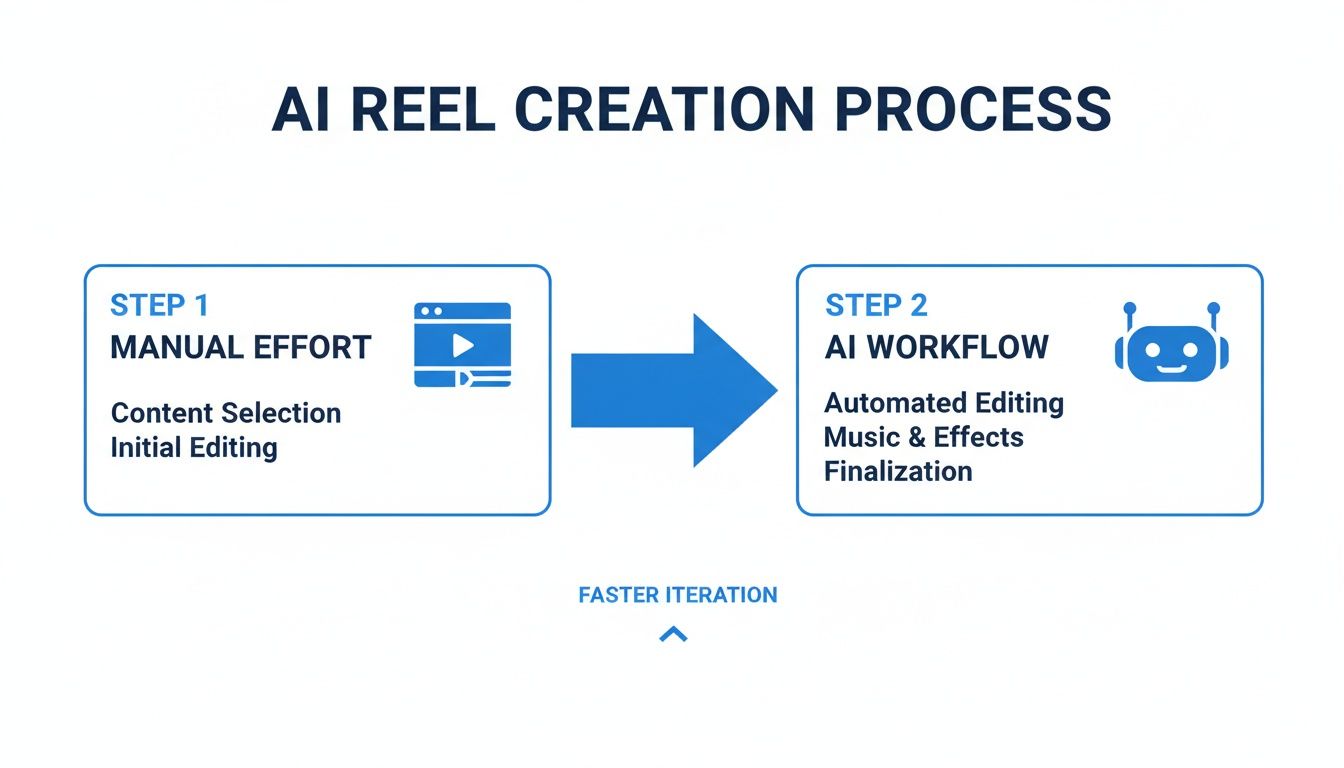
It’s a clear shift from a clunky, time-sucking manual process to an efficient, almost hands-off AI workflow. Adopting this model isn't just about saving a few hours here and there; it’s about creating a sustainable system for consistent, high-quality output.
The Power of an Integrated System
The true magic of this toolkit is how it creates an end-to-end production line. You go from a simple text prompt to a finished Reel, ready to publish, with AI doing the heavy lifting at every stage. This setup empowers you to churn out high-quality, engaging faceless content at a scale that would be completely out of reach with traditional methods.
This integrated approach is a game-changer. It removes the technical barriers and creative friction, allowing your core ideas to be the star. The tools work together to execute your vision, not complicate it.
This whole strategy is backed by some serious momentum. The generative AI market is on track to hit $62.8 billion, which is fueling the creation of tools that make viral content accessible to anyone. In fact, 71% of marketers have found that AI-generated content actually performs better than human-made content, which shows just how effective it can be at grabbing attention.
To get a closer look at the platforms making this all possible, check out our complete guide to the best AI video creation tools on the market. This workflow isn't just a cool new trick; it's the future of scalable social media content.
How to Script Viral Reels Using AI Prompts
Every viral Reel starts with a solid idea, and this is where AI becomes your secret weapon for brainstorming. Forget staring at a blank page. You can tap into tools like ChatGPT to churn out a constant stream of concepts perfectly suited for Instagram's fast-paced, thumb-stopping world.
The real trick isn’t just asking for "Reel ideas." That’s how you get generic, forgettable content. To create Reels with AI that actually connect with an audience, you have to be the creative director. Think of the AI as a brilliant junior scriptwriter—it's fast and creative, but it needs clear instructions on the niche, tone, and what you want viewers to do next. Vague prompts get you vague results.
Crafting the Perfect AI Prompt
The difference between a dud Reel and a viral hit often boils down to the first three seconds. Your prompt needs to force the AI to build everything around a powerful hook that stops the scroll. From there, the script should deliver value fast and wrap up with a clear call-to-action (CTA).
Here’s a simple formula I use that works like a charm:
- Pinpoint the Niche: Get specific. Don't just say "history," say "ancient history," "vegan baking," or "personal finance for beginners."
- Define the Structure: Tell the AI exactly what you want. Ask for a strong hook, a list of three facts, and a concluding question.
- Set the Tone: Use descriptive words. Is the vibe "surprising," "myth-busting," "inspirational," or "humorous"?
- Include a CTA: Direct the AI to end with a specific action, like a question to spark comments or a prompt to follow your account.
For instance, instead of a lazy prompt like "history Reel ideas," you need to get granular. Try something like this:
"Generate 5 short Reel scripts for a history niche. Each script must start with a shocking hook, reveal three little-known facts about a famous historical figure, and end with the question, 'Which fact surprised you the most?' Keep the total script under 150 words."
This level of detail gives the AI guardrails, forcing it to produce a tight, structured concept that’s nearly ready to go. The scripts you get back are designed to hold attention, which is a massive signal to the Instagram algorithm.
Refining and Polishing Your AI Script
The AI's first draft is just that—a draft. It’s your starting point, not the finish line. Your job now is to inject your own personality and voice into the script.
Read it out loud. Does it sound clunky or robotic? Is it punchy enough for a Reel?
Here are a few quick refinements I always make:
- Trim the Fat: Be ruthless. Cut any word or phrase that doesn't add value. In a Reel, every single word has to earn its place.
- Punch Up the Hook: Can you make that first line even more intriguing? Sometimes swapping a single word makes all the difference.
- Personalize the Language: Tweak the wording to sound like you. If your brand is casual, ditch the formal language and make it conversational.
This whole process, from brainstorming the prompt to the final polish, can take just a few minutes. By using AI as your creative springboard, you can consistently blow past writer's block and keep a steady flow of quality ideas in your content pipeline. This is the foundation for how you create Reels with AI that actually grow your audience.
Generating Compelling AI Visuals and Voiceovers
Got your script polished? Great. Now for the fun part: bringing it to life. This is where we craft the audio and visuals that will grab your viewers and refuse to let go. The goal is a seamless experience where the voiceover and imagery work together perfectly.
First up, let's talk about the voiceover. Honestly, the audio is probably the single most important part of a faceless Reel. A robotic, monotone voice is an instant scroll-past, no matter how cool your visuals are. This is why a top-notch AI voice generator is non-negotiable.
Tools like ElevenLabs are the industry standard for good reason. They offer a huge library of voices that can convey real emotion and sound incredibly natural. The voice you choose sets the entire vibe for your brand. Are you going for authoritative and wise, or something more energetic and inspiring? Take some time to play around and find a voice that truly fits your channel’s personality.
Pro Tip: Don't just paste your entire script and hit "generate." I've found it's much better to generate the audio line-by-line or in short phrases. This gives you way more control over the pacing and lets you tweak the delivery for specific words, which makes the final cut sound so much more human.
Once you have a voice you love, you can tweak the stability and clarity settings to fine-tune the delivery. You can make it sound more dynamic or more calm depending on what the script calls for. For a full rundown of the best options out there, check out our guide on the top AI voice generators to elevate your content.
Translating Words into Visuals
Alright, with the audio sorted, let's move on to the visuals. This is where you take your script's narrative and turn it into a string of stunning images using an AI art generator like Midjourney. You need to think like a film director here, writing prompts that produce a consistent, cinematic look.
Whatever you do, avoid lazy, generic prompts. Asking for "a photo of a Roman statue" will get you a generic, forgettable image. You have to be specific to nail a cohesive style. A solid prompt is packed with details about the subject, style, lighting, and composition.
Let's say your script mentions Marcus Aurelius. A weak prompt is just "Marcus Aurelius statue." A powerful prompt looks more like this:
- Prompt Example:
Cinematic close-up shot of a weathered marble bust of Marcus Aurelius, dramatic side lighting casting deep shadows, hyperrealistic, 8K, dark academia aesthetic --ar 9:16
See the difference? This detailed instruction gives the AI a clear roadmap, resulting in a unique, high-quality image that fits your visual theme.
Creating a Cohesive Visual Narrative
To successfully create Reels with AI, every single image needs to feel like it belongs in the same story. That means you need a consistent prompting strategy.
Come up with a "visual formula" and stick to it. This formula is what defines your channel's aesthetic.
- Style: Are you going for a
photorealisticlook, avintage filmvibe, or maybe aminimalist graphicstyle? Pick one. - Lighting: Consistently use terms like
dramatic lighting,soft natural light, orcinematic volumetric lightingto keep the mood the same. - Composition: Specify camera angles. Do you want
close-up shots,wide-angle views, or aDutch anglefor a more dynamic feel? - Aspect Ratio: This one is crucial. Always, always end your prompts with
--ar 9:16. This ensures every image is perfectly formatted for Reels from the start.
By applying this formula to every single image you generate, you'll build a signature style that makes your content instantly recognizable. This kind of visual consistency is what separates amateur faceless channels from the professional ones.
Editing and Publishing Your AI-Generated Reel
You’ve got all the pieces: a solid script, a smooth voiceover, and a folder full of stunning visuals. Now it’s time to bring them all together into a polished, attention-grabbing Reel that’s ready for Instagram. This is where your raw AI assets become a final masterpiece.
Sure, you could fire up traditional video editing software, but that kind of defeats the purpose of an efficient AI workflow. A tool like ShortsNinja is a much better fit. It’s built to automatically sync your voiceover with your images, saving you from the soul-crushing task of manual timeline editing.
Animating Your Visuals
Static images in a video just feel… flat. The secret to making them feel dynamic is to add a little motion. You don't need wild, complex animations; a simple pan or zoom can make a world of difference.
The Ken Burns effect is a classic for a reason. It slowly pans and zooms across an image, breathing life into it. Most AI video tools, ShortsNinja included, can apply this and other animation styles automatically. It’s a small touch that instantly gives your faceless Reel a more professional, cinematic vibe and is absolutely crucial for holding a viewer's attention.
Another non-negotiable? Captions. A massive chunk of users—some studies say as high as 85%—watch videos with the sound off. If you don’t have accurate, easy-to-read captions, your message is lost. AI tools can auto-generate these from your voiceover, and all you have to do is give them a quick once-over for accuracy.
Optimizing for the Instagram Algorithm
Making a great video is only half the job. The other half is getting people to actually see it. Before you even think about hitting "Publish," you need to optimize every single element to give it the best possible shot at going viral.
The moment you publish, the algorithm starts judging. It looks at how you’ve packaged your content—the caption, hashtags, and audio choice—to decide who to show it to first. Nailing these details is non-negotiable for reach.
Your caption needs to be more than a simple description. It has to hook the reader and push for interaction. Try asking a question or using a strong call-to-action to get comments rolling in, which is a huge engagement signal for the algorithm.
Next up, hashtags. Choose them wisely. A good strategy is to mix broad, niche-specific, and trending tags to cast a wider net. Forget the giant block of generic tags; a handful of highly relevant ones will serve you much better.
Finally, a pro tip: layer trending background audio underneath your voiceover (at a very low volume). This simple trick can give your Reel an extra boost, as Instagram's algorithm often prioritizes content using popular sounds. It’s an easy but powerful way to help your AI-generated Reels get pushed to a much larger audience.
Before you send your Reel out into the world, run through this quick final check. Think of it as your pre-flight inspection to make sure everything is perfectly tuned for Instagram's algorithm.
Your Pre-Publish Optimization Checklist
| Optimization Element | Best Practice | Why It Matters |
|---|---|---|
| Engaging Caption | Start with a strong hook and end with a clear Call-to-Action (e.g., "Comment your thoughts below!"). | Encourages comments and shares, which are powerful signals to the algorithm that your content is valuable. |
| Relevant Hashtags | Use a mix of 5-10 broad, niche, and trending hashtags. Avoid overly generic or banned tags. | Helps Instagram categorize your content and show it to users who are most likely to be interested. |
| Trending Audio | Add a popular, trending sound at a low volume (1-5%) behind your main voiceover. | Taps into current trends and can significantly increase your Reel's visibility on the Reels tab and Explore page. |
| Cover Photo | Choose a compelling frame from your video or upload a custom cover that clearly communicates the video's topic. | A great cover photo can dramatically improve the click-through rate when your Reel appears in feeds or on your profile grid. |
| Video Quality | Export and upload in the highest possible resolution (at least 1080p). | Instagram's algorithm favors high-quality content. Blurry or pixelated videos get less reach. |
Taking a minute to tick off these boxes can be the difference between a Reel that gets a few hundred views and one that takes off. It ensures all your hard work in creation pays off with maximum reach and impact.
Common Questions About Creating Reels with AI
Jumping into AI content creation is exciting, but it’s totally normal for questions to pop up. Let's be real, any new workflow has a bit of a learning curve. I've put together some answers to the most common things creators wonder about when they start using AI for Reels.
Think of this as your go-to guide for clearing up those uncertainties, from legal stuff to making sure your videos still feel like you.
Is This All Legal for Commercial Use?
This is a big one. Can you actually make money from Reels that use AI-generated visuals and voices? For the most part, yes, but there's a huge string attached. You have to use AI tools that specifically grant you commercial rights for whatever you create on their platform.
Most of the big names give you this, especially on their paid plans. For instance:
- Midjourney: Paid subscriptions generally come with a commercial license for the images you generate.
- ElevenLabs: Their paid plans also typically allow you to use the AI voices for commercial projects.
I can't stress this enough: you absolutely must read the terms of service for every single tool you use. It's non-negotiable. Also, a quick note on ethics and the law—don't create AI voice clones of real people, especially famous ones, without getting their explicit permission. That's a fast track to legal trouble.
At the end of the day, your creativity is what makes the difference. AI is just the tool that brings your vision to life. Your unique ideas, stories, and prompts are what will make your content cut through the noise.
Will the Instagram Algorithm Penalize My Content?
A lot of creators worry about this, but right now, there's no evidence that the Instagram algorithm punishes content just for being made with AI. The algorithm doesn’t care how you made your Reel; it cares about how people engage with it.
Instagram’s main goal is to keep people on the app. To do that, it pushes content that gets a ton of engagement.
The metrics that matter are still the same:
- Watch Time: Are people sticking around to watch your whole video?
- Shares: Is your content good enough for people to send it to their friends?
- Comments: Does it get a conversation going?
- Saves: Is it valuable enough for users to save for later?
If your AI Reels are high-quality, entertaining, and offer real value, they have the exact same shot at going viral as any other video. Just focus on making awesome content, and the algorithm will do its job.
How Do I Avoid a Generic AI Look?
This is where your creative direction comes in. To keep your Reels from looking like they came off a robot assembly line, you need to inject your own style. The AI is a powerful machine, but it needs you in the driver's seat.
Get super specific with your image prompts. Don't just ask for a “futuristic city.” Instead, try referencing art styles like cyberpunk or solarpunk, mention camera angles like a low-angle shot, and describe the lighting with phrases like neon-drenched streets.
Find an AI voice on a platform like ElevenLabs that matches your brand's vibe and stick with it to build recognition. But honestly, the most important part is your initial script. Your unique ideas are what truly set your content apart. The AI is your assistant, not the artist.
Ready to stop wrestling with manual editing and start producing high-quality faceless videos in minutes? ShortsNinja automates the entire process, from script to finished Reel. Click here to get started with ShortsNinja and claim your first free video!