
In the fast-paced world of social media, consistency is king. But manually posting content across platforms like TikTok, YouTube, and Instagram is a huge time sink that drains creative energy and leads to missed opportunities. The secret to sustainable growth isn't working harder; it's working smarter with automation. The right scheduling tool can reclaim hours every week, ensure you post at peak engagement times, and maintain a steady stream of content that keeps your audience hooked. To truly address this issue, learning how to streamline social media posting with the right software is paramount.
This guide dives deep into the 12 best social media scheduling tools, breaking down their unique strengths, weaknesses, and ideal use cases for creators and small teams. We will analyze everything from all-in-one management suites like Hootsuite and Sprout Social to innovative AI-powered platforms such as ShortsNinja that automate short-form video creation from idea to scheduled post. You'll also find curated insights from trusted software review platforms like Capterra and G2 to help validate your choices.
Our goal is to help you move beyond the tedious cycle of daily manual posting and find a system that fuels your content strategy. Each option reviewed below includes a detailed breakdown of its features, pricing, and pros and cons, complete with screenshots and direct links to get you started. Get ready to find the perfect tool to put your content strategy on autopilot and focus on what you do best: creating.
1. ShortsNinja
ShortsNinja redefines the concept of social media scheduling by integrating it into an end-to-end AI video creation workflow. It’s a specialized platform designed for creators, agencies, and small businesses that need to produce and publish high-volume short-form video content with maximum efficiency. Its core strength lies in its ability to transform a simple idea into a fully edited, voiced, and scheduled video in approximately five minutes, dramatically reducing traditional production timelines.
This platform stands out by bundling AI-powered scriptwriting, visual generation from top-tier models (like Luma Labs and RunwayML), and realistic voiceovers (from providers like ElevenLabs and Speechify) with a built-in scheduling system. The process is streamlined into a three-step flow: input your idea, refine the AI-generated script and visuals, and then schedule the final video for auto-publishing on TikTok and YouTube.
Why ShortsNinja Is A Top Choice
What makes ShortsNinja a powerful contender in the world of the best social media scheduling tools is its unique "Series" automation. This feature allows users to set up a recurring content theme once, and the platform will continuously generate and post new "episodes" on schedule without any further manual input. This is a game-changer for maintaining consistent, hands-free content pipelines for channels focused on faceless content like history facts, motivational quotes, or educational series. The timezone-aware scheduling ensures posts go live at optimal times for your target audience, regardless of your location.
The platform's use of over 200 lifelike voices across 50+ languages also makes it an excellent tool for creators aiming for a global reach. Support is notably active, with a dedicated Discord community and daily feature updates, reflecting strong product momentum.
Key Features and Pricing
- End-to-End Automation: AI-driven creation from script to visuals, voiceover, and final scheduled post.
- "Series" Scheduling: Automates the creation and publishing of recurring themed content.
- High-Quality AI Models: Leverages top-tier AI for both video and voice generation.
- Multi-Language Support: Access to 200+ voices in over 50 languages for international content.
| Plan | Videos/Month (Approx) | Price/Month | Best For |
|---|---|---|---|
| Starter | 12 | $19 | Individuals starting out |
| Pro | 30 | $39 | Consistent content creators |
| Creator | 60 | $69 | Small businesses & agencies |
| Influencer | 120 | $129 | High-volume content producers |
Pros & Cons
Pros:
- Drastically reduces content production time from hours to minutes.
- True hands-off scheduling with its "Series" automation feature.
- High-quality outputs with versatile voice and visual options.
- Active development and responsive Discord-based support.
Cons:
- Auto-posting is currently focused on TikTok and YouTube; other platforms may require manual uploads.
- The credit-based system may require higher-tier plans for those producing longer or a very high volume of videos.
Website: https://shortsninja.com
2. Hootsuite
Hootsuite is one of the most established and comprehensive social media scheduling tools, making it a go-to for businesses that need an all-in-one management platform. It excels in environments where multiple team members collaborate across several brands, offering a unified dashboard for planning, scheduling, engagement, analytics, and social listening. Its longevity in the market has allowed it to build an extensive ecosystem with robust training resources, making it a reliable choice for scaling operations.
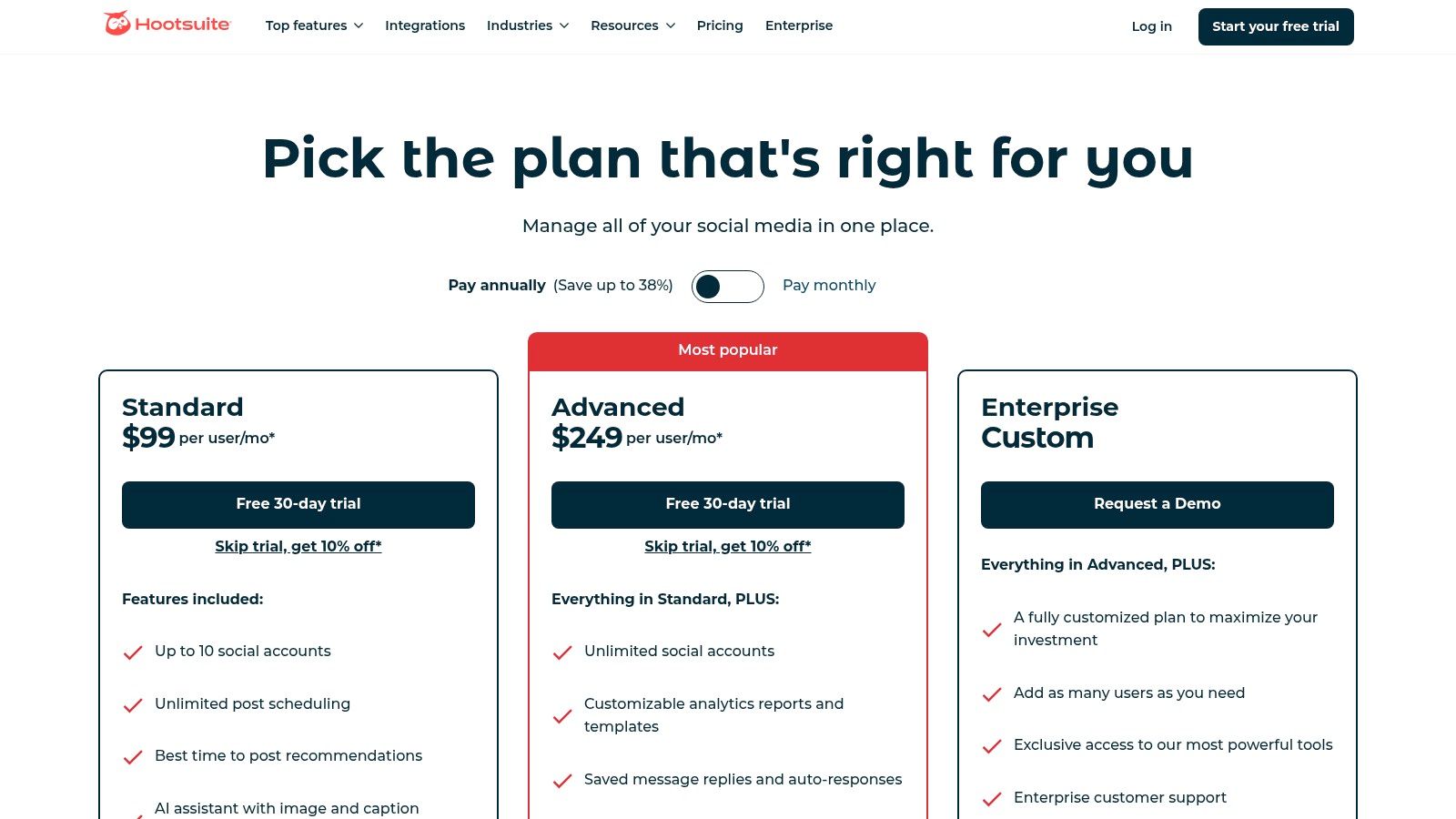
What truly sets Hootsuite apart is its sheer breadth of features. Users can manage everything from a single centralized content calendar with unlimited scheduling to a unified inbox that streamlines direct messages and comments with team assignments. For those wanting to learn more about the fundamentals, our guide covers how to schedule social media posts. The platform also integrates helpful AI tools for generating captions and hashtags, alongside built-in Canva and Adobe Express templates for quick content creation.
Key Features & Pricing
- Best For: Agencies, enterprise clients, and SMBs managing multiple brands and teams.
- Standout Features: Competitive benchmarking, sentiment analysis, social ad management (higher tiers), and automated best-time-to-post recommendations.
- Pricing: Plans start with the Professional tier at $99/month for 1 user and 10 social accounts. The Team plan, at $249/month, supports 3 users and 20 accounts. A 30-day free trial is available.
Pros and Cons
Pros:
- Scalability: Excellent for multi-brand and multi-team workflows with clear permission levels.
- All-in-One Power: Combines publishing, engagement, analytics, and listening in one place.
- Robust Support: Offers extensive training materials and a large third-party app ecosystem.
Cons:
- Cost: Pricing is significantly higher compared to tools focused solely on small businesses.
- Complexity: The vast feature set can present a steep learning curve for beginners or non-marketers.
3. Sprout Social
Sprout Social is a premium, all-in-one social media management platform designed for businesses that prioritize deep analytics and sophisticated team collaboration. It stands out in the market by offering one of the most robust reporting suites available, making it a top choice for mid-market and enterprise teams who need to prove social media ROI. The platform is built around a unified Smart Inbox and advanced publishing workflows, ensuring seamless governance and efficiency for larger organizations.
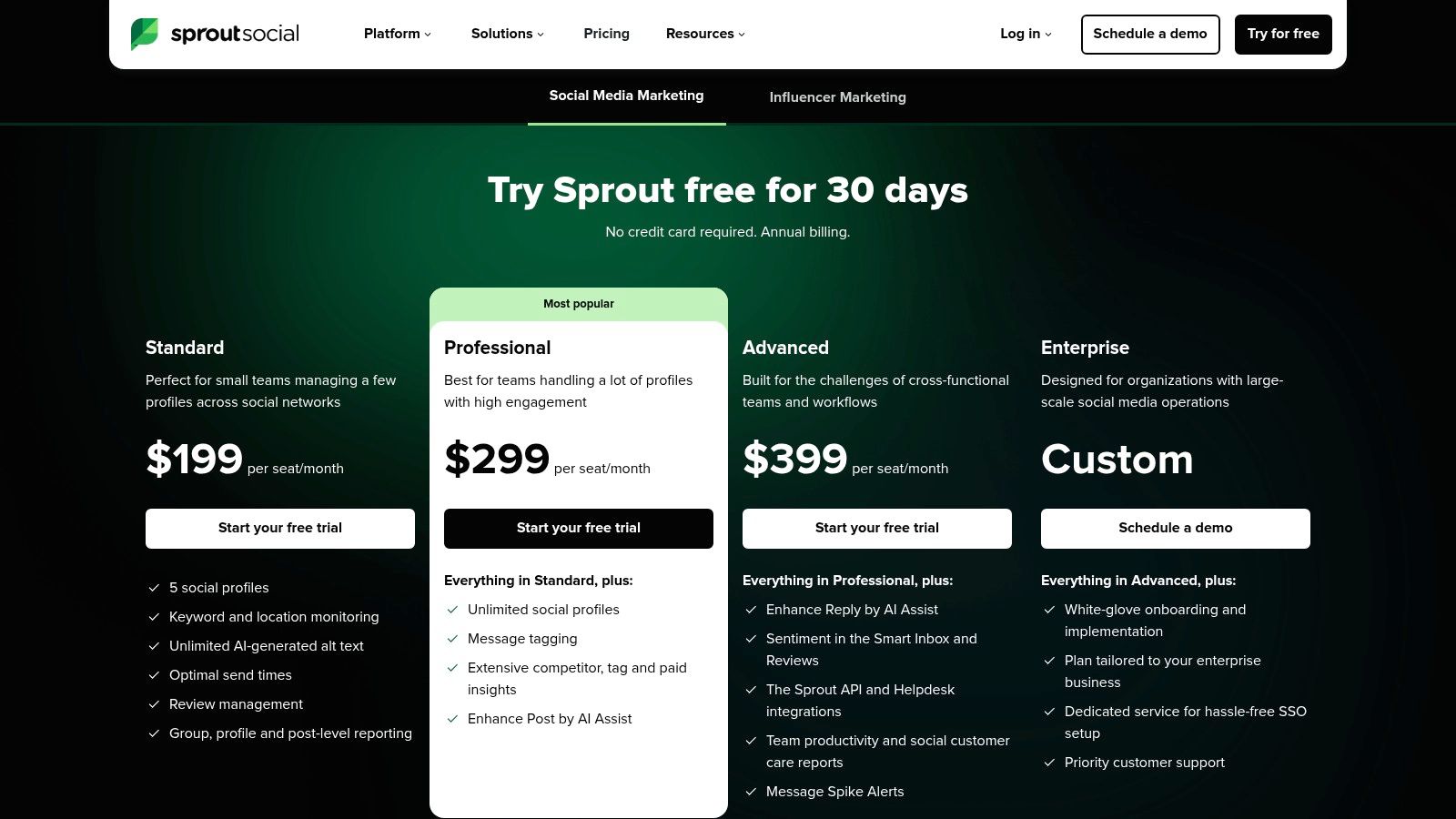
What truly distinguishes Sprout Social is its focus on actionable data and streamlined team operations. The platform offers incredibly detailed analytics, including post-level reporting, competitive analysis, and paid performance insights. This is paired with advanced collaboration tools like message tagging, custom approval workflows, and AI Assist features for enhancing posts and replies. This combination makes it one of the best social media scheduling tools for data-driven teams that require precision and control over their entire social strategy.
Key Features & Pricing
- Best For: Mid-market to enterprise companies, agencies, and teams requiring best-in-class reporting and governance.
- Standout Features: The Smart Inbox for unified engagement, advanced listening tools, in-depth competitive reporting, and AI-powered optimal send times.
- Pricing: Plans begin with the Standard tier at $249/month for 1 user. The Professional plan is $399/month, and premium solutions are also available. A 30-day free trial is offered for new users.
Pros and Cons
Pros:
- Best-in-Class Reporting: Offers unparalleled depth in analytics and performance insights.
- Excellent Team Workflows: Superior collaboration features with clear approval chains and task assignments.
- Intuitive Interface: Despite its powerful features, the platform is clean and user-friendly.
Cons:
- Premium Pricing: The per-user pricing model can become expensive for larger teams.
- Add-on Costs: Some advanced features like premium analytics and listening are sold as separate add-ons.
4. Buffer
Buffer is a long-standing favorite among the best social media scheduling tools, celebrated for its simplicity, clean user interface, and affordable, channel-based pricing. It is an excellent choice for creators, startups, and small businesses that need a straightforward, effective platform for scheduling, publishing, and basic analytics without the complexity of enterprise-level systems. Its intuitive design makes it incredibly easy to get started, allowing users to queue up content effortlessly and maintain a consistent posting cadence.
What makes Buffer particularly appealing is its focus on core scheduling functions done exceptionally well. The platform's queue-based system allows you to pre-load content and set a posting schedule for each social account, ensuring a steady stream of updates. For those interested in optimizing their content flow, our guide on automated social media posting offers deeper insights. Buffer also includes a handy AI Assistant for generating post ideas and a hashtag manager to boost discoverability, all within a streamlined workflow.
Key Features & Pricing
- Best For: Independent creators, startups, and small businesses looking for an affordable, user-friendly scheduler.
- Standout Features: Pay-per-channel pricing model, queue-based scheduling, first comment for Instagram, AI Assistant, and a streamlined engagement inbox.
- Pricing: A generous Free plan is available for up to 3 channels. The Essentials plan starts at $6/month per channel and includes planning, publishing, analytics, and engagement tools.
Pros and Cons
Pros:
- Affordability: The pay-per-channel model and robust free plan offer an accessible entry point.
- Ease of Use: An exceptionally clean and intuitive interface that is perfect for beginners.
- Core Functionality: Excels at the fundamental tasks of scheduling and publishing with useful extras like an AI assistant.
Cons:
- Limited Advanced Features: Lacks the deep analytics, social listening, and extensive team collaboration tools of enterprise platforms.
- Fewer Integrations: The app ecosystem is smaller compared to more comprehensive competitors.
5. Later
Later has solidified its place as one of the best social media scheduling tools by focusing on a visual-first approach, making it an indispensable asset for creators and brands on Instagram, TikTok, and Pinterest. Its intuitive drag-and-drop visual calendar allows users to plan their feed's aesthetic with precision, ensuring a cohesive and polished look. The platform has since expanded to support all major networks, including LinkedIn, YouTube, Facebook, Threads, and Snapchat, while retaining its core strength in visual content planning.
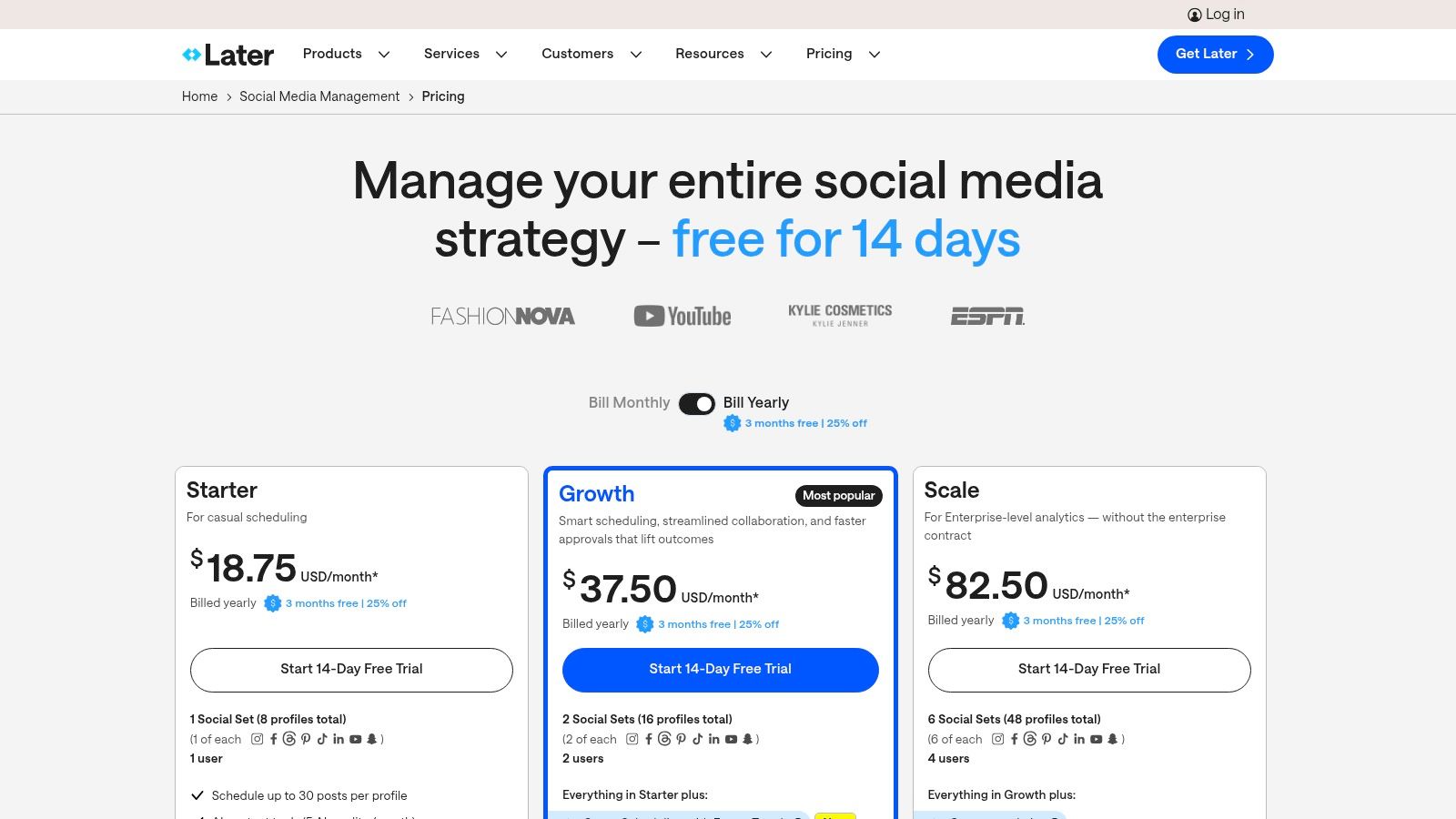
What makes Later unique is its deep integration with creator-centric workflows. Features like user-generated content (UGC) collection, a customizable link-in-bio tool, and direct Instagram product tagging streamline monetization and community engagement. The platform also offers smart scheduling recommendations based on optimal engagement times, alongside powerful analytics and internal approval workflows that support growing teams and agencies.
Key Features & Pricing
- Best For: E-commerce brands, creators, and marketers who prioritize visual content planning.
- Standout Features: Visual Planner for Instagram, hashtag suggestions, UGC discovery tools, and a comprehensive link-in-bio page builder.
- Pricing: A free plan is available for individuals. Paid plans start with Starter at $25/month for 1 user and 1 social set. The Growth plan, at $45/month, adds unlimited users and more analytics. A 14-day free trial is also offered.
Pros and Cons
Pros:
- Exceptional Visual Planning: The visual calendar is best-in-class for planning an aesthetically pleasing feed.
- Creator-Focused Tools: Built-in features for link-in-bio, UGC, and collaboration are highly practical.
- User-Friendly Interface: The platform is clean, intuitive, and easy for beginners to navigate.
Cons:
- Usage Limits: Lower-tier plans have strict limits on the number of posts and AI credits per month.
- Lighter on Enterprise Features: Lacks some of the advanced governance and security tools found in platforms like Hootsuite.
6. Loomly
Loomly is a brand success platform designed for marketing teams and agencies that prioritize collaboration, content planning, and approval workflows. It distinguishes itself with an intuitive, calendar-centric interface that simplifies the entire content lifecycle, from ideation and creation to scheduling and analysis. It’s one of the best social media scheduling tools for teams that need a clear, step-by-step process to ensure quality and brand consistency without getting lost in overly complex enterprise features.
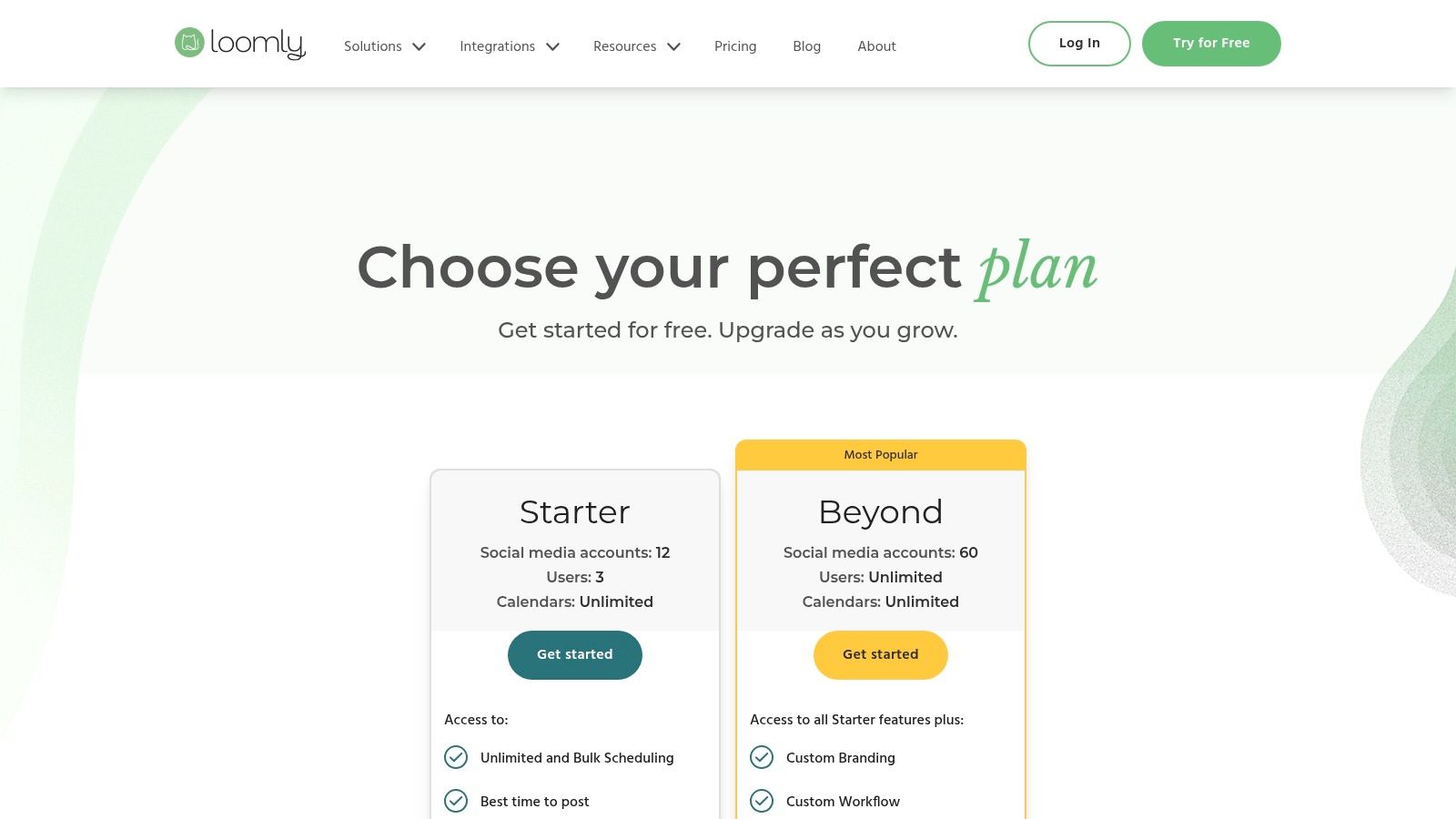
What makes Loomly particularly effective is its guided content creation process. The platform provides post ideas based on trending topics and best practices, offers post mockups for different channels, and has a clear approval system for client or stakeholder sign-off. This structure is ideal for keeping everyone on the same page. For those looking to build a structured plan, our guide to creating a social media content calendar can help you get started. Its integrated asset library also ensures that approved media is readily available for the entire team.
Key Features & Pricing
- Best For: Marketing teams, agencies, and social media managers who need streamlined approval workflows and a central content library.
- Standout Features: Automated publishing, post ideas and inspiration, ad mockups, and a robust content library for asset management.
- Pricing: Plans start with the Base tier at $42/month for 2 users and 10 social accounts. The Standard plan, at $84/month, supports 6 users and 20 accounts. A 15-day free trial is available.
Pros and Cons
Pros:
- Ease of Use: Clean, user-friendly interface that simplifies team collaboration.
- Helpful Workflows: Excellent for managing content approvals and maintaining brand consistency.
- Cost-Effective: Offers significant annual discounts, making it a budget-friendly option for teams.
Cons:
- Basic Analytics: Reporting and social listening features are less advanced than top-tier competitors.
- Pricing Clarity: Exact tier costs may not be visible without signing up or enabling JavaScript.
7. SocialPilot
SocialPilot carves out its niche as a powerful, agency-focused social media scheduling tool that prioritizes value and scalability. It's built for marketing agencies and growing businesses that need to manage a high volume of social media profiles without the enterprise-level price tag. The platform delivers a comprehensive suite of features designed to streamline client collaboration, including dedicated approval workflows and white-label reporting capabilities.
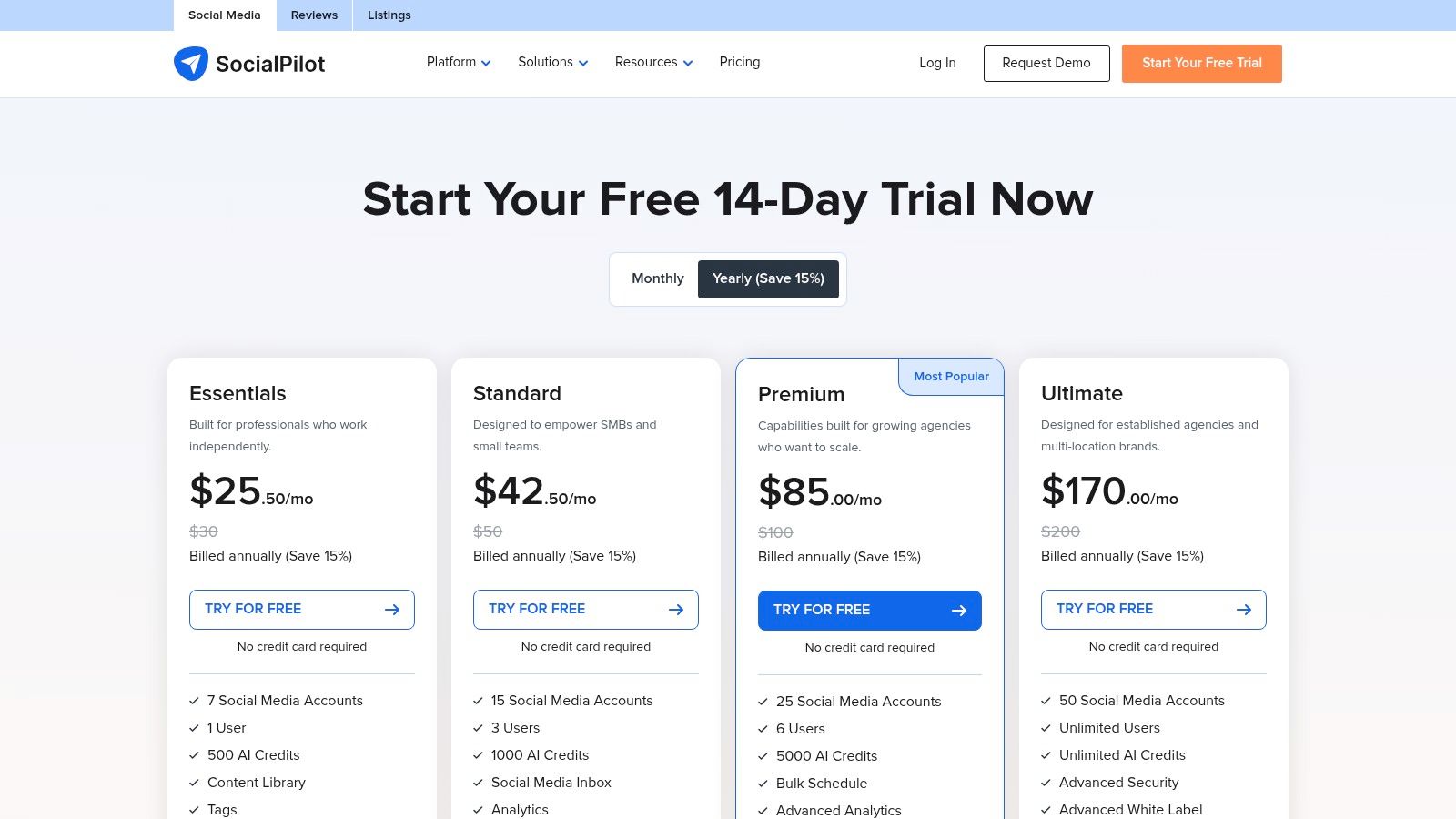
What makes SocialPilot a standout choice is its generous account and user limits, offering one of the most competitive per-account costs on the market. Users can efficiently manage content pipelines with features like bulk scheduling, content queues, and RSS feed automation. While its user interface may not feel as polished as some premium competitors, its functional design makes it easy to manage multiple client accounts from a single, organized dashboard, making it a pragmatic and cost-effective solution.
Key Features & Pricing
- Best For: Marketing agencies, SMBs, and teams managing a large number of client social media accounts.
- Standout Features: White-label PDF reports, client management and collaboration tools, bulk scheduling with image support, and content curation features.
- Pricing: The Professional plan starts at $25.50/month (billed annually) for 1 user and 10 social accounts. The popular Agency plan is $85/month for 5 users and 30 accounts. A 14-day free trial is available.
Pros and Cons
Pros:
- Excellent Value: Highly competitive pricing, especially considering the high number of accounts and users supported.
- Agency-Ready: Built-in client management, approval workflows, and white-labeling are perfect for agency use.
- Efficient Scheduling: Powerful bulk scheduling and content queue features save significant time.
Cons:
- Less Polished UI: The user interface is functional but can feel less modern than premium enterprise tools.
- Gated Features: Some advanced analytics and the social inbox are reserved for higher-tier plans.
8. Sendible
Sendible is a powerful social media management platform built with agencies and multi-brand businesses in mind. It provides a comprehensive suite of tools designed to streamline client management, from a unified content calendar and smart queues to in-depth reporting dashboards. The platform’s architecture is centered around collaboration, making it one of the best social media scheduling tools for teams that need to manage multiple client accounts with distinct branding and content strategies.
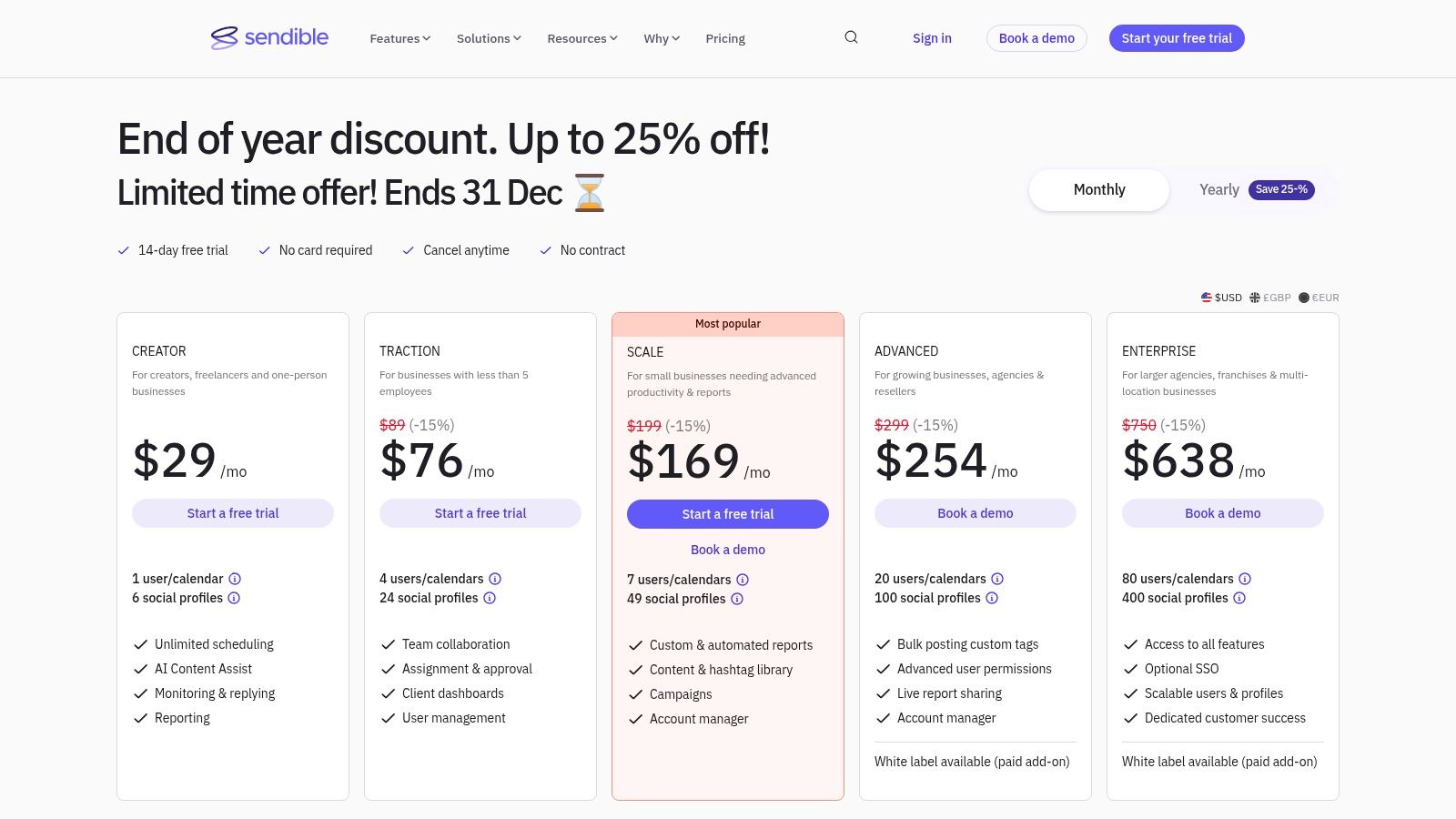
What makes Sendible a standout choice is its focus on agency-specific features. It offers white-label options that allow agencies to brand the platform as their own, creating a professional and seamless experience for clients. Users can create custom, shareable reports and leverage features like bulk scheduling and content libraries to maintain efficiency across all managed profiles. It also supports direct posting to major networks, including Instagram and TikTok, ensuring a versatile workflow for diverse client needs.
Key Features & Pricing
- Best For: Marketing agencies, freelancers, and businesses managing multiple client or brand accounts.
- Standout Features: White-label dashboards, client management workflows, live report sharing, and flexible user-and-profile bundles.
- Pricing: The Creator plan for solopreneurs starts at $29/month for 1 user and 6 social profiles. Agency-focused plans start with Traction at $89/month for 4 users and 24 profiles. A 14-day free trial is available.
Pros and Cons
Pros:
- Agency-Focused: Built-in client dashboards, custom branding, and approval workflows are ideal for service providers.
- Flexible Bundles: Plans are structured to scale affordably as you add more users and client profiles.
- Solid Reporting: Delivers robust and easily shareable analytics to demonstrate ROI to clients.
Cons:
- Posting Limits: Some lower-tier plans impose daily posting limits per user which can be restrictive.
- Paid Add-Ons: Key features for agencies, like the full white-label service, are often paid extras.
9. Agorapulse
Agorapulse is a full-stack social media management platform that excels in team collaboration and demonstrating return on investment. It's a powerful choice for agencies and businesses that need a unified system for publishing, engagement, and reporting without arbitrary post limits. Its strength lies in its meticulously organized inbox and robust collaboration tools, making it one of the best social media scheduling tools for teams focused on efficiency and measurable results.
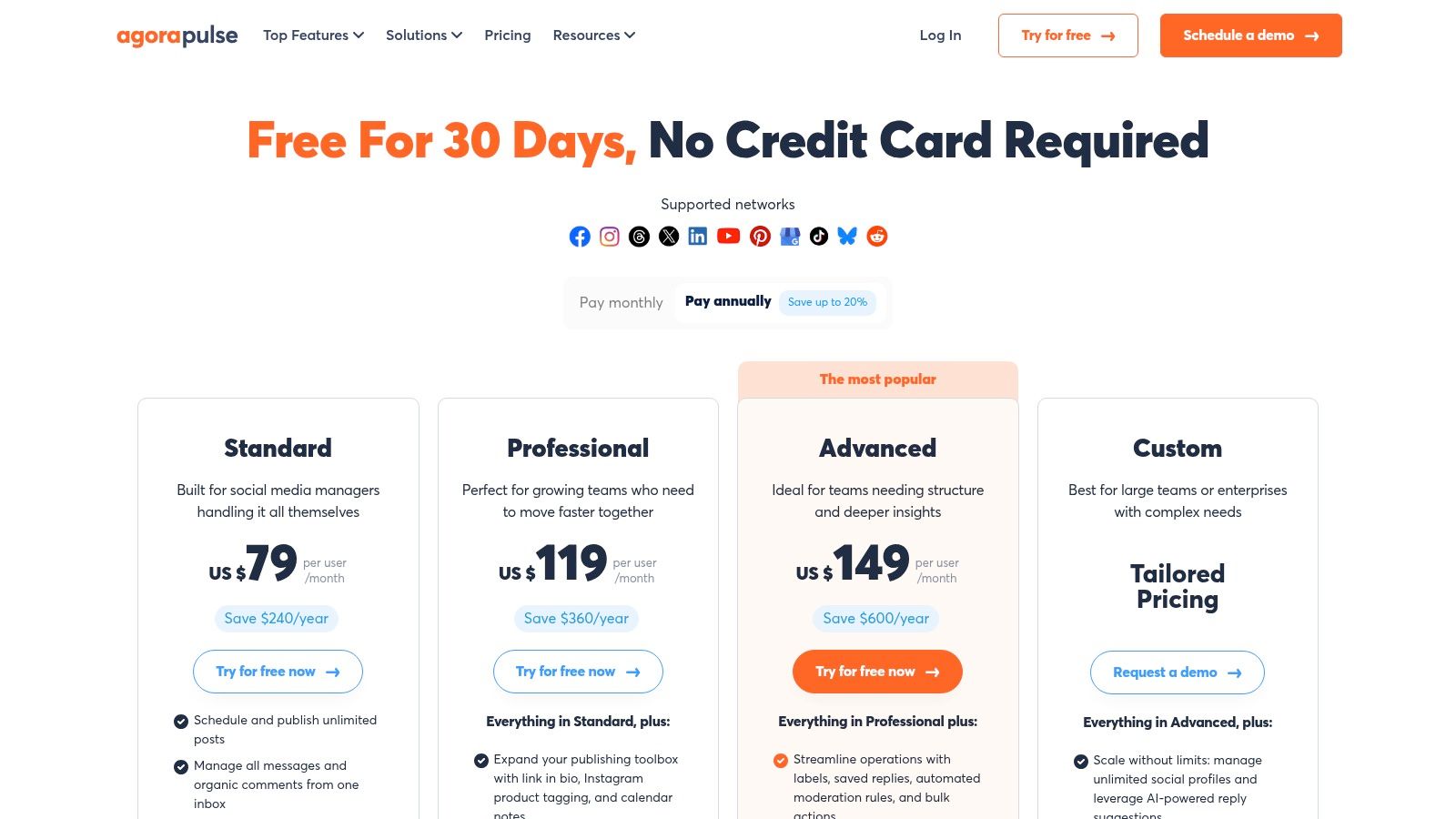
What sets Agorapulse apart is its commitment to providing core features without restriction. Every paid plan includes unlimited scheduled posts, a rare and valuable offering that gives content teams complete freedom to plan ahead. The platform also features an advanced unified inbox that allows for easy comment moderation, team assignments, and saved replies to streamline community management. With detailed ROI tracking and competitor analysis on higher tiers, it connects social activities directly to business outcomes.
Key Features & Pricing
- Best For: SMBs, agencies, and teams that need strong collaboration features and ROI reporting.
- Standout Features: Unlimited scheduled posts across all plans, ad comment moderation, team performance reporting, and advanced ROI tracking capabilities.
- Pricing: The Standard plan starts at $49 per user/month and includes 10 social profiles. The Professional plan at $79 per user/month adds more advanced features. A 30-day free trial is offered.
Pros and Cons
Pros:
- Unlimited Scheduling: No post limits on any paid plan, offering excellent value and flexibility.
- Strong Collaboration: Excellent inbox and team workflow features streamline engagement.
- Great Support: Known for its responsive customer support and offers a generous 30-day trial.
Cons:
- Per-User Costs: The per-user pricing model can become expensive as teams grow larger.
- Add-Ons for Full Analytics: Complete analytics for platforms like X/Twitter may require a paid add-on.
10. Metricool
Metricool stands out as an exceptionally affordable all-in-one platform that combines scheduling with deep analytics, reporting, and competitor tracking. It is particularly powerful for freelancers, creators, and agencies who need robust data insights without the enterprise-level price tag. The platform provides a unified dashboard to plan and schedule content, analyze performance across channels, and generate professional reports, making it one of the best social media scheduling tools for data-driven marketers.
What makes Metricool a unique choice is its brand-based pricing model and comprehensive analytics capabilities. Users can manage multiple brands from a single account, with paid plans offering unlimited scheduling and post history. Its standout features include a powerful competitor analysis tool, which allows you to track rivals' performance on key metrics, and an AI assistant to help generate post ideas. The platform also integrates smoothly with tools like Canva, Google Drive, and Adobe Express, streamlining content creation workflows.
Key Features & Pricing
- Best For: Freelancers, agencies, and data-focused creators needing deep analytics at a competitive price point.
- Standout Features: Comprehensive competitor tracking, unlimited historical data analytics (paid plans), automated PDF/PPT reporting, and a brand-centric pricing model.
- Pricing: A free plan is available for 1 brand with limited posts. Paid plans start with Starter at $18/month for 5 brands and unlimited scheduling. The Advanced plan is $45/month for 10 brands.
Pros and Cons
Pros:
- Affordability: Exceptionally competitive pricing that scales affordably per brand, not per user.
- Deep Analytics: Offers robust analytics and reporting features typically found in more expensive tools.
- All-in-One Functionality: Combines scheduling, analytics, ad management, and inbox management effectively.
Cons:
- Limited Free Plan: The free tier has significant limits on post scheduling and data history.
- Add-on Costs: Certain features, particularly for X (formerly Twitter), may require separate add-ons.
11. Capterra
While not a scheduling tool itself, Capterra is an indispensable resource for finding the perfect one for your needs. As a massive software marketplace, it aggregates hundreds of social media management platforms, allowing you to compare them side-by-side using verified user reviews and detailed feature lists. Instead of visiting dozens of individual sites, you can use Capterra’s powerful filters to narrow down options based on your specific requirements, such as budget, team size, or essential features like automated publishing.
What makes Capterra a crucial step in the selection process is its role as a neutral discovery platform. It provides a comprehensive overview of the market, helping you identify lesser-known tools that might be a better fit than the big names. Its comparison functionality, shortlists, and "Highest Rated" reports are invaluable for making an informed decision before committing to a subscription, making it one of the best places to start your search for social media scheduling tools.
Key Features & Pricing
- Best For: Marketers, agencies, and business owners in the research phase of selecting a new tool.
- Standout Features: Advanced filtering by feature and pricing model, side-by-side vendor comparisons, and extensive libraries of authenticated user reviews.
- Pricing: The platform is completely free for users to browse, compare, and read reviews.
Pros and Cons
Pros:
- Comprehensive Discovery: A one-stop-shop to discover and compare a vast range of scheduling tools.
- Helpful Filters: Easily narrow your search based on specific needs like calendar views or platform integrations.
- Verified Reviews: Gain insights from real users to understand a tool's practical strengths and weaknesses.
Cons:
- Sponsored Listings: Be aware that some results are promoted, which may influence their placement.
- Potential for Outdated Info: Pricing and feature data can occasionally lag behind official vendor websites, so always verify directly.
12. G2
While not a scheduling tool itself, G2 is an essential resource for researching and comparing the best social media scheduling tools on the market. It serves as a comprehensive software review and comparison platform, aggregating real, verified user feedback to help businesses make informed decisions. Its detailed grids allow you to evaluate dozens of platforms based on market presence and user satisfaction scores, providing an unbiased lay of the land.
What makes G2 invaluable is its ability to segment and filter results. You can narrow down your search for tools specifically suited for small businesses, mid-market companies, or enterprise-level organizations. This ensures you are comparing relevant solutions rather than wading through options that don't match your scale or budget. The side-by-side comparison feature is particularly useful for quickly assessing how top contenders stack up against each other on specific features, pricing, and integrations.
Key Features & Pricing
- Best For: Businesses and agencies conducting in-depth research before committing to a social media scheduling tool.
- Standout Features: Category grids with leader/momentum rankings, verified user reviews with role-based insights, and filters for business size, industry, and required features.
- Pricing: Free to browse and read reviews. Some in-depth reports and premium content may require a sign-in.
Pros and Cons
Pros:
- Authentic User Data: Relies on verified user reviews, providing deep, real-world insights.
- Helpful Segmentation: Easily filters tools to find the best fit for your business size (e.g., SMB vs. enterprise).
- Direct Comparisons: Enables clear side-by-side evaluation of features and vendor information.
Cons:
- Requires Critical Evaluation: Sponsored placements can appear, so it's important to differentiate them from organic rankings.
- Gated Content: Accessing some detailed reports requires creating an account.
Top 12 Social Media Scheduling Tools Comparison
| Product | Core features | Quality / UX | Value & Pricing | Audience & USP |
|---|---|---|---|---|
| ShortsNinja 🏆 | ✨ AI script → visuals → voice → editor → auto-publish (TikTok, YouTube) | ★★★★★ — fast, intuitive, Discord support | 💰 Tiered credits: Starter $19 → Pro $39 → Creator $69 → Popular $129; free trial & promo | 👥 Creators, agencies, SMBs, educators — ✨ faceless short-video automation, multi‑language voices, Series & timezone-aware scheduling |
| Hootsuite | Central calendar, publishing, engagement, ads | ★★★★☆ — robust but steeper learning curve | 💰 Higher-tier enterprise pricing; large-scale value | 👥 SMB → Enterprise — ✨ broadest toolset & ecosystem |
| Sprout Social | Deep analytics, Smart Inbox, team workflows | ★★★★★ — premium reporting & governance | 💰 Premium per-seat pricing; 30‑day trial | 👥 Mid‑market & enterprise — ✨ best‑in‑class reporting & collaboration |
| Buffer | Queue scheduling, AI assistant, hashtag manager | ★★★★ — simple, easy UX | 💰 Very affordable; free plan & channel‑based pricing | 👥 Creators & small teams — ✨ frictionless scheduling, low cost |
| Later | Visual calendar, Smart Scheduling, UGC tools | ★★★★ — creator‑friendly visual planning | 💰 Mid-range; credit limits on lower tiers | 👥 Instagram/TikTok/YouTube creators — ✨ visual planning & link‑in‑bio features |
| Loomly | Content calendar, approvals, asset library | ★★★★ — clean UI, quick setup | 💰 Competitive with annual discounts | 👥 Teams & agencies — ✨ simple approval workflows & asset management |
| SocialPilot | Bulk scheduling, client roles, white‑label reports | ★★★★ — functional, less polished UI | 💰 Strong per‑account value for agencies | 👥 Agencies managing many profiles — ✨ high account limits & white‑labeling |
| Sendible | Direct posting (incl. TikTok Business), bulk, reports | ★★★★ — agency-focused dashboard | 💰 Flexible bundles; white‑label add‑ons | 👥 Agencies & multi-location brands — ✨ client dashboards & reporting |
| Agorapulse | Unlimited scheduling, team inbox, ROI tracking | ★★★★☆ — strong support & inbox | 💰 Per‑user pricing; unlimited posts across plans | 👥 SMBs → Enterprise — ✨ inbox + campaign ROI reporting |
| Metricool | Multi‑brand analytics, competitor tracking, API | ★★★★ — deep analytics for price | 💰 Competitive brand‑based pricing; paid tiers unlock history | 👥 Creators, freelancers, agencies — ✨ robust reports & competitor insights |
| Capterra | Vendor directories, reviews, filters | ★★★★ — neutral marketplace | 💰 Free to use (vendor links) | 👥 Buyers/researchers — ✨ review‑centric discovery & shortlists |
| G2 | Verified reviews, category grids, buyer reports | ★★★★☆ — rich review data & segmentation | 💰 Free access; some reports require sign‑in | 👥 Buyers & procurement — ✨ market‑presence scoring & verified reviews |
Choosing Your Perfect Scheduling Partner
Navigating the crowded landscape of the best social media scheduling tools can feel overwhelming, but making the right choice is a pivotal step toward reclaiming your time and amplifying your content strategy. As we've explored, the "best" tool is not a one-size-fits-all solution; it's the one that aligns perfectly with your specific workflow, team size, content focus, and budget.
The journey from manual posting to automated efficiency is transformative. It frees you from the constant pressure of being "always on" and empowers you to shift your focus from repetitive administrative tasks to high-impact creative work. The key is to move beyond feature checklists and truly understand how a platform will integrate into your daily operations.
Key Takeaways and Final Considerations
To distill our in-depth analysis into actionable insights, remember these core principles as you make your decision:
- Define Your Primary Goal: Are you looking to master visual-first platforms like Instagram and Pinterest? Later and Loomly excel here. Is your priority robust analytics and comprehensive reporting for clients? Sprout Social and Agorapulse are industry leaders.
- Assess Your Team's Needs: Solo creators or small teams might find the simplicity and affordability of Buffer or SocialPilot to be a perfect fit. Larger teams and agencies will benefit more from the advanced collaboration features, approval workflows, and user permissions found in tools like Hootsuite and Sendible.
- Don't Underestimate Your Content Niche: The modern social media landscape is increasingly dominated by short-form video. If producing Shorts, Reels, and TikToks is central to your strategy, a general-purpose scheduler might create more work. A specialized tool like ShortsNinja is built to automate this specific, high-demand workflow, handling everything from AI-powered clip generation to direct scheduling.
- Budget vs. Value: While free plans and lower-priced tiers are attractive, consider the long-term value. Investing in a more powerful tool could save you dozens of hours each month, providing a return on investment that far exceeds its cost. Don't just look at the price tag; evaluate the time and resources you'll gain back.
Your Actionable Next Steps
Making a confident choice requires hands-on experience. Before committing to a subscription, leverage the free trials offered by nearly every platform on our list. Create a simple test project and run it through your top two or three contenders.
- Connect Your Core Accounts: Link the social media profiles you use most frequently.
- Schedule a Week of Content: Upload and schedule a mix of content types, including images, videos, and text posts. Pay attention to the user interface. Is it intuitive or clunky?
- Explore a Key Feature: Test the one feature that matters most to you, whether it's the visual calendar, the analytics dashboard, or the team collaboration tools.
- Review the Results: At the end of the trial, assess the process. Which tool saved you the most time? Which one provided the most valuable insights?
By investing this initial time in testing, you ensure your final decision is based on practical application, not just marketing promises. The right social media scheduling tool is more than just software; it's a strategic partner that works behind the scenes to help you achieve consistency, grow your audience, and ultimately, reach your business goals. Choose wisely, and you'll unlock a more efficient and impactful way to manage your social media presence.
Ready to put your short-form video strategy on autopilot? While many of the best social media scheduling tools handle traditional posts, ShortsNinja is uniquely designed to automate the entire video creation and scheduling process, turning your long-form content into dozens of engaging clips. Discover how AI can transform your content workflow by visiting ShortsNinja and starting your free trial today.