
Want to grow your audience without spending hours manually reposting your content? Auto-sharing your TikTok videos is a killer tactic that saves a ton of time while seriously expanding your reach.
Think about it: you create one awesome TikTok, and a tool like ShortsNinja instantly pushes it out as an Instagram Reel and a YouTube Short. That’s not just an upload; it's a multi-platform content launch.
Why Auto-Sharing Your TikToks is a No-Brainer
Let's be real—manually downloading your video from TikTok, then re-uploading it to Instagram, then again to YouTube is a drag. It’s a repetitive chore that completely saps your creative energy. An auto share TikTok strategy puts that whole process on autopilot, freeing you up to do what you actually enjoy: making great videos.
But this is about more than just saving time. It’s a strategic play to give your content a longer life and a bigger impact. Each platform has its own vibe, audience, and algorithm. A video that does okay on TikTok might just be the one that blows up on Instagram Reels or finds a whole new community on YouTube Shorts. When you’re everywhere, you triple your chances for a viral hit.
Seriously Amplify Your Message and Growth
Automating your posting keeps your content flowing consistently across all your channels. That consistency is a huge signal to the algorithms that you’re an active, valuable creator. It also keeps your brand fresh in your followers' minds, no matter which app they're scrolling through.
This approach directly fuels audience growth, too. A consistent cross-platform strategy is proven to boost visibility. In fact, some studies have linked auto-sharing to a 27% increase in follower growth for small businesses, making it a powerful tool for any digital marketing effort.
When you automate your distribution, you’re turning every single TikTok into a mini-campaign. It’s the difference between showing your art in one gallery versus displaying it in three at the same time.
Getting this right is all about understanding the principles of workflow automation. It’s how you ensure your creative work gets the visibility it deserves without demanding more of your precious time. If you want to dive deeper into streamlining your entire process, check out our guide on https://shortsninja.com/blog/automated-tiktok-posting/.
Getting Your Accounts Hooked Up to ShortsNinja
Alright, let's get down to business. The first real step to putting your content on autopilot is linking your social media profiles to ShortsNinja. We've made this process as painless as possible, creating a secure bridge between our platform and your accounts so you can start to auto share TikTok videos without the usual hassle. The whole point is to set it and forget it, letting the tool do the heavy lifting for you.
When you do this initial setup, you’ll be asked to grant some permissions. This is totally standard for any app that posts for you. Think of it like giving a trusted assistant a key to your office, but not your home; ShortsNinja only gets the access it needs to publish your awesome content, not to snoop in your DMs or mess with your profile settings. Everything is handled through official channels, so your account security is always locked down tight.
If you're curious about the tech behind this, it's all powered by the official TikTok API. This is what allows trusted tools like ours to talk directly and securely with your TikTok account.
A Quick Tour of the Connection Dashboard
Once you’re logged into ShortsNinja, you'll land on a clean dashboard prompting you to connect your accounts. This is your command center for authorizing TikTok, Instagram, and YouTube.
Here's what you'll see. It’s a simple, centralized spot to manage all your linked profiles.
From here, you can see which accounts are active at a glance, making it super easy to manage your cross-platform strategy.
Sometimes people hit a snag here, and it's almost always due to two-factor authentication (2FA) prompts or a simple password typo. Just be ready to punch in a code from an email or text message when the social platform asks for it. It’s a quick but necessary step.
Pro Tip: If you're running into trouble, try disabling any ad-blockers or browser extensions. They can sometimes get a little overzealous and block the legitimate authorization pop-up, causing the connection to fail. It's a simple fix that solves the problem 9 times out of 10.
After a successful connection, you'll see a green "Connected" status next to each profile. That's your green light to start building your first auto-share campaign. You're officially ready to roll.
Creating Your First Auto Share Campaign
Alright, with your accounts connected, it's time to shift from setup to strategy. This is where the fun begins. Building your first auto share TikTok campaign in ShortsNinja is how you'll start telling your content exactly where to go, how it should look, and who needs to see it. Forget simple cross-posting; this is about building a smart, automated distribution system from one dashboard.
First things first, you need to tell ShortsNinja where your TikToks are headed. Instead of the old routine of manually uploading to each platform, you just select which of your connected accounts—like Instagram or YouTube—should get your latest videos. This simple selection is the foundation of your entire automated workflow.
It really is that straightforward. This flow shows just how fast you can go from signup to being ready to launch.
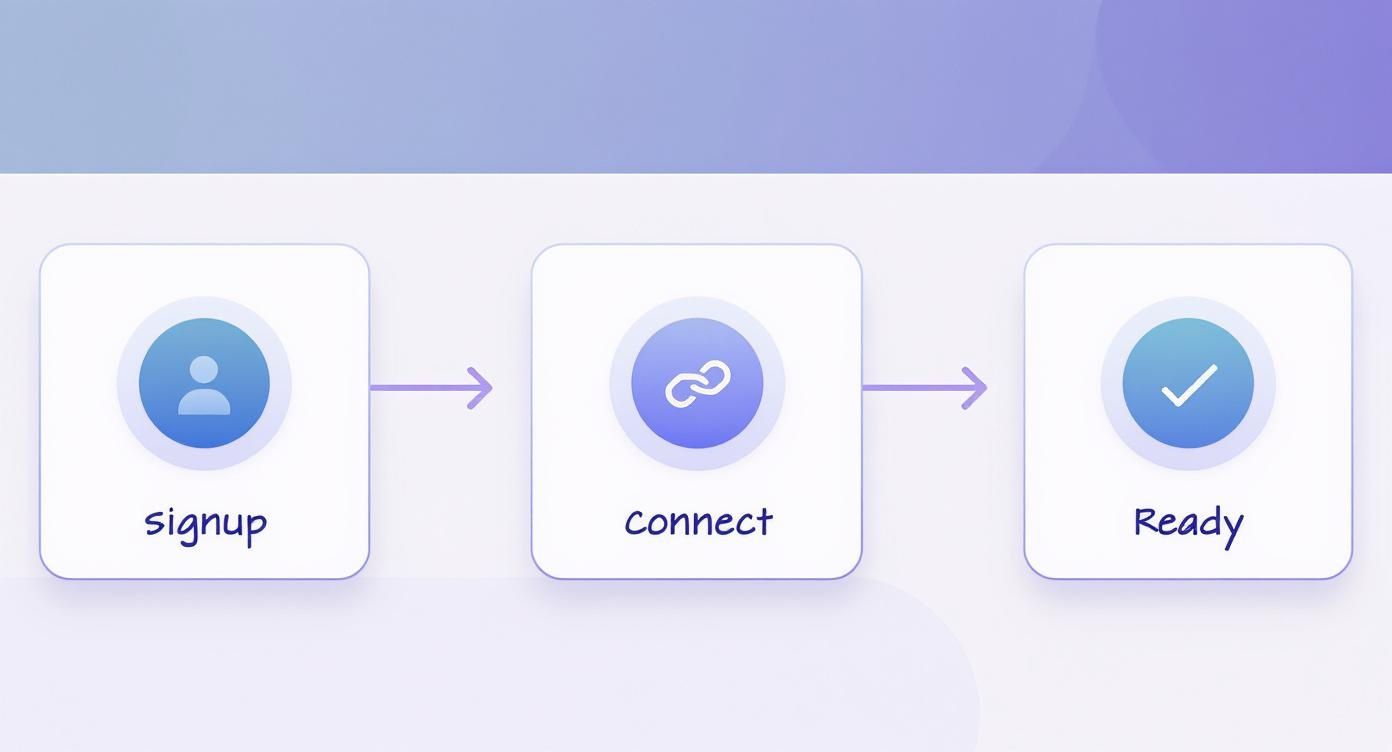
The diagram breaks it down into three core stages, proving the technical part is quick. That means you get to spend more time on what actually matters: your campaign strategy.
Customizing Your Content for Each Platform
I've seen it a thousand times: true multi-platform success isn't about copying and pasting. It’s about tailoring your content. ShortsNinja gives you the tools to make every shared video feel like it was made specifically for its new home. One of the most important features here is the automatic watermark removal, which keeps your videos looking clean and professional on Instagram Reels and YouTube Shorts. Nobody wants a recycled-looking video.
You can also write unique captions for each platform. Think about it—the hashtags that kill it on TikTok might do absolutely nothing for you on Instagram.
A huge mistake I see creators make is using the exact same caption everywhere. A much better approach is to slightly change the call-to-action. For example, ask for a 'Like' on Reels but a 'Subscribe' on YouTube Shorts. It aligns with how people actually use each app.
This level of customization stops your content from feeling like an afterthought and shows you respect the unique culture of each social network.
Setting Up Smart Rules for Automation
Now for the really cool part. You can create rules that tell ShortsNinja precisely which videos to share and which ones to skip. Maybe you only want to push videos that are already performing well, or perhaps only those that are part of a specific series.
You can set up rules like:
- Keyword Trigger: Only share a video if its description contains a specific hashtag, like #productlaunch.
- Performance Threshold: Automatically share a video once it hits 10,000 views or 1,000 likes on TikTok.
These smart rules turn your auto share TikTok process from a basic syndication tool into an intelligent content distribution engine. By setting these conditions, you guarantee that only your best and most relevant content gets amplified, saving you a ton of time while boosting your cross-platform results.
If you're looking for more ideas on structuring your workflow, you can learn more about how to auto-upload TikTok videos effectively in our detailed guide.
Mastering Your Content Schedule and Optimization
https://www.youtube.com/embed/_H3VmX-QXgw
Okay, so you've got the automation down. Now it’s time to get strategic with your scheduling—this is where you really start to pull ahead of the competition. Using the more advanced features inside ShortsNinja, you can map out your entire content calendar ahead of time.
This isn't just about posting regularly. It's about making sure your videos hit the right audience at the exact right moment. You're shifting your auto share TikTok process from something you do to a real, proactive growth strategy.
Think about it: you can batch-schedule a whole week's worth of content in one sitting. A video that pops off on TikTok in the evening might do even better on Instagram Reels during the next day's lunch break. ShortsNinja lets you set those platform-specific times, so you’re always hitting the sweet spot without having to think about it.
Optimizing Every Post for Peak Performance
Timing is one thing, but making sure each video is perfectly primed for its destination is just as important. ShortsNinja doesn’t just repost your content; it actually enhances it. For example, you get access to some seriously powerful AI-powered hashtag suggestions built specifically for Instagram and YouTube. No more guessing what's trending.
These tools scan your video and spit out relevant, trending hashtags that give your post the best shot at discovery. It’s like having a social media expert built right into your workflow, telling you exactly what to use.
One of my favorite small-but-mighty features? Setting custom thumbnails for YouTube Shorts directly within ShortsNinja. This is such a critical detail. A good thumbnail can dramatically boost your click-through rates and makes your channel look way more professional.
When you use features like these, every single video you auto share TikTok becomes a polished, platform-native piece of content. That level of detail saves a ton of time and makes sure your hard work actually gets seen.
If you want to dive even deeper into the tools that can level up your game, check out our guide on the 10 best AI tools for TikTok scheduling. It's packed with even more ways to streamline your calendar.
Tracking Performance to Maximize Your Reach

Pushing your content out automatically is a huge time-saver, but it's only half the job. To really get ahead, you have to know what's hitting the mark and what’s falling flat. An auto share TikTok strategy without good data is basically like driving with your eyes closed—sure, you're moving, but you have no clue if you're going the right way.
This is where ShortsNinja’s built-in analytics dashboard comes in. Think of it as your GPS. It cuts through the noise of vanity metrics and shows you the numbers that actually fuel growth. You're not just looking at a total view count; you're seeing exactly how each video performs on every single platform.
Pinpointing Your Strongest Platforms
Let’s play out a real-world scenario. You post a video that does okay on TikTok, but a quick glance at the ShortsNinja dashboard shows it's getting double the shares and comments over on YouTube Shorts. Now that is a game-changing insight. It's a clear signal that your style is clicking with the YouTube Shorts crowd.
With that piece of data, you can start making smarter moves. Maybe you tweak your captions to include YouTube-specific calls to action, or you start creating more content around topics you now know kill it over there. This is how you shift from guesswork to building a reliable growth machine.
The real goal here is to find your platform "hotspots." I've seen it time and again: every creator has an audience that just vibes more on one platform. Your job is to find them and double down on what they love.
Key Metrics to Monitor in ShortsNinja
It's easy to get lost in the data, so focus on the metrics that give you the clearest picture of your impact. These are the ones I always keep an eye on:
- Platform-Specific Views: See which channel is giving your videos the most initial eyeballs.
- Engagement Rate (Likes, Comments, Shares): This is the good stuff. It tells you how deeply your content is actually connecting with each audience.
- Follower Growth Per Platform: Directly tie your auto share TikTok efforts to actual audience growth on Instagram and YouTube.
As of early 2025, TikTok’s monthly active user base soared to 1.59 billion globally, and you can bet auto-sharing tools played a big part in that content explosion. Digging into your own analytics is how you carve out your piece of that massive audience. For a deeper dive, check out the full report on TikTok growth statistics on Famewall.io.
Your Top Questions About Auto-Sharing on TikTok
Jumping into automation always brings up a few questions. That's totally normal. When it comes to your social media accounts, you want to be sure you're doing things right. Let's tackle some of the most common worries creators have about using an auto share TikTok tool so you can get started with confidence.
Is This Going to Get My Account Banned?
This is probably the biggest one, and I get it. The last thing you want is to put your account at risk. The short answer? No, not when you use a trusted service like ShortsNinja. We're not using some shady workaround; we connect to your accounts using the official, approved APIs from the platforms themselves.
That means every connection is secure, authorized, and completely above board. We play by the rules, so your account's safety is never a concern.
Will My Content Just Look Like a Sloppy Repost?
Another great question. Nobody wants their Instagram Reels or YouTube Shorts to have that obvious TikTok watermark plastered all over them. It just screams "repost" and can hurt your engagement.
That's why a good automation tool does more than just copy and paste. ShortsNinja is built to automatically strip that watermark away, making sure your videos look clean and native on every platform. It’s a small detail, but it makes a massive difference in how professional your content feels.
The real magic of smart automation isn't just saving time; it's adapting your content. The ability to write unique captions for each platform is a game-changer. You can tweak your hashtags and calls-to-action to connect with the specific audience you're trying to reach on Instagram versus YouTube.
This is what elevates your strategy from simple reposting to a smart, effective cross-platform presence. It ensures every video feels like it belongs right where your audience is watching it.
Ready to put your content distribution on autopilot and get back to creating? ShortsNinja makes it dead simple to auto-share, customize, and schedule your videos across all your channels. Start your free trial today and see how easy it is to grow your reach!