
So, what does it mean to auto cut video? It’s when you let AI software do the heavy lifting, automatically finding and slicing the best parts of a longer video. This turns hours of raw footage into a stack of shareable short clips in just minutes. For anyone trying to keep up with the content demands of TikTok and YouTube Shorts, this isn't just a cool trick—it’s a necessity.
How AI Is Shaking Up Video Editing
The days of dragging a playhead across a timeline, looking for the perfect spot to make a cut, are numbered. The biggest headache for any content creator has always been the sheer amount of time editing takes, especially when you’re trying to feed the beast that is YouTube, TikTok, and Instagram. AI-powered workflows are completely flipping that script.
Instead of blocking out an entire day to edit one long video, you can now use an auto cut video tool and get even better results in a tiny fraction of the time. This is more than just a small boost in efficiency; it’s a fundamental change in how we make content.
- Saves a Ton of Time: What used to take hours of tedious work—finding the highlights, snipping out dead air, and piecing it all together—now happens on its own.
- Pump Out More Content: By automating the most boring parts of editing, you can turn a single podcast or webinar into a dozen engaging clips. That's a week's worth of content, done.
- Get Back to Being Creative: When AI handles the grunt work, you’re free to think about the bigger picture—your strategy, the story you want to tell, and actually talking to your audience.
The Rush for Smarter Editing Tools
This isn’t just a feeling; the market is proving it. The global video editing software market, which is where these AI tools live, hit a value of about $3.09 billion in 2023. And it’s not slowing down. It’s expected to climb to $5.13 billion by 2032, fueled by millions of creators and businesses who are desperate for smarter, faster ways to work.
Take a look at how traditional video editing compares to a workflow powered by auto-cutting AI. The differences in time and effort are pretty stark.
Manual vs Auto Cut Video Workflow
| Aspect | Manual Editing | AI Auto Cut Editing |
|---|---|---|
| Time Investment | Hours to days per video. | Minutes to a couple of hours. |
| Clip Selection | Manually scrubbing timelines to find good moments. | AI automatically identifies engaging segments. |
| Repurposing | A slow, one-by-one process. | Can create dozens of clips from one source instantly. |
| Skill Requirement | Requires technical editing skills and software knowledge. | Minimal technical skill needed; very beginner-friendly. |
| Consistency | Can be inconsistent depending on the editor's focus. | Consistently high-quality cuts based on data. |
| Focus | On the technical process of cutting and splicing. | On creative direction and final polishing. |
This side-by-side really highlights how much of a game-changer AI is. It’s not just about speed; it's about shifting your energy from tedious labor to creative strategy.
The trend is clear: creators are more than willing to invest in tools that give them back their time and help them create better content, faster.
For creators, the challenge is no longer just about creating great content, but about creating it consistently and at scale. AI editing tools are the only practical solution to this modern content dilemma.
Tools like ShortsNinja are leading the charge here, giving creators a simple way to put their video production on autopilot. When you start using AI for YouTube videos, you’re not just staying current—you’re building a smarter, more sustainable content machine that actually works for you, not the other way around.
Setting Your Footage Up for Perfect AI Cuts
The old saying "garbage in, garbage out" has never been more true than with AI video editing. The final clips you get are a direct reflection of the raw footage you feed the machine. To really get the most out of any auto cut video tool, you have to film with its strengths—and weaknesses—in mind.
Think of this as your pre-flight checklist. A few small tweaks to your recording process can save you hours of painful manual fixes down the road. It’s all about giving the AI clean, obvious signals to work with.
Crystal-Clear Audio is Non-Negotiable
If there’s one thing that trips up AI editing tools, it's bad audio. It's the number one reason for sloppy cuts.
If the software can't tell the difference between your voice and the air conditioner humming in the background, it has no idea where to make its edits. Muffled words, echo, and ambient noise will lead straight to awkward cuts and missed opportunities for great clips.
Ditch the built-in camera mic. Using a decent external microphone is the single best thing you can do here. It provides that clean audio track the AI needs for precise word detection and silence removal.
- Quick Tip for Multi-Cam Shoots: When you're running more than one camera, just clap your hands once, loudly, at the very beginning. That sharp spike on the audio waveform makes it dead simple for you—and the AI—to sync everything up perfectly.
Your audio track is literally the blueprint for the AI. A clearer blueprint means a stronger, more reliable final product. Don't let a little background noise derail your entire automated workflow.
Give the AI a Break with Intentional Pauses
When you're in the flow of recording, especially for a tutorial or a talking-head video, it feels natural to just keep talking. But for an AI that identifies cuts based on speech patterns, that can be a nightmare. It needs clear signals that one thought has ended and a new one is about to begin.
This is where deliberate pauses become your secret weapon.
Try pausing for a few seconds between different topics or key talking points. These intentional silences act like chapter breaks for the AI, giving it obvious places to slice your long video into distinct, logical short clips. It’s a tiny habit that makes a massive difference in the quality of the AI's automated edits.
Keep Your Lighting and Framing Consistent
Just like messy audio, inconsistent visuals can throw an AI for a loop and lead to jarring, unprofessional cuts. If your lighting suddenly changes or you're constantly moving around the frame, the final clips will feel disjointed.
Do your best to keep the lighting uniform throughout your shoot. If you're relying on a window for natural light, be mindful of how clouds or the time of day might affect it.
And if you’re the one on camera, try to stay relatively centered in the frame. This visual consistency ensures that when the tool does auto cut video clips, the transitions feel seamless and professional, not like a jumbled mess of random shots.
Your Workflow with an AI Video Editor
Alright, let's move from theory to action. Seeing how an AI-powered editor actually works is where the magic happens. I'll walk you through a practical, repeatable workflow using ShortsNinja as our example. You'll see how you can auto cut video content, turning a long, rambling recording into a whole batch of social-ready clips.
The key thing to remember? It's less about knowing technical editing and more about giving the AI the right prompts.
Kicking Off the Auto Cut Process
It all starts with a simple drag-and-drop. Just take your long-form video file—whether it's a podcast episode, a webinar, or a product demo—and pull it into the ShortsNinja dashboard. Once it's uploaded, the AI immediately gets to work transcribing every word, which is the foundation for all the smart cuts it's about to make.
This is your first chance to guide the AI. You'll see a few initial settings that are super important for getting the best results right out of the gate.
- Silence Removal: This is a lifesaver. It automatically finds and snips out all those awkward pauses and dead air. You can typically tweak the sensitivity, telling the tool to cut any silence longer than, say, 0.5 seconds. For a punchy, fast-paced tutorial, you might want aggressive cuts. For a more thoughtful interview, you can let it leave longer, more natural pauses.
- Smart Cut: This is the real brains of the operation. The AI scans the transcript for interesting words, questions, and moments where the energy spikes. It’s basically hunting for the "hooks" and "aha!" moments that are most likely to stop someone from scrolling on social media.
Fine-Tuning the AI's Brain
After you've set your initial preferences, the AI will serve up its first draft. It'll show you all the segments it thinks are the most compelling clips. In ShortsNinja, this usually looks like a list of suggested shorts, each with its own little transcript preview. Now, your role shifts from being a director to a collaborator.
You’re not slicing and dicing the timeline yourself. Instead, you're just giving a thumbs-up or thumbs-down to the AI's suggestions. You can quickly preview each clip. If one feels a bit off, just toss it. If another is almost perfect but starts a second too early, you can easily nudge the start time. This is what makes it so powerful—you get the speed of automation mixed with the finesse of your own judgment.
If you want to go even deeper, you can review a full guide on top-tier AI video editing tools.
The whole point isn't to replace you. It's to create a partnership where the AI handles 90% of the tedious grunt work. That frees you up to focus on the final 10% that actually makes the content great.
This flow chart gives you a visual of the pre-production steps I always recommend: clean audio, good lighting, and leaving intentional pauses. Getting these right sets your AI editor up for success from the start.
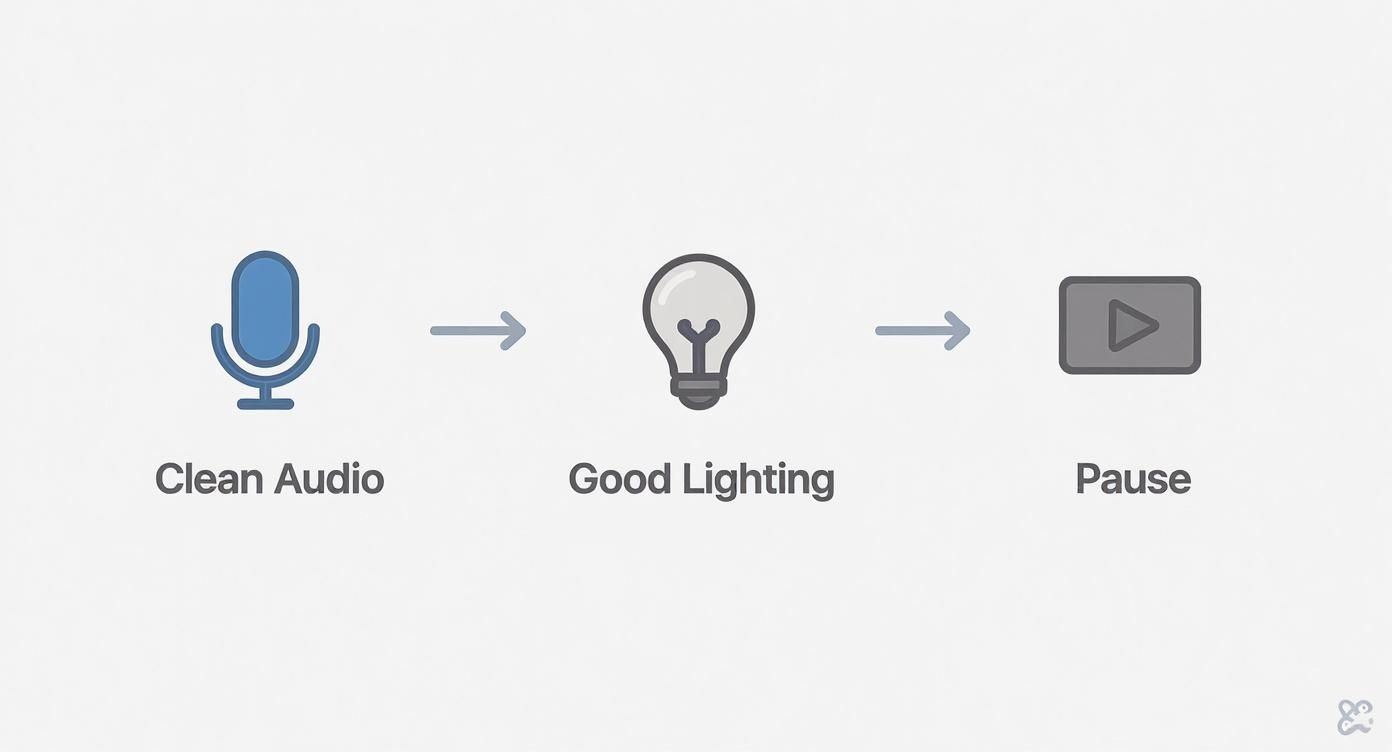
When you follow these simple habits during recording, you're feeding the AI clean, clear data to analyze. The result? Much higher-quality automated cuts.
From Raw Clips to Polished Content
AI-powered auto cut video tools are becoming essential in marketing and entertainment, where getting content out quickly is everything. The global adoption is telling: the Asia-Pacific region holds the biggest share of AI video editing revenue, around 31.4% in 2024. Here in Europe, the UK has become a major hub for this kind of innovation, with over 750 AI startups pushing automated editing forward.
Once you’ve given the green light to your clips, the final step is adding the polish. ShortsNinja lets you automatically burn in dynamic, animated captions—which are an absolute must-have for social media these days. You can also apply your brand kit in one click, adding your logo or brand colors to keep everything looking consistent.
Of course, sometimes you'll need more granular control. That's why it’s smart to have the best video editing software in your back pocket for those one-off manual tweaks. Having a workflow that combines both automated and traditional tools gives you the ultimate flexibility.
With just a few more clicks, you can export the entire batch of clips, ready to be scheduled and posted.
Refining Your AI-Generated Video Clips
The first pass an AI tool takes to auto cut video usually gets you about 90% of the way there. It’s pretty magical. But that last 10%? That’s where you step in. This isn't about fixing AI mistakes—it's about adding your unique creative spin to turn a good clip into a great one. Think of it as the AI doing all the heavy lifting, leaving you to focus on the fun stuff: storytelling and polish.
Once your tool spits out a batch of clips, put on your director’s hat. Watch each one and ask yourself, "Does this tell a complete, compelling mini-story?" You'll often find a clip that's almost perfect but needs a tiny timing tweak to land a punchline or really drive a point home.
This is where you’ll want to get hands-on with trimming the start and end points. Nudging the "in" point just a fraction of a second later can create a much more impactful opening. On the flip side, trimming the "out" point can make the ending feel snappier and more decisive.
Enhancing Your Clips With Essential Add-Ons
After you’ve locked in the timing, it’s time to layer in the elements that boost engagement and make the content accessible to everyone. This is also where you can stamp your brand on every clip so they feel uniquely yours.
- Auto-Generated Captions: This is a non-negotiable for social media. Seriously. So many people watch videos with the sound off. Tools like ShortsNinja can automatically transcribe your audio and burn captions right into the video, often with cool animations that keep viewers hooked.
- Background Music: The right soundtrack can completely transform a clip’s vibe. Adding a subtle, royalty-free track can elevate a simple talking-head segment into something that feels way more professional and emotionally resonant.
- Branding Elements: Consistency is everything for brand recognition. In this final stage, apply your brand kit. This usually means adding your logo as a watermark and making sure any on-screen text or graphics use your specific brand fonts and colors.
Refining the AI's output is where you inject personality. The tool provides the structure; you provide the soul. This collaborative process ensures you get the speed of automation without sacrificing creative control.
Building a Stronger Narrative
Don't just accept the order of clips the AI suggests. The software is brilliant at finding high-impact moments, but it doesn’t always grasp the perfect narrative flow. You might discover that a clip the AI put in the middle actually works way better as an opener to hook the viewer from the get-go.
Take a moment to think about the overall sequence. Does one clip introduce a problem that a later clip solves? Arranging them in a logical order creates a much more satisfying viewing experience. This is usually a simple drag-and-drop process, but it makes a huge difference in how your audience perceives the content.
When you combine the AI's speed with your own storytelling instincts, you end up with a polished final product that’s ready to kill it on any platform.
Get Your Clips Ready for Social Media

Using an auto cut video tool to batch-create clips is a huge time-saver, but it's only half the battle. A great video that nobody sees is just a file on your hard drive. The real work starts now: tailoring each clip for the platform where it will live, whether that’s TikTok, YouTube Shorts, or Instagram Reels.
Each of these platforms has its own culture and audience expectations. What absolutely crushes it on TikTok might get crickets on YouTube Shorts. So, the goal isn't just to spray and pray; it's to adapt your content for each specific environment.
That means fully embracing the native vertical 9:16 aspect ratio, making sure your video fills the entire screen and is impossible to ignore. But it goes deeper than just formatting. You need to tap into the platform’s vibe—think using trending audio, jumping on relevant challenges, or structuring your video in a way that feels native. That's how you get seen.
Build a Content Machine That Doesn't Burn You Out
One of the biggest wins of using an AI editor is building a sustainable content pipeline. That single long-form video you recorded—a podcast, a webinar, a tutorial—is no longer a one-and-done deal. It’s a goldmine.
After the AI has done its thing, you could easily be sitting on a full week's worth of short-form content. This is the kind of consistency social media algorithms reward. Instead of scrambling to create something new every single day, you can batch-produce your content and lock in a reliable posting schedule.
The true power of an auto cut video workflow isn't just about speed. It's about turning one hour of recording into seven days of consistent, high-quality social media content. This is how you build momentum and grow an audience without hitting a wall.
The impact on your resources is massive. For example, businesses that have adopted AI for video editing report that their production costs have dropped by around 58% compared to traditional methods. On top of that, these tools slash pre-production times by roughly 53%, which is a huge productivity boost.
Your Pre-Publish Checklist
Before you hit "schedule," take a few minutes to run through a quick but critical checklist. This small step can be the difference between a video that takes off and one that falls flat. Getting these final details right makes all your hard work worth it.
- Check Caption Accuracy: AI-generated captions are a lifesaver, but they’re not perfect. Give them a quick scan to fix any weird phrasing or misheard words.
- Optimize the First Three Seconds: The hook is everything. Does your clip immediately grab attention with a question, a bold statement, or eye-catching visuals? If not, trim it so it starts right at the good part.
- Add Trending Audio (If It Fits): On TikTok and Reels, layering in a trending sound—even at a super low volume behind your main audio—can give your video a nice little algorithmic push.
- Write a Solid Description: Keep it short and sweet. Ask a question to spark comments or include a clear call-to-action to tell people what to do next.
- Nail Your Hashtag Strategy: Don't just dump in a bunch of generic tags. A good strategy is to mix broad, niche, and trending hashtags that are actually relevant to your video. If you’re posting on Instagram, it’s especially important to discover the best hashtags for Instagram Reels.
Finally, remember that each platform has its own sweet spot for video length. To learn more, check out our guide on the best video lengths for TikTok, YouTube, and Instagram, where we break down what works best on each channel.
Got Questions About Auto Cut Video Tools?
Diving into AI video editing for the first time? You probably have some questions. It’s a new world, and getting a handle on what these tools can actually do helps set the right expectations for your workflow. Let's clear up a few of the most common ones I hear.
One of the biggest questions is whether an AI can truly replace a human editor. The honest answer? No, not completely—and that’s a good thing. The point of an auto cut video tool isn't to make editors obsolete, but to act as a hyper-efficient assistant. It’s brilliant at the stuff that drains your time and creativity, like chopping out every single pause or hunting for the best soundbites. This frees you up to focus on the things that matter: storytelling, pacing, and adding that creative touch a machine just can’t replicate.
How Do These Tools Handle Messy, Real-World Audio?
This is another big one. What happens when you feed the AI less-than-perfect footage? We’re talking podcast interviews with multiple people talking over each other, or clips with that lovely background hum from an air conditioner.
Modern AI tools have gotten surprisingly good at navigating the chaos. Here’s how they usually manage:
- Multi-Speaker Detection: The smarter platforms can tell the difference between voices. This is a game-changer for interviews, letting the AI cut back and forth between speakers without making it feel jarring or robotic.
- Noise Filtering: Many tools come with built-in noise reduction that cleans up the audio before making cuts. This means the AI is listening to the actual speech, not the background buzz, leading to much smarter edits.
Of course, the better your source material, the better the final product. A dedicated mic for each speaker will always beat a single microphone trying to capture an entire room.
An AI video editor is a powerful assistant, not a magic wand. It works best when you give it clean, high-quality material, but it's also smart enough to handle some of the messiness of real-world recordings.
So where does a tool like ShortsNinja fit into all this? While lots of tools can do basic silence removal, ShortsNinja was built from the ground up for creators who are repurposing content at scale. Its real power isn't just in cutting the video, but in analyzing the transcript to flag clips with "viral" potential. It’s designed to find the gold in your long-form content. This sharp focus on creating a social media content pipeline is what makes it different from a general-purpose AI editor.
Ready to stop wasting hours on tedious edits and start building a content machine? ShortsNinja uses AI to turn your long videos into dozens of social-ready clips in minutes. Try it for yourself and see the difference. https://shortsninja.com