
An AI reels creator is a tool that basically automates the entire video production pipeline. You can take a simple idea and turn it into an engaging short-form video for Instagram, TikTok, or YouTube Shorts in just a few minutes. It handles everything from scripting and visuals to voiceovers, slashing the time and cost you'd normally spend.
Why an AI Reels Creator Is a Game Changer
Let's be real: short-form video runs the social media world. But keeping up with the demand to consistently pump out high-quality content is a massive headache for creators and businesses alike. The old-school way of scripting, filming, and editing is just too slow and expensive.
This is where a tool like ShortsNinja completely changes the game.
Instead of burning hours on a single 30-second Reel, you can put almost the entire process on autopilot. This tech tears down the biggest walls standing in your way: time, technical skills, and budget. It gives anyone the power to create a steady flow of killer content, so you can stay relevant on the platforms that matter without burning out.
Overcoming Content Creation Hurdles
The pressure for fresh content is relentless. We all feel it. An AI reels creator helps you fight back by:
- Saving Time: It takes a process that used to take hours and boils it down to a few quick steps. This frees you up to work on the bigger picture, like strategy and talking to your audience.
- Lowering Costs: Forget about expensive cameras, editing software subscriptions, or hiring actors and voiceover artists. The AI handles it.
- Simplifying Production: You don't need to be a video editing wizard. The platform takes care of the complicated stuff, making pro-level video quality available to everyone.
To really see how much this changes things, let's compare the traditional workflow to the AI-powered one.
Traditional vs AI Powered Reel Creation
| Factor | Traditional Method | AI Reels Creator (ShortsNinja) |
|---|---|---|
| Time | Hours or even days per video (scripting, filming, editing, revisions) | Minutes per video (idea to final render) |
| Cost | High. Can include gear, software, stock footage, and hiring talent. | Low. A single, affordable subscription covers nearly everything. |
| Skill Required | Expert-level skills in video editing, sound design, and often filming. | Beginner-friendly. If you can type a prompt, you can make a video. |
The difference is pretty stark. This shift is more than just a convenience—it's a massive strategic advantage. When you start looking into the diverse applications of AI video generators, you see how this technology is reshaping workflows across countless industries.
By automating the tedious parts of production, creators can reclaim their time to analyze performance, interact with their community, and develop bigger-picture growth strategies.
The numbers back this up. The short-form video scene has absolutely exploded, with Instagram Reels alone now reaching 2.8 billion users. This insane demand is fueling the AI video generator market, which is expected to jump from USD 614.8 million in 2024 to USD 2,562.9 million by 2032.
To get a better handle on how this all works under the hood, check out our guide on AI social media content creation. Using an AI reels creator isn't just about making videos faster; it's about competing and winning in an environment that never slows down.
Your Workflow for Generating Reels in Minutes
The real magic of an AI reels creator like ShortsNinja isn't just the tech—it's how fast you can go from a flicker of an idea to a finished video, ready to post. We’re talking about condensing what used to be a full day's work into the time it takes to drink your morning coffee.
Let's walk through how it actually works.
It all kicks off with a simple concept. You can forget about wrestling with complex scripts or drawn-out brainstorming sessions. Your only job is to give the AI a starting point. This could be a topic, a keyword, or even a single sentence outlining what you want the video to be about.
For instance, a fitness coach could just type in "three common myths about building muscle." Or a financial advisor might use "quick tips for saving money in your 20s." The platform takes that little seed of an idea and runs with it.
From a Simple Idea to a Viral Script
Once you’ve given ShortsNinja your topic, it doesn't just spit out a wall of text. It generates a script that’s specifically built for short-form video. That means it comes pre-loaded with a hook, clear talking points, and a solid call-to-action—all designed to grab and hold attention in those first critical seconds.
The AI gets the rhythm of a good Reel. It knows that pacing is everything, so it breaks the content down into punchy, easy-to-digest sentences. You can look over the script, make a few tweaks to get the tone just right for your brand, or even hit "regenerate" if the first go isn't quite hitting the mark. You're always in the driver's seat.
This flowchart really drives home the difference between the old-school manual process and the streamlined workflow you get with an AI reels creator.
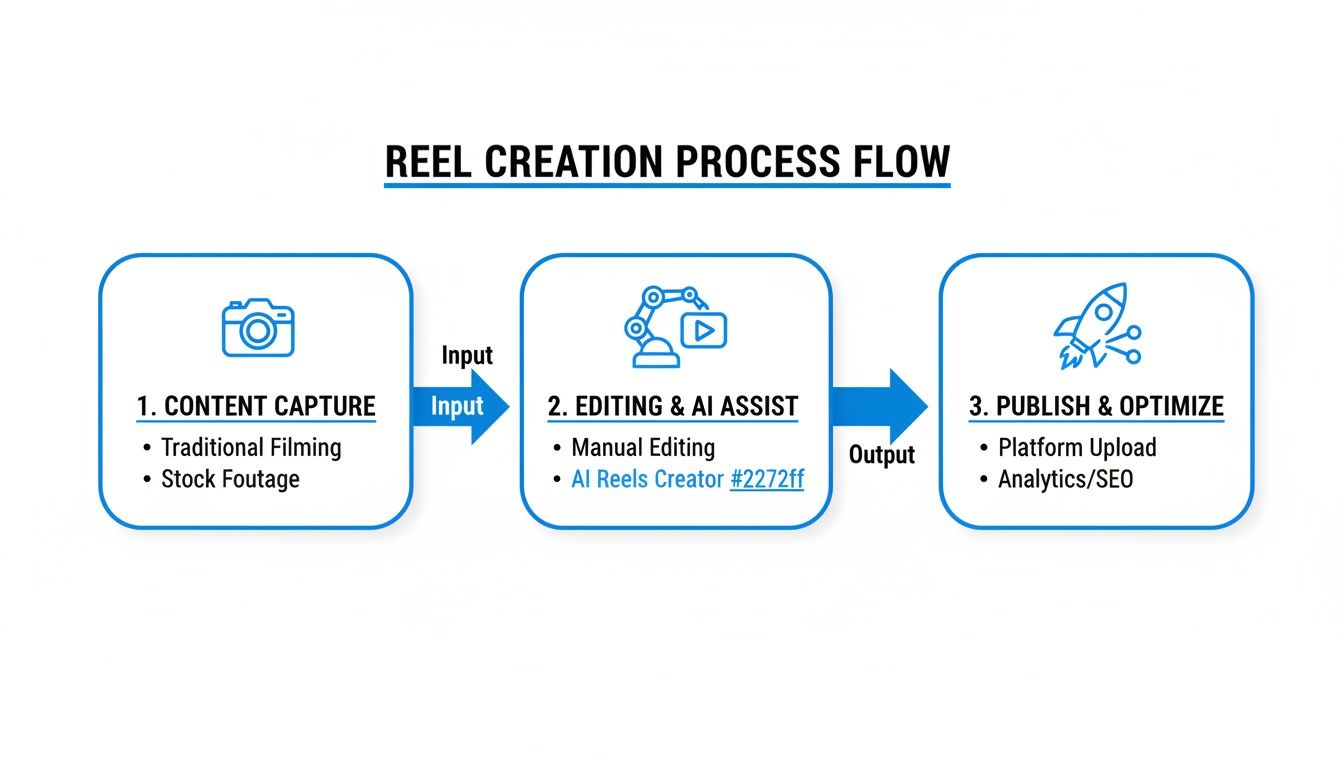
As you can see, the AI handles all the tedious, time-sucking steps—scripting, finding visuals, and editing—and merges them into one smooth, efficient process.
Generating Visuals and Voiceovers Instantly
With your script locked in, this is where things get really cool. ShortsNinja’s AI reads every sentence and automatically generates high-quality video clips and images to match the story you’re telling. You're not scrolling through endless stock libraries; the AI is creating unique visuals on the fly.
At the same time, you can pick a voiceover from a huge library of realistic AI voices in over 50 languages. Need a friendly, conversational tone? Or maybe something more professional and authoritative? You just pick the voice profile that fits your vibe, and the platform synthesizes the audio, syncing it perfectly to the visuals.
What used to demand a camera, a microphone, editing software, and hours of your life is now done with a few clicks. This is the massive advantage of a dedicated AI reels creator.
There's a reason the global AI video generator market is exploding, growing from USD 554.9 million in 2023 to a projected USD 1.96 billion by 2030. Tools that run on text-to-video workflows are leading the way, making up 45% of the market share because they make video production accessible to everyone.
Final Touches and Quick Edits
Finally, the AI puts it all together into a complete video draft for you to review. This is your chance to add that final human polish. The ShortsNinja editor is built for speed and simplicity, not for fiddling with complex timelines.
Here’s what you can quickly fine-tune:
- Background Music: Drop in a track from the built-in library to set the mood.
- Text Overlays: Make key points pop with animated text and captions.
- Clip Swapping: Don't love a particular visual the AI chose? Swap it out instantly for another one.
This last stage is all about refinement, not creation. The heavy lifting is already done. For a deeper dive into more advanced techniques, check out our guide on how to generate videos with AI.
Once you're happy with it, you can schedule the Reel to publish directly to your TikTok, Instagram, or YouTube accounts. It turns content creation from a chore into a fully automated engine for your brand's growth.
How to Write Prompts for Better AI Visuals
The quality of your final Reel boils down to one thing: the quality of your prompts. A generic prompt gets you a generic visual. It's that simple. But a well-crafted one? That's like a director's shot list, guiding the AI to create something that actually stops the scroll.
Think about the difference between "a person working" and "cinematic shot, a woman at a laptop in a cozy cafe, golden hour lighting, steam rising from her coffee cup." It’s night and day.
This is where the real magic of an ai reels creator comes in. It's not just about hitting "generate." It’s about having precise creative control without ever touching a camera. Your words become the lens, the lighting rig, and the set designer.
Here's a good way to think about it: the AI has seen millions of images. Your job is to give it the exact coordinates to find the one you're picturing in your head. Start with your main subject, then start layering on the details to build a vivid scene.
Mastering the Art of Detail
The secret to visuals that pop is specificity. Vague instructions force the AI to guess, and its guess is rarely what you had in mind. Instead, break your prompt down into a few key components to really take the wheel.
Here are the core elements I always include in my prompts:
- Subject and Action: Be crystal clear about who or what is in the scene and what they're doing. "A young man jogging" is way better than "a person exercising."
- Environment and Setting: Where is this all happening? Get descriptive. "A bustling city street at night" creates a totally different vibe than "a serene forest path at dawn."
- Lighting and Mood: Lighting is everything for setting the tone. Use terms like "dramatic shadows," "soft morning light," or "neon glow" to shape the atmosphere.
- Camera Shot and Angle: Direct your virtual camera. Tell it you want a "close-up shot," a "wide-angle view," or "drone footage" to control the perspective.
When you start combining these elements, you're no longer just making a request—you're giving a detailed directorial command. This ensures the AI spits out visuals that actually match your script. If you want to get even more granular, you can explore the world of AI video effects to add that final layer of polish.
A great prompt isn’t just a description; it’s a recipe. It provides the AI with a precise list of ingredients—subject, setting, light, and angle—to cook up the exact visual you imagined.
Effective Prompt Examples for Different Niches
Alright, let's put this into practice. The right prompt formula can completely transform your content, making it instantly recognizable to your target audience. An ai reels creator is brilliant for this because you can test out different styles in seconds.
Here’s a quick look at how you can level up your prompts across a few popular niches.
| Content Niche | Basic Prompt | Advanced Prompt for Better Visuals |
|---|---|---|
| Finance | A person looking at charts | A young professional in a modern office, analyzing a glowing holographic stock chart, focused expression, cinematic lighting. |
| Fitness | Someone lifting weights | Dynamic shot of an athletic woman lifting a barbell in a gritty gym, low-angle view, intense focus, dramatic side lighting. |
| Cooking | Food on a plate | Top-down shot of a vibrant pasta dish on a rustic wooden table, garnished with fresh basil, soft natural light from a window. |
| Travel | A beach | A lone backpacker watching a vibrant sunset over a tropical beach, silhouette against the orange sky, wide-angle shot. |
See the difference? The advanced prompts give the AI context, emotion, and technical direction. They start telling a story before the first word of the voiceover even hits.
Experimenting with detailed formulas like these is the fastest way to get good at visual storytelling and start making Reels that people actually watch.
Automating Your Content Schedule for Growth
Making a killer Reel is one thing, but consistency is what really moves the needle on platforms like TikTok and Instagram. An ai reels creator is more than just a production tool; it’s your secret weapon for automating the entire content pipeline and turning your ideas into a hands-free growth engine.
This is where the built-in scheduler comes in. By connecting your social media accounts directly inside a tool like ShortsNinja, you can skip the mind-numbing process of manually downloading and re-uploading every single video. This seamless workflow is how you build a solid content calendar that works for you, even when you’re offline.
Plan and Schedule for Peak Engagement
Instead of just posting whenever a video is ready, you can start strategically scheduling your content to drop when your audience is most active. It’s a simple change, but it can make a massive difference in your initial reach and engagement, giving the algorithm all the right signals.
With a scheduler, you can:
- Batch Your Work: Knock out a full week or even a month's worth of content in one sitting. Batching is one of the biggest productivity hacks you can implement.
- Target Peak Times: Schedule posts to go live during the high-traffic hours for your specific audience. This guarantees you get maximum eyeballs right from the jump.
- Maintain Consistency: Never miss a posting day again. The scheduler keeps your channels active, which is a huge factor in getting the algorithm on your side.
This is exactly why 93% of creators are now using AI to get their content out the door faster. It’s not about killing creativity—it’s about removing the logistical headaches that slow you down. By setting up a reliable content schedule, you build a constant presence that keeps your audience coming back for more.
The real power of an AI reels creator comes alive when you pair rapid creation with automated publishing. You're not just making videos; you're building a reliable content machine that fuels your growth 24/7.
Optimize Each Post for the Platform
Smart scheduling is about more than just picking a time. Every platform has its own unwritten rules for captions, hashtags, and calls-to-action (CTAs). A good ai reels creator workflow lets you fine-tune these details for every single post you schedule.
Instagram and TikTok Optimization Tips
- Craft Compelling Captions: Don't just describe the video; write something that sparks a conversation. Asking a simple question is a great way to get comments rolling in.
- Use a Mix of Hashtags: Combine broad, trending hashtags with smaller, niche-specific ones to hit different discovery paths. Aim for a solid mix of 5-10 relevant tags.
- Include a Strong CTA: Tell your viewers what to do next. Simple prompts like "Follow for more tips" or "Share this with a friend" really do work and can give your engagement a serious boost.
Taking a few extra minutes to tailor these details for each platform before you hit "schedule" turns every Reel into a targeted piece of content designed to perform. This shifts your whole approach from being reactive to proactive, letting you build your audience on autopilot.
Pro Tips and Common Mistakes to Avoid
Alright, you've got the hang of using an ai reels creator to pump out content. Now, let's talk about what separates the good Reels from the truly great ones. It often boils down to a few strategic tweaks that sharpen your production quality and build a recognizable brand.
Your first move? Stop relying on the default settings. A huge mistake I see is letting the AI take the wheel completely. Think of the AI as your super-powered assistant, not a replacement for your own creative spark. The goal is to develop a consistent visual vibe—a specific color palette, lighting style, or type of shot you use across all your videos. This is how you build a memorable brand identity.
Sidestep These Common Pitfalls
New creators tend to run into the same handful of issues. If you can learn to spot and dodge these, you'll be on the fast track to making professional-looking content that actually gets views.
Here are the missteps I see most often:
- Vague, Lazy Prompts: Typing "a person working" is a recipe for boring, generic visuals. Get specific. Try something like, "cinematic close-up, a focused female entrepreneur typing on a sleek laptop in a modern, sunlit office." See the difference?
- Forgetting Background Audio: Dead silence is a scroll-stopper, and not in a good way. You absolutely need background music or subtle sound effects to set a mood and keep people watching.
- Neglecting the Hook: You have three seconds. That's it. Your script and visuals must start with a bang—ask a provocative question, make a bold claim, or show something completely unexpected.
One of the most overlooked mistakes is using a one-size-fits-all approach. A Reel optimized for TikTok’s fast-paced, trend-driven culture needs a different energy than one for Instagram, which might favor more aesthetic or informational content.
Advanced Tactics for Higher Engagement
Ready to really level up? It’s time for some A/B testing. This is a game-changer. Create two versions of the same video but switch up just one thing—maybe a male voiceover in one and a female in the other. Post both and see which one performs better. Then, apply what you learned to your next videos.
And don't sleep on the power of collaboration. It goes way beyond just making cool content; it's a massive shortcut to more reach. Look into platform features like adding collaborators on Instagram Reels to tap into another creator's audience.
This simple move can literally double your video's exposure with zero extra creative work. When you pair a powerful ai reels creator with smart platform tactics, you’re not just making videos—you’re building a real growth strategy.
Got Questions About AI Reels Creators?
Jumping into the world of AI reels creators can feel like exploring new territory, so it's natural to have a few questions. It’s a totally different way of making content, and it pays to know how things work before you go all in. We've rounded up the questions we hear the most to give you straight answers, so you can start creating with confidence.
Can I Really Make High-Quality Videos if I Have Zero Editing Experience?
You absolutely can. In fact, that's the whole point of these tools. An AI reels creator is built from the ground up to do all the technical heavy lifting for you. The interfaces are designed to be intuitive, made for creators, not professional video editors.
Your job is to bring a solid idea and give the AI clear instructions. From there, the AI takes over, handling the tricky stuff like generating the visuals, syncing the audio, and stitching it all together into something that looks like it came from a pro.
What Kind of Visuals Can the AI Actually Generate?
Today's AI video generators are capable of producing an incredible range of visuals. You can get everything from clips that look almost like real photos and cinematic-style animations to sleek motion graphics. It’s pretty wild.
The style and quality of what you get back almost entirely boils down to how specific you are with your prompts. You can steer the AI to create exactly what you're picturing by using descriptive terms. For instance:
- Specify an artistic style like "3D render" or "watercolor animation."
- Control the camera work with phrases like "drone shot" or "low-angle view."
- Get granular with detailed descriptions of people, places, and objects.
How Does the Multi-Language Voiceover Feature Work?
This is one of the coolest parts. These platforms use advanced text-to-speech (TTS) engines that produce voiceovers that sound remarkably human. Once the AI has your script finalized, the rest is simple.
You just pick your target language from a massive list and then browse a library of different voice profiles—male, female, various accents, you name it. The AI then generates the full audio track and times it perfectly with the visuals on screen. This unlocks the ability to reach a global audience without the headache or cost of hiring voice actors.
The content you create is yours and yours alone. Every video is generated based on your unique prompts, making it original. Plus, the visuals, music, and voiceovers all come with commercial licenses, so you can use them on monetized channels like YouTube and TikTok without worry.
Is AI-Generated Content Unique and Safe for Monetization?
Yes, on both fronts. Since every video is spun up from your specific prompts, the final product is completely original to you. You're not just slapping your text on a pre-made template; the AI is creating brand-new content every single time.
On top of that, all the assets—the visuals, the background music, and the AI voiceovers—are generated with commercial-use licenses. This is a massive plus because it completely sidesteps the copyright strikes and demonetization headaches that pop up when you use unlicensed stock footage or popular songs.
Ready to stop scripting and start creating? Try ShortsNinja today and generate your first viral Reel in minutes. https://shortsninja.com