
An AI image-to-video generator is a tool that breathes life into a single, static picture, turning it into a short, animated video clip. It's all about adding motion, depth, and a story to a still image, creating a dynamic visual from just one starting point.
From Still Image to Moving Story
Think of it like this: you hand a photograph of a calm lake to a digital artist. They don't just see the picture; they imagine the subtle ripples on the water, the gentle sway of the trees, and the slow drift of clouds. An AI image-to-video generator does this on the fly, interpreting your image and generating a logical sequence of frames to create believable motion.
This technology is a huge deal for anyone creating content. The demand for engaging video is through the roof, but production has always been a major hurdle—expensive, slow, and complicated. These new AI tools are completely flipping that script.
Who Is This Technology For?
This isn't just some niche toy for animators or VFX artists. The applications are surprisingly broad and practical for a whole range of creators and professionals. If you're looking to grab an audience's attention without a Hollywood-sized budget, these tools are for you.
For example, this technology is a game-changer for:
- Social Media Managers who need to churn out eye-catching posts for Instagram Reels and TikTok without the hassle of a full-blown video shoot.
- Marketers looking to animate product photos, transforming a standard catalog image into a compelling ad that shows off features in motion.
- Digital Artists and Photographers who want to add a new dimension to their portfolios, turning their best shots into mesmerizing visual experiences.
- Small Business Owners aiming to produce professional-looking promo content on a tight schedule and an even tighter budget.
The Growing Demand for Visual AI
The crazy-fast adoption of these tools isn't happening in a vacuum. It’s part of a much bigger shift toward AI-powered visual media, and the market is exploding as more creators discover what's possible.
The related AI image generator market was valued at USD 2.39 billion in 2024 and is projected to skyrocket to USD 30.02 billion by 2033. This explosive growth shows just how much value creators place on automating and simplifying the way they produce visuals.
At its core, an AI image-to-video generator is a storytelling tool. It closes the gap between a static moment and a dynamic narrative, letting you tell a more engaging story with way fewer resources.
By turning simple images into motion, you can stop thumbs from scrolling and get a much more powerful message across. Whether you're building a personal brand or promoting a global one, these generators offer a fresh, essential way to connect with your audience. You can learn more about how to create stunning visuals by checking out our guide on AI image tools for viral visual content creation.
How AI Learns to Animate Your Pictures
Ever wondered what’s happening under the hood when you ask an AI to turn a photo into a video? It definitely feels like magic, but the process is really more like digital sculpting, powered by some seriously advanced pattern recognition.
At its core, an AI image-to-video generator isn't just pulling motion out of thin air. Instead, it’s making a highly educated guess about what that motion should look like, based on a massive library of visual knowledge it has already studied.
The "Digital Sculptor" Analogy
To get a handle on this, think of an artist staring at a block of digital "noise"—a blurry, pixelated mess. Their job is to slowly bring an image into focus, chipping away at the randomness until a clear, moving picture emerges. This is almost exactly how many of the top AI video models, known as diffusion models, get the job done.
These models are trained on millions upon millions of video clips scraped from the internet. This huge dataset is what teaches them the basic physics and patterns of our world.
Unpacking the Training Process
During its training phase, the AI learns a simple, two-part process that it repeats over and over again.
- Adding Noise: First, it takes a perfectly clean video clip and intentionally messes it up. It adds layers of digital static, or "noise," until the original video is completely gone. Crucially, it keeps a perfect record of every single step it took to degrade the image.
- Removing Noise (Denoising): This is where the real learning kicks in. The AI is then challenged to reverse the process. It has to learn how to take that chaotic, noisy image and carefully remove the static, layer by layer, to rebuild the original clean video.
By doing this millions of times, the AI develops a deep, almost intuitive grasp of motion. It learns that fire flickers, water ripples, and hair blows in the wind. It’s not just memorizing videos; it’s internalizing the fundamental principles of how things move and change over time.
When you feed the AI a static image and a text prompt, you’re giving it a starting point and a destination. The model then uses everything it learned during training to predict the most logical sequence of frames that connects your still picture to the motion you described.
This predictive power is what makes these tools so incredible. The more data a model has been trained on, the more detailed and realistic its animations become.
From Theory to Animation in Your Hands
So, when you upload a photo of a calm mountain lake and type in a prompt like, "clouds drifting slowly across the sky," the AI gets to work.
It takes your image, adds a little bit of initial noise to get started, and then begins the denoising process. Guided by your text prompt, it "sculpts" that noise away in a sequence that perfectly matches the motion of moving clouds.
It knows how clouds are supposed to behave—how they stretch, fade, and play with light—because it has seen countless hours of real skies. What you get back is a series of brand-new frames that create a seamless, believable animation built right on top of your original picture.
Of course, the quality of that final video depends a lot on the specific model doing the work. To get a better sense of what’s powering today's best tools, check out our breakdown of the 5 best AI video models for 2025, where we dig into their unique strengths and weaknesses. Understanding this helps you appreciate the sheer complexity that goes into making your still images come alive.
Your Practical Workflow for Creating AI Videos
Knowing the theory is one thing, but actually turning an idea into a polished AI video? That takes a solid, repeatable workflow. This is where we bridge the gap between abstract diffusion models and the hands-on steps of making cool stuff.
Think of this as a universal framework you can adapt to pretty much any AI image to video generator. It all starts with the most important ingredient: your image.
Sourcing and Preparing Your Perfect Image
Let’s be blunt: the quality of your final video is almost entirely dictated by the quality of your starting image. Garbage in, garbage out. A blurry, low-res, or visually messy picture will only lead to a muddy, confusing animation. Your job is to give the AI a clean, clear canvas to play with.
Imagine asking a painter to copy a photograph—the sharper the photo, the better the painting. To set yourself up for success, find images with:
- A Clear Subject: The main thing you want to bring to life needs to be well-defined and pop from the background.
- Good Composition: A strong visual layout helps the AI understand what’s important in the scene and where the motion should be focused.
- High Resolution: Crisp, detailed images give the AI more data to work with, which means smoother, more believable movement.
You can whip up a fresh image with a tool like Midjourney or grab a high-quality photo. Just make sure it’s ready to go before you hit the "animate" button.
Crafting Effective Motion Prompts
Got your image? Great. Now you need to tell the AI what to do with it. This is done with a motion prompt, and it's your main lever of control. Vague, lazy prompts like "animate" or "move" will give you chaotic, unpredictable results. The secret sauce is specificity.
Your prompt needs to be descriptive and direct. Tell the AI exactly what to move, how to move it, and in what direction.
Pro Tip: Structure your prompts like a director giving instructions: identify the subject, the action, and any extra details. Instead of just "wind," try "tall grass swaying gently from left to right in a light breeze." See the difference? Now the AI has clear orders to follow.
This diagram breaks down how the AI actually animates your image. It starts with a bunch of digital "noise" and then, guided by your prompt, refines it layer by layer into the final video.
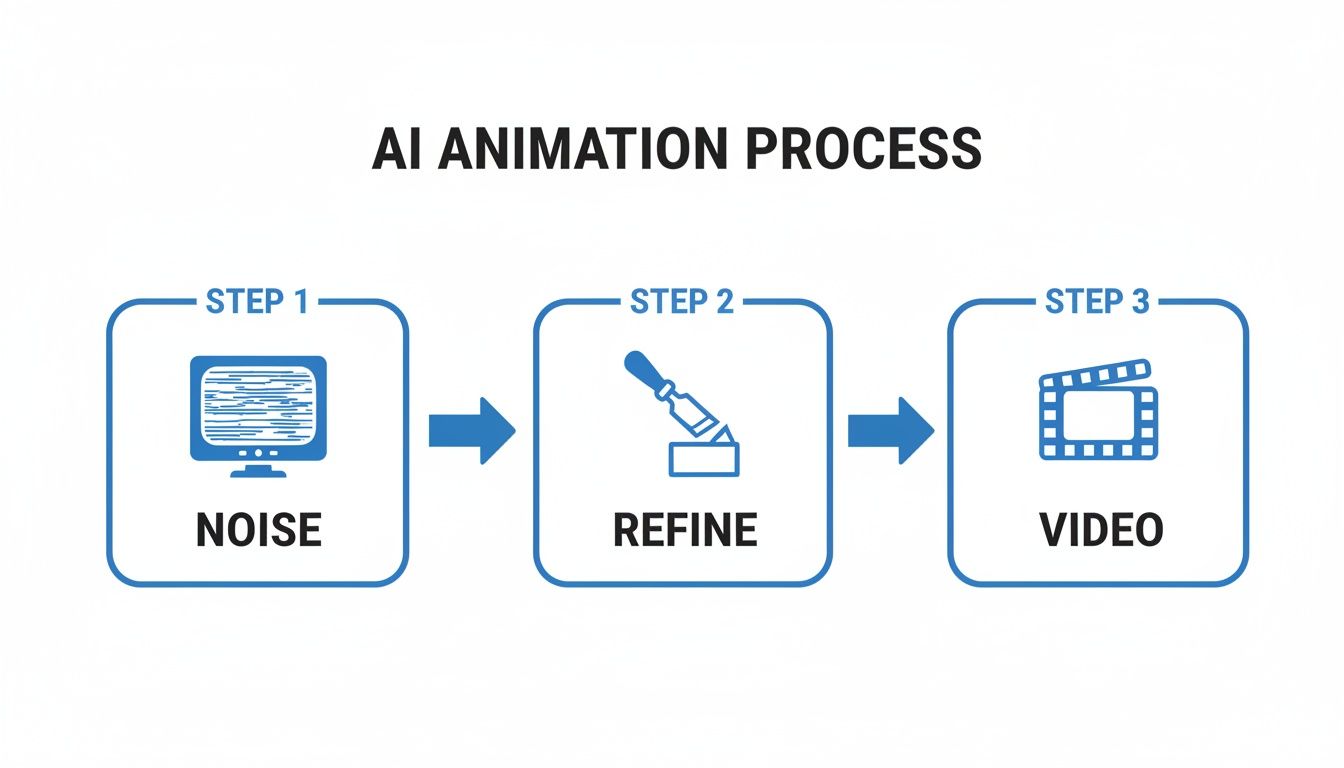
Think of your detailed prompts as the sculptor's chisel, carving a coherent animation out of that initial block of noise.
To really see this in action, check out the difference between a vague prompt and a specific one:
Effective Motion Prompts And Their Results
| Vague Prompt | Specific Prompt | Expected Outcome |
|---|---|---|
| "Water moves" | "Gentle ripples expanding outward from the center of the lake" | The entire image won't warp; instead, you'll see realistic, subtle water movement. |
| "Animate clouds" | "Wispy clouds drifting slowly from right to left across the sky" | You get a natural, believable sky, not a chaotic swirl of pixels. |
| "Make it windy" | "A woman's long hair and scarf blowing fiercely to the left in a strong wind" | The motion is focused on specific elements, creating a dynamic and targeted effect. |
As you can see, the more detail you provide, the more control you have over the final look and feel of your video.
Fine-Tuning Parameters and Generating
Beyond the text prompt, most good AI image to video generators give you extra knobs and dials to play with. These parameters are what take a video from "pretty good" to "wow."
Here are a few common settings you can tweak:
- Motion Intensity: This is basically a "how much" slider. Low settings create subtle, cinemagraph-style effects. High settings produce dramatic, sweeping action.
- Camera Controls: Many tools let you mimic camera moves like a pan, tilt, or zoom. Use these to add a sense of scale or guide the viewer’s eye through the scene.
- Video Length and FPS: You can usually set the clip's duration (often just a few seconds) and the frames per second (FPS), which impacts how smooth the motion appears.
This kind of creative control is becoming more common, and it’s fueling some serious industry growth. The global AI video generator market is expected to rocket from USD 534.4 million in 2024 to a staggering USD 2.56 billion by 2032. That explosion is driven by creators who want powerful, affordable tools just like these.
Getting the hang of these settings is all about experimenting. Don’t be afraid to generate a few different versions with different parameters to see what works best for your image. If you want to go deeper, our guide on how to generate videos with AI covers even more advanced tips.
By combining a stellar image, a specific prompt, and some careful tuning, you’ll be cranking out impressive AI videos in no time.
Comparing Different Styles of AI Video
Not all AI-generated videos are created equal. The second you start playing with an AI image to video generator, you'll see the output can range from a tiny bit of motion to a full-blown animated scene. Figuring out these different styles is the key to picking the right approach for your project and knowing what to expect from the final result.
It’s a bit like choosing a paintbrush. A super-fine brush is perfect for delicate details, but you’d grab a wide, flat one for big, sweeping strokes. In the same way, different AI video styles are built for different creative goals.
Subtle Motion and Cinemagraphs
One of the most popular and effective styles is what I call subtle motion. The idea is to animate only a small, specific part of your image, leaving everything else perfectly still. This creates a mesmerizing “cinemagraph”—a cool hybrid of a photo and a video that immediately grabs your attention.
This technique is fantastic for setting a mood or pulling the viewer's eye to a specific detail. A few examples:
- Portrait Animation: Making a character in a portrait subtly smile, blink, or have their hair gently rustle in an unseen breeze.
- Product Highlights: Adding a gentle gleam to a piece of jewelry or making steam rise from a hot cup of coffee in a product shot.
- Environmental Ambiance: Creating gentle ripples in a lake, making stars twinkle in a night sky, or having smoke drift slowly from a chimney.
Because the movement is so limited and controlled, this style usually gives you the most believable and clean-looking results. It's a great place to start if you're new to AI video.
Here’s a look at the interface for Runway, one of the heavy hitters in this space. You can see how advanced the tools are getting for creating these different effects.
This screenshot shows just how sophisticated the controls have become. We've moved way beyond simple text prompts into a world of camera controls, motion brushes, and more.
Dynamic Scenes and Full Animation
On the complete opposite end of the spectrum is full-scene animation. This is where you’re asking the AI to generate significant, widespread motion across the entire image. This approach is much more ambitious—it’s about turning your static photo into a complete, dynamic video clip.
The goal here isn't just to add a touch of life but to create a narrative through movement. You're telling the AI to invent what happened just before or just after the photo was taken.
This is how you create more dramatic effects, like:
- Fly-Throughs: Turning a landscape photo into a drone-like shot that soars through mountains or over a city.
- Character Action: Making a person walk, run, or gesture, basically turning a still portrait into a short action sequence.
- Weather Effects: Changing a sunny day into a rainstorm, complete with falling drops and puddles forming on the ground.
Understanding the Limitations and Artifacts
While dynamic scenes can be incredibly impressive, they also push the AI to its absolute limits. This is where you’re most likely to run into weird visual glitches, often called artifacts. One of the most common is a strange "morphing" or "warping" effect, where objects seem to melt or distort unnaturally as they move.
This happens because the AI is essentially just guessing what the hidden parts of an object look like. When a character turns their head, the AI has to generate the side of their face it couldn't see in the original photo. If it gets that guess even slightly wrong, you end up with some bizarre visual glitches. Keeping your clips short—usually under 4-5 seconds—can really help minimize these problems.
The good news is that the industry is moving incredibly fast to solve these issues. In October 2024, HIX.AI launched Pollo AI, a new product for AI video generation that shows just how quickly things are evolving. This tool joins other major players like Runway ML, Pictory, and HeyGen, who are all racing to create more realistic and controllable video for everything from entertainment to marketing. You can get more insights on the competitive landscape of the AI video generator market on knowledge-sourcing.com.
By understanding the difference between subtle and dynamic styles, you can match your creative vision with what the technology can realistically do today. That’s the secret to making a final video that’s both stunning and believable.
Use Cases for Social Media and Marketing
This is where the real magic of an AI image-to-video generator truly shines. It isn't just about making cool animations; it’s a direct solution to the massive challenge of grabbing attention in a ridiculously crowded digital world. Social media and marketing campaigns survive on a constant stream of fresh, engaging content, and these AI tools are quickly becoming the secret weapon for meeting that demand.
Let's be real—static images just don't cut it anymore. Video is king. Platforms like TikTok, Instagram Reels, and YouTube Shorts have completely rewired our brains to expect dynamic, fast-paced visuals. For most creators and businesses, this is a huge headache. Traditional video production is slow and expensive, creating a bottleneck that AI is perfectly built to break through.
Animating Products for E-commerce
Imagine you run an online shop selling handcrafted jewelry. A great photo is nice, but what if you could make the gemstones sparkle with a subtle glint of light? Or show a necklace gently swaying as if someone were wearing it? That’s the sweet spot for AI video generation.
By animating static product shots, e-commerce brands can create short, scroll-stopping clips for their social media ads and product pages. These little micro-videos are way more effective at catching a user's eye than a flat image ever could be.
- Highlighting Features: Add a shimmering effect to a metallic watch or a gentle ripple to a drink in a glass.
- Creating Atmosphere: Make steam rise from a fresh plate of food to signal warmth and flavor.
- Demonstrating Use (Implicitly): Show a backpack’s fabric subtly flexing, hinting at its durability and movement.
This simple trick can transform a boring product catalog into an interactive showcase, leading to more engagement and, you guessed it, more sales.
By bringing products to life with motion, marketers can tell a more compelling story in just a few seconds. This small change can make the difference between a potential customer scrolling past or clicking "add to cart."
Tools like ShortsNinja are built on these exact models, automating the entire short-form video creation process and saving creators a ton of time. Instead of animating every image by hand, a system can churn out dozens of faceless videos for different platforms, all from a single starting point.
Boosting Engagement for Creators and Artists
It’s not just about e-commerce. Individual creators are finding amazing ways to use AI-generated video to blow up their reach. The ability to pump out a high volume of content quickly is a total game-changer for anyone trying to please the ever-hungry social media algorithms.
A musician, for instance, could take their album art and generate a series of mesmerizing visual loops to promote a new single. A digital artist can bring their static illustrations to life, creating behind-the-scenes style clips or adding subtle blinks and expressions to their characters.
Real-World Applications Across Industries
The flexibility of this tech opens up all kinds of marketing strategies. Here are just a few practical examples of how different pros are putting it to work:
- Real Estate Agents: Animate a still photo of a property by making clouds drift across the sky or adding a lens flare to the sunset. It instantly creates a more inviting and luxurious vibe.
- Restaurants and Cafes: Turn a photo of their signature dish into a mouth-watering clip by adding rising steam or a gentle shimmer on a sauce.
- Event Promoters: Animate a promotional flyer, making text elements fade in or adding subtle motion to background graphics to make an upcoming concert or festival impossible to ignore.
Each of these examples plays to the core strength of an AI image-to-video generator: creating high-impact visuals quickly and without breaking the bank. As these tools get even better and easier to use, they're moving from a fun novelty to a must-have in every modern creator's toolkit.
The Future of AI-Driven Video
The line between AI-generated visuals and real-world video is getting blurrier by the day. What started out as a neat trick for animating static pictures is quickly becoming a full-blown production toolkit. We're moving past simple image-to-video tricks and into an era where entire scenes can be conjured up from nothing more than a text prompt.
This huge leap is being driven by the next wave of AI models focused on text-to-video generation. Instead of just adding a bit of motion to a picture you already have, these systems build brand new video clips from scratch, all based on a simple sentence. It’s like telling a director, "Show me a golden retriever puppy chasing a butterfly in a field of wildflowers at sunset," and watching that exact scene materialize on your screen.
The Next Frontier: Temporal Consistency
For a long time, the biggest headache with AI video has been temporal consistency—making sure objects and people look the same from one frame to the next. Early models often created weird, morphing visuals that were a dead giveaway, but the latest tech is making incredible progress.
Newer, more advanced models are finally learning to maintain object permanence and follow the basic laws of physics, making the final videos startlingly realistic. This means:
- A person's face will actually look like the same person from different angles.
- Objects won't just decide to change color or shape for no reason.
- Things like gravity and motion are respected, so the action feels more natural.
As these models get better, telling the difference between AI video and something shot on a camera will become nearly impossible, opening up a whole new world for filmmakers and creators.
A Fundamental Shift in Content Creation
The technology we've walked through in this guide isn't just another passing fad. It’s a genuine shift in how we make and watch digital media. Being able to create high-quality video from just a single image or a line of text completely changes the game. It tears down old barriers like needing expensive gear, a big crew, or complicated software.
The future of digital media is already here, and with an AI image to video generator, you have the power to shape it. The skills you've learned are the foundation for a new wave of storytelling where imagination is the only true limit.
This guide has given you the practical know-how to get started. You understand the models, you have a workflow you can repeat, and you know how to write prompts that get results. Now it's time to get your hands dirty, push the boundaries, and see what incredible stories you can bring to life.
Frequently Asked Questions
Jumping into the world of AI image-to-video can feel like learning a new language. You're not alone. Here are some of the most common questions creators have, with straightforward answers to help you get the best results from these powerful tools.
How Much Control Do I Actually Have Over The Final Video?
The amount of control you get really boils down to the specific tool you’re using. Some of the simpler generators are pretty hands-off—you give it an image and a text prompt for motion, and that's about it. It’s quick, but you’re mostly along for the ride.
But more advanced platforms like RunwayML or Pika Labs open up the toolbox quite a bit. They let you direct the action with specific camera movements like pan, tilt, and zoom. You can also tweak the intensity of the motion, adjust the frames per second (FPS), and even use seed numbers to get consistent outputs across different attempts.
While you can't go in and tweak individual frames like a traditional animator, your real power comes from two places: the quality of your starting image and how well you write your prompts. Getting good at "prompt engineering" is the single best way to steer the AI toward the vision you have in your head.
Can I Use Any Image To Create a Video?
Technically, you can upload just about any image. But the old saying "garbage in, garbage out" has never been more true. The quality of your video is directly tied to the quality of the image you start with. For the best results, always use high-resolution images with a clear, well-defined subject.
Images with clean, simple backgrounds tend to perform much better than cluttered ones. This helps the AI easily figure out what the main subject is, which means it can apply motion much more logically and accurately.
The AI can get confused by overly complex scenes, abstract art, or images loaded with text, often spitting out distorted or nonsensical movement. Experimentation is key, but starting with a crisp photograph or a clean digital illustration gives the AI a solid blueprint to work from.
Remember: The better the input image, the more coherent and visually pleasing the final video will be. Think of it as giving the AI a clean blueprint to work from.
Are There Copyright Issues With AI-Generated Videos?
This is a big one, and the legal side of AI-generated content is still being mapped out. The rules can vary a lot depending on where you are. As a general rule of thumb, if you create and own the rights to the source image, you’ll most likely own the rights to the video the AI generates from it.
But if you grab an image made by another artist (even if that was AI-generated), you could be stepping on their copyright. On top of that, the official copyright status of content made entirely by an AI is still a legal gray area, and platforms are figuring out their policies as they go.
If you plan on using your video for any commercial purpose, the safest bet is to always use images you’ve created yourself or those that come with a clear commercial license. And always, always read the terms of service for the specific AI image to video generator you’re using. They'll tell you exactly what their policies are on ownership and usage rights.
Ready to stop spending hours on video creation and start producing engaging faceless content in minutes? ShortsNinja leverages the power of these advanced AI models to automate your entire workflow. Go from a simple idea to a fully edited and scheduled short video for TikTok and YouTube, all in under five minutes. Start your free trial and see how easy it can be at ShortsNinja.com.