
Wondering how to create a short video that actually gets noticed? Forget everything you think you know about complicated production. The new way is fast, smart, and built for creators who want to move quickly. It all boils down to a simple, repeatable system: come up with a killer idea, script it for short attention spans, generate your visuals and voiceover (often with a little help from AI), and then edit for maximum punch.
This modern workflow can take a spark of an idea and turn it into a polished TikTok, Reel, or Short in minutes, not hours.
Your Modern Blueprint for Short Video Creation
You don't need a film degree or a studio full of expensive gear to pump out engaging short-form content anymore. The game has changed. Today, creators can build entire channels with a steady stream of high-quality videos using a much simpler, AI-assisted process designed for speed and impact.
And the audience is definitely there. Just look at the numbers: YouTube Shorts now pulls in over 70 billion daily views. That’s a massive crowd just waiting for your next video. This modern approach isn't about complex production; it's about efficient, powerful storytelling.
The Modern Video Creation Flow
At its heart, the modern process is all about getting from inspiration to a published video as fast as humanly possible, without sacrificing quality.
This simple flowchart breaks it down into the three core phases creators now live by: Idea, Script, and Generate.
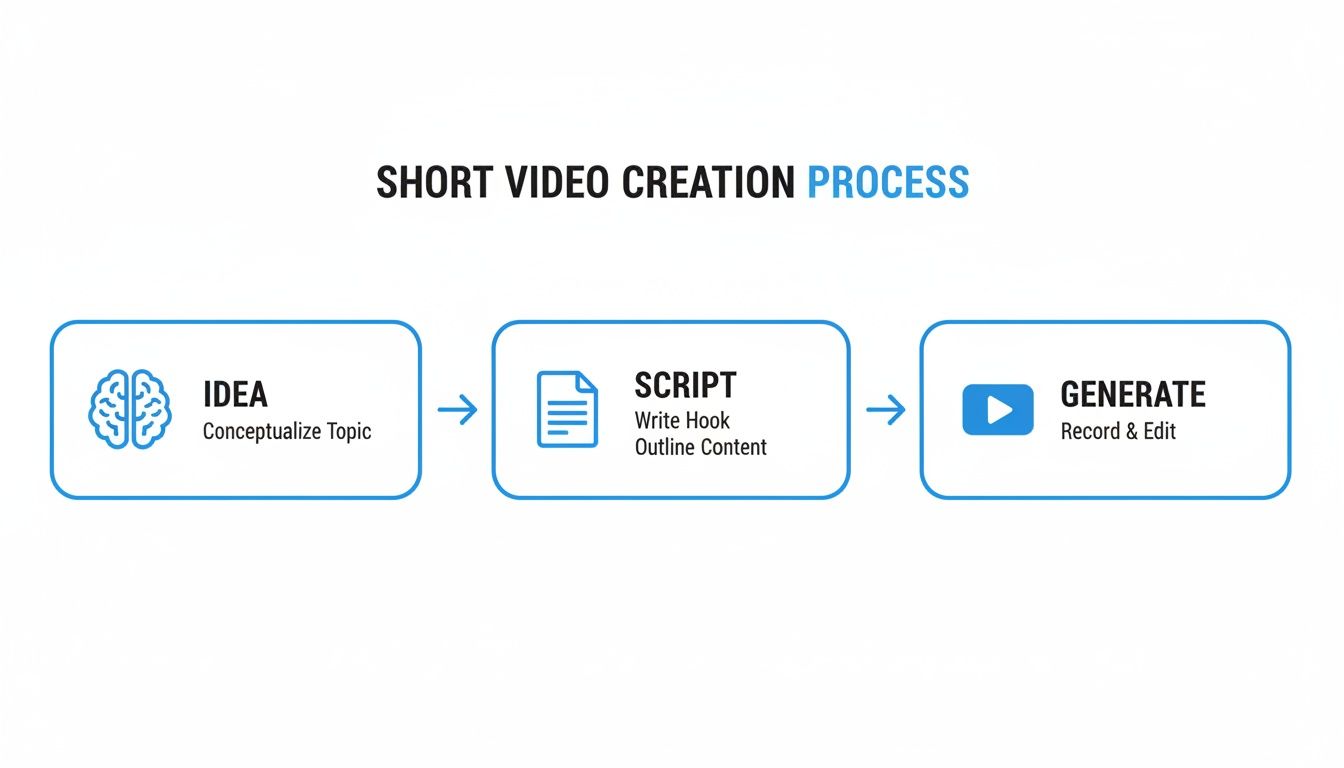
This entire workflow is built to remove friction. It's about using the right tools to handle the repetitive, time-consuming tasks so you can focus on what really matters: your message.
Here are the pillars that make this system work so well:
- Finding a Resonant Idea: This is less about inventing something out of thin air and more about tapping into what your audience is already thinking, asking, or struggling with.
- Scripting for Short Attention Spans: You have about three seconds to hook someone. Your script is the single most important tool for grabbing and holding their attention.
- Generating Visuals and Voiceovers: This is where AI tools like ShortsNinja completely change the game. You can now create stunning visuals and surprisingly human-like voiceovers straight from your script, often in just a few clicks.
- Editing for Impact and Publishing: The final stretch involves quick edits, adding dynamic captions, and using automated scheduling to get your content in front of people without burning yourself out.
The secret to winning with short-form video is a repeatable system. Stop reinventing the wheel for every single video. A consistent process is what both the algorithms and your audience will reward.
If you're looking for a deeper dive into creating videos that not only get views but also deliver real results, this guide on how to make marketing videos that drive conversions offers some fantastic strategies.
This table gives a quick overview of how the modern, AI-assisted workflow stacks up against the old-school way of doing things. It's a pretty stark difference.
Modern Short Video Workflow Overview
| Stage | Traditional Method (Hours) | AI-Assisted Method (Minutes) | Key Tools |
|---|---|---|---|
| Ideation | 1-2 Hours | 10-15 Minutes | AnswerThePublic, Google Trends, ChatGPT |
| Scripting | 1-3 Hours | 5-10 Minutes | ShortsNinja, Copy.ai, Jasper |
| Visuals/VO | 4-8 Hours | 5-15 Minutes | Murf AI, ElevenLabs, Midjourney |
| Editing | 2-5 Hours | 15-30 Minutes | CapCut, Descript, InShot |
| Publishing | 0.5-1 Hour | 5 Minutes | Buffer, Later, Metricool |
As you can see, what used to take a full day (or more) can now be knocked out in under an hour. This efficiency is what allows top creators to maintain a consistent presence and grow their channels so quickly.
How to Find and Script Your Next Viral Idea
Let's be real: a viral video is almost never a happy accident. It’s what happens when a killer idea meets a razor-sharp script. The whole process starts long before you even think about hitting record. It begins with figuring out what your audience actually wants to watch, not just jumping on the latest TikTok dance.
Chasing trends can feel like a shortcut to views, but that content has a short shelf life. A much better, more sustainable approach is to become the go-to problem-solver or entertainer for a specific group of people. I spend hours digging through forums like Reddit and Quora, or just scrolling through the comment sections of videos in my niche. What questions keep popping up? What are people genuinely struggling with? Every one of those questions is a potential video idea right there.
And this isn't just a hunch; the data backs it up. Right now, 69% of video marketers are prioritizing social media clips, and 59% are creating them in-house. That tells you that consistent, audience-focused content isn't just a trend—it's the core strategy.
Crafting a Script That Stops the Scroll
Once you’ve landed on a solid idea, you have to package it for the blink-and-you-miss-it world of short-form video. Attention is the only currency that matters here, and you’ve got about three seconds to earn it. That's where a simple but incredibly effective framework comes into play.
I live by the Hook, Story, Offer (HSO) model. It's the perfect blueprint for a script that just works.
- Hook (First 3 Seconds): You need to start with something that jolts them out of their mindless scrolling. It could be a bold claim, a super-relatable problem, or a question they can't ignore. For instance, instead of a boring "How to save money," try something like, "You're throwing away $100 a month and you don't even know it." See the difference?
- Story (3-20 Seconds): This is where you deliver the goods. You made a promise with your hook, and now it's time to pay up—fast. Use quick cuts, punchy on-screen text, and keep your tone conversational to explain your point. No fluff.
- Offer (Final 5 Seconds): This is your call to action, or CTA. It can be as simple as "Follow for more tips" or asking a question to get the comments flowing. The offer gives your viewer a clear next step and tells the algorithm that people are engaging with your content.
A great script isn't about writing an Oscar-winning screenplay. It’s about creating a clear, simple path for the viewer. You guide them from curiosity (the hook) to getting value (the story) to taking the next step (the offer), all in under 30 seconds.
Using AI as Your Creative Co-Pilot
Look, even with a great idea and a solid framework, sometimes the words just don't come. Writer's block is real. But thankfully, we've got tools now that can help you bust right through it. This is where AI can become an amazing creative partner.
Platforms like ShortsNinja can take a simple prompt—like "a video about budget travel hacks"—and instantly spit out multiple script variations using that HSO format we just talked about. This isn't about letting a robot replace your creativity; it's about amplifying it.
You can cherry-pick the best lines from several AI-generated options, tweak the tone to match your voice, and have a polished script ready in minutes. For anyone just starting out, checking out a beginner's guide to script writing can also give you a fantastic foundation. This AI-assisted workflow lets you test different angles and hooks without staring at a blank page for hours, making the whole content creation process way faster and more effective.
Generating Visuals and Voiceovers with AI
Once your script is locked in, it's time to bring it to life with visuals and audio. Not long ago, this meant shelling out for expensive cameras, lighting kits, and professional microphones. Now, you can create a professional-grade short video right from your desk, often without ever stepping in front of a camera.
Artificial intelligence has completely changed the game. There are now integrated platforms that can take your script and automatically whip up an entire sequence of engaging video clips to match. This is a massive leap forward, making high-quality content creation accessible to pretty much everyone.
From Text to Moving Pictures
The magic behind this is powered by incredible AI models like those from Runway or Google's Veo. These tools are trained on an unbelievable amount of visual data, which lets them understand text prompts and create unique, high-quality video footage from scratch. This means you don't even need stock footage or personal recordings to get started.
A platform like ShortsNinja, for example, uses this tech to break down your script scene by scene. It then generates visuals that actually match the narrative, essentially storyboarding and producing your video in one go.
Of course, to get the best results, your prompts need to be descriptive. Don't just say "a person walking." Instead, try something like, "a young woman walking confidently through a busy, futuristic city street at night, neon signs reflecting in puddles on the ground." The more detail you feed the AI, the closer the output will be to what you're imagining.
Here are a few quick tips for writing prompts that work:
- Be Specific About the Subject: Clearly define who or what is in the scene.
- Describe the Environment: Mention the location, time of day, and overall mood.
- Include Action and Emotion: Use strong verbs and adjectives to convey movement and feeling.
- Define the Artistic Style: Add terms like "cinematic," "hyperrealistic," "anime style," or "vintage film look."
The real power of AI visuals is speed and creativity. You can test a dozen different visual concepts for a single video in the time it would have taken to set up one traditional shot.
Giving Your Video a Voice
Visuals are only half the battle. Let's be honest—compelling audio is what really holds a viewer's attention. Thankfully, AI-powered voice generators can now produce incredibly realistic, human-like voiceovers in just a few seconds.
This is where services like ElevenLabs and OpenAI have made huge strides. They offer a massive library of voices, accents, and emotional tones, so you can find the perfect match for your video's vibe.
This variety means you can dial in a voice that fits your brand, whether you need an energetic, upbeat tone for a marketing clip or a calm, authoritative one for a tutorial. You just paste your script, pick a voice, and hit generate. For a deeper dive, you can explore some of the top AI voiceover tools for marketing videos to see what fits your workflow.
This process completely cuts out the need for expensive recording gear and saves hours of tedious work.
Editing Your Video for Maximum Engagement
You've got the raw ingredients—your script and visuals—but the edit is where you actually cook the meal. A sharp, punchy edit is what separates a decent clip from a video people can't look away from. This stage isn't about mastering complex software; it’s about understanding the psychology of short-form content.
The main goal here is to keep the momentum going. Viewers on platforms like TikTok and YouTube Shorts have zero patience for boredom. Every single second has to earn its place, pushing the story forward and keeping the energy high.
This is where integrated AI platforms like ShortsNinja really shine. Instead of getting lost in the technical weeds of traditional editing software, you can focus on what actually matters. These tools handle the heavy lifting, letting you easily trim clips, add dynamic captions, and layer in music, all within one intuitive interface.
Mastering Pacing and Captions
Pacing is the rhythm of your video. For shorts, you need it to be fast and dynamic. That means using quick cuts between scenes, often switching up the visual every 2-3 seconds. This constant refresh keeps the viewer's brain hooked and stops them from scrolling away.
Dynamic captions are another non-negotiable. With so many people watching videos with the sound off, captions are critical for just getting your point across. But don't settle for boring, standard text. Modern captions should be a part of the visual experience.
- Use Pop-Up or Animated Text: Make key words appear on screen right as they're spoken.
- Incorporate Emojis and Colors: Use visual flair to highlight emotion or important points.
- Keep it Short and Punchy: Only show a few words at a time to match the video's quick pace.
A great edit doesn't just show the story—it makes the viewer feel it. The right mix of fast cuts, engaging captions, and smart sound design is what gives a short video that addictive, viral quality.
If you're looking to streamline your workflow even more, exploring a curated list of the top AI video editing tools can uncover some powerful options for automating these critical but often tedious tasks.
Formatting for Every Platform
Once your edit is locked in, you need to make sure it looks perfect everywhere you post it. Each platform has its own quirks, and getting them wrong can make your hard work look amateurish. The most important thing is the 9:16 vertical aspect ratio—that's the standard across the board for short-form video.
But you also need to think about the "safe zones." These are the parts of the screen where platforms plaster their own overlays, like usernames, captions, and like/comment buttons. If you put critical text or visuals in these spots, they'll get covered up. After you have your raw footage, optimization is key. Learning the best video compression techniques is also a must for creating high-quality, shareable shorts without giant file sizes.
To keep your content looking clean and professional, I've put together a quick cheat sheet.
Platform-Specific Video Formatting Cheat Sheet
This table is your go-to reference for making sure your videos are perfectly formatted for TikTok, Reels, and Shorts, avoiding any awkward cropping or covered-up text.
| Platform | Aspect Ratio | Max Length | Key Feature |
|---|---|---|---|
| TikTok | 9:16 | 10 min | The description and engagement icons clutter the bottom and right side. Keep text centered and higher up. |
| Instagram Reels | 9:16 | 90 sec | The bottom of the screen is where the caption lives, so avoid placing anything important there. |
| YouTube Shorts | 9:16 | 60 sec | Watch out for the right-side engagement icons and the channel info at the bottom. |
Using this as a final check before you post will save you a lot of headaches and ensure your audience sees your content exactly as you intended.
How to Publish Consistently Without Burning Out
Making killer short-form videos is only half the job. If you want to actually grow on TikTok, YouTube Shorts, or Instagram Reels, the real secret is showing up, day after day. The algorithms love consistency, but that constant pressure to create and post is a fast track to burnout.
So, what's the answer? It’s not about grinding harder; it's about working smarter. You need to build a sustainable content engine that serves you, not the other way around. This means ditching the daily scramble and shifting to a more strategic, planned-out approach that respects your time and creative energy.
The Power of Batching and Scheduling
Instead of trying to come up with, create, and post a new video every single day, the top creators use a method called batching. It’s simple: you block out a chunk of time—say, a single afternoon—and create a bunch of videos at once. You could knock out a whole week's worth of content, or even a month's, in one focused session.
This approach is a total game-changer, and here’s why:
- It builds momentum. Once you're in that creative flow, scripting and editing several videos back-to-back is way easier than trying to start from scratch every single day.
- It guarantees consistency. Life happens. With a library of videos ready to go, you'll never have to skip a posting day just because you were too busy.
- It slashes daily stress. By splitting up your "creation days" from your "publishing days," you free up a ton of mental space to focus on other important things, like actually engaging with your community.
After you've batched a set of videos, the next move is scheduling. This is where you let automation become your best friend.
The goal is to turn content creation into a strategic, planned activity, not a frantic daily chore. Batching your work and scheduling it in advance is the single most effective way to maintain a consistent posting cadence without sacrificing your sanity.
Tools like ShortsNinja are built for exactly this workflow. You connect your social accounts one time, then upload and schedule your entire batch of videos to go out automatically. You can pick the exact date and time for every single post, making sure your content drops when your audience is most likely to see it.
This is what the final destination on TikTok looks like, where your scheduled videos will appear.
This kind of automated pipeline takes care of that final, tedious step, leaving you free to get back to what you do best: coming up with the next round of awesome ideas.
Putting a system like this in place lets you think bigger. You can plan entire content series or themed weeks, building real anticipation with your audience. When your publishing process is practically hands-free, content creation stops being a reactive daily task and becomes a powerful, proactive engine for growing your channel.
Got Questions About Making Short Videos?
Jumping into short-form video can feel like trying to hit a moving target. New tools, new trends, new strategies… it's a lot. I get asked the same questions all the time by creators, so I've put together a quick rundown of the big ones.
Think of this as your cheat sheet. No fluff, just straight answers to help you get from a rough idea to a polished, published video that actually gets seen.
What’s the Real Sweet Spot for Video Length?
Platforms are always extending their limits—TikTok even allows up to 10 minutes now—but don't let that fool you. The audience's attention span hasn't gotten any longer.
Data from across the board consistently points to the magic window: videos between 21 and 34 seconds get the most love. It’s just enough time to land a solid hook, deliver the core message, and drop a call to action before people swipe away.
If you’ve got a bigger idea, don't try to cram it into one long video. That’s a recipe for a massive drop-off in viewers. Instead, break it down into a multi-part series. It keeps people coming back for more.
A critical mistake is confusing what the platform allows with what the audience prefers. Your job is to deliver a punch of value so efficiently that people can't help but re-watch it or send it to a friend.
Seriously, How Many Hashtags Should I Be Using?
Remember the old days of cramming 30 hashtags into an Instagram post? Yeah, that’s over. These days, a targeted, strategic approach is what wins. For TikTok, Reels, and Shorts, the gold standard is 3 to 5 highly relevant hashtags.
Why so few? Because it forces you to be specific, which helps the algorithm understand exactly who needs to see your video. A shotgun approach just confuses it.
Here’s the simple formula I use:
- 1-2 Broad Hashtags: Think high-level, industry-related terms (e.g.,
#DigitalMarketing,#HomeCooking). - 2-3 Niche Hashtags: Get super specific about what’s in the video (e.g.,
#SEOtipsforbeginners,#VeganPastaRecipe). - 1 Branded Hashtag (Optional): If you're building a community, throw this in (e.g.,
#ShortsNinjaTips).
This tells the algorithm precisely who you're trying to reach, leading to higher-quality views from people who will actually care.
Can AI Actually Create a Good Video?
Absolutely, but you have to know how to use it. AI isn't here to replace your creativity; it's here to be your super-fast, tireless production assistant. It's about executing your vision without the technical headaches.
Modern AI video generators can churn out stunning visuals, create surprisingly human-like voiceovers, and even help you outline a script. But the quality of the output depends entirely on the quality of your input.
A lazy prompt like "make a video about coffee" is going to get you a boring, generic result. But get specific: "Create a cinematic, fast-paced video showing the process of making a latte, from grinding beans to latte art, with an upbeat, lo-fi hip-hop track." See the difference? You’re the director, and the AI is your crew.
Ready to stop wrestling with complicated editing software and start creating content that actually grows your channel? ShortsNinja uses AI to turn your ideas into ready-to-publish short videos in minutes. Try it now and see how easy content creation can be at https://shortsninja.com.