
Welcome to a whole new world of content creation—one where mind-blowing AI video effects aren't just for big-shot studios anymore. Today, anyone can whip up cinematic, wildly engaging short-form videos without getting tangled up in complicated software or needing a film degree. This guide is your roadmap to doing just that.
The New Frontier of AI Video Effects in Content Creation
The old way of making compelling videos is officially dead. Gone are the days of tedious manual editing—painstakingly syncing clips, agonizing over color grades, and layering effects. Now, it’s all about a streamlined, idea-first workflow. This shift is a massive win for independent creators and agencies, letting them turn a simple concept into a scroll-stopping visual in minutes.
What’s fueling this change? A huge surge in accessible AI tech. The market for AI video enhancement tools is absolutely booming, valued at a cool USD 131 million in 2024 and on track to hit USD 1,166 million by 2032. That explosive growth tells you everything you need to know about the demand for high-quality video on platforms like TikTok and YouTube.
Unlocking Your Creative Potential
At its core, this evolution is a pivot from technical grunt work to pure creative vision. Instead of mastering complex software, the most important skill is now crafting a killer prompt. This throws the doors wide open for storytellers who never had the budget for professional video production before.
The possibilities are staggering. To really get a handle on it, it's helpful to understand what synthetic media is, as this umbrella term covers all the AI-generated magic we're talking about, including these advanced video effects.
The real power of AI video effects is that they level the playing field. An idea that once required a whole team of animators and VFX artists can now be brought to life by a single creator with a clear vision and the right tools.
A Streamlined Workflow for Modern Creators
This is where platforms like ShortsNinja come in. They're at the forefront of this movement, bringing multiple AI models together under one roof. No more jumping between different tools for visuals, voiceovers, and editing—it all happens in one intuitive space.
Here’s why this new workflow is such a game-changer for creators:
- Speed and Efficiency: Go from idea to a polished, ready-to-publish video in minutes, not hours.
- Creative Focus: Spend your time dreaming up awesome concepts, not getting bogged down in repetitive editing tasks.
- Consistency: Automate your content creation to keep up a regular posting schedule—a must for growing your channel.
- Accessibility: You don't need any prior video editing experience to start making content that looks incredible.
If you're laser-focused on building a presence on the world's biggest video platform, our guide on using AI for YouTube videos dives into specific strategies and tips. Think of this as setting the stage for the hands-on, step-by-step instructions to come.
Translating Your Vision into Powerful AI Prompts
Every jaw-dropping AI video effect you've seen scrolling through your feed started as a simple line of text. The real magic, though, isn't just telling an AI to make "a cat video." It's about mastering the art of the prompt—turning your idea into a set of clear instructions that guide the AI to create something truly cinematic.
Your prompt is the blueprint. A fuzzy idea gives you a fuzzy, generic video. But a detailed, vivid prompt? That’s how you get a high-quality clip that feels intentional and looks professional. The gap between "a forest" and "cinematic drone shot flying through a misty redwood forest at sunrise, golden light rays filtering through the canopy" is absolutely massive.
The Anatomy of a High-Impact Prompt
Think of your prompt less like a command and more like a director's brief. The most effective ones combine several key elements to give you precise control over the final scene, especially when using powerful generators like Luma Labs or Flux. Specificity is your best friend here.
A killer prompt goes way beyond just the subject. To really nail the shot, you need to guide the AI on a few different fronts:
- Subject and Setting: What's the star of your video, and where are they? Be specific. "A lone astronaut walking on a shimmering crystal planet."
- Camera Work: Tell the virtual camera what to do. Are we getting up close or pulling back for a wide shot? "Slow-motion macro shot" or "sweeping aerial drone footage."
- Lighting and Mood: This is where the emotion comes from. Use descriptive words to set the tone. Words like "ethereal glow," "dystopian grime," or "sun-kissed backlight" are incredibly powerful.
- Art Style: What's the overall aesthetic? You can guide the AI toward a certain look. Try adding terms like "hyperrealistic, 8k," "anime style," or "shot on vintage film."
The quality of your input directly dictates the brilliance of your output. A well-crafted prompt isn't just a suggestion; it's a detailed set of instructions that leaves less room for the AI to make unwanted creative choices.
For anyone looking to create more story-driven content, diving into detailed prompts for short films can be a goldmine for structuring your ideas into compelling visual narratives.
To make this crystal clear, here’s a breakdown of the core components you should be thinking about when crafting your prompts.
Effective AI Video Prompt Components
| Component | Description | Example |
|---|---|---|
| Subject | The main focus of the scene. Be as specific as possible. | "A weathered marble statue of Marcus Aurelius" |
| Setting | The environment or location where the action takes place. | "in a grand, ancient library" |
| Action/Camera | The movement or angle of the virtual camera. | "Slow, cinematic dolly shot moving past…" |
| Lighting | How the scene is lit. This heavily influences the mood. | "A single ray of golden sunlight illuminates…" |
| Atmosphere | Details that add depth and mood to the environment. | "Dust motes float in the air, deep shadows" |
| Style/Quality | The aesthetic and technical details you want to see. | "Hyperrealistic detail, 4K, subtle lens flare" |
Combining these elements gives you an incredible amount of control, letting you "art direct" the AI instead of just hoping for the best.
From Simple Idea to Vivid Reality
Let's walk through a real-world example. Say you're creating a short, faceless video about ancient stoic philosophy for TikTok or YouTube Shorts.
A basic, lazy prompt might be: "A statue of a Roman emperor." What you’ll get back will likely be static, boring, and completely uninspired.
Now, let’s build a multi-layered prompt designed to stop the scroll:
- Initial Concept: A video about Stoicism.
- Layer 1 (Subject): A weathered marble statue of Marcus Aurelius in a grand library.
- Layer 2 (Camera): Slow, cinematic dolly shot moving past the statue's face, with dust motes floating in the air.
- Layer 3 (Lighting): A single ray of golden sunlight hitting the statue's stoic expression, creating deep shadows in the background.
- Layer 4 (Details): Bookshelves packed with ancient scrolls, a subtle lens flare, hyperrealistic detail, 4K.
Put it all together, and your final prompt looks like this:
"Slow, cinematic dolly shot moving past a weathered marble statue of Marcus Aurelius in a grand, ancient library. A single ray of golden sunlight illuminates his stoic expression, casting deep shadows. Dust motes float in the air. Bookshelves are filled with ancient scrolls. Subtle lens flare, hyperrealistic detail, 4K."
This is how you create professional-grade AI video effects. That level of detail is what separates a forgettable clip from something that looks like it belongs in a high-budget production.
Choosing the Right AI Tools for Your Project
With what feels like a thousand AI models hitting the market every day, just picking your creative toolkit can feel like a full-time job. Here’s the secret: it’s not about finding one magical “best” tool. It’s about building an arsenal of specialized models that you can deploy to bring any idea to life.
Forget feature lists for a second and think about strategy. Are you trying to create something so real it looks like it was shot on a cinema camera? Or are you going for mind-bending, surreal visuals? The end goal is what should drive your tool selection.
Matching the Tool to the Creative Task
If you’re aiming for hyperrealistic scenes, a model like Luma Labs is often the way to go. It’s brilliant at producing visuals with incredible fidelity and lifelike motion. I’ve found its sweet spot is generating dynamic landscapes and environments that feel totally grounded in reality, which makes it perfect for establishing shots or nature-themed shorts.
But if your goal is something more artistic or abstract, ai video effects from a tool like RunwayML might be a better fit. It’s a powerhouse for creating surreal, dreamlike sequences that can give your videos a unique stylistic flair. The choice really comes down to the mood you're trying to set.
This kind of strategic thinking is quickly becoming the norm. The numbers don't lie: AI adoption among video marketers has absolutely exploded, with 63% now using AI tools for video creation or editing. This is part of a much bigger trend where 41% of businesses are creating videos with AI—a staggering 128% jump in just one year. Wyzowl's latest video marketing statistics offer a great deep dive into this rapid shift.
The Power of Combining AI Models
Where the real magic happens, though, is in the synergy you get from combining the strengths of different AI models. I've had great results generating a stunning visual clip with a model like Kling and then layering in an emotionally resonant voiceover from a specialized audio tool like ElevenLabs. This layering technique is what separates a basic AI-generated clip from a powerful, story-driven piece of content.
My typical workflow looks something like this:
- Visual Generation: I start with a model that nails the specific look I'm after (Luma for realism, Runway for something more artsy).
- Audio Enhancement: Next, I’ll bring in a high-quality voiceover that matches the video's tone.
- Post-Production: Finally, I’ll pull all the pieces together in an editing platform to get the timing and cuts just right.
The most effective AI video workflow isn't about finding one tool that does everything; it's about orchestrating a collection of specialized tools. Your role as a creator is becoming more like that of a director, guiding different AI specialists to produce a cohesive final piece.
Getting familiar with the broader landscape of AI tools, like AI ad writing tools, can also help you branch out your content strategy beyond just video. This multi-tool approach gives you incredible creative flexibility. If you want to see how the top platforms stack up, we break it all down in our detailed guide to AI video editing tools.
This is precisely where all-in-one platforms offer a massive advantage. A tool like ShortsNinja integrates multiple best-in-class models for visuals and voiceovers right into a single workflow. It cuts out all the friction of jumping between different apps and juggling subscriptions. You get to focus on your creative vision, not on technical headaches.
Refining and Optimizing Your AI-Generated Videos
Getting that first spectacular clip packed with AI video effects feels like a massive win, but that's really only half the battle. Think of the raw output from an AI model like an uncut gem—it’s got potential, but it needs some serious polishing before it’s ready to shine. This is where post-production comes in, turning a cool AI experiment into a polished, algorithm-friendly final product.
The first thing I always do is trim for pacing. AI-generated clips can sometimes drag at the beginning or have awkward, abrupt endings. You have to be ruthless here. Cut aggressively to get straight to the action and make sure your video hooks viewers within the first three seconds. That tiny window is everything on platforms like TikTok and YouTube Shorts.
Platform-Specific Optimization Strategies
You can't just post the same video everywhere and expect it to work. Tailoring your video to each platform's unique audience and algorithm is non-negotiable if you want to see results. What gets traction on TikTok might completely flop on YouTube Shorts or Instagram Reels. It's like speaking the native language of each social media channel.
Here’s a quick breakdown of what I focus on for each:
- TikTok: It's all about the trending audio. The algorithm heavily favors videos using popular sounds, so your first job is finding one that vibes with your visuals. Keep your descriptions short and punchy, and zero in on a few highly relevant hashtags.
- YouTube Shorts: SEO is your best friend on YouTube. Craft keyword-rich titles and descriptions to help the platform understand what your video is about and who to show it to. While a trending song can give you a boost, a strong, searchable title has a much longer shelf life.
- Instagram Reels: Aesthetics are king. Make sure your visuals are high-quality and match the polished, curated look that tends to perform well on the platform. Use a mix of trending, niche, and broad hashtags in your description to cast the widest net.
And a universal rule for all of them: always use a 9:16 vertical aspect ratio. This guarantees your video fills the entire screen on mobile, creating a much more immersive experience for anyone scrolling by.
Enhancing Engagement with Captions and Sound
Once your pacing is tight and the format is right, there are two more elements that can make or break your viewer retention: captions and music.
A huge percentage of people watch videos with the sound off, which makes dynamic, on-screen captions an absolute must. They keep viewers locked in and ensure your message lands, even in silent mode.
A video without captions is a video that’s ignoring a massive chunk of its potential audience. Dynamic, easy-to-read text isn’t just an accessibility feature; it's a core retention tool in modern short-form content.
Just as important is your choice of background music. The right track does more than just fill the silence; it dials up the mood and emotional impact of your visuals. Pick music that matches the energy of your AI video effects—maybe an epic cinematic score for a dramatic landscape or a chill lo-fi track for a calming, aesthetic clip.
Thankfully, you don't have to juggle a dozen different tools for this. Platforms like ShortsNinja actually integrate music libraries and captioning tools right into the workflow. It simplifies these final, critical steps and makes sure your content is ready to go viral.
How to Automate Your Content Workflow
Let's be real: juggling different AI models for visuals, voiceovers, and editing is a huge time sink. It's cool, it's powerful, but it's not scalable. If you're serious about growing your channel, you need a system that does the heavy lifting so you can stay focused on what matters—the creative ideas. This is where a fully automated workflow stops being a "nice to have" and becomes a total game-changer.
Imagine going from a rough idea to a polished, scheduled video in minutes. That’s exactly what platforms like ShortsNinja are built for. They take a process that could eat up your entire afternoon and boil it down to a few clicks. You bring the concept, and the platform handles the script, visuals, edits, and even publishing.
The Five-Minute Content Machine
The magic of a good automation platform is its ability to deliver speed without trashing your quality standards. Instead of bouncing between five different tabs, you just follow a simple path: plug in your topic, let the AI whip up a script with matching visuals, give it a quick once-over, and hit schedule. This level of efficiency is how top creators pump out content day after day.
And it’s a good time to get in on this. The AI video generation market is on a crazy trajectory, expected to jump from USD 3.0 billion in 2025 to USD 7.0 billion by 2033. This isn't some niche tech anymore; it's becoming a core tool for production. You can dig into the numbers in this report on AI video market growth.
This quick flowchart shows how the final steps—the tedious but crucial ones—are handled inside a single workflow.
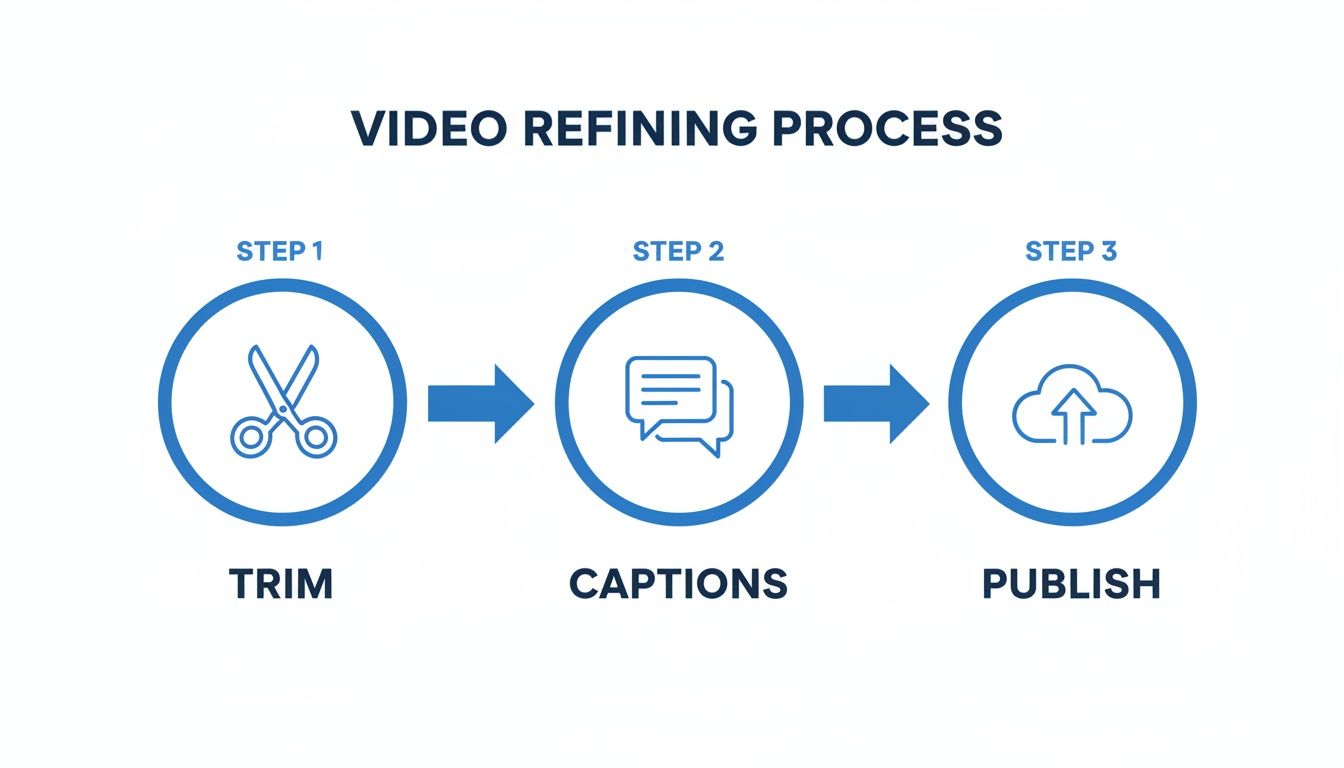
As you can see, trimming, captioning, and publishing all happen in one place, which saves an incredible amount of time.
Advanced Automation Features for Real Growth
But true automation isn't just about making one video faster. It’s about building a content engine that runs itself. When you're shopping for a platform, look for features designed for sustainable growth, not just one-off projects.
Here are a few must-haves:
-
Multi-Language Voiceovers: Want a global audience? This is non-negotiable. Instantly creating voiceovers in over 50 languages can blow your reach wide open without any extra production headaches.
-
Series Automation: This is a huge one. Got a great topic? Plan an entire series around it. The right platform can generate a whole batch of related scripts and visuals, giving you a steady pipeline of content that keeps people coming back for more.
-
Auto-Publishing: Connect your TikTok and YouTube accounts once, and you’re done. The system should handle posting at the best times, complete with optimized descriptions and hashtags. This is how you get to a truly hands-off channel management setup.
Automation isn't about replacing the creator; it's about removing the friction. It frees you up to test more ideas, explore new content pillars, and maintain the kind of consistency that social media algorithms love.
By adopting a tool like ShortsNinja, you’re not just speeding up your video creation—you're building a scalable system for your brand. This is how you maintain a high-quality, consistent presence across every platform without burning out.
If you’re ready to give this workflow a shot, you can start with a free trial video. Use the code NINJA30 to get 30% off for life.
Got Questions About AI Video Effects?
Jumping into AI video effects is exciting, but let's be real—it can also feel like a lot to take in. Like with any new creative tool, a few key questions always seem to surface. Let's get those out of the way so you can dive in and start creating with confidence.
Lots of creators get hung up on the money and tech side of things, but it's way more approachable than you'd guess. The real conversation isn't just about cost, but about getting the most bang for your buck and your time.
How Much Is This Going to Cost Me?
The price tag on AI videos can swing wildly depending on how you build your toolkit. You could piece everything together yourself—subscribing to one tool for video, another for voiceovers, and a third for editing. But those monthly bills add up fast, and you can easily find yourself paying over a hundred dollars. It's a flexible route, but it's often the most expensive and clunky one.
The smarter, more budget-friendly move is to find an all-in-one platform. Services like ShortsNinja bundle all those tools into a single subscription, usually based on a monthly credit system. This approach keeps your costs predictable and almost always delivers better value. For most creators, it's the simplest way to produce great content without getting nickel-and-dimed by a dozen different subscriptions.
Can I Actually Make Money with AI-Generated Content?
Absolutely. It’s a huge myth that you can't monetize AI-generated content. I've seen countless faceless channels, built entirely with AI video effects, pull in serious income across YouTube, TikTok, and Instagram. The secret sauce is consistency and quality, and that's exactly where automation tools give you a massive advantage.
There are plenty of proven ways to earn:
- Ad Revenue: This is the classic route. The YouTube Partner Program and the TikTok Creator Fund will pay you based on the views and engagement your content gets.
- Affiliate Marketing: You can weave product or service promotions into your videos and collect a commission from any sales you drive. It's a natural fit for many niches.
- Digital Products: Once you've built an audience with your AI content, you can sell your own courses, ebooks, or templates directly to them.
The earning potential is not just real—it's growing every single day.
Your ability to monetize AI content isn't limited by the tools you use, but by the value and consistency you provide to your audience. Automation helps you deliver on both fronts, paving the way for a profitable channel.
Do I Need to Be a Tech Whiz to Get Started?
Not even a little bit. This is probably the biggest misconception holding people back. Forget the steep learning curves of traditional editing software like Adobe Premiere Pro or DaVinci Resolve. Modern AI video platforms are designed to be dead simple. If you can type a sentence, you can make a video.
The entire workflow is built around simple, prompt-based commands. You’re not messing with confusing timelines, keyframes, or effect panels. Your creativity and your ability to describe what you want are the only skills you really need. Platforms like ShortsNinja handle all the technical heavy lifting, turning your ideas into polished videos. It’s a huge shift that puts your imagination in the driver's seat.
Ready to stop wondering and start creating? ShortsNinja automates your entire workflow, from script to final publish, so you can build a successful channel in minutes a day. Start your free trial and see how easy it is to create stunning AI videos!