
If you've heard the term "YouTube automation," you might be picturing robots churning out soulless videos. The reality is far more practical—and powerful. Today's AI tools are all about taking over the tedious parts of content creation like scripting, voiceovers, and finding visuals. It's not about replacing your creativity; it's about amplifying it.
This approach lets you build a consistent, faceless content engine without needing a big team or expensive gear. You can go from a simple idea to a fully published YouTube Short in minutes, not hours.
The Reality of Modern YouTube Automation AI
Forget the sci-fi stuff. Modern YouTube automation is about tangible, accessible tools that turn a one-sentence prompt into a polished video in less time than it takes to brew a pot of coffee. We're talking less than five minutes from concept to completion. This isn't just a theory; it's a real-world workflow that creators and marketers are using right now.
The core of this system is consolidation. Instead of juggling separate apps for scripting, recording audio, finding B-roll, and editing, you do it all in one place. This is what makes creating high-quality faceless content a real option for anyone, regardless of their technical skill. You bring the ideas; the AI handles the execution.
From Hours to Minutes
The biggest win here is efficiency. The time savings are staggering. What used to be a multi-hour slog of writing, recording, editing, and sourcing clips is now condensed into a few clicks.
These platforms work by stringing together different AI models—one for scripting, one for voice, one for visuals—into a single, smooth process.
This simple workflow is completely changing the game for creators.
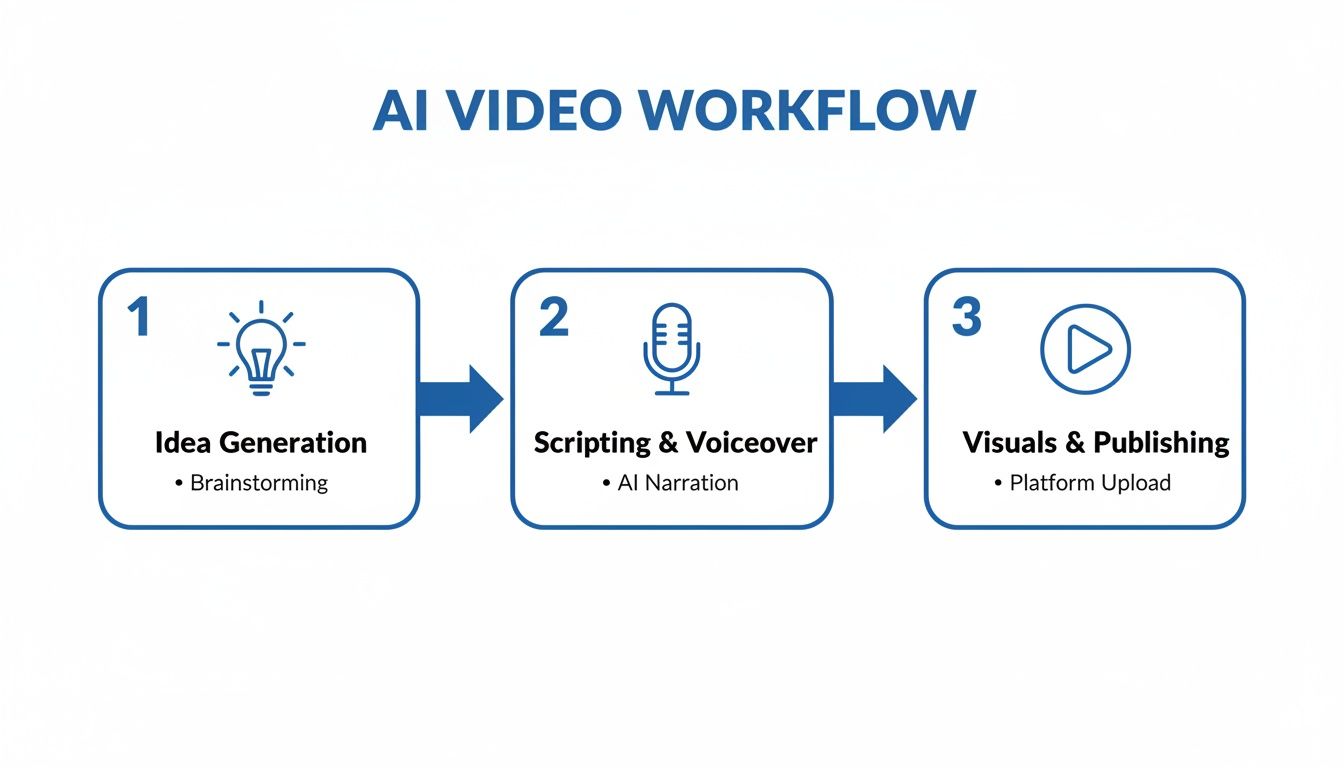
As you can see, the whole journey is just a few quick stages. This is a fundamental shift in creator economics. By slashing production time, these tools make it possible to scale your content output in a way that was previously unimaginable. To see how creators are putting this into practice, check out these top YouTube automation hacks.
Let's look at a side-by-side comparison to see just how much of a difference this makes.
Traditional vs AI-Powered YouTube Workflow
This table breaks down the practical differences between the old way of making videos and the new AI-automated approach, highlighting where you save the most time.
| Production Stage | Traditional Method (Typical Time) | AI Automation (Typical Time) |
|---|---|---|
| Idea & Research | 30 – 60 minutes | 1 – 2 minutes |
| Scripting | 30 – 90 minutes | 1 minute |
| Voice Recording | 15 – 30 minutes | 30 seconds |
| Visual Sourcing | 60 – 120 minutes | Automated |
| Editing & Rendering | 60 – 180 minutes | 1 – 2 minutes |
| Total Time | 3.25 – 8 hours | < 5 minutes |
The numbers speak for themselves. The AI-powered workflow collapses a process that took half a day (or more) into a task you can knock out on your lunch break. This is how you build a real content machine.
Key Takeaway: AI automation for YouTube isn't about letting a robot take over. It’s about tearing down the technical barriers that slow you down. This frees you up to focus on the things that actually matter: strategy, creativity, and building a sustainable channel that connects with an audience.
Finding a Niche and Generating Endless Ideas
Before you can even think about automating anything, you have to make a foundational decision: your niche. This isn't just about picking something you find interesting. The real goal is to find a corner of YouTube where viewer demand is high, but the supply of quality content is low. Forget broad categories. You need to drill down and find specific, underserved audiences.
Think about topics that work well for faceless channels—subjects that are more about the information than the personality presenting it. Things like historical events, psychology facts, Stoic philosophy, or deep dives into specific technologies are fantastic starting points. The key is finding a subject with a built-in audience that's hungry for knowledge.
A lot of newcomers worry about saturation, but the data tells a different story. As more creators jump in, viewer demand actually grows to match it. Research shows that as of 2026, highly specialized channels—especially those focused on AI automation itself—are still "very rare" on the platform. That's a huge opportunity. You can discover more insights about the potential in YouTube automation and see the market dynamics for yourself.
Brainstorming with Your AI Partner
Once you've settled on a niche, the real fun begins: generating a bottomless well of video ideas. This is where an AI tool, like the one built into ShortsNinja, becomes your most valuable creative partner. Forget weak, generic prompts. The secret is to give the AI a clear role and some tight constraints.
For instance, instead of asking for "history video ideas," get specific. Try a prompt like this:
Act as a content strategist for a YouTube Shorts channel focused on weird history facts. Generate 10 video ideas about obscure historical figures. Each idea should have a click-worthy title, a one-sentence hook, and mention the key fact to cover. Format this as a table.
See the difference? This prompt forces the AI to think strategically. It delivers structured, ready-to-use concepts instead of a vague list. You're not just asking for ideas; you're asking for a miniature content plan.
Validating Your Topics
Before you commit to turning an idea into a video, take a few minutes to validate it. It’s a simple but critical step. Just do a quick YouTube search for your topic and see what pops up. Are the top-ranking videos old? Do they have surprisingly low view counts? That's a great sign that there's an opening for fresh, higher-quality content.
You can also use keyword research tools to get a feel for search volume. The sweet spot is where high interest meets low competition.
- High Interest: Lots of people are actively searching for this topic.
- Low Competition: There aren't many good videos available to satisfy that interest.
This two-step system—AI brainstorming followed by a quick market check—is a reliable way to find winning ideas. It ensures every single video you create has an audience waiting for it, setting your channel up for consistent, sustainable growth right from the start.
Crafting Compelling Scripts and AI Voiceovers
Once you've nailed down your niche and have a list of solid ideas, it's time to get into the heart of your content: the script and voiceover. For YouTube Shorts, the script is everything. You've got less than three seconds to hook someone, give them a reason to care, and keep them from swiping away.
This is where AI can be a massive help, letting you churn out tight, punchy scripts without spending hours staring at a blank page.
Prompting for Scripts That Actually Perform
The secret to a great AI-generated script isn't the AI—it's the prompt you feed it. Just asking for a script on a topic is a recipe for generic, boring content. You need to give the AI structure and a clear goal. A great Short needs a powerful hook, a valuable piece of info in the middle, and a clear call-to-action (CTA). Your prompt should mirror that.
Let’s say your channel is all about "Surprising History Facts." A lazy prompt would be: "Write a script about the Great Emu War." It’s okay, but we can do so much better.
Here’s a more strategic approach:
Act as an expert scriptwriter for a viral history YouTube Shorts channel. Write a 150-word script about Australia's Great Emu War. Start with a shocking hook. The body should cover three surprising facts. End with a clear call-to-action asking viewers to subscribe for more weird history.
See the difference? This prompt gives the youtube automation ai all the context it needs to succeed. You’re telling it who to be (an expert scriptwriter), setting a word count (crucial for Shorts pacing), and demanding the three key ingredients: a hook, the body, and a CTA. This method just works better.
Leaning on proven templates is another trick I use all the time. Here are a couple of formats you can plug right into your AI prompts:
- The "Myth vs. Fact" Format: "You think [common misconception], but the truth is [surprising fact]. Here's why…" This structure grabs attention instantly by challenging something the viewer thinks they know.
- The "Quick Facts" Format: "Here are three things you never knew about [topic]. One… Two… And three…" It's perfect for fast-paced content that’s easy to digest and keeps people watching to the end.
Giving Your Faceless Channel a Voice
With a solid script in hand, the next step is bringing it to life with audio. AI voiceovers have gotten scarily good. Platforms like ElevenLabs and OpenAI offer voices that are incredibly realistic and full of emotion.
The voice you pick literally becomes the personality of your faceless channel, so don't rush this part.
Think about your brand's tone. Are you going for an authoritative, educational vibe? Or maybe a calm, meditative style? Or something super energetic and exciting? The best tools let you tweak the pitch, speed, and emotion to get the delivery just right.
Pro Tip: Please don't just use the default voice. Dig in and experiment with different options and custom settings. A unique and consistent voice helps build brand recognition and makes your automated videos feel way more human.
Your goal is to find a voice that doesn't just sound real but also connects with your target audience. If you're looking for the right fit, you can check out some detailed breakdowns of the top 5 AI voice generators to elevate your content. This step is what turns a simple script into a captivating piece of audio, setting the stage for adding visuals.
Generating Stunning Visuals Without an Editor
Okay, you've got your audio sorted. Now for the fun part: creating the visuals. Forget spending hours digging through stock footage sites or wrestling with clunky editing software. Modern YouTube automation AI platforms roll powerful image and video generation right into the workflow, making this one of the fastest steps in the whole process.
This isn't just about grabbing random clips. It’s about building a visual story that flows perfectly with your script's tone and timing. You can literally generate entire scenes from a single line of text, giving you total creative control without needing a film degree.
Thinking Like an AI Artist
The secret to getting incredible visuals lies in mastering the art of the prompt. Just like with scripting, if you give the AI a vague request, you'll get a bland, generic result. You have to be specific and descriptive to really steer the AI toward what you’re picturing in your head. Think of yourself as a film director giving very clear instructions.
So, instead of a lazy prompt like "an ancient Roman statue," you need to dial it up with something far more evocative:
Prompt Example: "Cinematic shot of a weathered marble statue of Marcus Aurelius, golden hour lighting, dramatic shadows, highly detailed, 4K."
See the difference? That level of detail gives the AI everything it needs: the subject, the lighting, the mood, and the desired quality. The more precise you are, the better the final image will be. This is where you get to be creative. To get a better handle on this, check out this guide on the top 5 AI image models to transform your creativity to see how different models think.
Achieving a Consistent Visual Style
To build a real brand for your faceless channel, you absolutely need a consistent visual style across your videos. AI makes this surprisingly easy. All you have to do is include a few "style keywords" in every single prompt to maintain that signature look.
A few popular styles and the keywords that trigger them include:
- Cinematic: Throw in terms like "cinematic lighting," "dramatic," "wide-angle shot," and "4K."
- Animated: Try phrases like "Pixar style," "3D animation," or "Japanese anime style."
- Minimalist: Use keywords such as "clean background," "simple," "flat design," or "monochromatic."
By creating a little "style guide" of keywords for your channel, you make sure every video feels like it belongs. Consistency is what turns casual viewers into loyal subscribers.
A great prompt is like having a conversation with the AI. Your output is a direct reflection of your input. Be descriptive, lock in a style, and don't hesitate to hit "regenerate" a few times to land that perfect shot. This is how you create professional-grade visuals in minutes, not hours.
To help you get started, here’s a quick reference guide with some prompt templates you can adapt for your own videos.
AI Visual Generation Prompt Guide
This table gives you a practical starting point for generating different visual styles, helping you create a consistent and appealing look for your channel.
| Desired Visual Style | Example Prompt Template | Best Used For |
|---|---|---|
| Photorealistic | A hyper-realistic photograph of [subject], [action], [setting], captured with a [camera type], [lighting condition], 8K, highly detailed. |
Documentaries, historical content, educational videos requiring realism. |
| Digital Art | Digital painting of [subject], [mood], [color palette], fantasy concept art, intricate details, trending on ArtStation. |
Fantasy storytelling, gaming channels, content needing a creative flair. |
| Vintage Film Look | 1970s film still of [subject], [location], grainy texture, muted colors, cinematic, 35mm film look. |
Retro topics, history deep-dives, or creating a nostalgic atmosphere. |
| Cyberpunk/Sci-Fi | A neon-noir cityscape of [city], [weather condition], glowing holographic ads, cyberpunk aesthetic, Blade Runner style, ultra-detailed. |
Tech reviews, future-focused discussions, sci-fi narrative content. |
| Watercolor | A soft watercolor illustration of [scene], gentle brushstrokes, pastel colors, [emotion], on textured paper. |
Relaxing content, ASMR videos, art channels, or a gentle, calming tone. |
Use these templates as a jumping-off point. Swap out the bracketed text with your own ideas and see what the AI comes up with. The more you experiment, the better you'll get at translating your vision into a stunning final product.
Finalizing Your Video with Automated Editing
Once your visuals are ready, the last step is putting it all together. This is where automation platforms really shine, handling the assembly almost instantly. The AI syncs each visual to the right part of your script and voiceover, creating a perfectly timed video without you having to touch a timeline.
From there, adding the final polish that keeps viewers watching is just a few clicks away:
- Background Music: Pick a track from a royalty-free library to set the mood.
- Auto-Captions: Instantly burn subtitles right into your video. This is a non-negotiable for mobile viewers watching with the sound off.
- Transitions: Add simple cuts or fades between scenes to keep the flow smooth.
This entire "editing" process takes maybe a couple of minutes. You're not dragging and dropping clips for an hour; you're just making a few high-level creative choices. The result is a sharp, high-impact YouTube Short that's ready to schedule and publish.
Automating Your Publishing and Growth Strategy
Getting the video made is a huge step, but you're not done yet. The final phase—publishing, optimizing, and analyzing—is where your YouTube automation AI strategy really starts to work for you, turning your content into a proper growth engine. This part is less about raw creativity and more about smart, systematic execution to get your videos seen.
With a library of videos ready to go, you can finally shift from a frantic, one-off creator mindset to that of a strategic content manager. Automated scheduling tools are the key to making this happen. Instead of manually uploading every single Short, you can map out and schedule weeks or even months of content in one sitting.
This is a game-changer for batching your work. You can set it, forget it, and have peace of mind knowing your channel will stay active. Consistency is a huge signal to the YouTube algorithm, and automation makes it effortless. For a deeper dive, our ultimate guide to YouTube video upload automation breaks down all the technical details.
Optimizing Your Shorts for Discoverability
Uploading is one thing, but you need to make sure viewers can actually find your stuff. This is where YouTube SEO for Shorts comes in, and thankfully, AI can do most of the heavy lifting. A well-prompted AI can spit out multiple title ideas, draft keyword-rich descriptions, and suggest the right hashtags in seconds.
Here’s how I structure my prompts for optimization:
- Titles: "Generate 5 click-worthy, keyword-focused titles under 70 characters for a YouTube Short about [your topic]."
- Descriptions: "Write a 200-word SEO-friendly description for a Short about [your topic], including related long-tail keywords."
- Hashtags: "Provide 10 relevant hashtags for a Short about [your topic], mixing broad and niche tags."
This methodical approach ensures every video is fully primed for search and discovery before it even goes live, dramatically increasing its odds of getting picked up by the algorithm.
A consistent publishing schedule combined with smart, AI-driven SEO is the foundation of sustainable channel growth. It's not about one viral hit; it's about building a reliable system that attracts viewers day after day.
If you're looking to repurpose existing long-form content, check out some of the powerful AI YouTube to Shorts converters out there. They can quickly turn your longer videos into a stockpile of engaging clips, which is a fantastic way to expand your content library fast.
Analyzing and Refining Your Strategy
The final piece of the automation puzzle is using data to figure out what to do next. Most scheduling platforms have built-in analytics that show you what's working and what's not. Keep a close eye on a few key metrics:
- View Count: Which topics get the most initial attention?
- Audience Retention: Where are people dropping off? Are your hooks actually working?
- Engagement Rate (Likes/Comments): What type of content gets your audience talking?
Use this feedback to double down on your winners. If Shorts about "weird history" facts are blowing up while your "famous battles" videos fall flat, it's time to adjust your content plan. This feedback loop—create, publish, analyze, refine—is what separates channels that grow exponentially from those that just stagnate.
Scaling Production and Monetizing Your Channel
Once you've got a smooth, repeatable workflow humming along, your automated system stops being an experiment and starts becoming a real content engine. The next logical move? Scale it up and turn that engine into a profitable asset. This is where the true power of YouTube automation AI really shines, letting you manage multiple content streams or even entire channels from one spot.
Scaling isn't just about cranking out more videos—it's about diversifying your output. You could launch a second channel in a related niche or maybe create a few different content series on your main channel. For instance, a "Weird History Facts" channel could easily add a weekly "Historical Myths Debunked" series. Automation makes this totally manageable, even for a solo creator.
Building Multiple Revenue Streams
Monetization is a much bigger game than just waiting for YouTube ad revenue to trickle in. Getting into the YouTube Partner Program is a great goal, but if you're only relying on that, you're in for a slow ride. The most successful automated channels build a whole portfolio of income sources that all work together.
This approach makes your channel feel more like a stable, predictable business. Here are a few key strategies that work well right out of the gate:
- Affiliate Marketing: This is often the first and most effective method. Just find products or services that fit your niche—like history books for that history channel—and drop affiliate links in your video descriptions.
- Selling Digital Products: Got some expertise to share? Create and sell your own simple products. Think ebooks, templates, or short guides. A channel focused on financial literacy could sell a handy budget spreadsheet.
- Brand Sponsorships: As your channel grows, brands will start noticing. You don't need a massive audience to land deals; even a smaller, highly engaged community can attract sponsors who align with your content.
Don't just build a channel; build a business around it. Diversifying your income protects you from algorithm mood swings and creates a much more resilient operation. Your content becomes the marketing engine for your various products and affiliate partnerships.
YouTube automation has definitely matured into a legitimate business model, but success is never guaranteed. While some channels bring in a modest side income, others in high-demand niches can generate tens of thousands of dollars per month by combining these different revenue streams. The key is pairing consistent, high-quality content with a smart monetization strategy from day one. To see this in action, you can discover more about profitable automation models. If you treat your channel like a media asset from the beginning, you're setting yourself up for long-term financial success.
Burning Questions About YouTube Automation AI
If you're diving into YouTube automation AI, you've probably got a few questions. I hear the same ones all the time, so let's clear the air and get you started on the right foot.
So, Can You Actually Get Monetized with AI Videos?
Yes, you absolutely can. Let’s bust this myth right now.
YouTube has no problem with AI-generated content, as long as you're using AI as a tool to create something original and valuable. The platform's goal is to keep viewers engaged, not to ban innovative creators. Countless faceless channels are getting monetized every single day by using AI for visuals and voiceovers to produce unique, high-quality videos.
The line is drawn at spam. If you're just pumping out low-effort, repetitive junk, you'll run into trouble. But if you’re creating content that people actually want to watch, you’re good to go.
What’s This Going to Cost Me?
Getting this off the ground is way more affordable than you might think.
Sure, you could try to patch together a bunch of free tools, but that's a quick way to get frustrated. A much smarter move is to use an all-in-one platform that handles everything for you. These plans typically run between $30 to $100 per month.
When you think about it, that’s a steal. This single investment covers your entire production line—from scripting and voice generation to finding visuals and scheduling uploads. It’s a fraction of what you'd spend hiring a video editor, writer, or voice actor.
My Two Cents: The automated channels that really take off are almost always in information-based, evergreen niches. Think history facts, psychology tips, financial literacy, or science explainers. These topics are perfect because they don't need a human face to connect with an audience that's actively searching for knowledge.
Ready to build your own content engine? ShortsNinja gives you all the tools you need to go from idea to published video in just five minutes. Start creating with ShortsNinja today