

If you feel like you're constantly logging in and out of different social media platforms, you're not just imagining it. The real struggle of managing a diverse social media presence isn't just the sheer volume of work; it's the mental gymnastics you have to perform every single day.
One minute you’re writing a professional, data-heavy post for LinkedIn. The next, you're scrambling to nail the perfect tone for a new TikTok trend. It's exhausting.
The Reality of Juggling Multiple Social Accounts
This constant jumping between platforms, or "context switching," is a huge drain on your energy and a fast track to burnout for social media managers. It's not just you. Each platform has its own unwritten rules, audience expectations, and content formats. A witty, informal voice that kills it on X (formerly Twitter) can feel completely out of place on a corporate Facebook page.
The Strain of Constant Context Switching
The pressure to be active everywhere is real, especially when you look at how people use social media today. In 2025, the average person will use nearly seven different social platforms every month. This creates a powerful expectation for brands to show up consistently across multiple channels.
We all know the challenges of managing multiple accounts, but it helps to see them laid out. Here's a quick look at the hurdles we're up against before we dive into the solutions.
Core Challenges in Multi-Account Management
| Challenge Area | Description of Impact | Key Solution Area (Preview) |
|---|---|---|
| Brand Consistency | Brand voice becomes fragmented and confusing to the audience. | Creating a centralized brand playbook. |
| Content Creation | Creative energy is drained by the need for unique, platform-specific content. | Batching content and repurposing core ideas. |
| Workflow Inefficiency | Constant logging in/out and context switching wastes time and mental energy. | Using a central dashboard and automation tools. |
| Strategic Focus | Time is spent reacting to daily demands instead of executing a proactive strategy. | Developing a unified content calendar and scheduling system. |
Recognizing these issues is the first step. They're common, they're frustrating, but they are absolutely solvable with the right systems in place.
Why a Unified Voice Feels Impossible
Maintaining a consistent brand identity is marketing 101, but it gets incredibly tough when you’re spread thin. This fragmentation usually leads to a few common pain points:
- Inconsistent Messaging: Your brand’s personality accidentally changes from one platform to another, which can confuse your audience.
- Reactive Posting: You spend your day putting out fires instead of following a proactive, goal-driven strategy.
- Burnout and Creative Fatigue: The constant demand for fresh, platform-specific content is a recipe for creative exhaustion.
The core problem isn't a lack of effort; it's the absence of a system. Without a unified strategy, each account becomes an isolated island, demanding its own unique strategy, content, and attention, which is simply unsustainable.
Before we start building the systems to fix this, it's important to acknowledge these hurdles. Understanding the chaos is the first step toward implementing the right social media marketing best practices that will bring order to your workflow. This guide is the playbook you need to make that happen.
Building Your Social Media Command Center
If you’re juggling multiple social media accounts, your first move shouldn’t be a content calendar. It should be building a command center. Forget messy spreadsheets and scattered files—this is about creating a single source of truth that puts an end to the daily scramble for logins, brand assets, or that one specific hex code.
This organized hub is the first real step toward getting your time and sanity back.
This isn't just about being tidy. It's about creating a solid operational backbone for your entire team. When a designer needs the right logo or a new hire needs access to the company’s LinkedIn, that info should be instant, secure, and standardized. It's how you shift from putting out fires to actually building something great.
Conduct a Swift Social Media Audit
Before you can build, you need to know what you’re working with. A quick audit of all your accounts will tell you what’s working, what isn’t, and what’s been gathering digital dust. You don't need to spend a month on this; a focused, one-hour session can bring a ton of clarity.
Start by listing every single social profile tied to your brand. For each one, ask a few tough questions:
- Performance: Is this account actually driving engagement or traffic? A quick look at the last 90 days of metrics will tell the story.
- Audience Fit: Is our ideal customer really spending time here? An account with 10,000 followers is worthless if none of them fit your audience profile.
- Resource Drain: How much time and energy does this account suck up compared to the results it delivers?
This quick exercise will help you sort every account into one of three buckets: Keep & Optimize, Downgrade & Automate, or Cut. Be ruthless. It's way better to dominate on three key platforms than to be mediocre on seven.
A classic mistake is holding onto dead accounts because of FOMO. The truth is, every minute you waste on a platform that isn't delivering is a minute stolen from one that could be driving real growth.
Assemble Your Centralized Asset Hub
Once you've trimmed the fat, it’s time to build the command center. This could be a secure Google Drive folder, a slick Notion database, or a dedicated channel in your project management tool. The tool itself is less important than the structure you create. To really make this work, your command center needs to integrate with a suite of powerful social media management tools.
Your hub should have a few non-negotiable components.
Your Command Center Checklist
| Category | Essential Items to Include | Purpose |
|---|---|---|
| Access & Security | Secure login credentials, 2FA recovery codes, admin contact list. | Ensures smooth, secure access for your team and prevents lockouts. |
| Brand Identity | Logos (all versions), color palettes (hex codes), font files, brand voice guide. | Keeps your brand consistent across every platform, so every post looks and feels like you. |
| Platform Specs | Up-to-date image and video dimensions for Reels, Shorts, posts, etc. | Stops the guesswork and ugly, cropped visuals, speeding up content creation. |
| Content Pillars | A defined list of 3-5 core topics your brand consistently talks about. | Gives your team strategic direction and makes brainstorming on-brand content a breeze. |
Getting these assets organized creates a frictionless workflow. No more digging through old emails for a logo file or Slack messages for the TikTok password. This system is what separates a chaotic, stressful social media process from a smooth, scalable operation. It sets the foundation for everything that comes next.
Develop a Cohesive Cross-Platform Content Strategy
If you're just blasting the same exact post across all your social media accounts, you’re doing it wrong. It’s one of the fastest ways to kill engagement. The people following you on LinkedIn are there for a completely different reason than your audience on TikTok, and treating them the same screams that you’re not paying attention.
A winning strategy for managing multiple social accounts is built on a simple idea: create a unified message, then intelligently adapt it for each platform's unique vibe.
This doesn't mean you have to invent something new for every single post. Far from it. The trick is to establish core content pillars and then get really good at what’s known as "content atomization." It’s how you keep your brand consistent while tailoring the delivery—saving a ton of time and creative juice in the process.
Establish Your Core Content Pillars
Before you even think about creating a post, you need to decide what your brand actually talks about. Your content pillars are the 3-5 foundational topics your brand has the credibility and passion to discuss, day in and day out. These pillars have to tie directly back to your business goals and what your audience genuinely cares about.
Think of them like the main channels on a TV network. If you sell project management software, your pillars might look something like this:
- Productivity Hacks: Quick, actionable tips people can use immediately.
- Team Leadership Insights: Real-world advice for managers and team leads.
- Future of Work Trends: Your take on remote work, AI, and industry shifts.
- Customer Success Stories: Proof that your software solves real problems.
Every piece of content you create should fall neatly into one of these buckets. This simple framework acts as a guardrail, ensuring every post, video, or thread reinforces your expertise and doesn't wander off into random topics that confuse your followers.
The magic of content pillars is that they provide structure without being restrictive. They act as a strategic filter, making it easy to say "no" to off-brand ideas and "yes" to content that builds authority and drives business goals.
Master the Art of Content Atomization
Content atomization is a game-changer. It’s the process of taking one big, cornerstone piece of content and slicing it up into dozens of smaller, native pieces for your different social channels. This is the secret to producing a high volume of quality content without burning out.
Your core message gets heard everywhere, but it always feels right for the platform it’s on.
Let's say you just ran a one-hour webinar on "Boosting Team Productivity." That single event is a content goldmine. Instead of just sharing a link to the recording and calling it a day, you can atomize it.
From One Webinar to a Week of Content
| Original Asset | Repurposed for Instagram | Repurposed for LinkedIn | Repurposed for X (Twitter) |
|---|---|---|---|
| 1-Hour Webinar | Create a 30-second Reel featuring the most impactful tip. | Write a long-form post summarizing three key takeaways. | Start a thread breaking down a surprising statistic from the Q&A. |
| Webinar Slides | Turn a key data visualization into a carousel post. | Share a single, powerful slide with a thought-provoking question. | Post a screenshot of a compelling quote as an image. |
| Guest Speaker Quote | Design a graphic with the quote overlaid on their headshot. | Tag the speaker in a post highlighting their expert insight. | Use the quote as a hook to start a conversation with your followers. |
This approach multiplies the value of your initial work. Suddenly, that one hour of effort has filled your content calendar for a week or more across every account. You aren't just recycling content; you're strategically reformatting it to squeeze out every last drop of value.
If you want to go deeper on this, we've put together a complete guide that explores more powerful content repurposing strategies you can put into action right away.
By using this method, the overwhelming task of feeding multiple platforms becomes a manageable, creative system. Your brand voice stays consistent while your execution is perfectly tailored—and that's the key to effectively managing multiple social media accounts at scale.
Streamline Your Workflow with Smart Automation
A solid content strategy is your foundation, but let's be real—smart automation is what keeps you from burning out. Trying to manage multiple social media accounts by hand is a recipe for disaster. It’s slow, tedious, and a fast track to inefficiency. The goal isn't to replace the human touch, but to build a reliable system that handles the grunt work, freeing you up for big-picture strategy and real audience engagement.
Think of automation as the engine that powers your consistency. It’s what lets you execute your content plan perfectly while you’re busy doing what actually matters—chatting with your community and digging into the data to make smarter moves.
From Long-Form Content to Viral Shorts in Minutes
One of the biggest time-sucks for any social media manager is creating video, especially short-form content. TikTok, Reels, and YouTube Shorts are hungry beasts that demand a constant stream of new stuff, which can feel completely overwhelming. This is where AI-powered automation really shines.
Tools like ShortsNinja were built to solve this exact headache. Say you've got a 30-minute podcast episode. Instead of blocking out hours to manually find the best clips, add captions, and reformat everything for different platforms, an automation tool can do it for you. Just upload your long-form video, and the AI will pinpoint the most compelling moments, transforming them into a dozen ready-to-post short clips in minutes.
The whole idea is to "atomize" your content—breaking down one big asset into lots of smaller pieces you can spread across your channels.
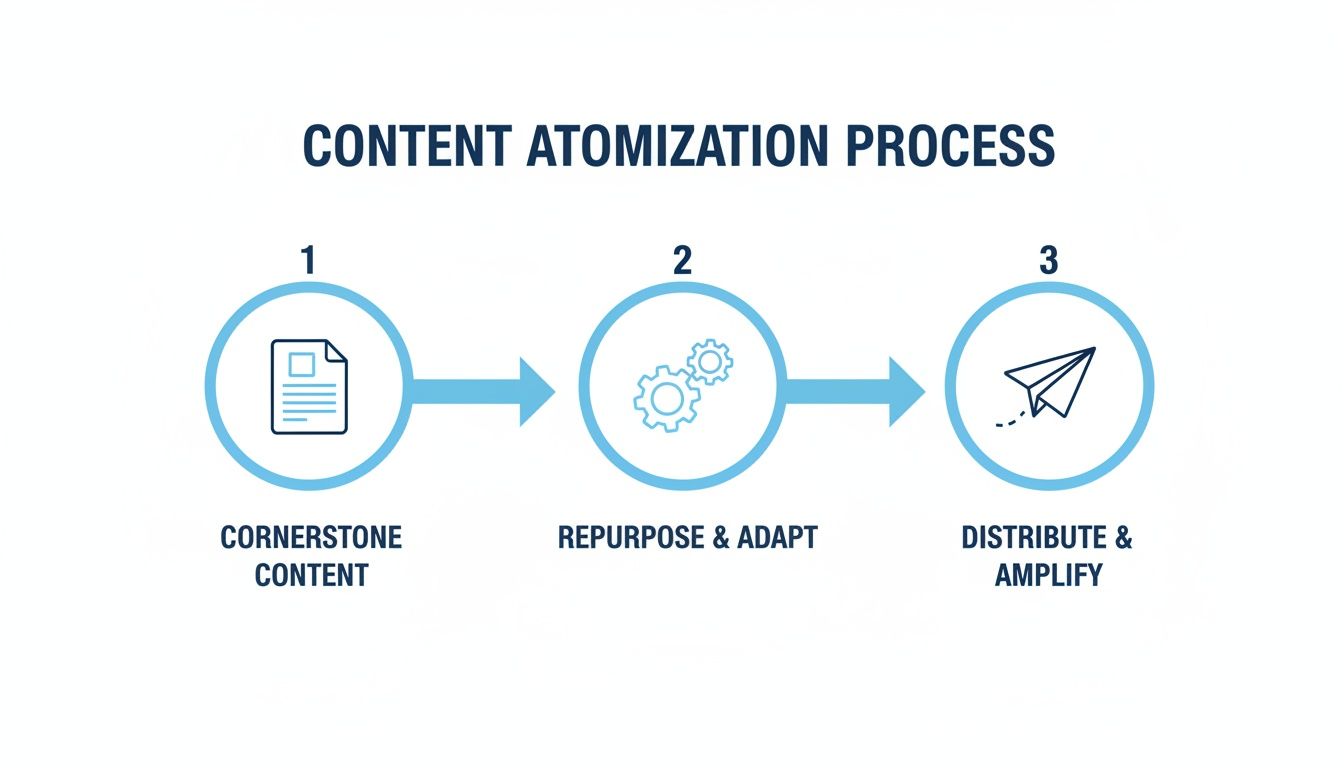
This process takes a single piece of cornerstone content and multiplies its value, squeezing every last drop of reach out of it.
This isn't just a time-saver; it’s a game-changer for your output. The ability to pull a week's worth of short-form videos from one podcast or webinar fundamentally alters your workflow. You can maintain a constant, high-quality presence on the platforms that drive visibility, all without the creative burnout.
The real power of automation is that it systematizes your best ideas. It ensures the most valuable insights from your long-form content actually get seen by the widest possible audience in the format they prefer.
Integrating Automation into Your Broader Workflow
Great automation doesn’t stop at content creation. The real magic happens when you connect specialized tools with your main social media management platform to create a seamless workflow from start to finish. This integration is what gives you total control when you're juggling multiple accounts.
Once your short videos are ready, they can be pushed directly to your scheduling tool’s media library. From there, you can:
- Batch Schedule Posts: Knock out your content calendar for the week or month across all your platforms from a single dashboard.
- Set Up Approval Workflows: If you’re on a team or working with clients, you can build in approval steps to make sure every post gets a final look before it goes live.
- Manage Community Engagement: Pull all your comments and DMs into a unified inbox so nothing important ever slips through the cracks.
This integrated approach turns a chaotic string of manual tasks into a smooth, automated machine. It’s no surprise that more brands are investing in this area. In fact, the market for social listening tools is projected to jump from $9.61 billion in 2025 to $18.43 billion by 2030, which shows just how critical efficient multichannel management has become.
Building a Reliable Publishing System
The final piece of the automation puzzle is establishing a reliable publishing rhythm. Social media algorithms love consistency, and an automated scheduler is your best friend for making that happen.
For example, a tool like ShortsNinja lets you set up a "series" that automatically posts a new short video to your TikTok and YouTube channels every day at a specific time. You connect your accounts once, load up the content pipeline, and let the system run on its own. It's a "set it and forget it" approach that's perfect for maintaining a baseline of activity so your channels never go dark. You can learn more about how to set up automated social media posting to keep the content flowing.
The same principles apply to your paid campaigns. If you really want to get efficient, digging into a comprehensive Facebook Ads Automation guide can show you how to build smarter campaigns that practically run themselves. By automating both your organic and paid efforts, you create a powerful, hands-off system that drives growth while you focus on the bigger picture.
Measure What Matters Across Every Channel
When you're running multiple social media accounts, you're going to be swimming in a sea of data. It's easy to get fixated on vanity metrics—impressions, follower counts—but those numbers rarely tell you what’s actually moving the needle for your business. The real trick is to ignore the noise and zero in on the metrics that reflect genuine performance.
This is all about shifting your mindset from "more is better" to "what's driving results?" A huge follower count is just a number if your engagement rate is less than 1%. To get this right, you need a tight, data-driven feedback loop that informs every single decision.
Building a Unified Performance Dashboard
Constantly bouncing between the native analytics dashboards for LinkedIn, TikTok, and Instagram is a massive time-suck. A unified dashboard is your secret weapon, pulling all your most important key performance indicators (KPIs) into a single, clean view. This lets you spot cross-platform trends and make smarter decisions, faster.
You don't need fancy, expensive software to get started. A simple Google Sheet or a Looker Studio dashboard can work wonders.
The goal is to build a weekly or monthly snapshot that answers three core questions at a glance:
- What content is actually resonating? Pinpoint your top-performing posts across every channel.
- Which platforms are driving action? See exactly where your link clicks and conversions are coming from.
- Is our audience growing and engaged? Keep an eye on follower growth, but always pair it with engagement rates.
This centralized view pulls you out of the platform-specific data silos. It gives you the big-picture context you need to put your time and money where they'll have the most impact, instead of just feeding the beast that shouts the loudest.
Tracking the Right KPIs for Each Platform
While a unified dashboard is a game-changer, you can't just apply the same metrics to every platform. What defines success on a professional network like LinkedIn is worlds away from what matters on a visual-first platform like Pinterest. You have to tailor your KPIs to what each channel is built for.
Don’t fall into the trap of a one-size-fits-all approach to analytics. Measuring LinkedIn by TikTok's standards is like judging a fish by its ability to climb a tree. Each platform has a unique role, and your metrics must reflect that reality.
Choosing the right KPIs for each platform is crucial for understanding what's truly working. The table below breaks down the key metrics you should be tracking for the major social networks. Think of it as a cheat sheet for building out your performance dashboard.
Platform-Specific KPI Tracking
| Platform | Primary KPIs for Success | Secondary Metrics to Watch |
|---|---|---|
| Click-Through Rate (CTR) on links, Engagement Rate on posts (comments/shares), Follower Demographics (job titles, industries). | Profile views, Company Page follows, Impression share. | |
| Instagram/Reels | Engagement Rate per Follower, Saves, Shares, Story Completion Rate, Reach vs. Impressions. | Website taps from bio, Follower growth rate, Comments per post. |
| TikTok/Shorts | Average Watch Time, Shares, Video Views to Follower Ratio, Comments, Sound Usage. | Profile views, Saves, Trending audio participation. |
| X (Twitter) | Replies and Retweets, Link Clicks, Profile Visits, Engagement Rate on threads. | Follower growth, Hashtag performance, Top mentions. |
This table provides a solid starting point, but always be ready to adapt as platforms evolve and your own goals change. The key is to measure what reflects real business impact, not just vanity numbers.
Conducting Meaningful Monthly Reviews
Your dashboard is the tool, but the monthly review is where the real strategy happens. This is your dedicated time to step back, dig into the data you’ve gathered, and turn those insights into concrete actions for the next month.
Look for patterns. Did a certain type of Reel consistently get more saves? Did that long-form LinkedIn post drive a surprising number of clicks to your website? These trends are your roadmap. They tell you exactly what your audience wants and where you should be doubling down.
This simple, repeatable cycle of measure, review, and refine is the engine that powers a successful multi-account strategy. It transforms your social media management from a bunch of disconnected tasks into a smart system for predictable growth.
Common Questions About Managing Social Accounts
Even the slickest social media strategy hits a few bumps in the road. The day-to-day grind of managing multiple accounts always throws up new challenges that a high-level plan just can't predict. This is where we get into the nitty-gritty.
Think of this as your field guide for those "what do I do now?" moments. From dealing with trolls to deciding if you really need a Threads account, here are some straight answers to the questions we hear all the time.
How Should I Handle Negative Comments Across Different Platforms?
Negative feedback is tough enough, but it gets way more complicated when you’re dealing with different audiences and platform etiquette. A grumpy comment on LinkedIn needs a totally different touch than a snarky reply on TikTok. The goal is to build a response playbook that's flexible but consistent.
First, get a universal protocol down. This should clarify when to reply in public, when to slide into the DMs, and when to just ignore the trolls. A good rule of thumb is to publicly acknowledge the complaint so people see you're paying attention, then offer to fix it privately.
- On professional networks like LinkedIn: Keep your tone buttoned-up, empathetic, and focused on a solution.
- On casual spots like Instagram or TikTok: It's okay to be more human and conversational. The goal is the same, though: show you're listening and you want to make it right.
And one thing you should almost never do? Delete a legitimate negative comment. Unless it's spam or breaks your community guidelines (like hate speech), deleting criticism makes you look guilty and can turn a small problem into a massive one. It kills trust faster than the original comment ever could.
When Is the Right Time to Add a New Social Media Channel?
The pressure to be everywhere is real. But chasing the latest shiny platform without a solid reason is a classic way to burn out your team and dilute your efforts. Before you add another account to your plate, you need to have a rock-solid case for it.
Run through this checklist before you even think about creating a new profile:
- Is My Audience Actually Hanging Out There? Don't just go by the headlines. Dig into the demographic data and make sure a real chunk of your target customers are active on the platform.
- Do We Have the Bandwidth to Do It Right? A new channel isn't just another place to post. It needs its own unique content, daily engagement, and constant monitoring. A sad, half-dead account is way worse than no account at all.
- Does This Platform Even Vibe with Our Brand? Think about the format and the culture. If your brand is all about serious, data-heavy reports, a platform built on dance challenges might be a tough sell without a seriously creative angle.
A new platform should feel like a strategic move, not a reaction to FOMO. Only add another channel when you've truly tapped out your potential on your current ones or you've found a clear, can't-miss opportunity that fits your goals.
What Is the Best Way to Manage Different Time Zones?
When you’re talking to a global audience, your 9-to-5 schedule doesn’t mean much. If you're only posting when it's convenient for you, a huge slice of your followers in other parts of the world will simply never see your content.
Honestly, the only sustainable solution here is a good social media management tool with smart scheduling. These platforms can dive into the data for each of your accounts and pinpoint the optimal times to post to reach people in different regions.
You can set up dedicated content queues for different time zones, making sure you have a steady stream of posts going out when your followers in New York, London, or Tokyo are actually awake and scrolling. It puts the whole process on autopilot, so you don't have to set a 3 AM alarm just to catch the morning rush in Europe.
Ready to stop juggling and start automating? ShortsNinja transforms your long-form content into a library of ready-to-post short videos, complete with scheduling and series automation to keep your channels growing hands-free. Start your free trial and see how easy it can be.